1. Introduction
This manual provides essential information for the safe and effective use of your YUSTDA 24V AC/DC Power Adapter, model TNS30W-xy. This adapter is designed to provide reliable power to compatible electronic devices, including the idodo URG-13271 Electric Shiatsu Heated Foot Massager Machine and Hammacher Schlemmer YJS060E-2402100D.
Please read this manual thoroughly before use and retain it for future reference.
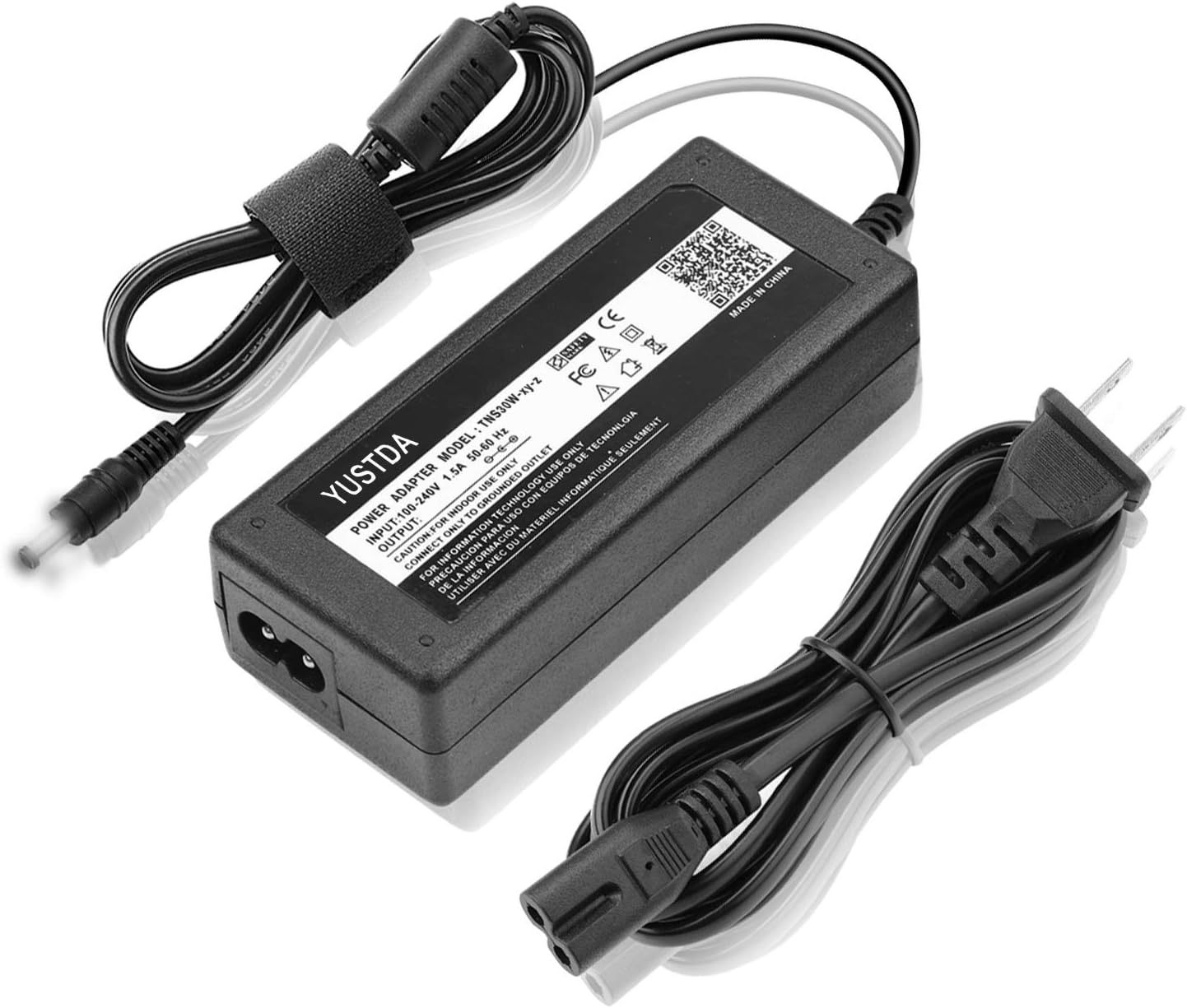
Figure 1: YUSTDA 24V AC/DC Power Adapter. This image displays the main adapter unit, the detachable AC power cord, and the DC output cable with a barrel tip connector.
2. Safety Information
To ensure safe operation and prevent damage, observe the following safety guidelines:
- Indoor Use Only: This adapter is designed for indoor use. Do not expose it to rain, moisture, or extreme temperatures.
- Proper Grounding: Connect the adapter only to grounded outlets.
- Voltage Compatibility: Ensure the input voltage (100-240VAC) is compatible with your region's electrical supply.
- Device Compatibility: Verify that the output voltage (24V) and current (2.1A) match the requirements of your device. Using an incompatible adapter can damage your device.
- Cable Integrity: Do not use the adapter if the power cord or adapter casing is damaged.
- Ventilation: Ensure adequate ventilation around the adapter during use to prevent overheating.
- Protection Features: The adapter includes built-in safety features such as over-current protection, total power protection, over-voltage protection, and short-circuit protection.

Figure 2: Safety Design with Multiple Protections. This image highlights the adapter's integrated safety features, including protection against over-temperature, over-voltage, over-current, and short circuits.
3. Setup and Connection
Follow these steps to connect your YUSTDA power adapter:
- Connect AC Power Cord: Insert the figure-8 connector of the AC power cord into the corresponding port on the power adapter unit.
- Connect DC Output: Plug the barrel tip connector of the adapter's DC output cable into the power input port of your compatible device (e.g., idodo URG-13271 or Hammacher Schlemmer YJS060E-2402100D).
- Plug into Outlet: Insert the AC plug of the power cord into a standard wall outlet (100-240VAC, 50/60Hz).
- Verify Power: A small LED indicator on the adapter unit will illuminate when power is supplied, confirming proper connection.

Figure 3: Adapter Connection Points. This image provides a detailed view of the adapter's barrel tip output and the AC power input, illustrating where to connect the respective cables.

Figure 4: Cable Features. This diagram illustrates the anti-interference magnetic ring on the DC output cable, designed for system stability, and indicates the approximate lengths of the DC (4ft) and AC (6ft) cables.
4. Operation
Once connected as described in the "Setup and Connection" section, the adapter will supply power to your device. The adapter operates automatically, converting AC input to stable 24V DC output. There are no user-adjustable settings on the adapter itself.
Refer to your device's instruction manual for specific operating procedures related to the device itself.
5. Care and Maintenance
Proper care ensures the longevity and reliable performance of your power adapter:
- Cleaning: Disconnect the adapter from the power outlet and your device before cleaning. Use a soft, dry cloth to wipe the surface. Do not use liquid cleaners or solvents.
- Storage: When not in use, store the adapter in a cool, dry place, away from direct sunlight and moisture. Avoid tightly coiling the cables to prevent damage.
- Handling: Avoid dropping the adapter or subjecting it to strong impacts. Do not pull on the cables to disconnect the adapter from the outlet or device; always grasp the plug or connector.
6. Troubleshooting
If you experience issues with your power adapter, consult the following common solutions:
| Problem | Possible Cause | Solution |
|---|---|---|
| No power to device | Adapter not properly connected; Wall outlet not functioning; Device power issue; Adapter failure. | Ensure all connections are secure. Test the wall outlet with another device. Check your device's power button/settings. If issues persist, contact support. |
| Adapter is hot to touch | Normal operation; Overload; Poor ventilation. | A slight warmth is normal. Ensure the adapter is not covered and has adequate airflow. If excessively hot, disconnect immediately and contact support. |
| Intermittent power | Loose connection; Damaged cable/connector. | Check all connections for tightness. Inspect cables for visible damage. If damaged, discontinue use and replace the adapter. |
If troubleshooting steps do not resolve the issue, please contact customer support.
7. Technical Specifications
| Feature | Specification |
|---|---|
| Model Number | TNS30W-xy |
| Input Voltage | 100-240VAC, 50/60Hz |
| Output Voltage | 24VDC |
| Output Amperage | 2.1A |
| Power Output | 35W |
| Connector Type | Barrel Connector |
| Cable Length (Total) | Approximately 6.5 feet (2 meters) |
| Color | Black |
| Certifications | FCC, CE, RoHS |

Figure 5: Durable and Compact Design. This image emphasizes the adapter's robust construction and its compact form factor, suitable for various environments.
8. Warranty and Customer Support
YUSTDA products are manufactured with high-quality materials and undergo rigorous testing. For warranty information, please refer to the product packaging or your purchase documentation.
If you have any questions, encounter problems, or require technical assistance, please contact our customer support team:
Email: epcustomerservice@yahoo.com


