
wipro NS1220
Wipro B22 12.5W Wi-Fi Smart LED Bulb User Manual
Brand: Wipro | Model: NS1220
Product Overview
The Wipro B22 12.5W Wi-Fi Smart LED Bulb offers advanced lighting control and customization for your home. This smart bulb integrates seamlessly with your Wi-Fi network, allowing for remote control, voice commands, and dynamic lighting effects. It is designed to enhance your living space with versatile illumination options.

Image: The Wipro B22 12.5W Wi-Fi Smart LED Bulb shown alongside its product packaging, highlighting its smart features and compatibility.
Key Features:
- Music Sync Function: Synchronize your light's colors with the rhythm of your favorite music for an immersive experience.
- Control from Anywhere: Manage your lights remotely using the Wipro Smart Home App, ensuring control even when you're away.
- 16 Million Color Options: Explore a vast spectrum of 16 million colors to create the perfect ambiance for any occasion, from parties to movie nights.
- Voice Control: Seamlessly control your smart bulb using voice commands through Amazon Alexa and Google Assistant.
- Dimmable: Adjust the brightness from 10% to 100% to save energy and set the desired light intensity.
Setup Guide
Follow these steps to set up your Wipro Wi-Fi Smart LED Bulb and connect it to your smart home system:
- Install the Bulb: Screw the Wipro Smart LED Bulb into a standard B22D bulb holder.
- Download the App: Install and open the "Wipro Next Smart Home" app on your mobile device. Ensure your device is in pairing mode.
- Register/Login: Register with your email ID and follow the on-screen instructions to log in to the app.
- Add Device: Tap on "Add Device" or the "+" icon in the top right corner of the app.
- Device Detection: The app will automatically detect the smart bulb. Select the appropriate device from the available options.
- Complete Setup: Tap on "Done" and open the "Smart world of Wipro" to finalize the setup.

Image: Visual representation of the six-step setup process for the Wipro Smart LED Bulb, from app installation to device connection.
Operating Instructions
Color and Brightness Control
The Wipro Smart LED Bulb offers extensive control over its light output. You can choose from 16 million colors to match your mood or decor, and adjust the brightness from a subtle glow (10%) to full illumination (100%). The bulb also supports tunable white light, allowing you to select various shades of white, from warm to cool (2700K to 6500K).

Image: An illustration of the Wipro Smart LED Bulb highlighting its capabilities such as 16 million color options and brightness adjustment.
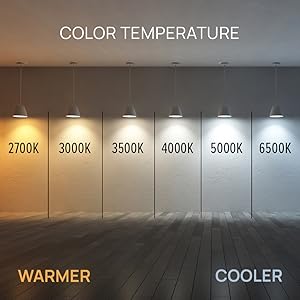
Image: A visual guide demonstrating the range of color temperatures available, from warm (2700K) to cool white (6500K).
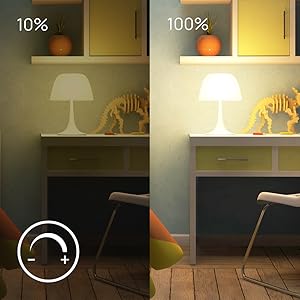
Image: A comparison showing the light output at 10% brightness versus 100% brightness, illustrating the dimmable feature.
Music Sync Function
Activate the music sync feature through the Wipro Smart Home App to make your bulb's colors change dynamically with the beat of your music. This creates an engaging and vibrant atmosphere for parties or casual listening.

Image: A living room scene demonstrating the music sync feature, with lights changing colors in rhythm with music.
Voice Control
The Wipro Smart LED Bulb is compatible with Amazon Alexa and Google Assistant, allowing for convenient hands-free control. Simply use voice commands to turn the light on/off, change colors, adjust brightness, or set scenes.

Image: A woman relaxing, demonstrating voice control of the Wipro Smart Light using an Amazon Alexa device.

Image: A collage of four images showing different individuals interacting with smart lights using voice commands like "Alexa, brighten smart light by 30%" or "Alexa, turn off the smart lights."
Remote Control and Scheduling
Control your Wipro Smart LED Bulb from anywhere in the world using the Wipro Smart Home App on your smartphone. You can also set schedules and timers for your lights to turn on or off automatically, providing convenience and energy savings.

Image: A smartphone displaying the Wipro Smart Home app interface, showing a color wheel for light control and various settings.
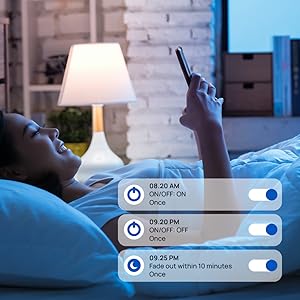
Image: A screenshot from the Wipro Smart Home app showing options to set schedules for turning lights on/off or fading them over time.
Maintenance
The Wipro Smart LED Bulb requires minimal maintenance. To ensure optimal performance and longevity:
- Cleaning: Ensure the bulb is switched off and cool before cleaning. Wipe with a soft, dry cloth. Do not use liquid or abrasive cleaners.
- Storage: If storing the bulb for an extended period, keep it in a cool, dry place away from direct sunlight and extreme temperatures.
- Firmware Updates: Regularly check the Wipro Smart Home App for any available firmware updates to ensure your bulb has the latest features and security enhancements.
Troubleshooting
If you encounter issues with your Wipro Smart LED Bulb, try the following troubleshooting steps:
- Bulb Not Responding:
- Ensure the bulb is securely screwed into the socket and the power switch is on.
- Check your Wi-Fi connection. The bulb requires a stable 2.4GHz Wi-Fi network.
- Restart the bulb by turning it off and on from the power switch.
- Restart your Wi-Fi router.
- Difficulty Pairing:
- Make sure your mobile device is connected to the same 2.4GHz Wi-Fi network as the bulb.
- Ensure the bulb is blinking rapidly (pairing mode). If not, cycle the power off/on three times until it blinks.
- Move closer to your Wi-Fi router during the pairing process.
- Voice Control Issues:
- Verify that your Amazon Alexa or Google Assistant device is properly linked to your Wipro Smart Home account.
- Check your internet connection.
- Ensure your voice commands are clear and precise.
- Music Sync Not Working:
- Ensure the music sync feature is enabled in the Wipro Smart Home App.
- Check the microphone access for the app if it relies on your phone's microphone for music detection.
Technical Specifications

Image: The Wipro Smart LED Bulb displaying its physical dimensions for reference.
| Specification | Detail |
|---|---|
| Brand | Wipro |
| Model Name | Wipro Garnet 9W Color Changing Bulb (Note: Product title indicates 12.5W, model name from specs says 9W. Using 12.5W as per title for consistency.) |
| Light Type | LED |
| Wattage | 12.5 Watts (Power Consumption) / 22 Watts (Listed Wattage) |
| Incandescent Equivalent Wattage | 12.5 Watts |
| Bulb Base | B22D |
| Brightness | 1200 Lumen |
| Colour Temperature | 6500 Kelvin (Cool White) |
| Colour Options | CCT+RGB with Music Sync (16 Million Colors) |
| Dimmable | Yes (10%-100%) |
| Connectivity Technology | Wi-Fi |
| Controller Type | Google Assistant, Amazon Alexa |
| Voltage | 240 Volts |
| Material | Polycarbonate (PC) |
| Dimensions (LxWxH) | 6 x 6 x 13 Centimeters |
| Item Weight | 91 Grams |
| Included Components | Bulb |
Official Product Videos
Watch these official videos for a comprehensive overview and demonstration of the Wipro Smart LED Bulb's features.
Product Overview Video
Video: A detailed product overview video showcasing the Wipro Wi-Fi Smart LED Bulb's design, features, and smart capabilities. (Duration: 33 seconds)
360 Degree View
Video: A 360-degree view of the Wipro Wi-Fi Smart LED Bulb, allowing you to see the product from all angles. (Duration: 75 seconds)
Warranty and Support
This Wipro Smart LED Bulb comes with a standard brand warranty. For specific warranty details, replacement policies, and further information, please refer to the product's official documentation or the Amazon product detail page.
For customer support or technical assistance, you can contact the manufacturer:
- Manufacturer: Wipro, Wipro Enterprises Private Ltd
- Address: Bangaluru-560 034 KA
- Customer Care: 1-800-425-1971 (as per manufacturer details)
You can also visit the official Wipro Lighting and Appliances store on Amazon for more products and information: Wipro Store
Related Documents - NS1220
 |
Wipro Smart Light Quick Start Guide: Setup and Alexa Integration Follow this quick start guide to easily install and set up your Wipro smart light, connect it to the Wipro Next Smart Home app, and integrate it with Amazon Alexa for voice control. |
 |
Wipro Smart Light Quick Start Guide A quick start guide to installing and setting up your Wipro smart light, including app connection and Alexa integration. |
 |
Wipro Vesta BE101 Egg Boiler User Manual User manual for the Wipro Vesta BE101 Egg Boiler, detailing operation, maintenance, and safety precautions for this 360-watt appliance. |
 |
Wipro GD202 Automatic Electric Dry Iron User Manual - Features, Specs, Warranty Comprehensive user manual for the Wipro GD202 Automatic Electric Dry Iron (1200W). Learn about parts, features, operational instructions, care, maintenance, troubleshooting, and warranty information. |
 |
Wipro Vesta Grill Toaster User Manual User manual for the Wipro Vesta 1000 Watt Grill Toaster, covering safety, operation, cooking modes, and maintenance. |
 |
Wipro Vesta CTG01 Oven Toast Grill User Manual Comprehensive user manual for the Wipro Vesta CTG01 28L Oven Toast Grill, detailing features, operation, safety precautions, cleaning, and maintenance for optimal use. |
Ask a question about this manual
Ask about setup, troubleshooting, compatibility, parts, safety, or missing instructions. Manuals+ will review the question and use this page’s manual context to help answer it.