
1. Introduction
This manual provides essential information for the safe and efficient installation, operation, and maintenance of the TRACO POWER TIB 080-124 DIN Rail Power Supply. Please read this manual thoroughly before using the product and retain it for future reference.
1.1 Safety Information
- Installation must be performed by qualified personnel only.
- Ensure the power supply is disconnected from the mains before any installation, wiring, or maintenance work.
- Do not operate the unit in wet or humid environments.
- Ensure proper ventilation to prevent overheating.
- Observe all local and national electrical codes and regulations.
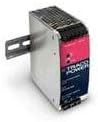
Figure 1: TRACO POWER TIB 080-124 DIN Rail Power Supply. This image displays the compact, enclosed design of the power supply, suitable for DIN rail mounting, with visible input/output terminals and adjustment potentiometer.
2. Key Features
The TRACO POWER TIB 080-124 is a high-performance DIN rail power supply designed for industrial applications. Its key features include:
- Output Power: 80 Watts
- Output Voltage: 24 VDC
- Output Current: 3.4 Amps
- Input Voltage Range: 85-264 VAC (universal input)
- Adjustable Output Voltage: Allows fine-tuning of the DC output.
- Enclosed Design: Provides protection for internal components.
- DIN Rail Mount: Easy installation in control cabinets.
3. Technical Specifications
| Parameter | Value |
|---|---|
| Brand | TRACO POWER |
| Model | TIB 080-124 |
| Input Voltage Range | 85-264 VAC |
| Output Voltage | 24 VDC (Adjustable) |
| Output Current | 3.4 A |
| Output Power | 80 Watts |
| Mounting Type | DIN Rail |
| Enclosure Type | Enclosed |
| UPC | 091128534812 |
| Manufacturer | TRACO POWER |
4. Installation and Setup
4.1 Mounting
- Ensure the DIN rail is securely mounted within the enclosure.
- Hook the top edge of the power supply onto the DIN rail.
- Push the bottom of the power supply firmly until it clicks into place on the DIN rail.
- Verify the power supply is securely attached and does not wobble.
4.2 Wiring
Before wiring, ensure all power sources are disconnected.
- Input Wiring (AC): Connect the AC input lines (Line, Neutral, Ground) to the designated input terminals on the power supply. Refer to the terminal markings on the unit for correct connections. Use appropriate wire gauges for the current rating.
- Output Wiring (DC): Connect the DC output lines (+V, -V) to your load. Ensure correct polarity.
- Grounding: Always connect the protective earth (PE) terminal to a reliable ground connection.
4.3 Output Voltage Adjustment
The TIB 080-124 features an adjustable output voltage. Locate the potentiometer on the front panel (typically marked "V.ADJ" or similar). Use a small screwdriver to carefully turn the potentiometer clockwise to increase the output voltage or counter-clockwise to decrease it. Monitor the output voltage with a multimeter during adjustment to ensure it is within the desired range and does not exceed the maximum specified voltage.
5. Operation
Once installed and wired correctly, the TRACO POWER TIB 080-124 is ready for operation.
- Power On: Apply AC input power to the unit.
- Indicator: The power supply typically features an LED indicator (e.g., "DC OK" or "Power") that illuminates when the output voltage is within specification.
- Load Connection: Connect your DC load to the output terminals.
- Monitoring: Periodically check the output voltage and current to ensure stable operation, especially during initial setup or after load changes.
6. Maintenance
The TRACO POWER TIB 080-124 is designed for reliable operation with minimal maintenance. However, periodic checks can extend its lifespan and ensure optimal performance.
- Cleaning: Ensure the ventilation openings are free from dust and debris. Use a soft, dry cloth to clean the exterior. Do not use liquid cleaners.
- Inspection: Periodically inspect wiring connections for tightness and signs of corrosion or damage. Check for any unusual noises or odors during operation.
- Environment: Ensure the operating environment remains within the specified temperature and humidity ranges.
Warning: Disconnect all power before performing any cleaning or inspection.
7. Troubleshooting
If the power supply is not functioning as expected, refer to the following common issues and solutions:
| Problem | Possible Cause | Solution |
|---|---|---|
| No output voltage / LED off | No AC input power Blown fuse Incorrect wiring | Check AC input connection and power source. Inspect and replace fuse if necessary (by qualified personnel). Verify all wiring connections are correct and secure. |
| Output voltage too low/high | Incorrect adjustment Overload condition | Adjust the output voltage potentiometer (V.ADJ). Reduce the load connected to the power supply. |
| Intermittent operation | Loose connections Overheating | Check and tighten all wiring connections. Ensure adequate ventilation and ambient temperature is within limits. |
If the problem persists after attempting these solutions, contact TRACO POWER technical support.
8. Warranty and Support
8.1 Warranty Information
TRACO POWER products are manufactured to high-quality standards and are typically covered by a standard manufacturer's warranty. For specific warranty terms and conditions applicable to your TIB 080-124 unit, please refer to the documentation included with your purchase or visit the official TRACO POWER website.
8.2 Technical Support
For technical assistance, product inquiries, or service requests, please contact TRACO POWER customer support. Contact details can usually be found on the official TRACO POWER website or on the product packaging.
Website: www.tracopower.com