
1. Introduction
This manual provides detailed instructions for the safe and efficient operation, installation, and maintenance of your LG 14,000 BTU Through-the-Wall Air Conditioner, model LT1430CNR. This unit is designed to cool rooms up to 700 square feet, offering customizable comfort with multiple cooling and fan speeds, and energy-saving features.

Image 1.1: Front view of the LG Through-the-Wall Air Conditioner.
2. Safety Information
Please read all safety instructions before installing and using the air conditioner to prevent personal injury or property damage. Keep this manual for future reference.
- Ensure the unit is connected to a properly grounded 230/208V LCDI Plug (NEMA 6 - 20) electrical outlet.
- Do not operate the air conditioner with a damaged power cord or plug.
- Do not insert fingers or foreign objects into the air inlet or outlet.
- Keep flammable materials away from the unit.
- Always disconnect power before cleaning or servicing the unit.
3. Package Contents
Verify that all components are present in the package:
- LG Through-the-Wall Air Conditioner Unit
- Remote Control
- Mesh Filter (pre-installed)
- Trim Kit
- User Manual / Installation Instructions
- Warranty Information
4. Product Overview
The LG LT1430CNR features a user-friendly digital control panel and a remote control for convenient operation. It includes a removable, washable filter and a trim kit for a finished installation look.
Control Panel and Display

Image 4.1: Close-up of the digital control panel, showing mode, timer, fan speed, and power buttons, along with temperature display and indicator lights for Cool, Energy Saver, Fan, Dry, and Clean Filter.
The control panel features a digital display for temperature and mode indicators. Buttons include MODE, TIMER, FAN SPEED, and POWER, along with temperature adjustment arrows. Indicator lights show the current operating mode (Cool, Energy Saver, Fan, Dry) and a 'Clean Filter' reminder.
Key Features
- Multiple Fan Speeds: 3 cooling and fan speeds (Low, Medium, High) with an Auto Cool option.
- 4-Way Air Deflection: Allows precise control over airflow direction.
- 24-Hour On/Off Timer: Program the unit to turn on or off automatically.
- Energy-Saving Option: Optimizes energy consumption.
- Auto Restart: Automatically resumes operation after a power outage.
- Dehumidifier Function: Helps reduce room humidity.
- Filter Light Reminder: Indicates when the filter needs cleaning.
5. Setup and Installation
This LG air conditioner is designed for through-the-wall installation. A compatible wall sleeve is required and is sold separately. Refer to the separate installation instructions provided with the unit for detailed steps.
Pre-Installation Considerations
- Electrical Requirements: The unit requires a dedicated 230/208V circuit with a NEMA 6-20 LCDI plug. Ensure your electrical system meets these specifications.
- Wall Sleeve: A properly sized and installed wall sleeve is crucial for secure mounting and efficient operation.
- Location: Choose a location that allows for proper airflow around the unit and easy access for maintenance.

Image 5.1: Example of the LG Through-the-Wall Air Conditioner installed in a room.
Dimensions and Weight
- Product Dimensions (D x W x H): 20.1 x 24 x 14.4 inches
- Item Weight: 77 pounds

Image 5.2: Dimensional diagram of the LG Through-the-Wall Air Conditioner.
6. Operating Instructions
Operate your air conditioner using either the control panel on the unit or the provided remote control.
Basic Operation
- Power On/Off: Press the POWER button.
- Select Mode: Press the MODE button to cycle through Cool, Fan, Dry, and Energy Saver modes.
- Adjust Temperature: Use the TEMP UP/DOWN arrows to set the desired temperature between 60°F and 86°F (16°C and 30°C).
- Adjust Fan Speed: Press the FAN SPEED button to select Low, Medium, or High.

Image 6.1: Illustration depicting the airflow distribution from the air conditioner.
Advanced Features
- Timer Function: Press the TIMER button to set a 24-hour on/off schedule. Use the temperature arrows to adjust the time.
- Energy Saver Mode: In this mode, the fan will cycle on for a few minutes every 3 minutes to check the room temperature. If cooling is needed, the compressor will turn on.
- Auto Restart: In the event of a power interruption, the unit will automatically resume its previous settings once power is restored.
- 4-Way Air Deflection: Manually adjust the horizontal and vertical louvers on the front of the unit to direct airflow as desired.
7. Maintenance
Regular maintenance ensures optimal performance and longevity of your air conditioner.
Cleaning the Air Filter
The air filter should be cleaned regularly, especially when the 'Clean Filter' indicator light illuminates (approximately every 250 hours of operation).
- Disconnect power to the unit.
- Open the front grille and carefully remove the mesh filter.
- Wash the filter with warm, soapy water. Rinse thoroughly.
- Allow the filter to air dry completely before re-installing.
- Once the filter is re-installed and power is restored, press the Filter Reset button (if available) or hold the FAN SPEED button for 3 seconds to reset the filter timer.
General Cleaning
- Wipe the exterior of the unit with a soft, damp cloth. Do not use harsh cleaners or abrasives.
- Ensure the drainage area is clear of obstructions.
8. Troubleshooting
Before contacting service, review the following common issues and solutions.
| Problem | Possible Cause | Solution |
|---|---|---|
| Unit does not turn on | No power; circuit breaker tripped; plug not fully inserted. | Check power supply, reset breaker, ensure plug is secure. |
| Insufficient cooling | Dirty air filter; blocked air intake/outlet; room too large; temperature setting too high. | Clean filter; clear obstructions; lower temperature setting. |
| Unit makes unusual noise | Loose parts; unit not level; foreign object inside. | Check for loose parts; ensure unit is level; inspect for obstructions. |
| Error Code CH34 | Indicates potential overheating, often related to dirty coils or insufficient heat dissipation within the wall sleeve. | Ensure air filter is clean. Verify that the outdoor coils are free from debris. Check for proper ventilation around the unit within the wall sleeve. If the issue persists, professional service may be required. |
9. Specifications
| Feature | Specification |
|---|---|
| Model Number | LT1430CNR |
| Cooling Capacity | 14,000 BTU |
| Voltage | 230/208 Volts |
| Wattage | 1500 watts |
| Coverage Area | Up to 700 sq. ft. |
| Product Dimensions (D x W x H) | 20.1 x 24 x 14.4 inches |
| Item Weight | 77 pounds |
| Noise Level | 58 Decibels |
| Energy Efficiency Ratio (SEER) | 9.3 |
| Dehumidification Capacity | 3.9 Pints |
| Power Source | Corded Electric |
| Installation Method | Through the Wall |
| Special Features | Dehumidifier, Dust Filter, Filter Light Reminder, Remote Controlled |
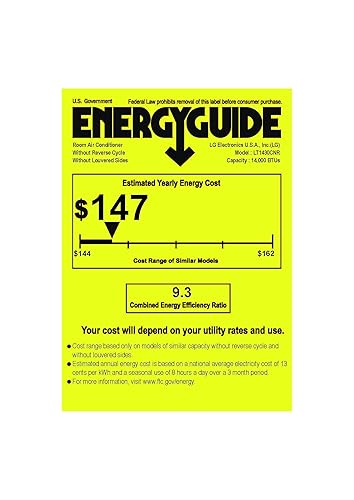
Image 9.1: Energy Guide label for the LG LT1430CNR, indicating energy consumption details.
10. Warranty and Support
Warranty Information
This LG air conditioner comes with a 1-year warranty covering parts and labor. Please refer to the warranty documentation included with your product for full terms and conditions.
Customer Support
For technical assistance, troubleshooting not covered in this manual, or warranty claims, please visit the official LG support website or contact LG customer service. You can find more information and support resources at the LG Store.