
1. Product Overview
The STEEL MATE Solar Power Tire Pressure Monitoring System (TPMS) is designed to provide real-time tire pressure and temperature data, enhancing driving safety and tire longevity. This system features a smart LCD display, multiple alarm modes, and convenient solar and USB charging options. It is a reliable and easy-to-use addition for any vehicle.

Figure 1: STEEL MATE Solar Power TPMS Unit and External Sensors
This image displays the main pink TPMS monitor unit, which features a solar panel on top and a digital display on the front. Below it, three smaller images show the unit from different angles, highlighting its compact design and the four external tire pressure sensors.
2. Key Features
- Digital Display: Provides quick and accurate readings of tire pressure and temperature.
- All-Weather Performance: Designed to withstand extreme temperatures and various weather conditions.
- Solar and USB Charging: Offers flexible charging options for continuous operation. Includes a built-in slot for an aromatherapy strip (not included).
- Six Alarm Methods: Notifies users of tire pressure changes through visual, audible, and vibration alerts.
- Easy to Use: A user-friendly system ensuring optimal tire pressure for better fuel efficiency and tire longevity.
- Car Bracket Function: The main unit can function as a car bracket, allowing horizontal or vertical placement of a mobile phone for navigation or information display.

Figure 2: Visual Representation of Alarm Types
This image illustrates the various alarm conditions detected by the TPMS, including fast leak alarm, high/low pressure alarm, high temperature alarm, and sensor low voltage alarm, each with an associated icon.
3. Setup and Installation
3.1 Charging the Monitor Unit
The monitor unit can be charged via its integrated solar panel or through the Micro USB input port. Ensure the unit is fully charged before initial use for optimal performance.

Figure 3: Solar and USB Charging Options
This image demonstrates the two charging methods for the TPMS unit: solar power, indicated by a sun icon and the unit placed on a dashboard, and USB charging, shown with a USB cable connected to a car's power outlet.
3.2 Sensor Installation
The system includes four external TPMS sensors. Install one sensor on each tire valve stem. Ensure they are securely tightened to prevent air leakage. Refer to the detailed diagram for component identification.

Figure 4: TPMS Unit Components and Dimensions
This diagram labels key components of the TPMS unit, including tire position, tire pressure, tire temperature, display battery indicator, SET button, Select button, solar panel, temperature unit, and Micro USB input. It also provides the dimensions of the main unit and the external sensors.
3.3 Aromatherapy Strip Installation (Optional)
The unit features a slot for an aromatherapy strip to enhance your driving experience. Gently slide the strip into the designated slot on the back of the unit.

Figure 5: Installing the Aromatherapy Strip
This series of three images demonstrates the process of installing an aromatherapy strip into the TPMS unit. It shows the back of the unit with the slot, the strip being inserted, and the strip fully in place.
3.4 Using the Car Bracket Function
The TPMS unit's base can be adjusted to serve as a mobile phone holder, allowing for convenient navigation or media viewing while driving. Simply open the mini-ones tire pressure host to reveal the phone holder.
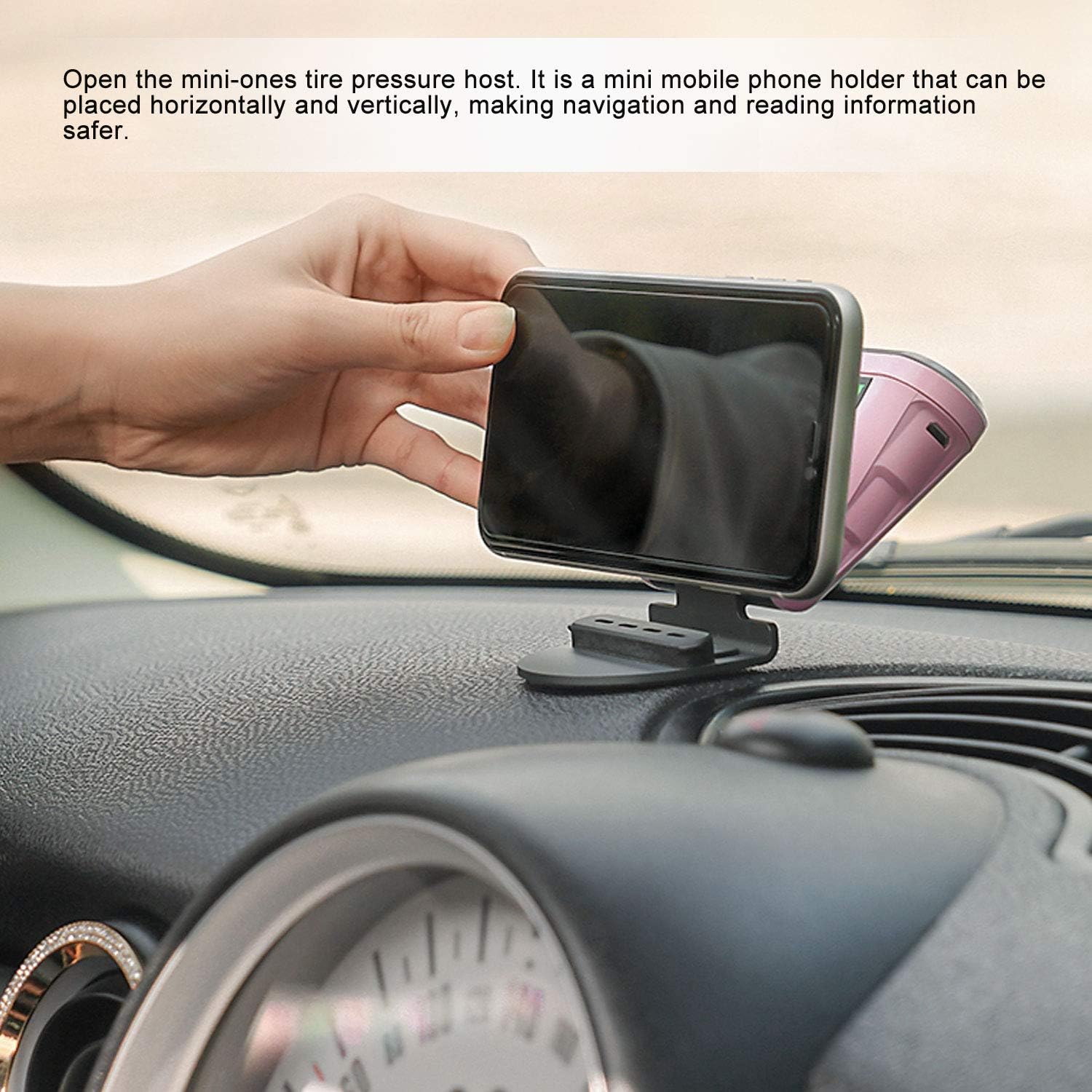
Figure 6: TPMS Unit Functioning as a Phone Holder
This image shows the TPMS unit positioned on a car dashboard, with a smartphone placed vertically in its integrated holder, demonstrating its dual functionality as a TPMS monitor and a phone bracket.
4. Operating Instructions
4.1 Power On/Off
The unit automatically powers on when it detects vibration (e.g., when the car starts moving) and enters sleep mode after a period of inactivity to conserve power.
4.2 Display Readings
The smart LCD display shows real-time tire pressure and temperature for all four tires. The display also includes a battery indicator for the main unit and individual sensor low voltage alerts.
4.3 Alarm Modes
The system provides six alarm methods to alert you to potential tire issues:
- Fast Leak Alarm
- High Pressure Alarm
- Low Pressure Alarm
- High Temperature Alarm
- Sensor Low Voltage Alarm
- No Signal Alarm (if a sensor loses connection)
Upon an alarm, the unit will provide visual, audible, and potentially vibration alerts. Address the issue promptly.
4.4 Setting Parameters (Pressure Units, Temperature Units)
Use the 'SET' and 'Select' buttons on the unit to cycle through and adjust settings such as pressure units (PSI/Bar) and temperature units (°C/°F). Refer to the labeled diagram (Figure 4) for button locations.
5. Maintenance
- Regular Charging: Ensure the monitor unit is regularly exposed to sunlight for solar charging or charged via USB, especially during periods of low light.
- Sensor Check: Periodically check that all external sensors are securely attached to the tire valve stems.
- Cleaning: Wipe the monitor unit and sensors with a soft, dry cloth. Avoid using harsh chemicals or abrasive materials.
- Storage: If storing the unit for an extended period, ensure it is fully charged and stored in a cool, dry place.
6. Troubleshooting
| Problem | Possible Cause | Solution |
|---|---|---|
| Monitor not turning on. | Low battery; no vibration detected. | Charge the unit via USB or place it in direct sunlight. Ensure the car is moving for auto-on. |
| No tire pressure readings. | Sensor not installed correctly; sensor battery low; signal interference. | Re-install sensors securely. Check for sensor low voltage alarm. Move unit to a less obstructed location. |
| Inaccurate readings. | Sensors not calibrated; extreme temperature fluctuations. | Ensure tires are at recommended pressure before initial setup. Allow time for readings to stabilize in extreme conditions. |
| Alarm sounds frequently. | Tire pressure/temperature outside set limits. | Check tire pressure and temperature immediately. Adjust tire pressure to recommended levels. |
7. Product Specifications
- Item Weight: 1.02 pounds
- Package Dimensions: 6.89 x 4.49 x 3.03 inches
- Wireless Remote: Yes
- Compatible Devices: Cars
- Manufacturer: STEEL MATE
- Brand: STEEL MATE
- First Available Date: July 22, 2020
8. Official Product Video
Video: STEELMATE MINI ONES Tire pressure monitoring system
This video demonstrates the features and usage of the STEELMATE MINI ONES Tire Pressure Monitoring System, including its design, installation, and functionality. It provides a visual guide to setting up and operating the device.
9. Warranty and Support
For detailed warranty information and customer support, please refer to the official STEEL MATE website or contact their customer service directly. Keep your purchase receipt for warranty claims.
Official Brand Store: Visit the STEEL MATE Store on Amazon