
COMEXION BH-M100
COMEXION BH-M100 Trucker Bluetooth Headset User Manual
Model: BH-M100
Introduction
Thank you for choosing the COMEXION BH-M100 Trucker Bluetooth Headset. This headset is designed to provide stable and clear audio for calls and music, featuring a noise-canceling microphone and comfortable wear for extended periods. This manual will guide you through the setup, operation, and maintenance of your new headset to ensure optimal performance.
Package Contents
Please verify that all items are present in your package:
- COMEXION Bluetooth Headset (BH-M100)
- USB-C Charging Cable
- User Manual
Product Overview
Familiarize yourself with the components and controls of your BH-M100 headset:
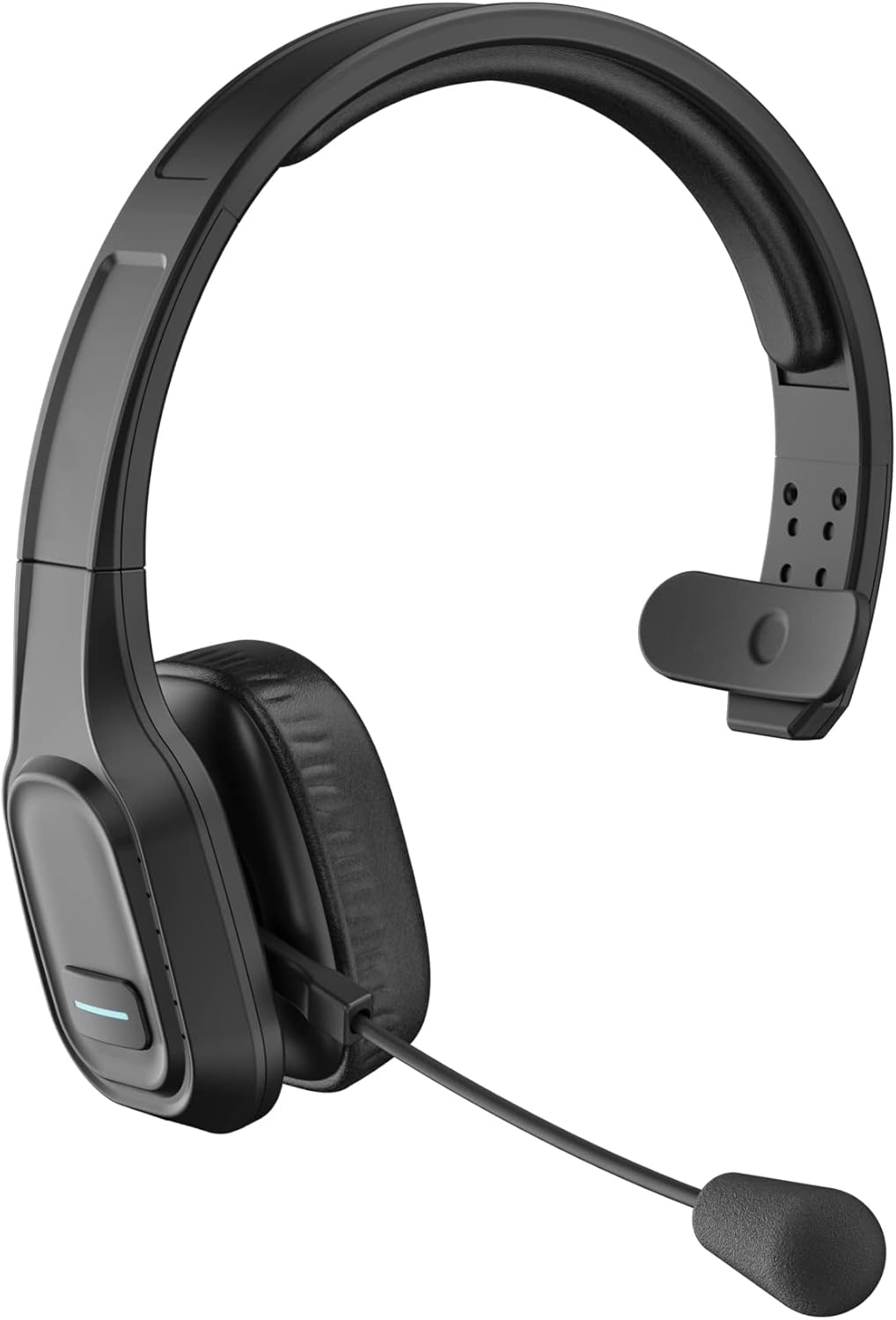
Figure 1: COMEXION BH-M100 Trucker Bluetooth Headset - Front View
Headset Controls and Ports

Figure 2: Side view of the headset highlighting the Multi-Function Button (MFB), Volume +/- (Next/Previous Song), Microphone Mute Button & LED Indicator, Type-C Charge Port, and Microphone.
- Multi-Function Button (MFB): Used for power on/off, play/pause music, answer/end calls.
- Volume + / Next Song: Press to increase volume, long press for next song.
- Volume - / Previous Song: Press to decrease volume, long press for previous song.
- Microphone Mute Button & LED Indicator: Press to mute/unmute the microphone. The LED indicates mute status.
- Type-C Charge Port: For charging the headset.
- Microphone: Adjustable boom microphone with noise-canceling capabilities.
Setup
1. Charging the Headset
Before first use, fully charge your headset. A full charge takes approximately 1.5 hours.
- Connect the provided USB-C charging cable to the headset's Type-C Charge Port.
- Connect the other end of the cable to a USB power source (e.g., computer USB port, wall adapter).
- The LED indicator will show red during charging and turn blue when fully charged.

Figure 3: Headset battery life indicators, including 1.5 hours charging time.
2. Pairing with Your Device
The BH-M100 uses Bluetooth 5.0 for quick, efficient, and stable connections. It can pair with two devices simultaneously.
- Power On: Long press the Multi-Function Button (MFB) until the LED indicator flashes blue and red alternately, indicating pairing mode.
- Activate Bluetooth: On your device (smartphone, laptop, tablet), enable Bluetooth.
- Search and Connect: In your device's Bluetooth settings, search for "BH-M100" and select it to connect.
- Confirmation: Once connected, the LED indicator on the headset will turn solid blue. You will also hear an audible confirmation.

Figure 4: The headset supports simultaneous connection to two devices.
Note: If connecting to a PC without built-in Bluetooth, a USB dongle (not included with BH-M100, available with BH-M100 with Dongle variant) may be required.
Operating Instructions
Call Management
- Answer/End Call: Press the MFB once.
- Reject Call: Long press the MFB.
- Mute/Unmute Microphone: Press the Microphone Mute Button once. (Note: Mute function on BH-M100 without Dongle is only for cell phones. For PC applications like Skype or Zoom, mute via software settings.)
Volume Control
- Increase Volume: Press the Volume + button.
- Decrease Volume: Press the Volume - button.
Microphone Adjustment
The 270° rotatable microphone allows for flexible positioning on either the right or left side, ensuring optimal voice pickup.

Figure 5: The directional microphone can be adjusted for optimal voice clarity and muted during conversations.
Comfort and Wearing
The headset is designed for all-day comfort with soft protein leather earmuffs and an adjustable headband.
- Adjust the headband to fit comfortably over your head.
- Position the ear cup over one ear, allowing the other ear to remain open to your surroundings.
- Rotate the microphone boom to align with your mouth for clear communication.

Figure 6: Features ensuring comfort for all-day wear, including adjustable headband, soft ear pad, anti-slip pad, and 270° rotatable microphone.
Maintenance
To ensure the longevity and optimal performance of your headset, follow these maintenance guidelines:
- Clean the ear pads and headband regularly with a soft, dry cloth.
- Avoid exposing the headset to extreme temperatures, humidity, or direct sunlight.
- Do not use abrasive cleaners or solvents.
- Store the headset in a cool, dry place when not in use.
Troubleshooting
If you encounter issues with your headset, please refer to the following common problems and solutions:
- Headset won't turn on: Ensure the headset is fully charged.
- Unable to pair: Make sure the headset is in pairing mode (flashing blue and red LED). Ensure Bluetooth is enabled on your device and it's within range (10 meters). Try restarting both the headset and your device.
- Poor sound quality/connection: Ensure your device's Bluetooth driver is updated (especially for laptops). Turn off other Bluetooth devices nearby. Test in a quieter environment.
- Mute button not working on PC: The mute button on the BH-M100 without a dongle only works for cell phones. For PC applications (Skype, Zoom, Teams), use the mute function within the software.
- Cannot connect to a device without Bluetooth: The BH-M100 requires Bluetooth connectivity. For non-Bluetooth devices, consider the BH-M100 with Dongle variant.
Specifications
| Feature | Detail |
|---|---|
| Model Name | BH-M100 |
| Brand | COMEXION |
| Connectivity Technology | Bluetooth 5.0 |
| Wireless Communication Technology | Bluetooth |
| Ear Placement | On Ear |
| Noise Control | Active Noise Cancellation (Microphone) |
| Charging Time | 1.5 Hours |
| Continuous Talking Time | Up to 30 Hours |
| Standby Time | Up to 400 Hours |
| Bluetooth Range | 10 Meters |
| Item Weight | 4.9 ounces |
| Product Dimensions | 8.86 x 7.28 x 2.95 inches |
| Material | Faux Leather |
Warranty and Support
COMEXION offers a Lifetime Extended Warranty for your BH-M100 headset. To activate your warranty and access technical support, please scan the QR code provided on the warranty card included in your package or visit the official COMEXION website.
The warranty provides:
- Lifetime Extended Warranty
- Replacement at no cost if return window closed
- Technical support for any usage problems
For further assistance, please refer to the contact information provided on the official COMEXION website.
Ask a question about this manual
Ask about setup, troubleshooting, compatibility, parts, safety, or missing instructions. Manuals+ will review the question and use this page’s manual context to help answer it.