
Introduction
Thank you for choosing the Lorus RM335GX9 Men's Quartz Analog Chronograph Watch. This manual provides detailed instructions for the proper setup, operation, and maintenance of your new timepiece. Please read this manual thoroughly to ensure optimal performance and longevity of your watch.
Product Overview
The Lorus RM335GX9 is a sophisticated men's quartz analog watch featuring a chronograph function, a durable stainless steel case, and a comfortable leather strap. It is designed for everyday wear and offers reliable timekeeping with added stopwatch capabilities.

Image 1: Close-up view of the Lorus RM335GX9 watch face, highlighting the black dial, silver hour markers, and red accents on the chronograph subdials. The main hands are silver with luminous inserts.
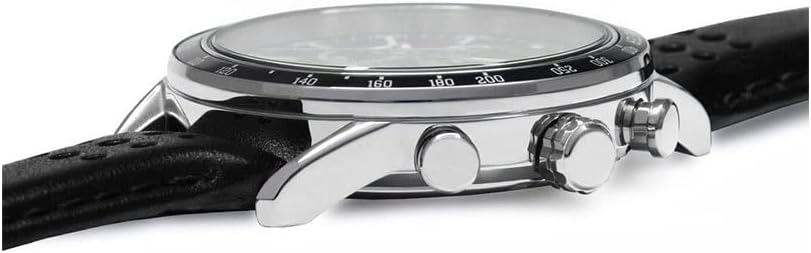
Image 2: Side profile of the Lorus RM335GX9 watch, illustrating the polished stainless steel case, the main crown for time adjustment, and the two pushers used for the chronograph functions.

Image 3: Rear view of the Lorus RM335GX9 watch, displaying the engraved stainless steel case back and the black leather strap secured with a silver buckle.
Setup
Setting the Time
- Pull the crown out to the second click position.
- Rotate the crown to set the hour and minute hands to the desired time.
- Push the crown back in to the normal position to start the watch.
Setting the Date
- Pull the crown out to the first click position.
- Rotate the crown clockwise or counter-clockwise (depending on the movement) to set the date.
- Once the correct date is displayed, push the crown back in to the normal position.
Note: Avoid setting the date between 9:00 PM and 3:00 AM, as this may interfere with the automatic date change mechanism.
Operating Instructions
Using the Chronograph (Stopwatch)
Your Lorus RM335GX9 watch is equipped with a chronograph function, allowing you to measure elapsed time.
- Start: Press the upper pusher (A) to start the chronograph. The chronograph second hand will begin to move.
- Stop: Press the upper pusher (A) again to stop the chronograph. The elapsed time will be indicated by the chronograph hands.
- Reset: After stopping the chronograph, press the lower pusher (B) to reset all chronograph hands to their zero positions.
Note: The chronograph subdials typically measure seconds, minutes, and fractions of a second (e.g., 1/10th of a second). Refer to the watch face for specific subdial markings.
Maintenance
Water Resistance
Your watch has a water resistance rating of 100 meters (10 ATM). This means it is suitable for swimming and snorkeling, but not for diving. Always ensure the crown is fully pushed in before exposing the watch to water.
- Do not operate the crown or pushers while the watch is wet or submerged.
- Avoid exposing the watch to hot water, steam, or sudden temperature changes, as this can compromise the water seals.
Cleaning
To maintain the appearance of your watch:
- Wipe the case and crystal with a soft, dry cloth.
- For the leather strap, avoid prolonged exposure to water, direct sunlight, and harsh chemicals to prevent damage and discoloration.
Battery Information
This watch is powered by a quartz movement and uses a battery. The included battery has a typical lifespan of several years. When the battery needs replacement, it is recommended to have it done by a qualified watch technician to ensure proper sealing and function.
Troubleshooting
- Watch Not Running: Check if the crown is fully pushed in. If the watch still does not run, the battery may need replacement.
- Incorrect Time/Date: Refer to the 'Setting the Time' and 'Setting the Date' sections to re-adjust.
- Chronograph Hands Not Resetting to Zero: If the chronograph hands do not return to their 12 o'clock (zero) position after pressing the reset pusher, a calibration may be required. Consult a watch technician for assistance.
Specifications
| Feature | Detail |
|---|---|
| Brand | Lorus |
| Model Number | RM335GX9 |
| Movement | Quartz |
| Display Type | Analog |
| Case Material | Stainless Steel |
| Case Diameter | 32 millimeters |
| Case Thickness | 12 millimeters |
| Band Material | Leather |
| Band Width | 22 millimeters |
| Band Color | Black |
| Dial Color | Black |
| Dial Window Material | Crystal |
| Clasp Type | Buckle |
| Water Resistance Depth | 100 meters (10 ATM) |
| Power Source | Battery Powered (Battery Included) |
| Included Components | Leather strap, buckle, battery |
| Product Dimensions | 10 x 3 x 5 cm; 140 grams |
| Country of Origin | China |
Warranty and Support
Warranty Information
Your Lorus RM335GX9 watch comes with a 1-year manufacturer warranty from the date of purchase. This warranty covers manufacturing defects under normal use. It does not cover damage resulting from improper handling, accidents, unauthorized repairs, or normal wear and tear.
Please retain your proof of purchase for warranty claims.
Customer Support
For any questions, service, or warranty claims, please contact your authorized Lorus dealer or the official Lorus customer service in your region. Contact details can typically be found on the Lorus official website or through your retailer.


