
1. Product Overview
The AODELAN RMT-P1BTA is a wireless remote control designed for select Sony cameras, offering convenient control over various camera functions such as still image shooting, video recording, focus adjustment, and zoom. It operates wirelessly via Bluetooth, providing a reliable connection up to 10 meters (32.8 feet).

Figure 1.1: Front view of the AODELAN RMT-P1BTA Camera Remote Control. It features a sleek black design with clearly labeled buttons for various functions, including zoom, shutter, record, AF-ON, and C1.
1.1 Components and Controls
Familiarize yourself with the buttons and switches on your remote control:

Figure 1.2: Detailed view of the remote control's buttons and their functions. This includes the Indicator light, Focus/Zoom buttons (+/-), Shutter-release button, REC (record) button, AF-ON button, and C1 button.
- Indicator: Indicates the camera's operational state in accordance with the Remote Control operation.
- Focus/Zoom Buttons (+/-): Adjusts the camera focus or zooms in/out the camera. The function depends on the FOCUS/ZOOM switch setting.
- Shutter-release Button: Shoots a still image. When the camera is set to BULB exposure, press once to start exposure, press again to end. Half-press for auto-focus.
- REC (record) Button: Starts and stops video recording.
- AF-ON Button: Activates the function assigned to the AF-ON button on the camera.
- C1 Button: Activates the function assigned to the C1 button on the camera.

Figure 1.3: Side view of the remote control, highlighting the FOCUS/ZOOM switch and the Lock switch. The strap holder is also visible at the bottom.
- FOCUS/ZOOM Switch: Determines the function of the +/- buttons. Set to FOCUS for fine-tuning focus, or ZOOM for electronic power zoom and digital zoom.
- Lock Switch: Disables all buttons on the remote control to prevent unintentional operations.
- Strap Holder: For attaching a wrist strap.
2. Setup
2.1 Battery Installation
The remote control requires a CR2032 coin cell battery (typically included). To install or replace the battery, locate the battery compartment on the back of the remote, open it, insert the battery with the positive (+) side facing up, and close the compartment securely.
2.2 Pairing with Your Camera
To use the remote control, you must pair it with your compatible Sony camera via Bluetooth. Follow these steps:
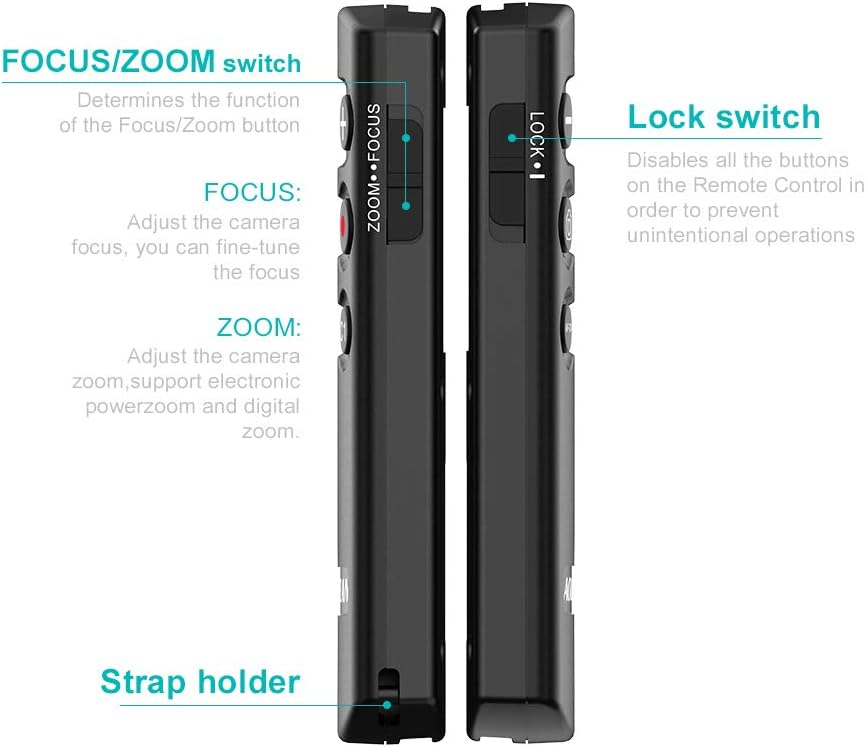
Figure 2.1: Visual guide for pairing the remote control with a Sony camera, showing the steps and important user notes.
- Ensure the Lock switch on the left side of the remote is NOT in the lock position.
- On your camera, navigate to: Menu > Network > Bluetooth setting > Bluetooth function > ON.
- On your camera, navigate to: Menu > Network > Bluetooth RMT Ctrl > ON.
- On your camera, navigate to: Menu > Network > Bluetooth setting > Pairing.
- Hold down both the Shutter button and the Zoom + button on the remote simultaneously for more than 7 seconds.
- When a confirmation message appears on the camera screen, tap "OK". The camera will display "Paired" once successful.
3. Operating Instructions
3.1 Still Image Shooting
To capture still images:

Figure 3.1: The remote control supports both still image and video recording functions, indicated by the camera and record icons.
- Ensure your camera is in a still image shooting mode.
- Half-press the Shutter-release button to activate autofocus.
- Fully press the Shutter-release button to take a picture.
3.2 Video Recording
To record videos:
- Ensure your camera is in a video recording mode.
- Press the REC (record) button once to start recording.
- Press the REC (record) button again to stop recording.
3.3 Focus and Zoom Control
The +/- buttons can control either focus or zoom, depending on the position of the FOCUS/ZOOM switch on the side of the remote.

Figure 3.2: Illustration of the zoom function using the remote control, showing wide-angle and telephoto adjustments.
- For Focus Control: Set the FOCUS/ZOOM switch to "FOCUS". Use the +/- buttons to fine-tune the camera's focus. This is particularly useful for macro photography and focus stacking.
- For Zoom Control: Set the FOCUS/ZOOM switch to "ZOOM". Use the +/- buttons to adjust the camera's electronic power zoom or digital zoom. This helps avoid vibrations caused by physically touching the camera.
3.4 Long Exposure (BULB) Function
When your camera is set to BULB exposure mode:

Figure 3.3: The remote control's shutter button supports both BULB exposure control and half-press autofocus.
- Press the Shutter-release button once to start the exposure.
- Press the Shutter-release button again to end the exposure.
3.5 Assignable Buttons (AF-ON and C1)
The AF-ON and C1 buttons on the remote control mirror the functionality of the corresponding buttons on your camera. Their specific actions depend on how you have configured them in your camera's settings.
4. Maintenance
To ensure the longevity and proper functioning of your AODELAN RMT-P1BTA remote control:
- Keep the remote clean by wiping it with a soft, dry cloth. Avoid using harsh chemicals or abrasive materials.
- Store the remote in a cool, dry place away from direct sunlight, extreme temperatures, and high humidity.
- If not using the remote for an extended period, consider removing the battery to prevent leakage.
- Avoid dropping the remote or subjecting it to strong impacts.
5. Troubleshooting
If you encounter issues with your remote control, refer to the following common solutions:
- Remote not responding:
- Check if the Lock switch on the side of the remote is in the unlocked position.
- Ensure the battery is correctly installed and has sufficient charge. Replace if necessary.
- If you turn off the camera and then turn it on again, you may need to wait a few seconds and then activate the remote by pressing one of its buttons.
- Re-pair the remote with your camera following the steps in Section 2.2.
- Zoom buttons not working:
- The zoom buttons on the remote only work for power zoom lenses when used on mirrorless cameras.
- The zoom buttons will not work when taking RAW or RAW + JPEG images. They only function when taking JPEG images.
- GPS location tagging not working: You cannot use GPS location tagging when using this remote.
6. Specifications
| Feature | Description |
|---|---|
| Brand | AODELAN |
| Model | RMT-P1BTA |
| Special Feature | Ergonomic |
| Color | Black |
| Max Number of Supported Devices | 1 |
| Compatible Devices | Camera (Sony ZV-E10, FX3, A1, a6100, a6400, a6600, a7C, a7 III, a7R III, a7R IV, a9, a9 II, DSC-RX0 II, DSC-RX100 VII, ZV-1, etc.) |
| Operating Range | Up to 10m / 32.8ft |
7. Warranty and Support
AODELAN products are designed for reliability and performance. For warranty information and technical support, please refer to the official AODELAN website or contact their customer service directly. Keep your purchase receipt as proof of purchase for warranty claims.
Official Website: www.aodelan.com
Customer Support: Refer to the contact information provided on the product packaging or the official website.