
1. Introduction
This manual provides detailed instructions for the proper use and maintenance of your MAITE MTDVD-XTP Mini DVD Player. Please read this manual thoroughly before operating the device to ensure optimal performance and longevity. This compact DVD player supports various disc formats and offers multiple connectivity options for your entertainment needs.
2. Package Contents
Carefully unpack your MAITE MTDVD-XTP Mini DVD Player and verify that all items listed below are included:
- 1x MAITE MTDVD-XTP Mini DVD Player
- 1x Disc Player Holder (Stand)
- 1x 4 Feet 4K/60Hz HDMI Connection Cable
- 1x 3.3 Feet 4K/60Hz RCA Output Cable
- 1x Remote Control (Batteries not included)
- 1x User Manual (This document)

Image: The MAITE MTDVD-XTP Mini DVD Player shown with its remote control, HDMI cable, RCA cable, USB Type-C power cable, power adapter, and the included stand.
3. Product Overview
The MAITE MTDVD-XTP is a compact and versatile DVD player designed for ease of use and broad compatibility. Its slim profile and included stand allow for flexible placement, either horizontally or vertically.
Key Features:
- Compact Design: Measuring approximately 6 x 5.4 x 1.1 inches and weighing 0.7 pounds, it is highly portable.
- Region-Free Playback: Supports DVD playback from all regions (1-6), excluding Blu-ray discs.
- Multi-Format Disc Support: Compatible with CD, VCD, SVCD, CD-R, CD-RW, EVD, DVD, DVD-9, DVD-R, and DVD-RW.
- USB Input: Play media files directly from a USB drive, supporting formats such as AVI (Xvid, MP4V, MPEG-1), D2VX, MPG, MPEG, MP3, MOV, and ASF.
- High-Definition Output: Features HDMI output for up to 1080P resolution and RCA (AV) output for broader compatibility.
- Memory Playback: Resumes playback from where it was last stopped.
- Disc to USB Copy: Allows copying of CD, MP3, WMA, CD-R, and CD-RW files to a connected USB drive.

Image: The MAITE MTDVD-XTP Mini DVD Player connected to a television, demonstrating its 1080P output capability for clear and smooth picture quality.

Image: A visual comparison highlighting the anti-jam flip cover design of the MAITE MTDVD-XTP Mini DVD Player against a traditional spit disc design, emphasizing ease of use and disc protection.
4. Setup Instructions
4.1 Power Connection
- Connect the provided USB Type-C power cable to the power input port on the DVD player.
- Plug the other end of the USB Type-C cable into the included power adapter.
- Insert the power adapter into a standard electrical outlet.
4.2 Connecting to a Display Device (TV/Monitor)
The MAITE MTDVD-XTP offers two primary ways to connect to a display:
HDMI Connection (Recommended for High Quality)
- Locate the HDMI output port on the back of the DVD player.
- Connect one end of the provided HDMI cable to the DVD player's HDMI output.
- Connect the other end of the HDMI cable to an available HDMI input port on your TV or monitor.
- Select the corresponding HDMI input on your TV/monitor using its remote control.
RCA (AV) Connection (Standard Definition)
- Locate the RCA (AV) output ports (Yellow for Video, White for Left Audio, Red for Right Audio) on the back of the DVD player.
- Connect the corresponding colored plugs of the provided RCA cable to the DVD player's RCA output ports.
- Connect the other end of the RCA cable to the matching colored RCA input ports on your TV or monitor.
- Select the corresponding AV input on your TV/monitor using its remote control.

Image: A visual guide illustrating the different connection ports on the MAITE MTDVD-XTP Mini DVD Player, including HDMI, RCA, and USB, and how to connect them to a display or audio system.
4.3 Using the Stand
The included stand allows for vertical placement of the DVD player, optimizing space. Insert the DVD player into the stand, ensuring it is stable. The stand is designed to hold the player securely at various angles (e.g., 30°, 45°, 90°).

Image: The MAITE MTDVD-XTP Mini DVD Player positioned vertically in its dedicated stand, illustrating its stable design and space-saving capability.
5. Operating Instructions
5.1 Disc Playback
- Ensure the DVD player is powered on and connected to your display device.
- Gently open the flip cover on the top of the DVD player.
- Place a compatible disc (CD, VCD, SVCD, EVD, DVD) onto the spindle, ensuring it is seated correctly with the label side facing up.
- Close the flip cover. The player will automatically begin reading the disc.
- Use the remote control to navigate menus, play, pause, stop, skip tracks/chapters, and adjust volume.

Image: The MAITE MTDVD-XTP Mini DVD Player with its transparent lid open, showing a disc being played, with the time counter visible on the front display.
5.2 USB Media Playback
- Insert a USB flash drive into the USB port on the side of the DVD player.
- The player should automatically detect the USB drive and display its contents. If not, use the 'MODE' button on the remote to switch to USB input.
- Navigate through your files using the remote control. Select the desired video, audio, or image file to play.
5.3 Region-Free Functionality
The MAITE MTDVD-XTP is designed to play DVDs from all regions (Region 1, 2, 3, 4, 5, 6). This means you can play DVDs purchased from different geographical areas without needing to change region settings. Note that Blu-ray discs are not supported.
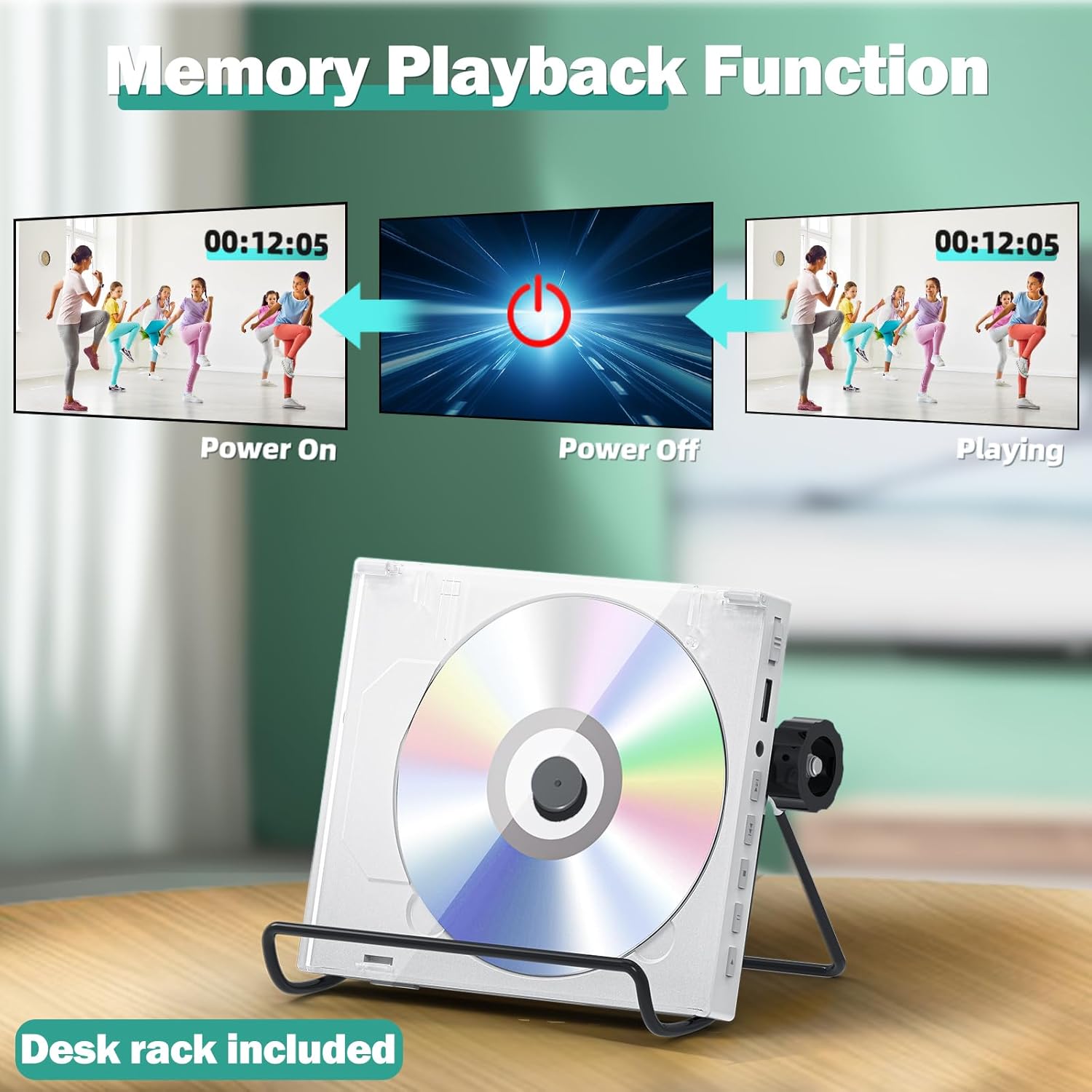
Image: A world map graphic demonstrating the MAITE MTDVD-XTP Mini DVD Player's 'All Region Free' capability, contrasting it with a standard Blu-ray player that typically supports only Region 1 (US/CA).

Image: A couple watching a movie on a television, with the MAITE MTDVD-XTP Mini DVD Player visible, illustrating its region-free playback capability via HDMI or RCA connections.
5.4 Memory Playback Function
The player features a memory playback function. If the device is powered off during disc or USB playback, it will resume from the last stopped point when powered on again, provided the same media is inserted.

Image: A diagram showing the 'Memory Playback Function' where the MAITE MTDVD-XTP Mini DVD Player resumes video playback from the exact timestamp (00:12:05) after being powered off and then on again.
5.5 Copy Disc Files to USB
You can copy audio files from compatible discs (CD, MP3, WMA, CD-R, CD-RW) directly to a connected USB drive.
- Insert the audio disc into the DVD player.
- Insert a USB flash drive into the USB port.
- During playback or when the disc is loaded, press the 'COPY' button on the remote control.
- Follow the on-screen prompts to select the files you wish to copy to the USB drive.
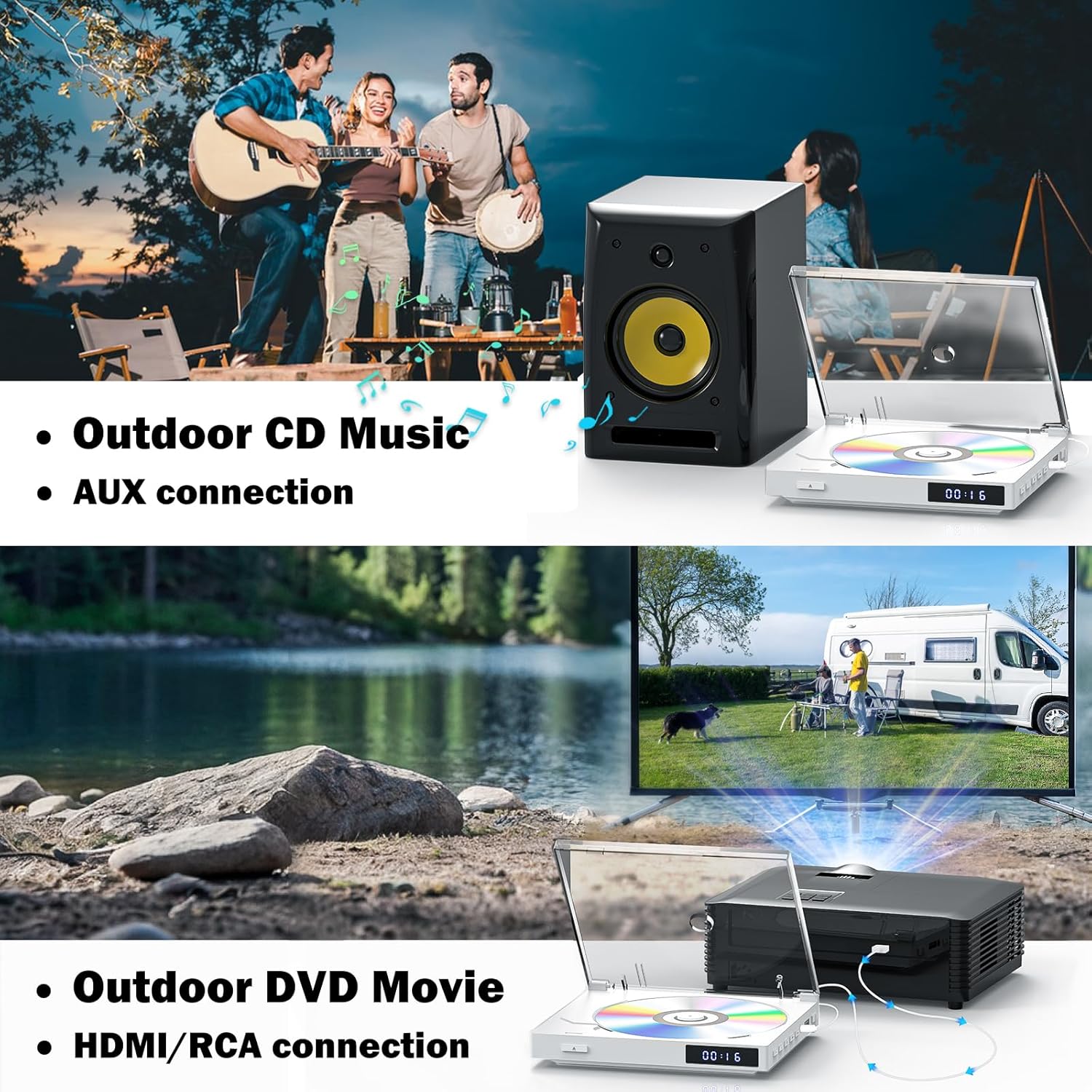
Image: The MAITE MTDVD-XTP Mini DVD Player with a USB drive inserted, and its remote control highlighting the 'COPY' button, demonstrating the feature to copy disc files (CD, MP3, WMA, CD-R, CD-RW) to USB.
6. Connections and Versatility
The MAITE MTDVD-XTP is designed for various usage scenarios, from home entertainment to outdoor activities.
6.1 Audio Output Options
- HDMI: Transmits both audio and video digitally to compatible display devices.
- RCA (AV): Provides analog stereo audio output (White and Red jacks) for connection to older TVs or external audio systems.
- AUX: The player can be connected to external speakers or headphones via its AUX output for enhanced audio.

Image: Two scenarios showing the MAITE MTDVD-XTP Mini DVD Player's versatility: one for 'Outdoor CD Music' connected via AUX to a speaker, and another for 'Outdoor DVD Movie' connected via HDMI/RCA to a projector, highlighting its adaptability for various entertainment setups.
7. Maintenance
Proper care ensures the longevity and optimal performance of your DVD player.
- Cleaning the Player: Use a soft, dry cloth to wipe the exterior of the player. Avoid using liquid cleaners or abrasive materials.
- Disc Care: Handle discs by their edges. Keep discs clean and free of scratches, dust, and fingerprints. Use a soft, lint-free cloth to wipe discs from the center outwards.
- Ventilation: Ensure the player has adequate ventilation. Do not block any ventilation openings.
- Storage: Store the player in a cool, dry place away from direct sunlight, extreme temperatures, and high humidity.
8. Troubleshooting
If you encounter issues with your MAITE MTDVD-XTP, refer to the following common problems and solutions:
| Problem | Possible Cause | Solution |
|---|---|---|
| No power | Power cable not connected; Power outlet not active | Ensure power cable is securely connected. Check power outlet with another device. |
| No picture on TV | Incorrect input selected on TV; Loose HDMI/RCA cable; TV/monitor issue | Select correct input on TV. Check cable connections. Test TV with another source. |
| Disc not playing / 'ERR' message | Disc is dirty or scratched; Incompatible disc format; Disc inserted incorrectly | Clean the disc. Ensure disc is compatible (not Blu-ray). Reinsert disc correctly. |
| No sound | Volume too low; Audio cables loose; TV/monitor audio settings | Increase volume on player and TV. Check audio cable connections. Adjust TV audio settings. |
| Remote control not working | Batteries depleted or inserted incorrectly; Obstruction between remote and player | Replace batteries. Ensure correct polarity. Remove obstructions. Point remote directly at player. |
9. Specifications
| Feature | Specification |
|---|---|
| Brand | MAITE |
| Model Name | MTDVD-XTP |
| Product Dimensions | 6 x 5.4 x 1.1 inches |
| Item Weight | 0.7 Pounds (11.2 ounces) |
| Color | Pearl White |
| Media Type Supported | CD, DVD, MP3, SVCD, VCD, EVD, DVD-9, DVD-R, DVD-RW, CD-R, CD-RW (Blu-ray excluded) |
| USB File Formats | AVI (Xvid, MP4V, MPEG-1), D2VX, MPG, MPEG, MP3, MOV, ASF |
| Resolution | Up to 1920x1080 (1080P) |
| Connector Types | HDMI, RCA (AV), USB, 3.5mm Jack (AUX) |
| Connectivity Technology | AUX, HDMI, USB |
| Special Features | Anti-Shock, Compact, Multi-Format Playback, Region Free, USB Input |
| Audio Output Mode | Stereo |
| Power Consumption | <25W |
| Output Voltage | 5V, 2A |
10. Warranty and Support
MAITE products are designed for reliability and performance. For specific warranty information, please refer to the documentation included with your purchase or visit the official MAITE support website. If you require technical assistance or have questions not covered in this manual, please contact MAITE customer support through their official channels.
Return Policy: This product typically includes a 30-day return for refund policy. Please check your purchase details for specific terms.