
Important Safety Information
Read all instructions carefully before using the UMIDIGI Uwatch 2S Smart Watch. Failure to follow these instructions may result in damage to the device or personal injury. This device is not a medical instrument and should not be used for medical diagnosis or treatment. Consult a medical professional for any health concerns.
- Keep the device away from extreme temperatures, direct sunlight, and strong magnetic fields.
- Do not attempt to disassemble or modify the device.
- Use only the provided charging cable.
- Ensure the charging contacts are clean and dry before charging.
- Dispose of the device and its battery according to local regulations.
Product Overview
The UMIDIGI Uwatch 2S is a versatile smart watch designed for fitness tracking and daily convenience. It features a 1.3-inch full-color touch screen, a lightweight aluminum frame, and various health and activity monitoring functions.

Figure 1: Front view of the UMIDIGI Uwatch 2S Smart Watch, showing its round display and white silicone band.

Figure 2: Rear view of the UMIDIGI Uwatch 2S Smart Watch, highlighting the optical heart rate sensors and magnetic charging contacts.
Setup
1. Charging the Device
Before first use, fully charge your UMIDIGI Uwatch 2S. Connect the magnetic charging cable to the charging contacts on the back of the watch and plug the USB end into a power adapter (not included) or a computer USB port. A full charge typically takes approximately 2.5 hours.
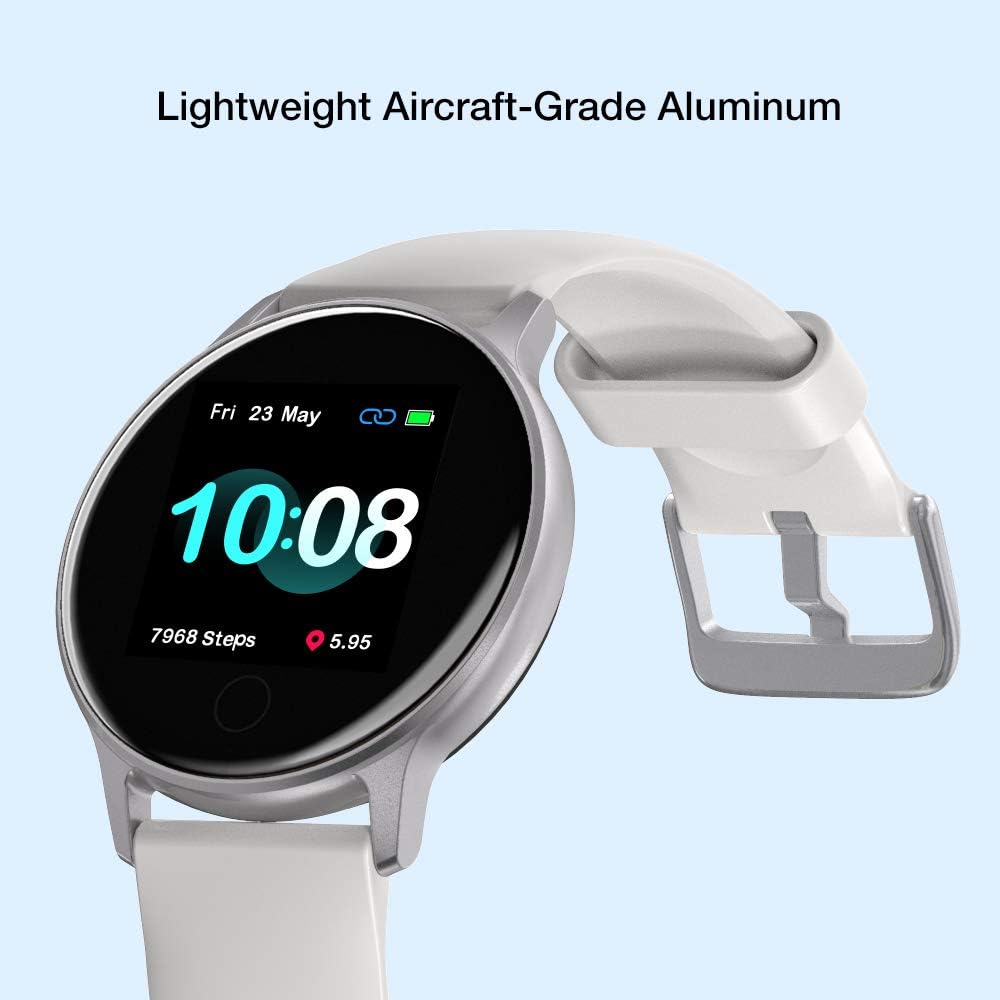
Figure 3: The Uwatch 2S connected to its magnetic charging cable, indicating charging status.
2. Downloading the App
To unlock the full functionality of your Uwatch 2S, download the Paiactive app on your smartphone. Search for "Paiactive" in the Apple App Store (for iOS devices) or Google Play Store (for Android devices).
3. Pairing with Your Smartphone
- Ensure your smartphone's Bluetooth is enabled.
- Open the Paiactive app and create an account or log in.
- Follow the in-app instructions to add a new device. Select "UMIDIGI Uwatch 2S" from the list of available devices.
- Confirm the pairing request on both your watch and smartphone.
Operating Instructions
1. Basic Navigation
- Touch Screen: Swipe left/right to navigate through main functions, swipe up/down to view notifications or quick settings. Tap to select an option.
- Side Buttons: The two buttons on the right side provide additional control, typically for power on/off, returning to the home screen, or quick access to specific features. Refer to the in-app guide for specific button functionalities.
2. Watch Faces
Customize your watch face through the Paiactive app. You can choose from various pre-installed designs or create custom watch faces to personalize your device.

Figure 4: The Uwatch 2S displaying a customizable digital watch face.
3. Health Monitoring
The Uwatch 2S provides comprehensive health monitoring features:
- Heart Rate Monitoring: The watch continuously monitors your heart rate throughout the day. View real-time data on the watch or detailed graphs in the Paiactive app.
- Blood Oxygen (SpO2) Measuring: Measure your blood oxygen levels on demand.
- Sleep Tracking: Automatically tracks your sleep patterns, including deep sleep, light sleep, and awake times. Review your sleep quality analysis in the app.
- Sedentary Reminder: Receive alerts when you have been inactive for too long, encouraging you to move.

Figure 5: The Uwatch 2S actively tracking sleep patterns during rest.

Figure 6: The Uwatch 2S providing continuous 24/7 heart rate monitoring.
4. Activity Tracking and GPS
The Uwatch 2S is equipped with a built-in GPS and supports 17 sport modes to accurately track your workouts:
- Sport Modes: Walking, Running, Cycling, Badminton, Basketball, Football, Treadmill, Exercise, Climb, Tennis, Yoga, Dance, Skipping, Training, and more.
- Data Recording: For each activity, the watch records data such as steps, distance, calories burned, average pace, stride, and GPS track (for outdoor activities).

Figure 7: Visual representation of the various sport modes available on the Uwatch 2S.

Figure 8: The Uwatch 2S provides 24-hour activity tracking for various exercises.
5. Notifications and Smart Features
Once paired with your smartphone, the Uwatch 2S can display notifications and offer smart controls:
- Notifications: Receive alerts for incoming calls, messages, and app notifications (e.g., Facebook, WhatsApp, Skype, YouTube, Twitter, Instagram). Configure these in the Paiactive app.
- Weather Forecast: View current weather conditions and forecasts directly on your watch.
- Music Control: Control music playback on your smartphone (play, pause, skip tracks).
- Camera Shutter: Use your watch as a remote shutter for your smartphone camera.
6. Water Resistance
The Uwatch 2S has a 5ATM water resistance rating, meaning it can withstand pressures equivalent to a depth of 50 meters. This makes it suitable for swimming and showering, but it is not recommended for diving or high-pressure water activities.
Figure 9: The Uwatch 2S is suitable for swimming due to its 5ATM water resistance.
Maintenance
1. Cleaning the Watch
Regularly clean your Uwatch 2S to ensure optimal performance and hygiene:
- Wipe the screen and body with a soft, damp, lint-free cloth.
- For stubborn dirt, use a mild soap solution and rinse thoroughly with clean water.
- Ensure the watch is completely dry before charging.
2. Band Care
The silicone band can be cleaned with water and mild soap. Avoid harsh chemicals that may damage the material.
3. Battery Care
To prolong battery life:
- Avoid fully discharging the battery frequently.
- Charge the watch before the battery level drops too low.
- Store the watch in a cool, dry place if not used for extended periods.
Troubleshooting
If you encounter issues with your UMIDIGI Uwatch 2S, try the following solutions:
| Problem | Solution |
|---|---|
| Watch does not turn on | Ensure the watch is fully charged. Connect it to the charger for at least 30 minutes. |
| Unable to pair with smartphone | Ensure Bluetooth is enabled on your phone. Restart both the watch and your phone. Make sure the watch is within Bluetooth range. Clear Bluetooth cache on your phone if necessary. |
| Inaccurate heart rate/activity data | Ensure the watch is worn snugly on your wrist, not too tight or too loose. Clean the sensor on the back of the watch. |
| Notifications not received | Check notification settings in the Paiactive app and your phone's system settings. Ensure the app is running in the background. |
| Short battery life | Reduce screen brightness, disable continuous heart rate monitoring if not needed, and limit excessive notifications. |
If the problem persists, try resetting the watch to factory settings via the watch's menu or the Paiactive app. For further assistance, contact UMIDIGI customer support.
Specifications
- Model: UMIDIGI Uwatch 2S
- Display: 1.3-inch LCD, 240 x 240 resolution, Full-color touch screen
- Case Material: Aluminium
- Band Material: Rubber
- Dimensions: 25.7 x 4.4 x 1.3 cm
- Weight: 25 Grams
- Water Resistance: 5ATM (50 meters), suitable for swimming
- Connectivity: Bluetooth
- GPS: Built-in GPS
- Sensors: Heart Rate Monitor, Blood Oxygen Sensor, Pedometer
- Battery Life: Up to 15 days (typical use), 40 days (standby)
- Charging Time: Approximately 2.5 hours
- Compatibility: Android (e.g., Xiaomi, Huawei, Samsung) and iOS (e.g., iPhone) smartphones
- Supported Application: Paiactive App
Warranty Information
UMIDIGI products are covered by a limited warranty against defects in materials and workmanship. The specific terms and duration of your warranty may vary depending on your region and point of purchase. Please retain your proof of purchase for warranty claims. For detailed warranty information, refer to the official UMIDIGI website or contact your local retailer.
Support
For technical support, frequently asked questions, or further assistance with your UMIDIGI Uwatch 2S, please visit the official UMIDIGI support website or refer to the help section within the Paiactive app. You can also reach out to UMIDIGI customer service through the contact information provided on their official website.