
Introduction
This manual provides detailed instructions for the assembly, operation, and maintenance of your ECOTOUGE PTG-GMC PC Massage Gaming Chair with Footrest. Please read thoroughly before use to ensure proper functionality and longevity of your product.
The ECOTOUGE gaming chair is designed for comfort and support during extended periods of sitting, whether for gaming, office work, or studying. It features high-quality materials, ergonomic design, and adjustable components to enhance your experience.
Safety Information
- Maximum Weight Capacity: This chair is designed to support a maximum weight of 330 pounds (150 kg). Do not exceed this limit.
- Stable Surface: Always ensure the chair is placed on a stable, flat surface to prevent tipping.
- Proper Assembly: Follow all assembly instructions carefully. Incorrect assembly can lead to instability and potential injury.
- Regular Inspection: Periodically check all bolts and connections to ensure they are secure. Tighten if necessary.
- Avoid Standing: Do not stand on the chair or use it as a step stool.
- Children and Pets: Keep children and pets away from the chair during assembly.
Parts List
Before beginning assembly, ensure all parts are present and undamaged. Refer to the included diagram for identification.
- Backrest
- Seat Cushion
- Armrests (2)
- Five-Star Base
- Casters (5)
- Gas Lift Cylinder
- Gas Lift Cover
- Mechanism Plate
- Headrest Pillow
- Lumbar Support Pillow (with massage function)
- Footrest Assembly
- Hardware Kit (bolts, washers, Allen wrench)
Setup and Assembly
Assembly of the ECOTOUGE gaming chair is designed to be straightforward and typically takes approximately 15 minutes. It is recommended to have a second person assist during certain steps, such as attaching the seat and armrests, for ease and safety.
- Attach Casters to Base: Insert the five casters into the holes at the end of each leg of the five-star base until they click securely into place.
- Install Gas Lift: Place the gas lift cylinder into the center hole of the five-star base. Cover it with the gas lift cover.
- Attach Mechanism Plate: Secure the mechanism plate to the underside of the seat cushion using the provided bolts. Ensure the front of the mechanism faces the front of the seat.
- Connect Seat to Base: Carefully place the assembled seat cushion onto the gas lift cylinder.
- Attach Armrests: Secure the armrests to the sides of the seat cushion using the designated bolts.
- Attach Backrest: Align the backrest with the seat cushion and attach it using the remaining bolts.
- Install Footrest: Slide the footrest assembly into the designated slots under the seat.
- Attach Pillows: Secure the headrest pillow and lumbar support pillow to the backrest using their elastic straps.
Once assembled, ensure all connections are tight and the chair is stable before use.
Operating Instructions

Image: Adjustable features of the ECOTOUGE gaming chair.
- Height Adjustment: Locate the lever on the right side under the seat. Pull the lever upwards to raise the seat. To lower the seat, remain seated and pull the lever upwards. Release the lever to lock the height.
- Recline Function: The chair features a recline function from 90 to 135 degrees. Use the recline lever, typically located on the left side under the seat, to adjust the backrest angle. Release the lever to lock the backrest in your desired position.
- Footrest Operation: To use the footrest, pull it out from under the seat. Flip the padded section upwards to create a comfortable leg rest. To retract, flip the padded section down and push the footrest back under the seat.
- Lumbar Massage Function: The lumbar support pillow includes a massage feature. Connect the USB cable from the pillow to any standard USB power source (e.g., a phone charger, power bank, or computer USB port) to activate the massage.
- Swivel and Rocking: The chair is designed to swivel 360 degrees. It also has a rocking function; adjust the tension knob under the seat to control the resistance of the rocking motion.
Maintenance
- Cleaning: The chair is made of high-quality PU leather, which is waterproof and easy to clean. Wipe surfaces with a damp cloth and mild soap. Avoid harsh chemicals or abrasive cleaners.
- Caster Care: Periodically clean the casters to remove dust and debris that may hinder smooth movement.
- Fastener Check: Regularly inspect all bolts and screws to ensure they remain tight. Re-tighten as needed to maintain stability.
- Avoid Direct Sunlight: Prolonged exposure to direct sunlight can cause the material to fade or crack.
Troubleshooting
If you encounter any issues with your ECOTOUGE gaming chair, please consider the following general advice:
- Chair is Wobbly: Check all assembly bolts and ensure they are securely tightened. Verify the casters are fully inserted into the base.
- Height Adjustment Not Working: Ensure the gas lift lever is fully engaged or disengaged as required. If the issue persists, the gas lift cylinder may need replacement.
- Massage Function Not Working: Confirm the USB cable is properly connected to a working power source. Check for any damage to the cable or connection.
- Difficulty Reclining/Locking: Inspect the recline mechanism for any obstructions. Ensure the lever is fully engaged to lock the position.
For persistent problems or specific concerns, please contact ECOTOUGE customer service for assistance.
Specifications
| Feature | Detail |
|---|---|
| Brand | ECOTOUGE |
| Model Name | PTG-GMC |
| Color | Black |
| Material | Faux Leather (Seat), Sponge (Fill), Metal (Frame) |
| Product Dimensions (D x W x H) | 19.7"D x 21.5"W x 46.5"H |
| Item Weight | 37.5 Pounds |
| Maximum Weight Recommendation | 330 Pounds |
| Reclining Position Count | 5 (90 to 135 degrees) |
| Additional Features | Adjustable Backrest, Adjustable Headrest, Adjustable Height, Adjustable Lumbar, Retractable Footrest, 360° Swivel, Rocking Function |
| Certifications | BIFMA, SGS |
Visual Aids
Product Images
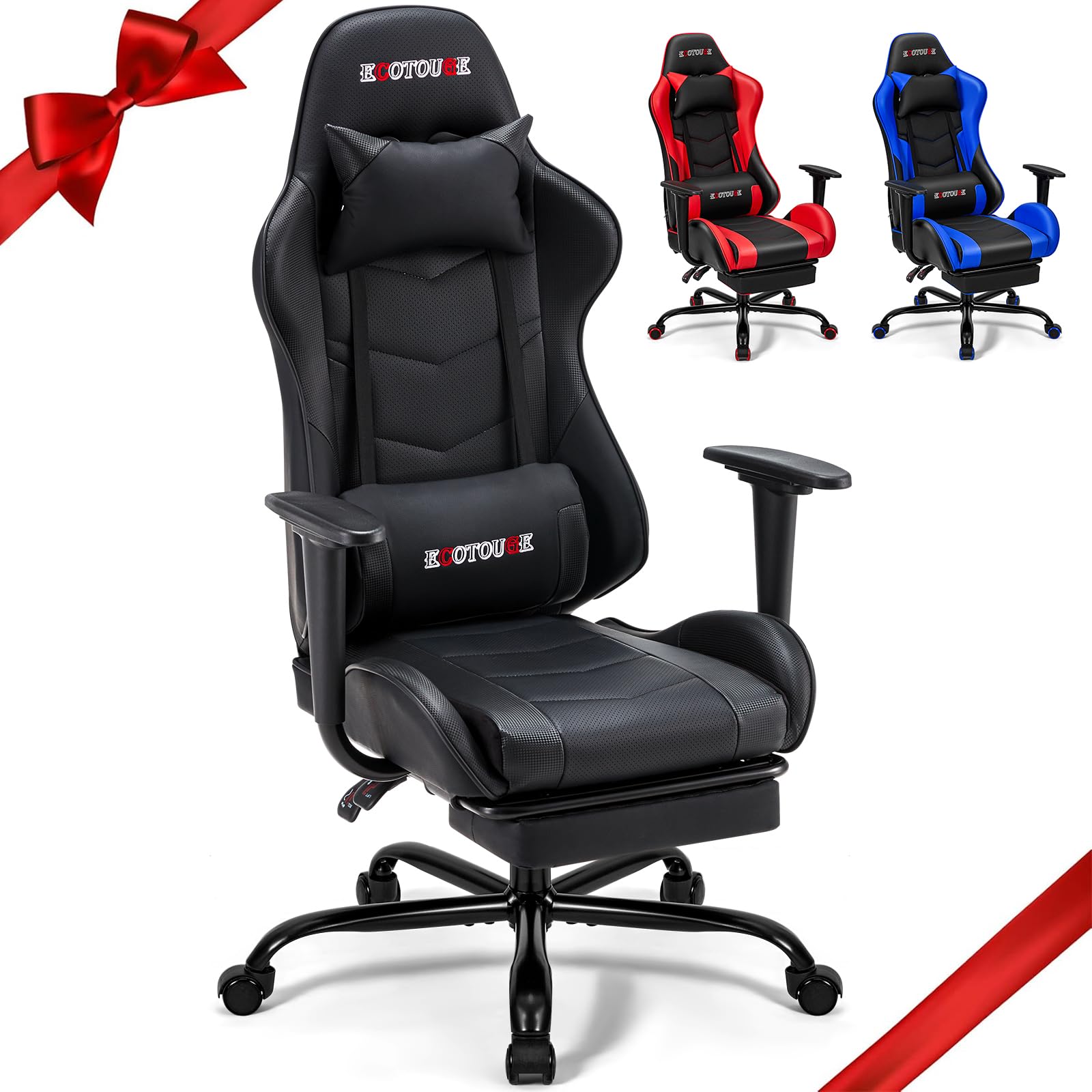
Image: The ECOTOUGE PC Massage Gaming Chair with Footrest, showcasing its design and presence in a typical gaming setup.

Image: Detailed dimensions and weight capacity of the ECOTOUGE gaming chair.

Image: Ergonomic design features providing neck, back, and lumbar support.

Image: Illustration of the thickened, high-density cushion for enhanced comfort.

Image: The extendable footrest in use, offering leg relaxation.

Image: Lumbar massage vibration feature powered by USB for comfort.
Official Product Videos
Video: An official overview of the ECOTOUGE PC Massage Gaming Chair, demonstrating its features and design. This video is provided by the seller.
Warranty and Support
Your ECOTOUGE PC Massage Gaming Chair comes with a return policy allowing for refunds or replacements within 30 days of purchase. For any dissatisfaction, product issues, or support needs, please contact ECOTOUGE after-sales customer service. We are committed to resolving your problems as quickly as possible.