
Introduction
This manual provides detailed instructions for the safe and efficient operation of your Myvision Portable USB Charging Electric Water Pump. Designed for convenience and ease of use, this water dispenser is suitable for 3-5 gallon bottled water, making it ideal for home, kitchen, office, and outdoor activities like camping.
Product Components
Before setup, please ensure all components are present and undamaged.

Figure 1: Included components of the Myvision water dispenser kit.
- Water Pump Unit: The main dispensing unit with power button and charging port.
- 304 Stainless Steel Outlet Pipe: For water dispensing.
- Food-Grade Silicone Hose: For drawing water from the bottle.
- Micro-USB Charging Cable: For recharging the internal battery.
- Food-Grade Silicone Lid/Cap: To ensure a secure fit on various bottle necks.
Safety Information
- Do not immerse the main pump unit in water or other liquids.
- Keep out of reach of children.
- Use only with potable water.
- Do not use with hot liquids (above 40°C / 104°F) or corrosive liquids.
- Ensure the charging cable is disconnected before cleaning.
- Do not attempt to disassemble or repair the unit yourself. Contact customer service for assistance.
- Avoid placing the pump near heat sources or in direct sunlight for prolonged periods.
Setup Guide
1. Initial Charging
Before first use, fully charge the water pump. The built-in 1200mAh rechargeable battery can last for approximately 30-40 days or dispense 4-6 bottles of 5-gallon water on a full charge.
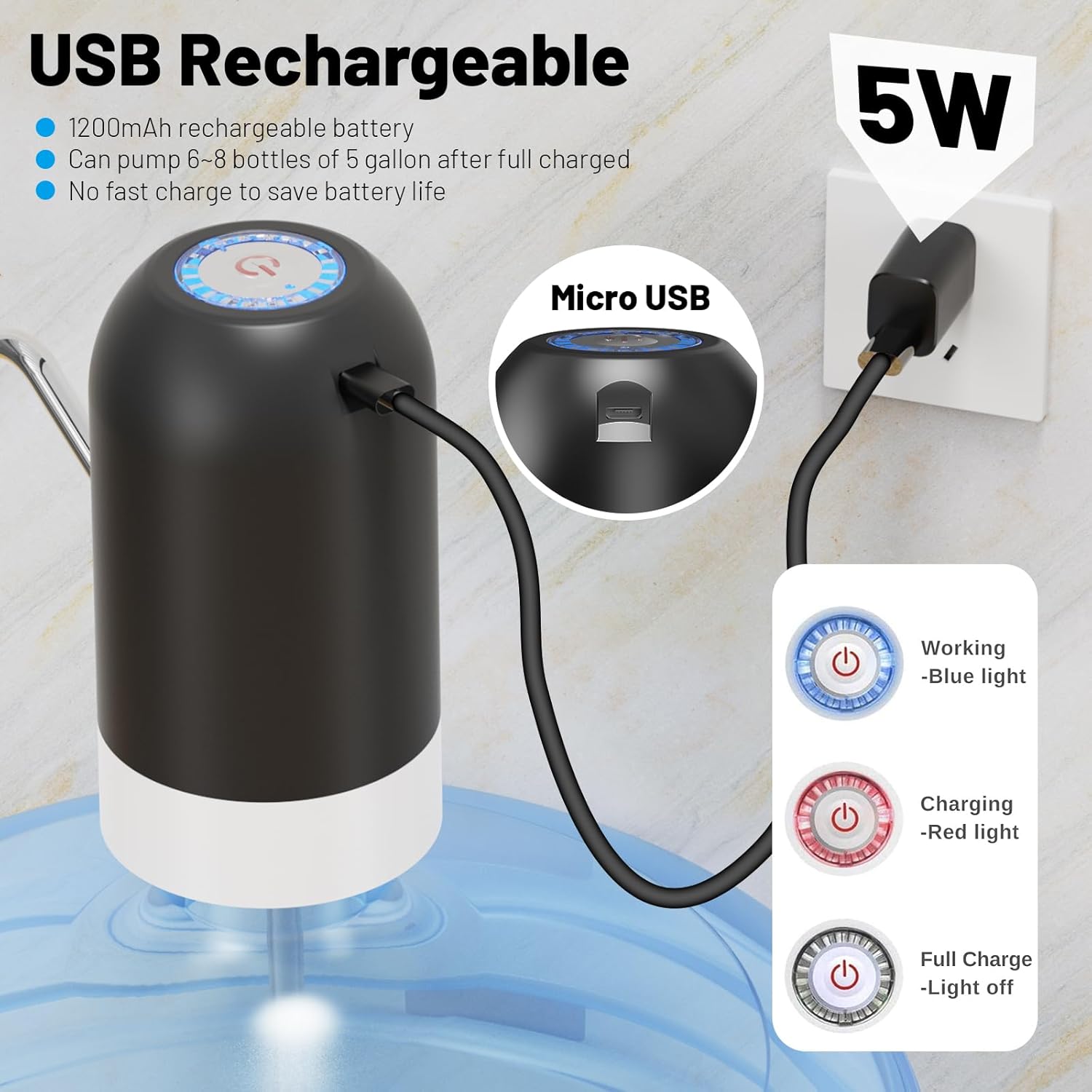
Figure 2: USB charging process and indicator lights.
- Connect the Micro-USB charging cable to the charging port on the pump unit.
- Plug the other end of the cable into a standard USB power adapter (e.g., phone charger, computer USB port).
- The indicator light will show red during charging.
- Once fully charged, the indicator light will turn off.
2. Assembly and Installation
Figure 3: Step-by-step assembly and installation.
- Insert the stainless steel outlet pipe into the designated hole on the top of the pump unit. Ensure it is firmly seated.
- Attach one end of the food-grade silicone hose to the inlet port at the bottom of the pump unit.
- Clean the water bottle mouth. If your bottle has a cap, remove it.
- Place the provided silicone lid/cap onto the neck of your 3-5 gallon water bottle. This helps create a secure seal and prevents the pump from loosening.
- Insert the other end of the silicone hose into the water bottle.
- Carefully place the pump unit onto the water bottle, ensuring the silicone lid/cap is properly aligned and the pump sits securely.
Operating Instructions

Figure 4: Dispensing water with a single touch.
- To Dispense Water: Press the power button on the top of the pump unit once. The pump will start dispensing water, and a blue indicator light will illuminate.
- Automatic Stop: The pump is designed to automatically stop after dispensing approximately 1.5 liters of water or after 60 seconds of continuous operation to prevent overflow.
- To Stop Manually: Press the power button again at any time to stop the water flow.

Figure 5: Fast pumping and auto-stop feature in action.
Maintenance
Cleaning the Pump and Components
- Pump Unit: Wipe the exterior of the pump unit with a soft, damp cloth. Do not use abrasive cleaners or immerse the unit in water.
- Stainless Steel Outlet Pipe: The pipe can be removed and rinsed with clean water. For thorough cleaning, use a mild dish soap and warm water, then rinse completely.
- Silicone Hose: Periodically clean the silicone hose by running clean water through it or soaking it in warm, soapy water. Ensure it is thoroughly rinsed before reassembly.
- Silicone Lid/Cap: Wash with warm, soapy water and rinse thoroughly.
- Ensure all components are completely dry before reassembling and storing.
Battery Care
- To prolong battery life, avoid completely draining the battery before recharging.
- Charge the device regularly, even if not in frequent use, to maintain battery health.
- Do not use fast chargers as this can reduce battery lifespan.
Troubleshooting
| Problem | Possible Cause | Solution |
|---|---|---|
| No water dispenses / Weak flow | Low battery; Silicone hose kinked or blocked; Pump not securely installed; Air in the system. | Charge the pump fully; Check and straighten the hose; Reinstall the pump securely, ensuring the silicone cap is used; Press the button a few times to clear air. |
| Indicator light not working | Battery fully charged (light off); Unit malfunction. | Check if the unit is fully charged (light off indicates full charge); If not, contact customer service. |
| Pump makes unusual noise | Air in the system; Component loose. | Operate the pump for a few seconds to clear air; Check if the stainless steel pipe and silicone hose are securely attached. |
| Water leaks from connection points | Loose connections; Damaged silicone seal/hose. | Ensure all connections (hose, pipe, pump on bottle) are tight; Inspect silicone parts for damage and replace if necessary. |
Specifications
| Brand | Myvision |
| Model Number | 012 |
| Color | Black |
| Material | Stainless Steel, ABS Plastic |
| Capacity Compatibility | 3-5 Gallon Bottles |
| Battery Capacity | 1200mAh Rechargeable |
| Product Dimensions | 2.9"D x 2.9"W x 5.1"H |
| Item Weight | 1.06 ounces |
| Power Source | Corded Electric (USB Charging) |
| Wattage | 500 watts |
| Patent No. | US D910,084 S |
Warranty and Support
Myvision offers a 2-year replacement service for this product. If the product does not work within two years of purchase, you are eligible for a direct replacement without needing to return the original unit.
For warranty claims, technical support, or any inquiries, please contact Myvision Store customer service through Amazon. Our customer service team aims to resolve your issues within 24 hours.
For more information, visit the Myvision Store on Amazon.