
Introduction
Welcome to the Uniqcell UNI X Cell Phone user manual. This guide provides comprehensive instructions to help you set up, operate, maintain, and troubleshoot your new device. Please read this manual carefully to ensure proper use and to maximize your phone's performance and longevity.

Image: Front and back view of the Uniqcell UNI X Cell Phone, showcasing its design and display.
1. Setup
1.1 Unboxing Your Device
Upon opening the package, ensure all items are present:
- Uniqcell UNI X Phone
- User Guide
- SIM Tool
- Charger
- USB Cable
1.2 SIM Card Installation
To install your Nano SIM card:
- Locate the SIM card tray on the side of the phone.
- Insert the provided SIM tool into the small hole next to the tray to eject it.
- Place your Nano SIM card(s) into the tray with the gold contacts facing down. Ensure proper orientation.
- Carefully reinsert the tray into the phone until it clicks into place.
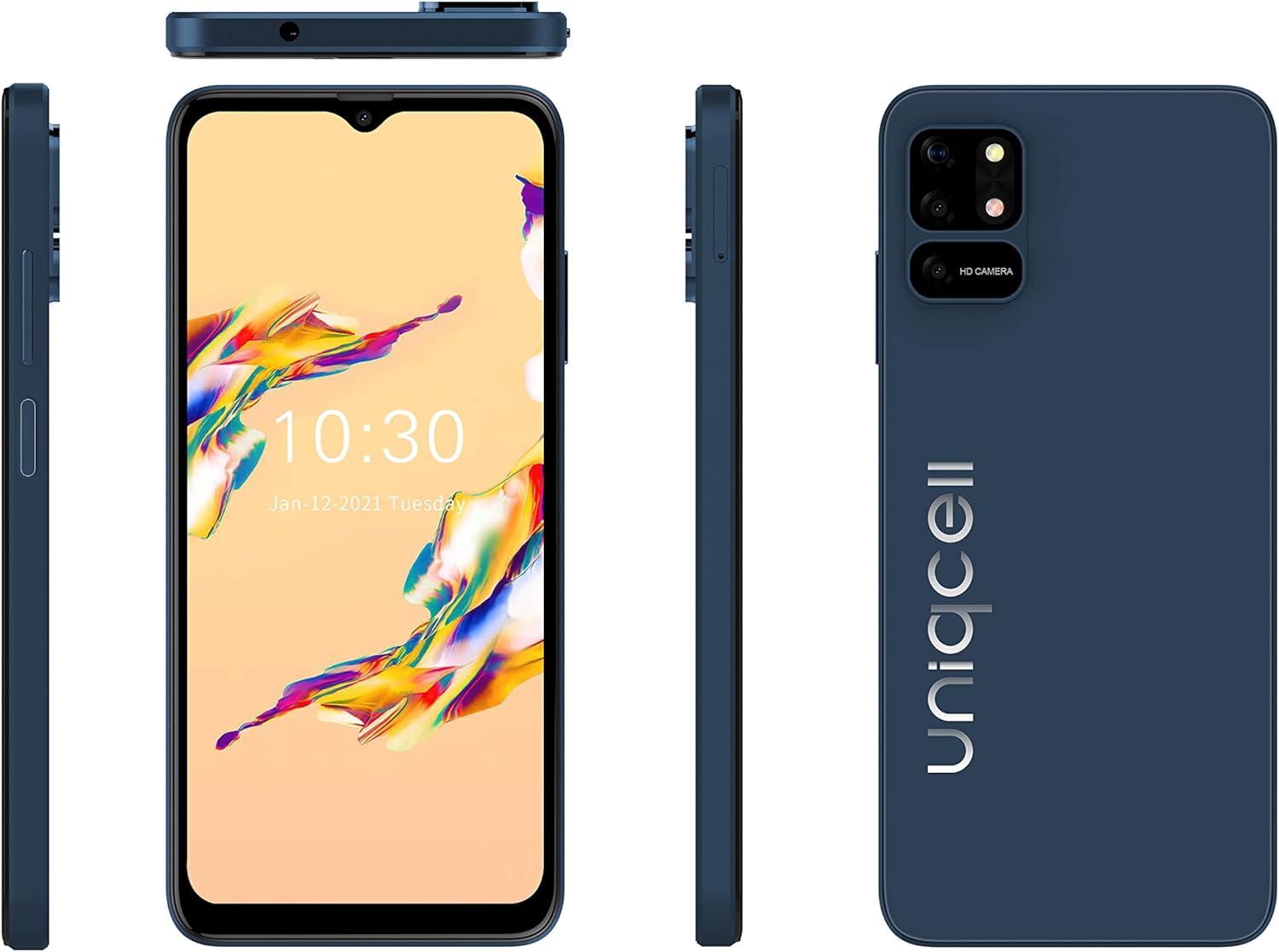
Image: Multiple views of the Uniqcell UNI X, illustrating the phone's sides where the SIM tray is typically located.
1.3 Initial Power On and Charging
Before first use, it is recommended to fully charge your phone.
- Connect the USB cable to the charger and then to the phone's USB Type C port.
- Plug the charger into a power outlet.
- Once charged, press and hold the Power button (located on the side) for a few seconds until the Uniqcell logo appears to turn on the device.
- Follow the on-screen prompts to complete the initial setup, including language selection, Wi-Fi connection, and Google account setup.
2. Operating Your Device
2.1 Basic Navigation
The Uniqcell UNI X features an intuitive Android operating system with a responsive touchscreen interface.
- Touchscreen: Tap to select, swipe to scroll, pinch to zoom.
- Power Button: Press to wake/sleep the screen. Press and hold to power off or restart.
- Volume Buttons: Adjust media volume, call volume, and notification volume.
2.2 Display Features
Your UNI X phone is equipped with a 6.517" HD+INCELL Waterdrop display, offering clear visuals for all your content.

Image: Front view of the Uniqcell UNI X with its display active, alongside side profiles.
2.3 Camera System
The UNI X features a versatile camera system:
- Rear Camera: 16MP AF + 5MP + 2MP for high-resolution photos and detailed shots.
- Front Camera: 8MP FF for clear selfies and video calls.
To use the camera, open the Camera app from your home screen or app drawer. Tap the shutter button to take a photo, or switch to video mode to record.

Image: Detailed view of the Uniqcell UNI X's rear camera module, highlighting the multiple lenses.
2.4 Fingerprint Unlock
The UNI X includes a side-mounted fingerprint sensor for secure and convenient unlocking.
- Go to Settings > Security & privacy > Fingerprint.
- Follow the on-screen instructions to register your fingerprint.
- Once registered, simply place your finger on the sensor to unlock your phone.
2.5 Battery Management
Your phone is equipped with a 4200mAh Lithium-Ion battery. To optimize battery life:
- Avoid using the phone for extended periods in high-temperature environments or while charging, as this can affect battery health.
- Adjust screen brightness, close unused apps, and enable battery saver mode when needed.
2.6 Connectivity
The UNI X supports 4G cellular technology and Wi-Fi for internet access. It is unlocked for all carriers.
- Wi-Fi: Go to Settings > Network & internet > Wi-Fi to connect to available networks.
- Mobile Data: Ensure your SIM card is active and mobile data is enabled in Settings > Network & internet > Mobile network.
- Bluetooth: For connecting wireless accessories, go to Settings > Connected devices > Bluetooth.
3. Maintenance
3.1 Cleaning Your Device
To keep your phone clean and in good condition:
- Use a soft, lint-free cloth to wipe the screen and body.
- Avoid using harsh chemicals, abrasive cleaners, or aerosol sprays.
- Ensure ports are free of dust and debris.
3.2 Software Updates
Regularly check for and install software updates to ensure your phone has the latest features, security patches, and performance improvements. Go to Settings > System > System update.
3.3 Storage Management
Your phone comes with 64GB of internal storage. To manage storage effectively:
- Regularly delete unnecessary files, photos, and videos.
- Uninstall apps you no longer use.
- Consider using cloud storage services for backups.
4. Troubleshooting
If you encounter issues with your Uniqcell UNI X, try the following solutions:
4.1 Common Issues and Solutions
- Phone not turning on: Ensure the battery is charged. Connect to the charger for at least 15 minutes, then try powering on again.
- Screen unresponsive: Restart the phone by holding the Power button until it reboots.
- Network issues (no signal/data): Check if your SIM card is properly inserted. Ensure mobile data is enabled in settings. Try restarting the phone.
- Apps crashing: Clear the cache of the problematic app (Settings > Apps > [App Name] > Storage & cache > Clear cache). If the issue persists, try reinstalling the app.
- Battery draining quickly: Review battery usage in Settings > Battery to identify power-hungry apps. Reduce screen brightness and disable unnecessary features like GPS or Bluetooth when not in use.
4.2 Factory Reset
If problems persist, a factory reset may resolve them. Warning: This will erase all data on your phone. Back up important data before proceeding.
- Go to Settings > System > Reset options > Erase all data (factory reset).
- Confirm your decision and enter your PIN/password if prompted.
- The phone will restart and restore to its original factory settings.
5. Specifications
Key technical specifications for the Uniqcell UNI X Cell Phone:
| Feature | Specification |
|---|---|
| Brand | Uniqcell (Generic) |
| Model Name | UNI X |
| Operating System | Android |
| Processor | 2.0GHz Quad Core |
| RAM | 4 GB |
| Internal Storage | 64 GB |
| Screen Size | 6.517 inches HD+INCELL Waterdrop |
| Display Resolution | 1280x720 |
| Rear Camera | 16MP AF + 5MP + 2MP |
| Front Camera | 8MP FF |
| Battery Capacity | 4200 mAh Lithium-Ion |
| Biometric Security | Side Fingerprint Recognition |
| Connectivity | 4G, Wi-Fi, Bluetooth, USB Type C |
| SIM Card Type | Nano SIM (Single SIM) |
| Color | Black |

Image: Uniqcell UNI X phone displayed alongside a list of its core specifications.
6. Warranty and Support
For warranty information and customer support, please refer to the warranty card included in your product packaging or visit the official Uniqcell website. Keep your purchase receipt as proof of purchase for warranty claims.
If you require further assistance or have questions not covered in this manual, please contact Uniqcell customer service.