
1. Important Safety Information
Read all safety instructions carefully before using the INNZA IPL Hair Removal Device D26. Failure to follow these instructions may result in injury or device malfunction.
- Avoid use on broken or irritated skin.
- Do not use on the face, genitals, or near the eyes.
- Keep the device away from water while charging or in operation.
- Always use the provided safety glasses during treatment to protect your eyes.
- Do not use on tattoos or very dark skin tones, as this can cause burns or skin damage.
- Avoid prolonged use on a single area of skin.
- Consult the full user manual for comprehensive safety guidelines.
2. Product Overview
The INNZA IPL Hair Removal Device D26 utilizes Intense Pulsed Light (IPL) technology for hair reduction. It features 999,000 flashes, five adjustable energy levels, and both automatic and manual modes for versatile use on various body areas.

Figure 2.1: Key components of the INNZA IPL Hair Removal Device D26, including energy level indicators, control buttons, and the LCD display.
Device Features:
- Low Energy Mode: For delicate skin areas.
- High Energy Mode: For faster hair reduction.
- Switch Gear Button: To adjust energy levels.
- LCD Display: Shows flash count, energy level, and mode.
- Mode Adjustment Flash Button: To switch between auto and manual modes and initiate flashes.
3. Setup and Preparation
Proper preparation ensures effective and safe treatment.
- Shave the Hair: Before each treatment, shave the area to be treated. Do not wax or pluck, as IPL targets the hair follicle.
- Clean Skin: Ensure the skin is clean, dry, and free from lotions, oils, or deodorants.
- Connect Power: Connect the power adapter to the device and plug it into an electrical outlet.
- Wear Safety Glasses: Always wear the provided safety glasses to protect your eyes from the intense light flashes.
- Turn On: Press and hold the power button to turn on the device.

Figure 3.1: Visual guide for device setup and initial use, including shaving, power connection, eye protection, and device activation.
4. Operating Instructions
Follow these steps for effective and safe operation of your INNZA IPL Hair Removal Device D26.
4.1 Energy Level Selection
- After turning on the device, press the 'Switch Gear Button' to cycle through the 5 energy levels.
- Start with the lowest energy level (Level 1) for your first treatment and gradually increase as your skin tolerates it.
- Higher energy levels generally provide more effective results but require careful skin monitoring.
4.2 Mode Selection (Auto/Manual)
- Manual Mode: Press the 'Mode Adjustment Flash Button' once to emit a single flash. This mode is suitable for small, precise areas like the upper lip or bikini line.
- Auto Mode: Press and hold the 'Mode Adjustment Flash Button' for a few seconds until 'AUTO' appears on the LCD display. In this mode, the device will automatically flash when it detects full contact with the skin. This is ideal for larger areas like legs or arms.
4.3 Application Technique
- Place the device's flash window firmly against your skin, ensuring full contact. The device will not flash if there is insufficient contact.
- For Manual Mode, press the flash button. For Auto Mode, glide the device slowly over the skin, allowing it to flash automatically.
- Treat each area once per session. Avoid overlapping flashes on the same spot during a single session.
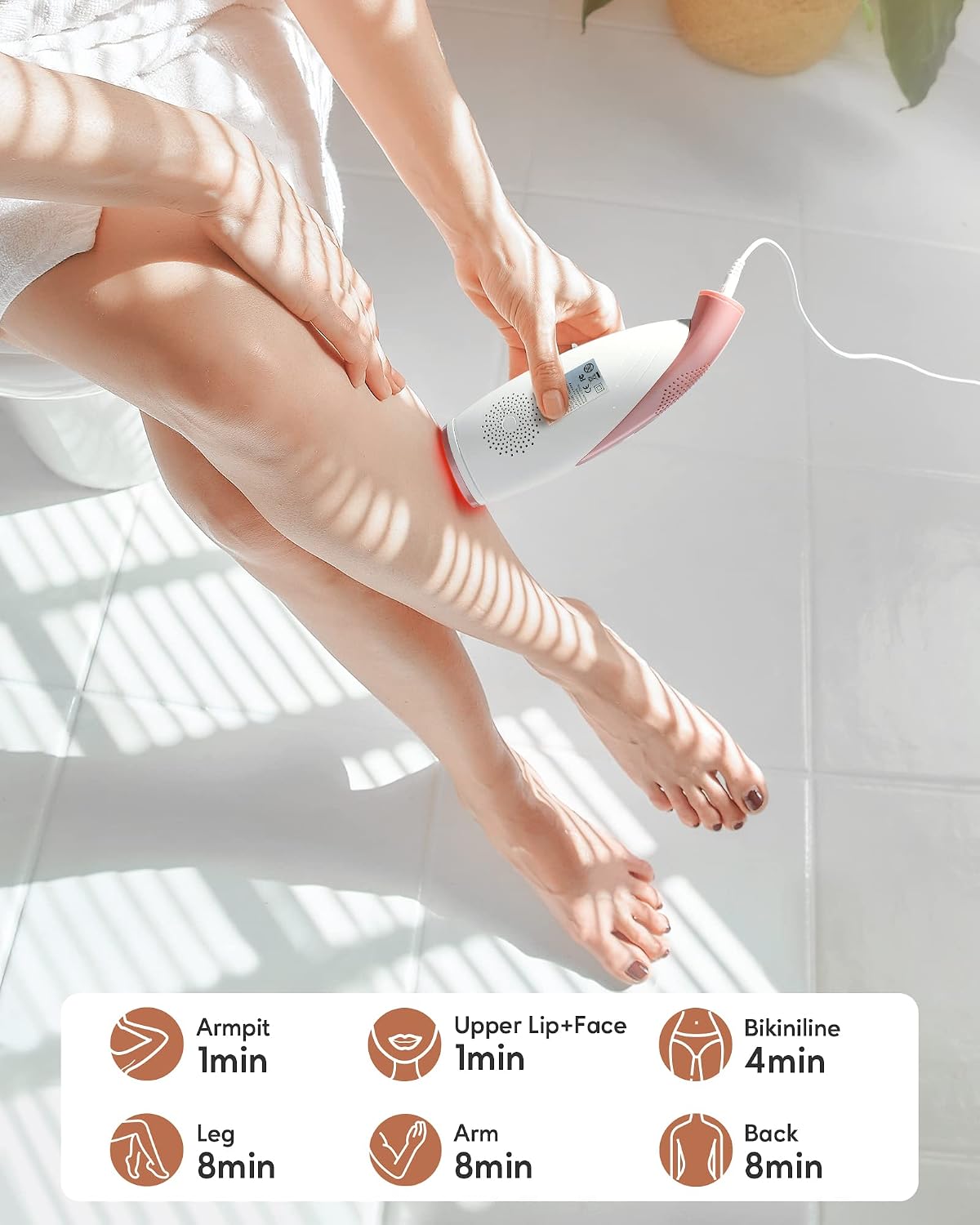
Figure 4.1: Recommended treatment times for various body areas using the IPL device.
4.4 Skin and Hair Suitability
The effectiveness and safety of IPL treatment depend on your skin tone and hair color. Refer to the chart below:

Figure 4.2: IPL suitability chart based on hair color and skin tone.
Important: IPL technology is most effective on darker hair colors and lighter skin tones. It is not recommended for use on red, grey, very light (blonde) hair, or the darkest skin tones, as it may not be effective or could cause adverse reactions.
4.5 Post-Treatment Care
- After treatment, you may apply a soothing lotion or moisturizer to the treated area.
- Avoid sun exposure on treated areas for at least 24 hours. If sun exposure is unavoidable, use a high SPF sunscreen.
5. Maintenance
Regular maintenance ensures the longevity and optimal performance of your device.
- Cleaning: After each use, ensure the device is unplugged and cool. Gently wipe the flash window with a soft, dry cloth. Do not use abrasive cleaners or immerse the device in water.
- Storage: Store the device in a cool, dry place, away from direct sunlight and moisture. Keep it in its original packaging or a protective case to prevent damage.
- Cord Care: Do not wrap the power cord tightly around the device. Avoid bending or twisting the cord excessively to prevent damage.
6. Troubleshooting
If you encounter issues with your INNZA IPL Hair Removal Device D26, refer to the following common solutions:
| Problem | Possible Cause | Solution |
|---|---|---|
| Device does not turn on | Not properly plugged in; Power button not held long enough | Ensure power adapter is securely connected to device and outlet. Press and hold the power button for 2-3 seconds. |
| Device does not flash | Flash window not in full contact with skin; Device in standby mode; Energy level too low for skin tone | Ensure full contact with skin. Press the flash button firmly. Increase energy level if appropriate for your skin tone. |
| Skin irritation after use | Energy level too high; Overlapping flashes; Not suitable for your skin type | Reduce energy level. Avoid treating the same area multiple times in one session. Review skin tone suitability chart. Apply soothing lotion. If irritation persists, discontinue use and consult a dermatologist. |
| No visible hair reduction | Inconsistent use; Energy level too low; Not suitable for hair color | Follow recommended treatment schedule. Gradually increase energy level if comfortable. Review hair color suitability chart. IPL results vary by individual. |
If the problem persists after attempting these solutions, please contact customer support.
7. Specifications
Technical details for the INNZA IPL Hair Removal Device D26.
| Feature | Detail |
|---|---|
| Model Number | D26 |
| Flashes | 999,000 |
| Energy Levels | 5 |
| Modes | Auto, Manual |
| Power Source | Battery Powered (Rechargeable) |
| Battery Average Life | 30 minutes |
| Included Components | Charger, Safety Glasses |
| Color | Rose Gold |
| Package Dimensions | 9.29 x 7.91 x 3.23 inches |
| Item Weight | 1.96 Pounds |
8. Official Product Video
Watch the official product video for a visual guide on using the INNZA IPL Hair Removal Device D26.
Video 8.1: Official INNZA D26 IPL Hair Removal demonstration. This video provides a visual overview of the device and its basic operation.
9. Warranty and Support
For warranty information, technical support, or any inquiries regarding your INNZA IPL Hair Removal Device D26, please refer to the contact details provided in your product packaging or visit the official INNZA website.
Online Support: Visit the INNZA Store on Amazon