
TP-Link TL-SG105PE
TP-Link TL-SG105PE 5-Port Gigabit Easy Smart Switch User Manual
Model: TL-SG105PE
Brand: TP-Link
Product Overview
The TP-Link TL-SG105PE is a 5-Port Gigabit Easy Smart Switch featuring 4 PoE+ ports. This device is designed to simplify network expansion and power delivery for compatible devices such as IP cameras, IP phones, and wireless access points.
- Power Over Ethernet (PoE+): Equipped with 4 PoE+ (802.3at/af) ports, each providing up to 30W, with a total PoE budget of 65W.
- Easy Smart Management: Offers simple setup and network monitoring through an intuitive web-based management interface and smart configuration utility.
- Network Segmentation: Includes VLAN features to enhance network security through traffic segmentation.
- Advanced Software Features: Supports Port-based 802.1p/DSCP QoS, IGMP Snooping, rate limiting, and traffic monitoring for optimized video and voice data transmission.
- Plug and Play: Designed for easy setup without requiring software installation or complex configuration.
- Durable Construction: Features a sturdy metal casing for enhanced durability and shielded ports to protect against electromagnetic interference.
- Silent Operation: Fanless design ensures quiet operation, suitable for various environments.

Figure 1: Front view of the TP-Link TL-SG105PE switch, showing five Ethernet ports and Power/PoE Max LEDs.
Setup and Installation
The TL-SG105PE switch is designed for straightforward plug-and-play installation, requiring no complex software setup. Follow these steps to get your switch operational:
- Connect to Power: Connect the provided power adapter to the switch's power input port and then plug it into a power outlet. The Power LED on the switch will illuminate.
- Connect Devices: Connect your network devices (e.g., computers, IP cameras, access points) to the Gigabit Ethernet ports (1-5) using standard Ethernet cables. For PoE-powered devices, connect them to ports 1-4.
- Verify Connection: Observe the LED indicators on the switch. The Left LED (Green) indicates a 1000Mbps connection, while the Yellow LED indicates a 10/100Mbps connection. The Right LED (Solid Green) indicates a PoE Powered device, and Flashing Green indicates a PoE fault.

Figure 2: Diagram illustrating the simple three-step setup: Connect to Power, Connect Devices (IP Phone, IP Camera, Access Point, Internet), and Enjoy.
The switch supports both desktop placement and wall-mounting for flexible deployment options.
Operating the Switch
The TL-SG105PE operates automatically once connected. For advanced management and optimization, you can access its web-based interface.
Key Operational Features:
- Quality of Service (QoS): Prioritize network traffic to ensure high-quality transmission for critical applications like video streaming and voice calls. This prevents lag and ensures smooth performance.
- IGMP Snooping: Optimizes multicast traffic delivery, which is crucial for applications like IPTV. It prevents multicast streams from flooding the entire network, improving efficiency.
- VLAN (Virtual Local Area Network): Segment your network into smaller, isolated broadcast domains. This enhances security by preventing unauthorized access between different network segments and improves network performance by reducing unnecessary traffic.
- PoE Auto Recovery: This feature automatically reboots unresponsive PoE-powered devices, ensuring continuous operation without manual intervention.

Figure 3: Visual representation of advanced functions: IGMP Snooping for traffic optimization and QoS for fluent online experience.
Video 1: Official product video showcasing the features and benefits of the TP-Link TL-SG105PE 5-Port Gigabit Easy Smart Switch with 4-Port PoE+.
Maintenance
The TL-SG105PE is designed for low maintenance. Regular checks and proper placement can ensure optimal performance.
- Environmental Conditions: Ensure the switch is placed in a well-ventilated area, away from direct sunlight, heat sources, and excessive moisture. The fanless design relies on passive cooling.
- Cable Management: Keep network cables organized and free from kinks or excessive bends to prevent signal degradation.
- Firmware Updates: Periodically check the TP-Link official website for any available firmware updates to ensure your device has the latest features and security enhancements.
- PoE Auto Recovery: This built-in feature helps maintain the stability of your PoE-powered devices. If a connected PoE device becomes unresponsive, the switch can automatically detect this and restart power to that port, bringing the device back online without manual intervention.
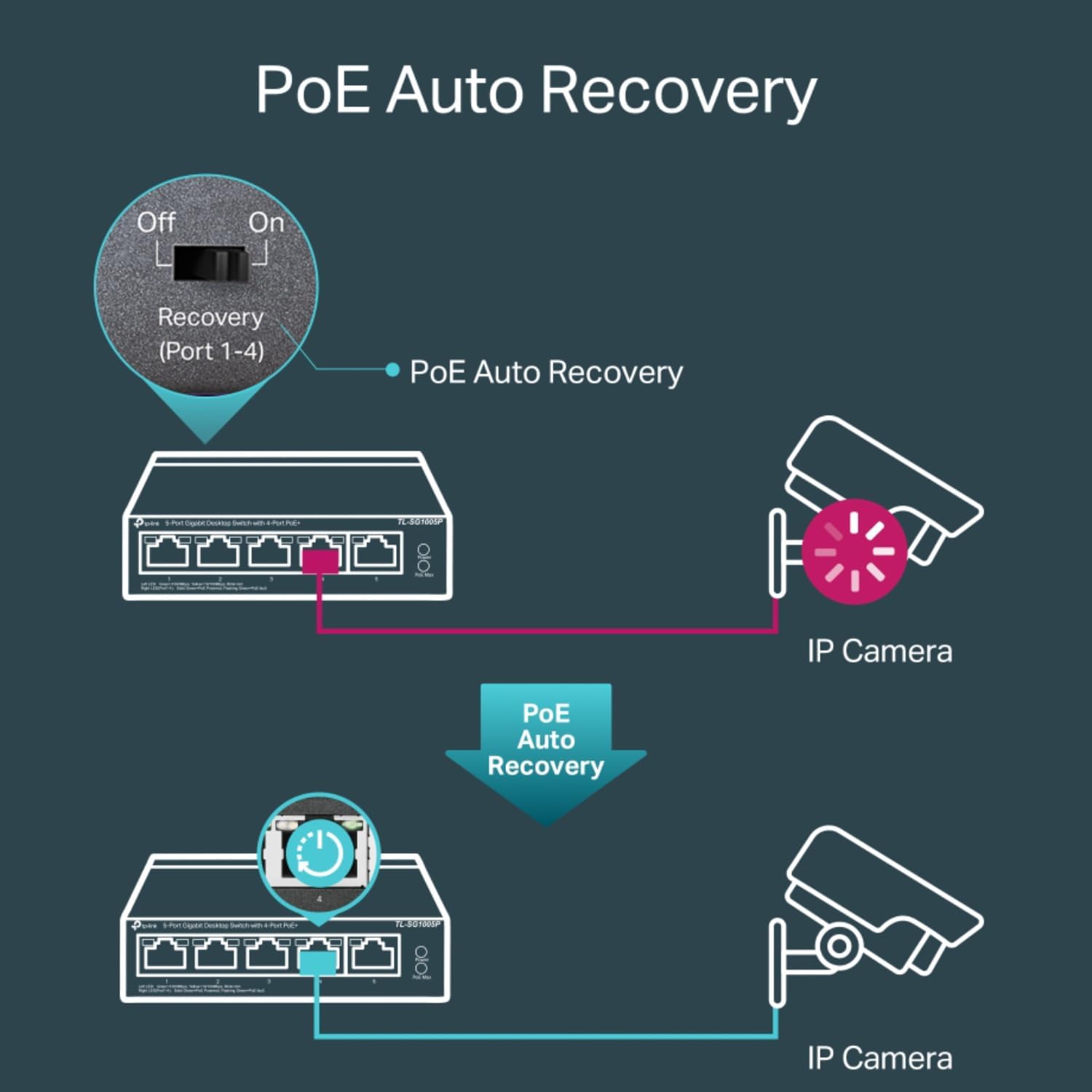
Figure 4: Illustration of the PoE Auto Recovery function, showing how the switch can automatically restart power to an unresponsive IP camera.
Troubleshooting
If you encounter issues with your TL-SG105PE switch, consider the following common troubleshooting steps:
- No Power:
- Ensure the power adapter is securely connected to the switch and a working power outlet.
- Verify the power outlet is functional by plugging in another device.
- No Link/Activity on a Port:
- Check if the Ethernet cable is securely connected at both ends (switch and device).
- Try a different Ethernet cable to rule out a faulty cable.
- Ensure the connected device is powered on and functioning correctly.
- For PoE ports (1-4), check the PoE Max LED. If it's flashing green, there might be a PoE fault or the device is drawing too much power.
- Slow Network Speed:
- Verify that both the switch and the connected device support Gigabit Ethernet (1000Mbps). The Left LED (Green) should be solid.
- Check for excessive network traffic or bandwidth-intensive applications.
- Ensure cables are Cat5e or Cat6 for optimal Gigabit performance.
- PoE Device Not Powering On:
- Confirm the device is PoE compatible (802.3af/at standard).
- Check the total PoE budget (65W) to ensure it's not exceeded by all connected PoE devices.
- Utilize the PoE Auto Recovery feature by power cycling the switch or the specific port if accessible via management interface.
If issues persist, consult the comprehensive user manual available on the TP-Link support website or contact technical support.
Specifications
| Feature | Detail |
|---|---|
| Model Number | TL-SG105PE |
| Switch Type | Managed PoE |
| Number of Ports | 5 (4 PoE+ ports, 1 Non-PoE port) |
| PoE+ Ports | 4 (802.3at/af compliant) |
| Total PoE Budget | 65W |
| Data Transfer Rate | 1 Gigabits Per Second (Gigabit Ethernet) |
| Dimensions (L x W x H) | 3.93"L x 3.85"W x 0.98"H |
| Item Weight | 0.22 Kilograms (7.7 ounces) |
| Case Material | Plastic |
| Voltage | 53.5 Volts |
| Operating Temperature | Up to 95.31 Degrees Celsius (Note: Refer to full manual for detailed operating range) |
| Included Components | TL-SG105PE, Power Adapter, Installation Guide, Rubber Feet |
Warranty and Support
The TP-Link TL-SG105PE comes with a 3-year manufacturer warranty, providing peace of mind regarding product quality and reliability. Free technical support is available from 6 AM to 6 PM PST, Monday to Friday.
Additional Resources:
- User Manual (PDF): For detailed instructions and advanced configurations, please refer to the official user manual: Download User Manual
- Technical Support: For any technical assistance or inquiries, please visit the official TP-Link support website or contact their customer service during business hours.
- Protection Plans: Optional protection plans are available for extended coverage:
- 3-Year Protection Plan: $7.99
- 4-Year Protection Plan: $10.99
- Complete Protect: $16.99/month (covers all eligible past and future purchases)
What's in the Box
Upon opening the product packaging, you will find the following items:
- TL-SG105PE 5-Port Gigabit Easy Smart Switch
- Power Adapter
- Installation Guide
- Rubber Feet
Related Documents - TL-SG105PE
 |
TP-Link Gigabit Easy Smart PoE+ Switch Installation Guide Installation guide for TP-Link Gigabit Easy Smart PoE+ Switches, including models TL-SG108PE, TL-SG105PE, TL-SG105MPE, and TL-SG1210MPE. This document details LED explanations, connection diagrams, configuration methods (Web-based GUI and Windows utility), technical specifications, and frequently asked questions. It provides essential information for setting up and managing these network switches. |
 |
TP-Link Gigabit Desktop Switch Installation Guide: TL-SG105, TL-SG108, TL-SG116 Installation guide for TP-Link's 5/8/16-Port Gigabit Desktop Switches (TL-SG105, TL-SG108, TL-SG116). Covers LED explanations, connection setup, technical specifications, FAQs, safety information, and compliance. |
 |
TP-Link Easy Smart Switch User Guide Comprehensive user guide for TP-Link Easy Smart Switches, covering setup, configuration, management, and advanced features like VLAN, QoS, and PoE. |
 |
TP-Link Wall Mounting Guide for Wall Mountable Switches A comprehensive guide detailing the wall mounting preparation, procedure, and specifications for various TP-Link wall mountable network switches. |
 |
Gigabit Easy Smart PoE+ Switch Installation Guide Installation and configuration guide for TP-Link Gigabit Easy Smart PoE+ Switches, including LED status explanations, connection diagrams, and technical specifications. |
 |
TP-Link 5/8-Port Gigabit Desktop Switch Installation Guide Comprehensive installation guide for TP-Link 5/8-Port Gigabit Desktop Switches, including models TL-SG1005D and TL-SG1008D. Covers connection setup, LED indicator explanations, frequently asked questions, detailed specifications, and safety information. |
Ask a question about this manual
Ask about setup, troubleshooting, compatibility, parts, safety, or missing instructions. Manuals+ will review the question and use this page’s manual context to help answer it.