
SYBO BM8601
SYBO BM8601 Stainless Steel Bread Machine User Manual
Model: BM8601 | Brand: SYBO
Introduction
Thank you for choosing the SYBO BM8601 Stainless Steel Bread Machine. This appliance is designed to simplify the bread-making process, offering a variety of programs to create delicious homemade bread, dough, jam, and more. Please read this manual thoroughly before first use to ensure safe operation and optimal performance.
Important Safety Instructions
- Always ensure the bread maker is placed on a stable, heat-resistant surface.
- Do not immerse the appliance, cord, or plug in water or other liquids.
- Close supervision is necessary when any appliance is used by or near children.
- Unplug from outlet when not in use and before cleaning. Allow to cool before putting on or taking off parts.
- Do not operate any appliance with a damaged cord or plug, or after the appliance malfunctions or has been damaged in any manner.
- Do not use outdoors.
- Do not let cord hang over edge of table or counter, or touch hot surfaces.
- Do not place on or near a hot gas or electric burner, or in a heated oven.
- Extreme caution must be used when moving an appliance containing hot oil or other hot liquids.
- Do not use the appliance for other than intended use.
- The bread pan is non-stick. Avoid using metal utensils that could scratch the surface.
Product Overview
Familiarize yourself with the components of your SYBO BM8601 Bread Machine.

Image: The SYBO BM8601 Bread Machine shown with its included accessories: a non-stick bread pan, measuring cup, measuring spoon, kneading blade, and metal hook for removing the kneading blade.
- Main Unit: The bread maker housing, featuring a stainless steel design and digital touch panel.
- Bread Pan: Removable non-stick pan for baking.
- Kneading Blade: Detachable blade located inside the bread pan for mixing and kneading dough.
- Measuring Cup & Spoon: For accurate ingredient measurement.
- Metal Hook: Used to remove the kneading blade from the baked bread.
- Control Panel: Digital display and buttons for program selection, time, weight, and crust color.
Setup and First Use
- Unpacking: Carefully remove all packaging materials and accessories.
- Cleaning: Wash the bread pan, kneading blade, measuring cup, and spoon with warm, soapy water. Rinse thoroughly and dry all parts completely. Wipe the exterior of the bread maker with a damp cloth.
- Placement: Place the bread maker on a dry, stable, and heat-resistant surface, ensuring adequate ventilation around the unit.
- Install Bread Pan: Insert the clean bread pan into the main unit, pressing down firmly until it clicks into place. Ensure the kneading blade is properly attached to the shaft inside the pan.
- Power Connection: Plug the power cord into a grounded electrical outlet. The display will light up, indicating the machine is ready.
Operating Instructions
Control Panel Overview

Image: A close-up view of the SYBO BM8601 Bread Machine's digital control panel, highlighting the 'MENU', 'WEIGHT', 'COLOR', and 'START/PAUSE/STOP' buttons, along with the digital display and program indicators.
- MENU Button: Press to cycle through the 19 available programs (e.g., Basic, French, Whole-Wheat, Gluten Free, Dough, Jam, Cake, etc.). The selected program number will display on the screen.
- WEIGHT Button: Selects the desired loaf size (1.0 LB or 1.5 LB).
- COLOR Button: Adjusts the crust color setting (Light, Medium, Dark).
- TIME +/- Buttons: Used to set the delay timer for deferred baking.
- START/PAUSE/STOP Button: Initiates, pauses, or cancels a program.
Baking Process
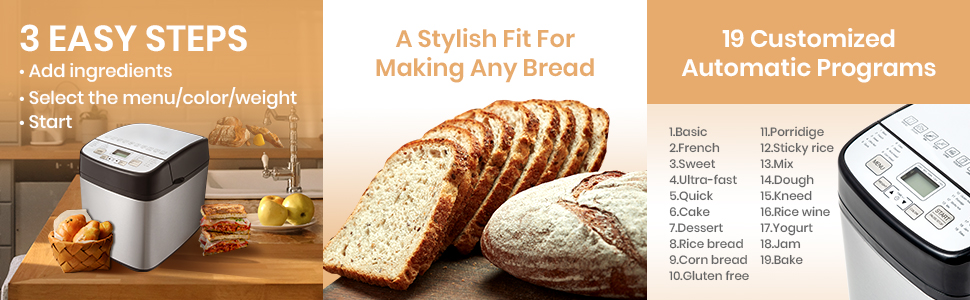
Image: A visual guide showing '3 Easy Steps' (Add ingredients, Select menu/color/weight, Start) and a list of the '19 Customized Automatic Programs' available on the bread machine.
- Add Ingredients: Place ingredients into the bread pan in the order specified by your recipe (typically liquids first, then dry ingredients, with yeast last). Ensure the kneading blade is in place.
- Select Program: Press the MENU button to choose the desired program (1-19).
- Select Loaf Size: Press the WEIGHT button to select 1.0 LB or 1.5 LB.
- Select Crust Color: Press the COLOR button to choose Light, Medium, or Dark crust.
- Start Baking: Press the START/PAUSE/STOP button. The machine will begin the baking process.
- Delay Timer (Optional): If you wish to delay the start of baking, set the desired delay time using the TIME +/- buttons after selecting your program, weight, and color. Then press START/PAUSE/STOP.
- Keep Warm Function: After baking is complete, the bread maker will automatically enter a 1-hour "Keep Warm" cycle.
- Remove Bread: Once the cycle is finished, unplug the machine. Use oven mitts to carefully remove the bread pan. Invert the pan to release the bread onto a wire rack to cool. Use the metal hook to remove the kneading blade from the bread if it remains inside.

Image: Visual representation of different crust shades (light, medium, dark) and loaf sizes (500g, 750g, 1000g, which correspond to approximately 1.0 LB and 1.5 LB options) achievable with the bread machine.
Recipes and Programs
The SYBO BM8601 offers 19 customized automatic programs to cater to various baking needs. Refer to the recipe booklet included with your bread machine for detailed ingredient lists and instructions for each program. These programs include, but are not limited to:
- Basic Bread
- French Bread
- Whole-Wheat Bread
- Gluten Free Bread
- Sweet Bread
- Dough (for pizza, rolls, etc.)
- Jam
- Cake
- Rice Wine
- And many more specialized programs.
Maintenance and Cleaning
Proper cleaning and maintenance will extend the life of your bread machine.
- Before Cleaning: Always unplug the bread maker and allow it to cool completely before cleaning.
- Bread Pan and Kneading Blade: The non-stick bread pan and kneading blade should be hand washed only with warm, soapy water. Avoid abrasive cleaners or scouring pads that can damage the non-stick coating. Rinse thoroughly and dry completely.
- Exterior: Wipe the exterior of the bread maker with a soft, damp cloth. Do not use harsh chemicals or abrasive cleaners.
- Interior: Clean the interior of the baking chamber with a damp cloth. Ensure no crumbs or residue are left behind.
- Storage: Store the bread maker in a dry, clean place when not in use.

Image: The non-stick interior pan of the bread machine, shown with a freshly baked loaf of bread, illustrating the even heating and non-stick properties.
Troubleshooting
If you encounter issues with your bread machine, refer to the following common problems and solutions:
| Problem | Possible Cause | Solution |
|---|---|---|
| Bread does not rise | Expired yeast, incorrect water temperature, too much salt/sugar. | Check yeast expiration, use lukewarm water (105-115°F), ensure correct ingredient measurements. |
| Bread is too dense | Too much flour, not enough liquid, old yeast. | Measure ingredients precisely, ensure fresh yeast. |
| Bread collapses in the middle | Too much liquid, too much yeast, high humidity. | Reduce liquid slightly, ensure correct yeast amount, adjust for humidity. |
| Kneading blade stuck in bread | Common occurrence. | Use the provided metal hook to carefully remove the blade after the bread has cooled slightly. |
| Machine not starting | Not plugged in, program not selected, START button not pressed. | Check power connection, select a program, press START. |
Specifications
- Model: BM8601
- Brand: SYBO
- Capacity: 1.0 LB and 1.5 LB loaf sizes
- Programs: 19 automatic programs
- Material: Stainless Steel (exterior)
- Pan Material: Non-stick Teflon
- Crust Settings: Light, Medium, Dark
- Delay Timer: Up to 15 hours
- Keep Warm: 1-hour automatic function
- Power Interruption Recovery: 15-minute memory function
- Item Weight: Approximately 9.13 pounds
- Dimensions: Approximately 14.1 x 13.6 x 10.7 inches (Package Dimensions)
Warranty and Support
SYBO offers a 30-day refund/replacement policy and a 2-year new replacement warranty for the BM8601 Bread Machine. For any questions, technical support, or warranty claims, please contact SYBO customer service through the retailer where the product was purchased or visit the official SYBO website for contact information.
Please retain your proof of purchase for warranty validation.
Related documentsBM8601

Ask a question about this manual
Ask about setup, troubleshooting, compatibility, parts, safety, or missing instructions. Manuals+ will review the question and use this page’s manual context to help answer it.