1. Introduction
The Pro Co WIEMS is a 5.8 GHz wireless in-ear monitoring system designed for audio professionals. This system provides a reliable and convenient method for monitoring audio mixes without the need for physical cables. It includes a transmitter and a beltpack receiver, offering ease of setup and portability.
2. Safety Information
- Hearing Protection: Always begin with a low volume setting and gradually increase to a comfortable listening level to prevent hearing damage. Prolonged exposure to high volume levels can cause permanent hearing loss.
- Water and Moisture: Do not expose the device to water, rain, or moisture. This can cause electric shock or damage the unit.
- Power Source: Use only the specified power adapter or charging method for the device. Ensure the power source matches the voltage requirements.
- Ventilation: Do not block any ventilation openings. Ensure adequate airflow around the unit to prevent overheating.
- Cleaning: Clean the unit only with a dry cloth. Avoid using liquid cleaners or aerosols.
- Servicing: Do not attempt to service this product yourself. Refer all servicing to qualified service personnel.
3. Package Contents
Verify that all items listed below are included in your package:
- WIEMS 5.8 GHz Transmitter
- WIEMS Beltpack Receiver
- USB Charging Cable
- User Manual (this document)
4. Product Overview
The Pro Co WIEMS system consists of two main components: the transmitter and the receiver.
4.1 Transmitter
The transmitter unit connects to a line-level audio source and broadcasts the audio signal wirelessly.
4.2 Beltpack Receiver
The beltpack receiver is a portable unit that receives the wireless audio signal from the transmitter. It features a built-in rechargeable battery and an output for connecting earphones.
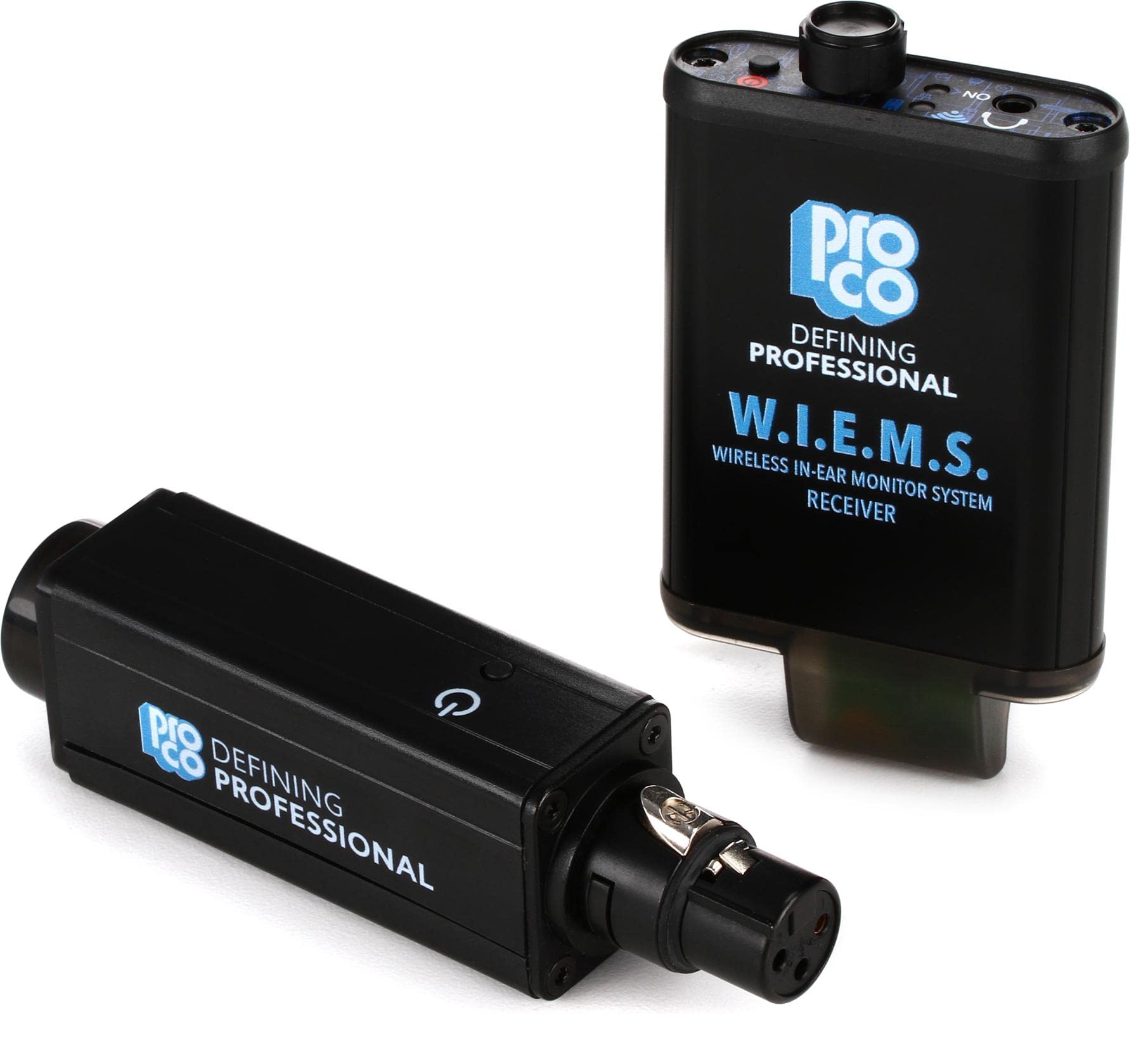
Figure 1: Image showing the Pro Co WIEMS Wireless In-Ear Monitoring System, including the transmitter and beltpack receiver. The transmitter is a compact black unit with an antenna, and the receiver is a smaller beltpack device with an earphone jack.
5. Setup
Follow these steps for initial setup of your WIEMS system:
- Charge the Receiver: Before first use, fully charge the beltpack receiver using the provided USB charging cable. Connect the cable to the receiver's charging port and a standard USB power source. The charging indicator will show the charging status.
- Connect the Transmitter: Plug the transmitter into a line-level audio output from your mixing console or audio interface. Ensure the connection is secure.
- Power On: Turn on both the transmitter and the receiver.
- Pairing: The units are designed for plug-and-pair operation. They should automatically establish a wireless connection. If pairing does not occur automatically, refer to the troubleshooting section.
- Connect Earphones: Plug your preferred earphones into the 3.5mm output jack on the beltpack receiver.
- Volume Adjustment: Start with the receiver's volume control at its lowest setting. Gradually increase the volume to a comfortable listening level.
6. Operating
Once set up, operating the WIEMS system is straightforward:
- Power On/Off: Use the dedicated power buttons on both the transmitter and receiver to turn them on or off.
- Volume Control: Adjust the volume on the beltpack receiver to suit your monitoring needs.
- Battery Life: The receiver's built-in rechargeable battery provides up to eight hours of operation on a single charge. Monitor the battery indicator to ensure sufficient power.
- Range: The system operates on a 5.8 GHz frequency. Maintain a clear line of sight between the transmitter and receiver for optimal performance. Obstructions can affect signal quality and range.
7. Maintenance
Proper care and maintenance will ensure the longevity of your WIEMS system:
- Cleaning: Wipe the units with a soft, dry cloth. Do not use abrasive cleaners, solvents, or harsh chemicals.
- Storage: When not in use, store the system in a cool, dry place away from direct sunlight and extreme temperatures.
- Battery Care: For optimal battery life, avoid fully discharging the receiver's battery frequently. If storing for an extended period, charge the battery to approximately 50% every few months.
- Cable Management: Avoid sharp bends or kinks in the USB charging cable to prevent damage.
8. Troubleshooting
If you encounter issues with your Pro Co WIEMS system, refer to the following common problems and solutions:
| Problem | Possible Cause | Solution |
|---|---|---|
| No audio from receiver | Receiver or transmitter not powered on; low battery; earphones not connected; volume too low; out of range; pairing issue. | Ensure both units are on and charged. Check earphone connection. Increase receiver volume. Move closer to the transmitter. Re-pair units if necessary. |
| Audio crackling or dropouts | Interference; too far from transmitter; obstructions between units; low battery. | Reduce distance between transmitter and receiver. Ensure clear line of sight. Charge receiver battery. Avoid areas with strong 5.8 GHz interference. |
| Units not pairing | Units not powered on; interference; faulty unit. | Ensure both units are powered on. Power cycle both units. Try pairing in a different location to rule out interference. If problem persists, contact support. |
| Short battery life | Battery degradation; incomplete charging. | Ensure receiver is fully charged. If battery life significantly decreases over time, the battery may need replacement (contact support). |
9. Specifications
| Feature | Detail |
|---|---|
| Model Number | WIEMS |
| Wireless Frequency | 5.8 GHz |
| Product Dimensions | 9 x 6 x 2 inches |
| Item Weight | 14.1 ounces |
| Power Source | Battery Powered (Receiver) |
| Special Feature | Lightweight |
| Material | Engineered Plastic / ABS Plastic |
| Manufacturer | Pro Co |
10. Warranty and Support
For warranty information and technical support, please refer to the documentation provided with your purchase or visit the official Pro Co website. Keep your proof of purchase for warranty claims.
If you require assistance beyond the troubleshooting steps provided in this manual, please contact Pro Co customer support.


