
Nulaxy KM30
Nulaxy KM30 FM Bluetooth Transmitter User Manual
Model: KM30
Brand: Nulaxy
Introduction
The Nulaxy KM30 FM Bluetooth Transmitter is designed to enhance your in-car audio experience by providing hands-free calling and versatile music streaming options. This device features a large 1.8-inch color screen for clear information display, a powerful microphone for improved call quality, and QC3.0 fast charging capabilities. This manual provides detailed instructions for setup, operation, maintenance, and troubleshooting to ensure optimal performance of your KM30 transmitter.
Product Overview
Familiarize yourself with the components of your Nulaxy KM30 FM Bluetooth Transmitter.
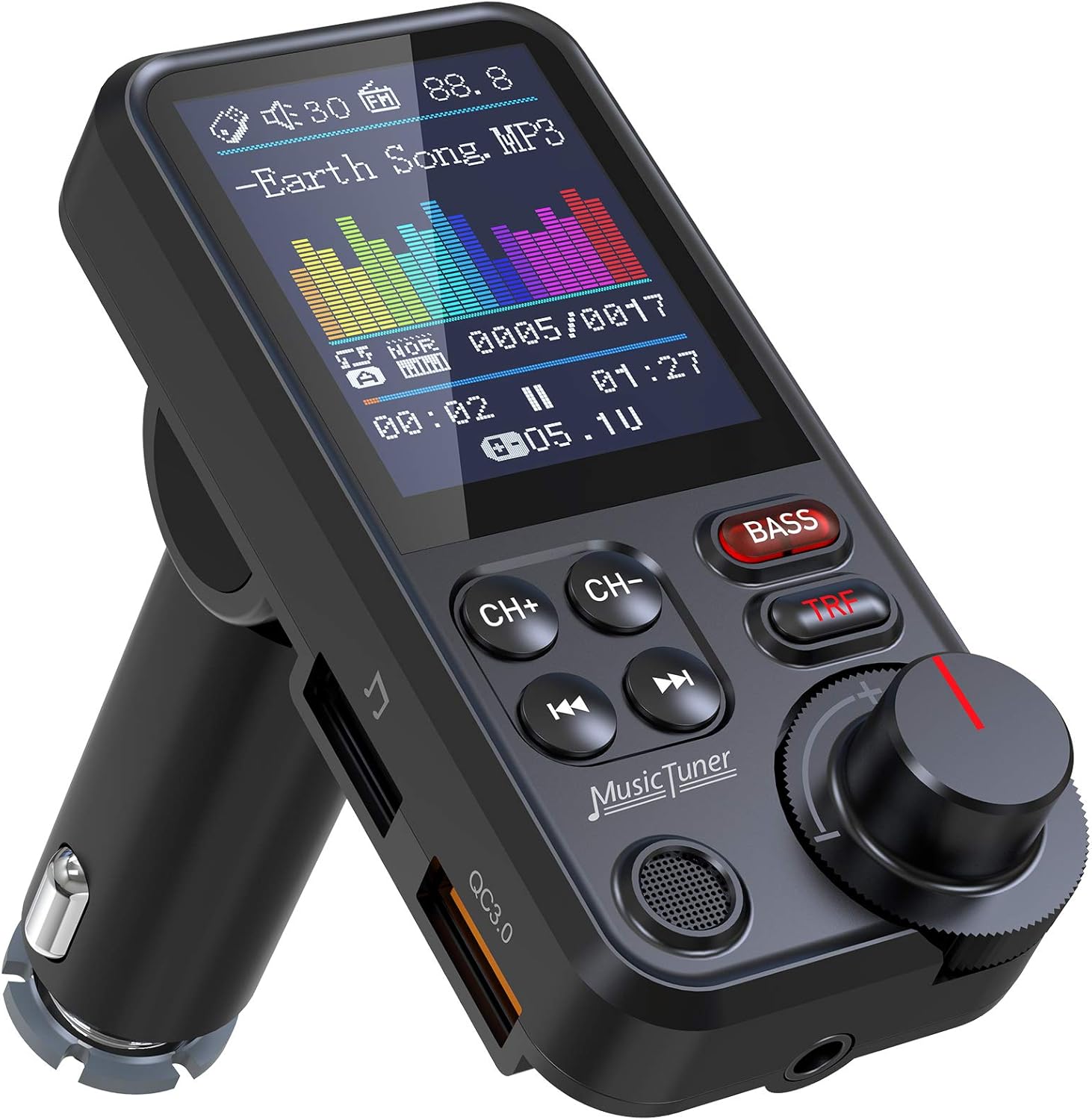


Setup Guide
- Power Connection: Insert the Nulaxy KM30 into your car's cigarette lighter socket. Ensure it is securely seated. The device will power on automatically.
Note: Compatible car cigarette lighter socket dimensions: Diameter (without spring clip): 20mm, Diameter (with spring clip): 24mm, depth: 65-70mm.
- Set FM Frequency:
- Find an empty FM frequency on your car radio (one with no strong broadcast).
- On the KM30, press the 'CH+' or 'CH-' buttons to adjust the FM frequency to match your car radio's frequency. Alternatively, long press the 'CH+' or 'CH-' buttons to quickly scan for an empty frequency.
- Bluetooth Pairing:
- The KM30 will enter Bluetooth pairing mode automatically when powered on. The screen will display "Bluetooth Connected Device" or similar.
- On your mobile device, enable Bluetooth and search for "KM30" in the list of available devices.
- Select "KM30" to pair. Once connected, the device will confirm the connection on its screen.

The Nulaxy KM30 installed in a car's cigarette lighter, demonstrating hands-free call functionality with a connected smartphone.
Operating Instructions
Music Streaming
The KM30 supports multiple music playing sources:
- Bluetooth: Once paired, stream music directly from your smartphone or other Bluetooth-enabled device.
- MicroSD Card: Insert a microSD card (TF card) with MP3 audio files into the designated slot. The device will automatically detect and play music.
- USB Flash Drive: Insert a USB flash drive with MP3 audio files into the USB port. The device will automatically detect and play music.
- Aux Out: Connect an audio cable from the KM30's Aux Out port to your car's Aux-in port for direct audio transmission.

Hands-Free Calling
The KM30 features a strong microphone for clear hands-free calls.
- Answering/Ending Calls: Use the designated button on the device to answer or end calls.
- Rejecting Calls: Press and hold the designated button to reject an incoming call.
- Redialing: Double-press the designated button to redial the last number.
Audio Adjustment
- Volume Control: Rotate the main knob to adjust the volume.
- Treble & Bass Mode: The KM30 allows you to switch between treble and bass modes for enhanced audio. Long press the BASS key to toggle between these modes. The color spectrum on the screen auto-syncs with your music.
QC3.0 Fast Charging
The KM30 includes a QC3.0 charging port, delivering fast charging for your devices, up to 4 times faster than conventional charging.
Voice Assistant
The KM30 supports voice assistant functionality. Press the designated button to activate your smartphone's voice assistant (e.g., Siri, Google Assistant) for navigation, calls, or other commands.

Maintenance
- Cleaning: Use a soft, dry cloth to clean the device. Avoid using liquid cleaners or abrasive materials, which can damage the screen or internal components.
- Storage: When not in use for extended periods, store the KM30 in a cool, dry place away from direct sunlight and extreme temperatures.
- Handling: Avoid dropping the device or subjecting it to strong impacts, as this can cause internal damage.
Troubleshooting
| Problem | Possible Cause | Solution |
|---|---|---|
| No power/Device not turning on | Loose connection in cigarette lighter socket; car socket issue. | Ensure the KM30 is firmly inserted. Try in a different car or socket to confirm. Check car's fuse for the cigarette lighter. |
| Static or poor audio quality | FM frequency interference; volume levels too low/high; poor signal. | Change to a different, clearer FM frequency. Adjust the volume on both the KM30 and your car radio. Ensure the KM30's volume is set to maximum for best output. |
| Bluetooth connection issues | Device not in pairing mode; phone's Bluetooth off; interference. | Ensure KM30 is powered on and in pairing mode. Restart both the KM30 and your phone's Bluetooth. Delete "KM30" from your phone's paired devices and re-pair. |
| USB/MicroSD card not recognized or freezing | Incompatible file format; card/drive issue; loose connection. | Ensure audio files are in MP3 format. Reinsert the USB drive/MicroSD card. Try a different USB drive/MicroSD card. Unplug and replug the KM30 if freezing occurs. |
| Phone call audio feedback/noise | High radio volume during calls; alternator interference. | Lower your car radio's volume during calls. While the KM30 has a strong microphone, external factors can affect call clarity. |
| Incorrect song title displayed via Bluetooth | Synchronization delay. | Pause and then resume playback on your connected device to refresh the display. |
Specifications
- Model: KM30
- Connectivity: Bluetooth
- Display: 1.8-inch Color Screen
- Charging Port: QC3.0 Fast Charging
- Audio Input: Bluetooth, MicroSD Card (TF Card), USB Flash Drive
- Audio Output: FM Transmitter, Aux Out
- Special Features: Hands-Free Calls, Noise Cancellation, Built-In Microphone, Treble & Bass Sound Adjustment, Voice Assistant Support
- Power Source: Car Cigarette Lighter (DC 12-24V)
- Item Weight: 3.17 ounces (0.09 Kilograms)
- Package Dimensions: 4.21 x 2.83 x 1.81 inches
Warranty and Support
Nulaxy products are designed for reliability and user satisfaction. The KM30 FM Bluetooth Transmitter comes with a 12-Month Hassle-Free Experience, ensuring peace of mind regarding product quality and performance.
For any inquiries, technical assistance, or support, Nulaxy offers 24/7 Customer Support. Please refer to the contact information provided with your product packaging or visit the official Nulaxy website for further details.
Visit the Nulaxy Store on Amazon for more information and product updates.