
POWZAN KB770
POWZAN KB770 Aluminum Quiet Wired Backlit Keyboard User Manual
Model: KB770 | Brand: POWZAN
Product Overview
The POWZAN KB770 is an ultra-slim, full-size wired keyboard designed for both Mac and Windows operating systems. It features comfortable low-profile keys with a quiet scissor-switch mechanism, providing an excellent and efficient typing experience. The keyboard also boasts splendid 7-color RGB backlighting with adjustable brightness, enhancing visibility and aesthetics in any environment. Its durable aluminum top case ensures a premium feel and long-lasting performance.

Figure 1: POWZAN KB770 Aluminum Quiet Wired Backlit Keyboard (Space Gray)
Video 1: Official product overview of the POWZAN KB770 keyboard, highlighting its features and design.
Setup Guide
1. Connecting the Keyboard
The POWZAN KB770 keyboard is designed for plug-and-play compatibility, requiring no additional software or drivers for basic functionality.
- Locate an available USB-A port on your computer (desktop, laptop, or compatible device).
- Insert the USB-A connector of the keyboard cable firmly into the USB-A port.
- For Mac users with only USB-C ports, a USB-C to USB-A adapter (not included) will be required to connect the keyboard.
2. Switching Between Mac and Windows Mode
The keyboard features a dedicated function to optimize key mappings for either Mac or Windows operating systems.
- To switch modes, press and hold the 'MAC/WIN' key for 5 seconds.
- Release the key when the indicator lights (NUM, CAP, SCR) blink 5 times.
- In Mac mode, the LED on the Scroll Lock indicator will be active.
- In Windows mode, the LED on the Scroll Lock indicator will be off.
Video 2: Demonstration on how to switch between Windows and Mac modes on the keyboard.
Operating Instructions
1. Typing Experience
The KB770 keyboard features ultra-quiet keys with a high-end scissor switch mechanism, designed for comfortable and smooth typing. This design minimizes noise compared to mechanical keyboards, making it ideal for quiet environments.

Figure 2: Close-up view of the ultra-quiet scissor switch key mechanism.
2. Backlight Control
The keyboard features a vibrant 7-color RGB backlight system to enhance visibility and personalize your workspace.
- To change the backlight color, press Fn + Home. Cycle through the available 7 colors.
- To adjust the backlight brightness, press Fn + Page Up (increase) or Fn + Page Down (decrease).

Figure 3: Visual representation of the 7-color RGB backlight and brightness adjustment.
3. Multimedia Keys
The keyboard includes 12 hotkeys designed for quick access to multimedia functions and common tasks on both Windows and Mac OS, providing convenience and efficiency.
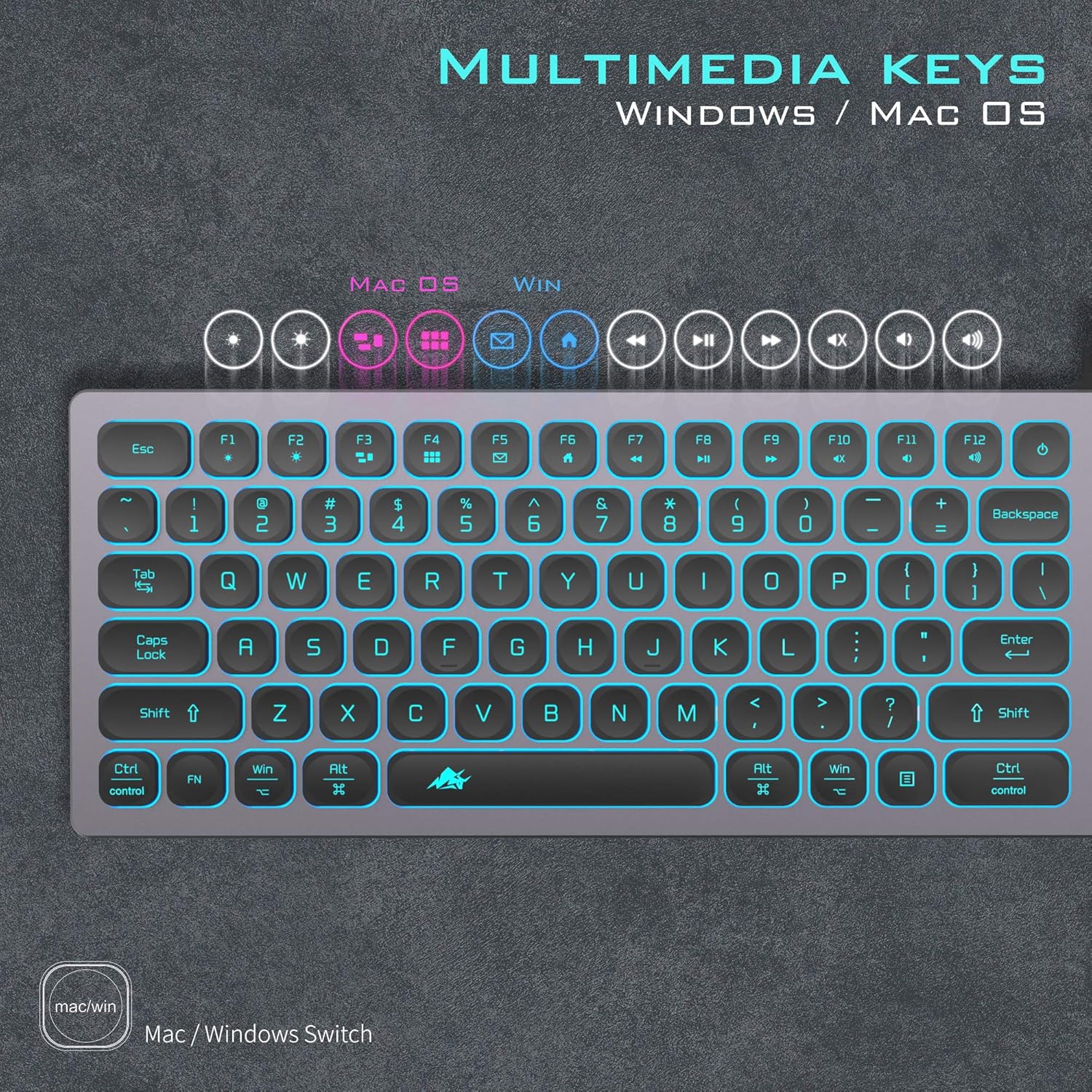
Figure 4: Layout of the multimedia keys and their functions for Windows and Mac OS.
Maintenance
To ensure the longevity and cleanliness of your POWZAN KB770 keyboard, a silicone keyboard cover is included to protect against spills and crumbs.
- Regularly clean the silicone cover with a damp cloth.
- Ensure the keyboard is unplugged before cleaning.
- If any liquid spills directly onto the keyboard (without the cover), immediately unplug it and allow it to dry completely before reconnecting.

Figure 5: The included silicone keyboard cover protecting the keys from spills and debris.
Troubleshooting
Common Issues and Solutions:
- Keyboard not responding:
- Ensure the USB cable is securely plugged into a working USB port on your computer.
- Try plugging the keyboard into a different USB port.
- Restart your computer.
- If using a USB-C adapter, ensure the adapter is functional and properly connected.
- Backlight not working or stuck on one color:
- Ensure the keyboard is properly connected and receiving power.
- Press Fn + Home to cycle through colors.
- Press Fn + Page Up/Down to adjust brightness. Ensure brightness is not set to minimum.
- Keys not functioning correctly in Mac/Windows mode:
- Verify that the keyboard is set to the correct operating system mode (Mac or Windows) by holding the 'MAC/WIN' key for 5 seconds.
- Check your computer's keyboard settings for any conflicting configurations.
Specifications
| Product Dimensions | 17 x 5 x 0.6 inches |
| Item Weight | 1.2 pounds |
| Manufacturer | POWZAN |
| Item Model Number | KB770 |
| Connectivity Technology | USB-A |
| Keyboard Description | Multimedia / Scissor Switch / Aluminum |
| Compatible Devices | Laptop, PC |
| Number of Keys | 110 |
| Keyboard Backlighting Color Support | RGB (7-color) |
Warranty and Support
POWZAN is committed to providing high-quality products and professional after-sales service. Your KB770 keyboard comes with a comprehensive warranty and dedicated support.
- Warranty: The product is covered by a 360-day warranty from the date of purchase.
- Customer Support: POWZAN offers responsive customer support with a commitment to 24-hour reply times for inquiries.
- For any questions, technical assistance, or warranty claims, please refer to the contact information provided in the product packaging or visit the official POWZAN website.
Related Documents - KB770
 |
Comprehensive Mobile Phone Model Directory A detailed directory of mobile phone models from numerous global manufacturers, including Apple, Samsung, LG, Nokia, Motorola, HTC, and many more, offering an overview of mobile technology. |
 |
2014 Bluetooth Compatibility List: Mobile Devices and Brands A comprehensive list detailing Bluetooth compatibility for various mobile devices, featuring brands such as Acer, Apple, BlackBerry, HTC, Huawei, LG, Motorola, Nokia, Samsung, and Sony Ericsson, among many others, along with their respective models. |