
Introduction
Thank you for choosing Wishouse M8 Rechargeable Walkie Talkies. This manual provides essential information for the safe and effective use of your new communication devices. These walkie talkies are designed for clear, long-range communication, suitable for both children and adults during various activities such as camping, hiking, or general play.
Key features include:
- Rechargeable batteries and USB charging cables for convenience.
- Extended range communication for various environments.
- High-definition sound for clear conversations.
- Durable design to withstand active use.
- Integrated flashlight for low-light conditions.
- VOX (Voice Operated Transmission) function for hands-free use.
- Adjustable volume settings.
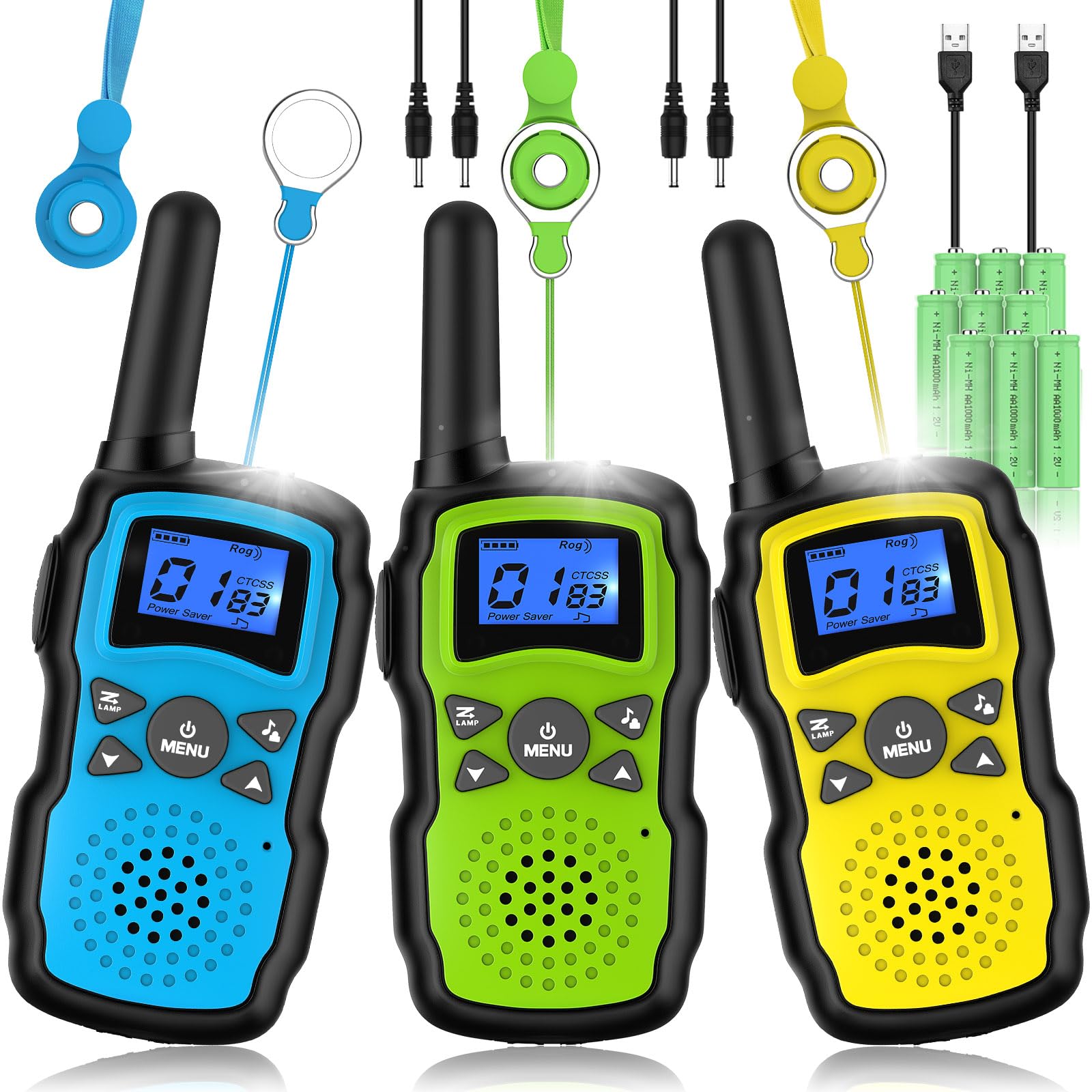
Image: Wishouse M8 walkie talkies in blue, green, and yellow, ready for use.
What's in the Box
Please check the package contents to ensure all items are present:
- 3 x Wishouse M8 Walkie Talkies
- 3 x Belt Clips
- 9 x 1000mAh AA Rechargeable Batteries
- 2 x 2-in-1 USB Charging Cables
- 3 x Lanyards

Image: All components included in the Wishouse M8 walkie talkie package.
Setup
1. Battery Installation
- Locate the battery compartment cover on the back of the walkie talkie.
- Use a small screwdriver or coin to open the cover.
- Insert 3 AA rechargeable batteries into the compartment, ensuring correct polarity (+/-).
- Replace the battery compartment cover and secure it.
2. Charging Instructions
Before first use, fully charge the walkie talkies.
- Connect one end of the 2-in-1 USB charging cable to the charging port on the walkie talkie.
- Connect the other end of the USB cable to a USB power adapter (not included) or a computer USB port.
- The battery indicator on the screen will show charging status.
- Charging typically takes 3-4 hours for a full charge. Disconnect once fully charged.

Image: Wishouse M8 walkie talkie connected to its USB charging cable.
Operating Instructions
1. Power On/Off
- To turn on: Press and hold the Power/Menu button (
 ) until the screen lights up.
 - To turn off: Press and hold the Power/Menu button until the screen turns off.
2. Channel Selection
- Press the Menu button once. The channel number will flash.
- Use the Up (
 ) or Down (
 ) buttons to select your desired channel (1-22).
 - Press the Menu button again or wait a few seconds to confirm the selection. All walkie talkies must be on the same channel to communicate.
3. Transmitting and Receiving
- To transmit: Press and hold the PTT (Push-to-Talk) button on the side of the walkie talkie. Speak clearly into the microphone.
- To receive: Release the PTT button. The walkie talkie will automatically receive transmissions from other units on the same channel.
4. Volume Adjustment
- Use the Up () or Down () buttons to adjust the speaker volume.
5. Flashlight Function
- To turn on the flashlight: Press the Light button (usually located near the top or side, often marked with a flashlight icon).
- To turn off the flashlight: Press the Light button again.

Image: Children utilizing the flashlight feature of the walkie talkies during an evening adventure.
6. VOX (Voice Operated Transmission)
VOX allows for hands-free communication. When activated, the walkie talkie will transmit automatically when it detects your voice.
- To activate VOX: Press the Menu button multiple times until 'VOX' appears on the screen.
- Use the Up or Down buttons to select the VOX sensitivity level (e.g., 1-3, with 3 being most sensitive).
- Press Menu or wait to confirm.
- To deactivate VOX: Repeat the steps and select 'OFF'.
7. Keypad Lock
The keypad lock prevents accidental changes to settings.
- To lock: Press and hold the Menu button until a key icon appears on the screen.
- To unlock: Press and hold the Menu button again until the key icon disappears.

Image: Children enjoying outdoor play with their Wishouse M8 walkie talkies.
Video: A demonstration of the Wishouse M8 walkie talkies in use, highlighting features and ease of communication.
Maintenance
1. Cleaning
- Wipe the walkie talkie with a soft, damp cloth. Do not use harsh chemicals or abrasive cleaners.
- Ensure the charging port and battery compartment are free from dust and debris.
2. Storage
- Store the walkie talkies in a cool, dry place away from direct sunlight and extreme temperatures.
- If storing for an extended period, remove the batteries to prevent leakage.
3. Battery Care
- Use only the provided rechargeable batteries and charging cables.
- Avoid overcharging or completely draining the batteries to prolong their lifespan.
- If batteries are damaged or leaking, replace them immediately and dispose of them properly.
Troubleshooting
| Problem | Possible Cause | Solution |
|---|---|---|
| No power | Batteries are dead or incorrectly installed. | Charge batteries fully or re-install them with correct polarity. |
| Poor reception/static | Out of range, obstacles, or interference. | Move closer to the other unit, find a clearer line of sight, or change channels. |
| Cannot transmit or receive | Different channels, low battery, or PTT button not pressed/released. | Ensure all units are on the same channel. Charge batteries. Press PTT to talk, release to listen. |
| Short communication range | Environmental factors (buildings, hills), low battery. | Move to an open area. Ensure batteries are fully charged. |
| VOX not working | VOX sensitivity too low or not activated. | Increase VOX sensitivity level or ensure VOX is enabled in the menu. |
Specifications
- Model Number: M8
- Item Weight: 1.39 pounds (for the pack)
- Product Dimensions: 1.1 x 2.3 x 6.2 inches (per unit)
- Batteries: 9 AA rechargeable batteries required (included)
- Number of Channels: 22
- Frequency Range: 462.5500-462.7250 MHz, 467.5625-467.7125 MHz
- Talking Range Maximum: Up to 5 miles (under optimal conditions)
- Voltage: 3.6 Volts
- Water Resistance Level: Not Water Resistant
- Special Features: Adjustable Receiver Sensitivity, Integrated Flashlight, Long Range, Rechargeable, Voice Operated Transmission (VOX)
Warranty & Support
Wishouse products are designed for quality and reliability. For specific warranty details, please refer to the warranty card included with your purchase or contact Wishouse customer support.
If you encounter any issues or have questions regarding your Wishouse M8 Walkie Talkies, please visit the official Wishouse store or contact their customer service for assistance.
Wishouse Store: Visit the Wishouse Store on Amazon