
Introduction
Thank you for choosing the Ecolite EZ-7901 Remote Controlled Socket Set. This product allows you to wirelessly control your electrical appliances with ease. Please read this manual carefully before use to ensure proper operation and to maximize the lifespan of your device. Keep this manual for future reference.
Safety Information
- Do not exceed the maximum load capacity specified in the 'Specifications' section.
- This product is designed for indoor use only. Do not expose to moisture or extreme temperatures.
- Ensure the socket is fully inserted into the wall outlet before connecting any appliance.
- Do not attempt to disassemble or repair the device. Refer all servicing to qualified personnel.
- Keep out of reach of children.
- Replace batteries in the remote control with the correct type and polarity.
Package Contents
- 3 x Ecolite EZ-7901 Remote Controlled Sockets
- 1 x Remote Control
- 1 x User Manual (this document)
Product Overview
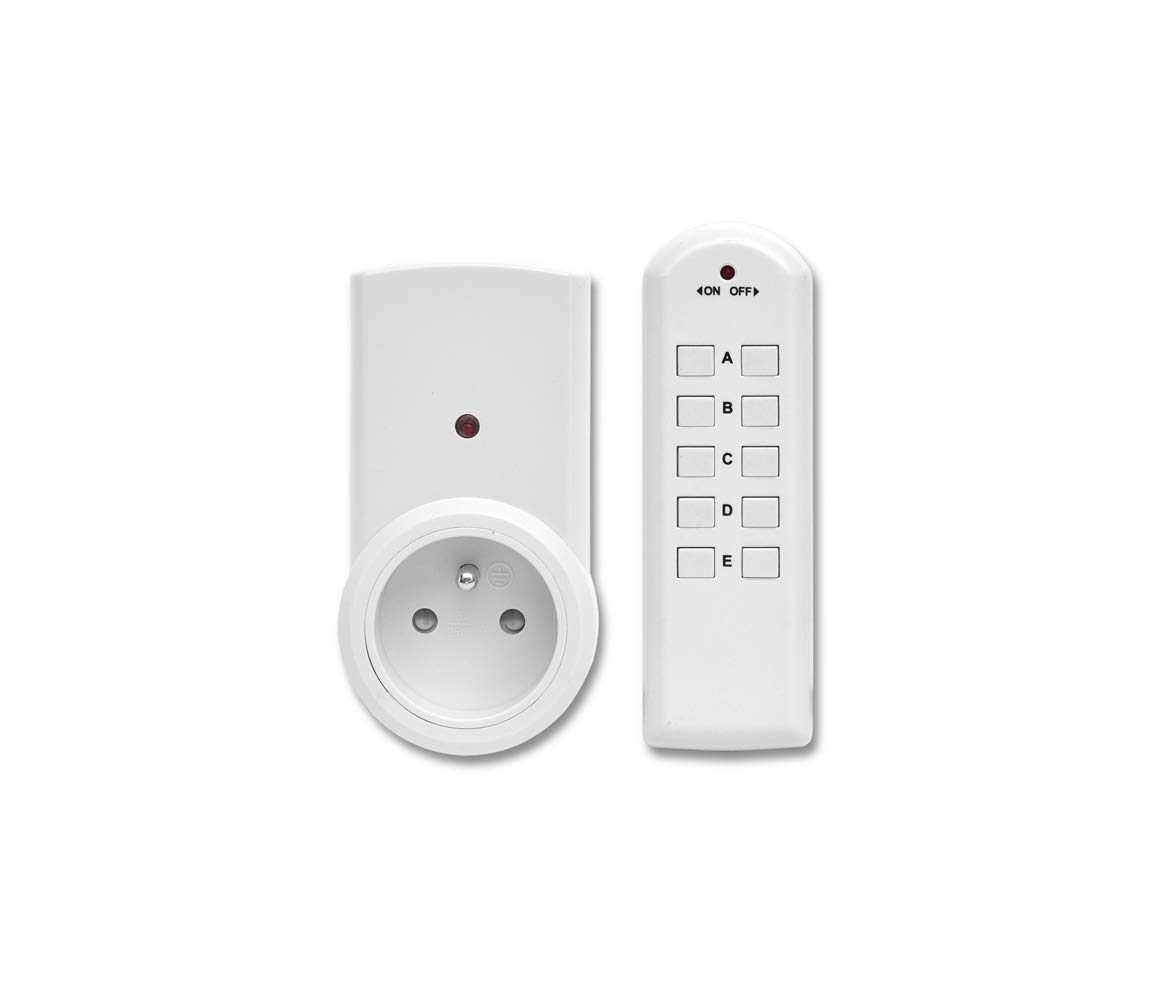
The Ecolite EZ-7901 set consists of three remote-controlled sockets and one remote control unit. Each socket features a power indicator light, and the remote control has individual buttons for each socket (A, B, C, D, E) as well as a master ON/OFF switch.
Setup
- Install Remote Control Batteries: Open the battery compartment on the back of the remote control. Insert 1 x 12V A23 battery (not included) ensuring correct polarity (+/-). Close the compartment.
- Plug in Sockets: Plug each remote-controlled socket into a standard wall outlet. The indicator light on the socket may flash or illuminate briefly.
- Pairing (Pre-paired or Manual):
- Pre-paired: Your sockets and remote control are typically pre-paired from the factory. Test by pressing the 'ON' button for channel A, B, or C on the remote. The corresponding socket's indicator light should turn on, and if an appliance is connected, it should power on.
- Manual Pairing (if needed): If a socket does not respond, plug the socket into a wall outlet. Press and hold the 'Learn' button (usually a small button on the side or front of the socket) for approximately 3-5 seconds until the indicator light starts flashing. While the light is flashing, press the desired 'ON' button (e.g., 'A ON') on the remote control. The indicator light on the socket should stop flashing and remain solid, indicating successful pairing. Repeat for other sockets and channels.
- Connect Appliances: Plug your desired electrical appliances into the remote-controlled sockets. Ensure the appliance's power switch is in the 'ON' position if it has one.
Operating
Once set up, operating the Ecolite EZ-7901 is straightforward:
- Individual Control: To turn a specific appliance ON, press the 'ON' button corresponding to its paired channel (e.g., 'A ON' for the socket paired to channel A). To turn it OFF, press the 'OFF' button for that channel (e.g., 'A OFF').
- Master Control: The remote control features a master 'ON' and 'OFF' button (often labeled 'ON OFF' with arrows). Pressing the master 'ON' button will turn on all paired sockets simultaneously. Pressing the master 'OFF' button will turn off all paired sockets simultaneously.
- Indicator Light: The indicator light on the remote control will illuminate when a button is pressed, confirming signal transmission. The indicator light on the socket will illuminate when the socket is powered ON and turn off when powered OFF.
Maintenance
- Cleaning: Disconnect the socket from the wall outlet before cleaning. Use a soft, dry cloth to wipe the surfaces. Do not use liquid cleaners or abrasive materials.
- Battery Replacement: When the remote control's range decreases or the indicator light dims, it's time to replace the battery. Use a 12V A23 battery. Ensure correct polarity during installation. Dispose of old batteries responsibly.
- Storage: If not in use for an extended period, store the sockets and remote control in a cool, dry place. Consider removing the battery from the remote control to prevent leakage.
Troubleshooting
| Problem | Possible Cause | Solution |
|---|---|---|
| Socket does not respond to remote. | Low remote battery, socket not paired, socket not powered, appliance switch off. | Replace remote battery. Re-pair the socket (see 'Setup'). Ensure socket is firmly plugged in. Check appliance's power switch. |
| Reduced remote control range. | Low remote battery, interference from other devices, physical obstructions. | Replace remote battery. Move the socket or remote to a different location. Avoid placing near large metal objects or other wireless devices. |
| Socket indicator light is off, but appliance is on. | Socket is bypassed or faulty. | Ensure the socket is correctly switched ON by the remote. If the issue persists, the socket may be faulty and require replacement. |
Specifications
- Model: EZ-7901
- Voltage: 230V~ / 50Hz
- Max. Load: 10A / 2300W
- Frequency: 433.92 MHz
- Remote Battery: 1 x 12V A23 (not included)
- Range: Up to 30 meters (open area)
- Channels: 5 (A, B, C, D, E)
- Protection Class: IP20 (Indoor use only)
Warranty and Support
Ecolite products are designed for reliability and performance. This product comes with a standard manufacturer's warranty against defects in materials and workmanship. For specific warranty terms, please refer to the documentation provided at the time of purchase or contact your retailer. For technical support or further assistance, please contact Ecolite customer service or visit the official Ecolite website.


