
Urbanista 41457
Urbanista London True Wireless Earbuds User Manual
Model: 41457
Introduction
Welcome to the Urbanista London True Wireless Earbuds user manual. These earbuds are designed to provide a superior audio experience with advanced features such as Active Noise Cancelling, Ambient Sound Mode, and In-Ear Detection. This manual will guide you through the setup, operation, and maintenance of your new earbuds to ensure optimal performance and longevity.
What's in the Box
Your Urbanista London True Wireless Earbuds package includes the following items:
- Urbanista London True Wireless Earbuds (Left and Right)
- Wireless Charging Case
- USB-C Charging Cable
- Multiple sizes of silicone ear tips for a customized fit
- User Manual (this document)
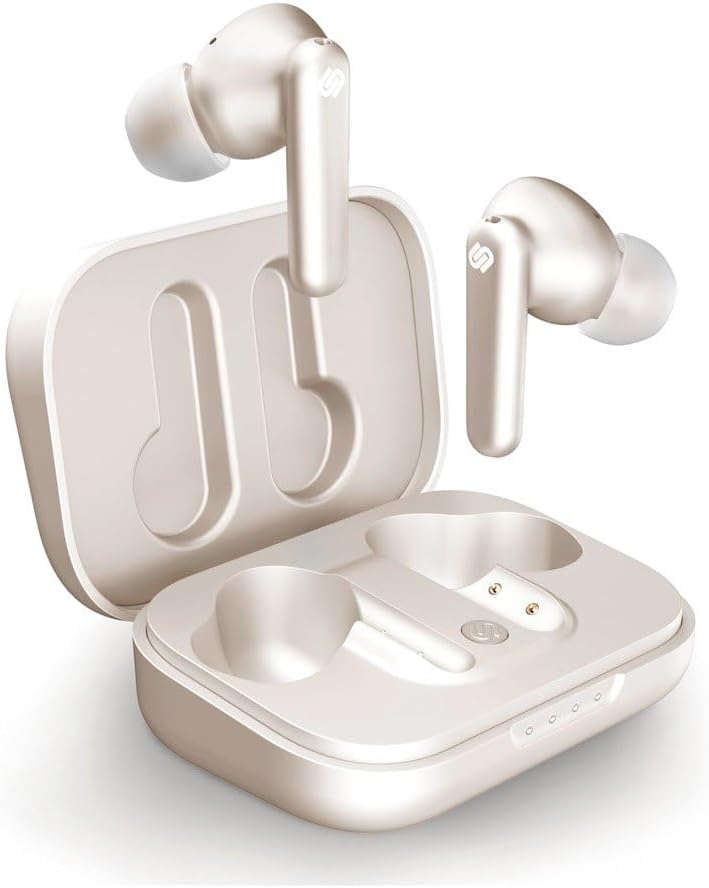
Image: Urbanista London True Wireless Earbuds in their open charging case, showcasing the earbuds and the case's interior.
Product Overview and Features
The Urbanista London earbuds are equipped with several advanced features to enhance your listening experience:
Active Noise Cancelling (ANC)
Experience pure sound by eliminating unwanted background noise. The sophisticated array of microphones and onboard processing detects and cancels out ambient sounds, allowing you to focus on your audio.
Video: An official product video demonstrating the Active Noise Cancelling feature of the Urbanista London earbuds, showing how external sounds are reduced for an immersive audio experience.
Ambient Sound Mode
Stay aware of your surroundings without removing your earbuds. This mode uses advanced filter techniques to enforce and clarify outside voices, allowing you to hear important announcements or engage in conversations while still connected to your audio.
In-Ear Detection
Built-in sensors automatically pause your music or video when you remove one earbud and resume playback when you place it back in your ear. This feature ensures seamless listening and conserves battery life.
Touch Controls
Manage your audio and calls with intuitive touch controls directly on the earbuds. Functions include play/pause, volume adjustment, answering/ending calls, and switching between Active Noise Cancelling and Ambient Sound modes.
Extended Playtime & Wireless Charging
Enjoy up to 25 hours of total playtime with the included wireless charging case. The case provides an additional 4 charges, and can be conveniently charged on any Qi-certified pad in under an hour.

Image: The Urbanista London charging case with earbuds inside, viewed from above, highlighting its compact design.
Setup
Initial Charge
- Place both earbuds into the charging case.
- Connect the USB-C charging cable to the case and a power source, or place the case on a Qi-certified wireless charging pad.
- Allow the earbuds and case to fully charge before first use. The LED indicators on the case will show charging status.
Pairing with Your Device
- Ensure the earbuds are charged and inside the charging case.
- Open the charging case lid. The earbuds will automatically enter pairing mode, indicated by a flashing LED on the earbuds.
- On your device (smartphone, tablet, computer), go to Bluetooth settings.
- Select "Urbanista London" from the list of available devices.
- Once connected, the LED indicator on the earbuds will stop flashing.
- The earbuds will automatically reconnect to the last paired device when removed from the case and within range.
Operating Instructions
Wearing the Earbuds
Select the silicone ear tips that provide the most comfortable and secure fit for your ears. A good seal is crucial for optimal sound quality and noise cancellation.

Image: A close-up view of the Urbanista London True Wireless Earbuds, showing their design and silicone ear tips.
Touch Control Functions
| Action | Function |
|---|---|
| Single Tap (Left/Right Earbud) | Play/Pause Music, Answer/End Call |
| Double Tap (Right Earbud) | Volume Up |
| Double Tap (Left Earbud) | Volume Down |
| Triple Tap (Right Earbud) | Next Track |
| Triple Tap (Left Earbud) | Previous Track |
| Long Press (Left Earbud) | Toggle Active Noise Cancelling / Ambient Sound Mode |
| Long Press (Right Earbud) | Activate Voice Assistant (Siri, Google Assistant, etc.) |
Maintenance
To ensure the longevity and optimal performance of your Urbanista London earbuds, follow these maintenance guidelines:
- Cleaning: Regularly clean the earbuds and charging case with a soft, dry, lint-free cloth. Do not use harsh chemicals or abrasive materials.
- Ear Tips: Remove the silicone ear tips periodically and clean them with mild soap and water. Ensure they are completely dry before reattaching them to the earbuds.
- Water Resistance: The earbuds have an IPX4 water resistance rating, meaning they are resistant to splashing water from any direction. They are not waterproof and should not be submerged in water. Avoid exposing them to excessive moisture, sweat, or rain for prolonged periods.
- Storage: When not in use, always store the earbuds in their charging case to protect them and keep them charged. Store in a cool, dry place away from extreme temperatures.
- Charging: Only use the provided charging cable or a Qi-certified wireless charger. Avoid using damaged cables or chargers.
Troubleshooting
If you encounter any issues with your Urbanista London earbuds, please refer to the following common solutions:
No Sound or Intermittent Connection
- Recharge: Ensure both earbuds and the charging case are fully charged. Low battery can cause connection issues.
- Re-pair: Disconnect "Urbanista London" from your device's Bluetooth settings. Place earbuds in the case, close the lid for 10 seconds, then open to re-enter pairing mode and try connecting again.
- Distance: Ensure your device is within the Bluetooth range (up to 10 meters) and there are no significant obstructions.
- Interference: Move away from other wireless devices that might cause interference (e.g., Wi-Fi routers, microwaves).
One Earbud Not Working
- Check Charge: Ensure both earbuds are charged.
- Clean Contacts: Clean the charging contacts on both the earbuds and inside the case with a dry cotton swab to ensure proper connection.
- Reset: Perform a factory reset (refer to the full Urbanista support page for specific instructions if available, as this is a common troubleshooting step for many earbuds). Typically, this involves holding a button on the case for a prolonged period.
Touch Controls Not Responding
- Clean Surface: Ensure the touch surface of the earbuds is clean and dry.
- Restart: Place the earbuds back in the case, close the lid, wait a few seconds, and then take them out again.
If these steps do not resolve your issue, please contact Urbanista customer support for further assistance.
Specifications
| Feature | Detail |
|---|---|
| Model Name | London |
| Model Number | 41457 |
| Connectivity Technology | Wireless (Bluetooth) |
| Bluetooth Version | 5.0 |
| Bluetooth Range | 10 Meters |
| Noise Control | Active Noise Cancellation |
| Battery Life (Earbuds) | 5 hours (per charge) |
| Total Playtime (with case) | 25 Hours |
| Charging Case Battery Charging Time | 1 Hour (wireless charging compatible) |
| Water Resistance Level | IPX4 (Waterproof) |
| Frequency Range | 20 Hz - 20,000 Hz |
| Control Type | Touch Control |
| Item Weight | 6.2 ounces (174.5 Grams) |
| Product Dimensions | 1.26 x 3.98 x 7.8 inches |
| Compatible Devices | iOS/Android |
Warranty and Support
Urbanista products are built with quality and reliability in mind. For detailed information regarding your product's warranty, please refer to the warranty card included in your original packaging or visit the official Urbanista website. If you require technical support, have questions about your product, or need to initiate a warranty claim, please contact Urbanista customer service through their official channels. Keep your proof of purchase for any warranty-related inquiries.
For more information and support, visit the Urbanista Store on Amazon.
Related Documents - 41457
 |
Urbanista Buenos Aires Active Noise Cancelling Headphones User Manual User manual for the Urbanista Buenos Aires Active Noise Cancelling Headphones, covering setup, Bluetooth pairing, multipoint connection, button controls, charging, and troubleshooting. |
 |
Urbanista New York Noise-Cancelling Bluetooth Headphones - User Guide Comprehensive guide for Urbanista New York noise-cancelling Bluetooth headphones, covering features, setup, functions, safety, warranty, and FCC compliance. |
 |
Urbanista Miami Headphones User Manual User manual for Urbanista Miami wireless headphones, covering Bluetooth pairing, button controls, Active Noise Cancelling, Ambient Sound Mode, and notifications. |
 |
Urbanista U101 Active Noise Cancelling Earphones User Manual User manual for Urbanista U101 Active Noise Cancelling Earphones, providing setup, controls, charging, and troubleshooting information. |
 |
Urbanista Miami Headphones User Manual Comprehensive user manual for the Urbanista Miami headphones, covering pairing, controls, features, notifications, and technical specifications. |
 |
Urbanista Santiago Active Noise Cancelling Earphones User Manual Get started with your Urbanista Santiago Active Noise Cancelling Earphones. This user manual provides setup instructions, touch controls, charging information, and troubleshooting tips for optimal use. |
Ask a question about this manual
Ask about setup, troubleshooting, compatibility, parts, safety, or missing instructions. Manuals+ will review the question and use this page’s manual context to help answer it.