
1. Introduction
The Garmin Montana 750i is a versatile GPS navigator and satellite communicator designed for outdoor use. This device integrates TopoActive and City Navigator mapping with global two-way messaging and interactive SOS capabilities via inReach satellite technology. It also features a built-in 8-megapixel camera for capturing images during outdoor activities.
The unit is equipped with a 5-inch color touchscreen, a full QWERTY keyboard for messaging, multi-GNSS support (GPS and Galileo), and sensors for a 3-axis compass and barometric altimeter. Wireless connectivity options include ANT+ technology, Wi-Fi, and Bluetooth, enabling BirdsEye Satellite Imagery downloads, location sharing, Connect IQ app support, and Active Weather forecasts when paired with a compatible smartphone. An ultralow-powered Expedition mode is available to extend battery life. The IPX7-rated unit is also compatible with Astro or Alpha series handhelds for tracking sporting dogs.

2. What's in the Box
Upon unboxing your Garmin Montana 750i, ensure all the following components are present:
- Montana 750i device
- Lithium-ion battery pack
- USB cable
- Documentation (Quick Start Manual, Safety Information)
3. Key Features
- Rugged Construction: Military-grade design with a 5-inch glove-friendly color touchscreen.
- inReach Satellite Technology: Global two-way messaging and interactive SOS to the GEOS 24/7 monitoring center (active satellite subscription required).
- 8-Megapixel Camera: Integrated camera for capturing photos.
- Multi-GNSS Support: Utilizes GPS and Galileo for enhanced positioning accuracy.
- Preloaded Maps: Includes TopoActive and City Navigator maps.
- Navigation Sensors: Features a 3-axis compass and barometric altimeter.
- Wireless Connectivity: ANT+ technology, Wi-Fi, and Bluetooth for BirdsEye Satellite Imagery downloads, location sharing, Connect IQ app support, and Active Weather forecasts.
- Garmin Explore Compatibility: Syncs with the Garmin Explore website and app for managing waypoints, routes, activities, and reviewing trip data.
- Expedition Mode: Extends battery life for prolonged outdoor use.
4. Setup
4.1 Battery Installation and Charging
The Montana 750i comes with a rechargeable lithium-ion battery pack. To install, remove the battery cover on the back of the device. Insert the battery pack, ensuring proper alignment, and then replace the cover securely.
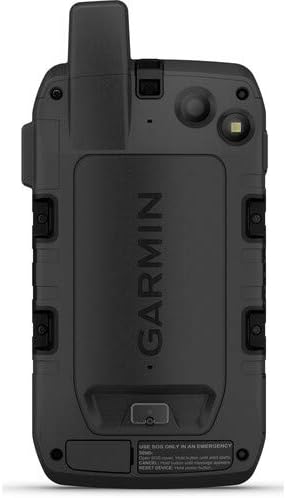
To charge the device, connect the supplied USB cable to the unit's USB port (located under a protective flap) and then to a power source (e.g., computer, USB wall adapter). Ensure the USB port is dry before charging to prevent damage.
4.2 Powering On/Off
To power on the device, press and hold the Power button (located on the side of the unit) until the screen illuminates. To power off, press and hold the Power button until the power options appear on the screen, then select 'Power Off'.

5. Operating the Device
5.1 Touchscreen and Button Navigation
The Montana 750i features a responsive 5-inch color touchscreen. You can interact with the device by tapping, swiping, and pinching. Physical buttons are also available for quick access to key functions, especially useful when wearing gloves.
5.2 GPS and Navigation
The device utilizes multi-GNSS support (GPS and Galileo) for accurate location tracking. Preloaded TopoActive and City Navigator maps provide detailed topographical and road information. Use the map screen to view your current location, plan routes, and navigate to waypoints.

5.3 inReach Satellite Technology
With an active satellite subscription, the inReach technology allows for global two-way messaging and interactive SOS. The SOS button is protected by a cover to prevent accidental activation. In an emergency, lift the cover and press the SOS button to send an alert to the GEOS 24/7 monitoring center.

5.4 8-Megapixel Camera
The integrated 8-megapixel camera allows you to capture images directly on the device. Access the camera function from the main menu to take photos of your outdoor adventures.

5.5 Wireless Connectivity
The device supports ANT+ technology, Wi-Fi, and Bluetooth. These features enable direct-to-device BirdsEye Satellite Imagery downloads, location sharing, Connect IQ app support, and access to Active Weather forecasts when paired with a compatible smartphone.
5.6 Expedition Mode
Activate Expedition Mode to significantly extend the device's battery life. This mode reduces the frequency of GPS track point recording, making it ideal for multi-day trips where power conservation is crucial.
6. Maintenance
6.1 Battery Care
To maximize battery life and performance, avoid exposing the device to extreme temperatures for extended periods. Charge the battery fully before long trips. If storing the device for an extended time, charge the battery to approximately 50% and store it in a cool, dry place.
6.2 Cleaning the Device
Clean the device using a cloth dampened with a mild detergent solution. Avoid using abrasive cleaners or solvents that could damage the device's finish or screen. Ensure the USB port cover is securely closed to maintain water resistance.
7. Troubleshooting
7.1 GPS Signal Acquisition
If the device is having difficulty acquiring a GPS signal, ensure you are in an open area with a clear view of the sky. Tall buildings, dense tree cover, or being indoors can obstruct satellite signals. Allow several minutes for the device to acquire a strong signal, especially after being off for an extended period or moved a significant distance.
7.2 Software Updates
Regularly check for software updates to ensure optimal performance and access to the latest features. Updates can typically be performed by connecting the device to a computer with Garmin Express installed and an active internet connection.
8. Specifications
| Feature | Detail |
|---|---|
| Product Dimensions | 7.2 x 3.6 x 1.3 inches |
| Item Weight | 1.55 pounds |
| Item Model Number | 010-02347-00 |
| Batteries | 1 Lithium Ion batteries required (included) |
| OS | [Proprietary Operating System] |
| Connectivity Technologies | ANT+ |
| Special Features | Routable Topo Maps; Multiple GNSS Networks, ABC Sensors; inReach Satellite Communication |
| Human Interface Input | Touchscreen |
| Screen Resolution | 480 x 800 pixels |
| Screen Size | 5 Inches |
| Map Type | North America (TopoActive and City Navigator) |
| Battery Life | 18 Hours (standard mode) |
| Water Rating | IPX7 |
9. Warranty and Support
For warranty information and technical support, please refer to the documentation included with your Garmin Montana 750i device or visit the official Garmin support website. An active inReach satellite subscription is required for satellite communication features.