
1. Overview
The Ambient Weather WH31LA Leak Detector is designed to provide early warning of water leaks in your home or property. This sensor integrates seamlessly with Ambient Weather WS-2000 and WS-5000 weather stations, transmitting leak detection data wirelessly. Upon detecting water, the unit emits a loud 90 dB alarm and sends a signal to your compatible weather station, allowing for timely intervention to prevent water damage.

Image: The Ambient Weather WH31LA Leak Detector, a compact white device designed to detect water presence.
2. What's Included
- 1 x Ambient Weather WH31LA Leak Detector
- Note: 2 x AA batteries are required and not included.
3. Setup
3.1 Battery Installation
- Locate the battery compartment on the back of the WH31LA Leak Detector.
- Open the battery compartment cover.
- Insert two (2) AA batteries, ensuring correct polarity (+/-). Alkaline or Lithium batteries are recommended for optimal performance and longevity.
- Close the battery compartment cover securely.

Image: Close-up view of the WH31LA Leak Detector, showing the sensor contacts and battery compartment area.
3.2 Pairing with Weather Station
The WH31LA Leak Detector automatically attempts to pair with compatible Ambient Weather stations (WS-1965, WS-2000, WS-5000) once batteries are installed. Ensure your weather station console is powered on and within range (up to 330 feet, or 100 feet in most conditions). The sensor transmits data at 915 MHz with a 60-second refresh rate. Refer to your specific weather station manual for instructions on adding new sensors or checking sensor status.
3.3 Placement
Place the leak detector on a flat surface in areas prone to water leaks, such as:
- Under sinks
- Near water heaters
- Behind toilets
- In basements or utility rooms
- Near washing machines or dishwashers
Ensure the sensor contacts on the bottom of the unit are in direct contact with the surface where water might accumulate. The device is designed for floor mounting.

Image: The WH31LA Leak Detector positioned on the floor under a sink, ready to detect leaks.
4. Operating Instructions
4.1 Leak Detection
The WH31LA Leak Detector continuously monitors for water presence every 3 seconds. When water bridges the sensor contacts, the device will immediately trigger an alarm.
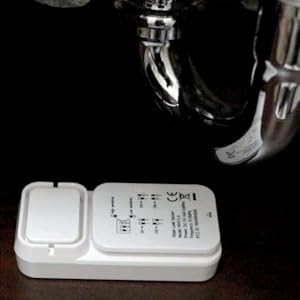
Image: A visual representation of a leak detector sensing standing water.
4.2 Alarm Function
Upon detecting water, the leak detector emits a loud audible alarm at 90 dB to alert you to the presence of water. Simultaneously, it sends a wireless signal to your compatible Ambient Weather station console.
4.3 Remote Monitoring and Alerts (via Weather Station)
When connected to a compatible Ambient Weather station (WS-2000, WS-5000), you can monitor the leak detector's status remotely via the Ambient Weather Network app or website. Configure custom alerts to receive notifications (email, text, push notifications) on your smartphone or computer when a leak is detected, even when you are away from home.

Image: Examples of remote monitoring and alert settings available through the Ambient Weather Network, showing email, text, and push notification options.
5. Maintenance
5.1 Battery Replacement
When the batteries are low, your weather station console will typically display a low battery indicator for the leak detector. Replace the two (2) AA batteries as described in the "Battery Installation" section (3.1). It is recommended to use fresh alkaline or lithium batteries for reliable operation.
5.2 Cleaning
Periodically inspect the sensor contacts on the bottom of the unit for dirt or debris. Clean with a soft, damp cloth if necessary. Ensure the contacts are dry before placing the sensor back in position. Do not use abrasive cleaners or immerse the unit in water.
6. Troubleshooting
| Problem | Possible Cause | Solution |
|---|---|---|
| No Leak Detection / No Alarm |
|
|
| No Data on Weather Station Console |
|
|
| False Alarms |
|
|
7. Specifications
| Feature | Detail |
|---|---|
| Model Number | WH31LA |
| Power Source | 2 x AA batteries (not included) |
| Battery Type Recommended | Alkaline or Lithium |
| Sensor Dimensions (L x W x H) | 3.5" x 1.5" x 1" (8.9 cm x 3.8 cm x 2.5 cm) |
| Wireless Frequency | 915 MHz |
| Wireless Range | Up to 330 feet (100 meters) line of sight; 100 feet (30 meters) in most conditions |
| Refresh Rate | 60 seconds |
| Audible Alarm | 90 dB |
| Detection Interval | Every 3 seconds |
| Mounting Type | Floor Mount |
| Compatible Devices | Ambient Weather WS-1965, WS-2000, WS-5000 Weather Stations |
8. Warranty and Support
8.1 Warranty Information
Ambient Weather products typically come with a limited warranty. Please refer to the warranty card included with your product or visit the official Ambient Weather website for detailed warranty terms and conditions. Keep your purchase receipt as proof of purchase for warranty claims.
8.2 Customer Support
For technical assistance, troubleshooting, or product inquiries, please contact Ambient Weather customer support. You can usually find contact information on the Ambient Weather website or in the documentation provided with your weather station console.
Website: www.ambientweather.com


