
Introduction
This manual provides detailed instructions for the installation, operation, and maintenance of your GETINLIGHT Under Cabinet Light. Designed to enhance your kitchen or workspace, this lighting solution offers versatile illumination with adjustable color temperatures and brightness settings. This bundle includes an extra 12-inch linking cord to extend your lighting setup as needed.
Product Features
- 3 Color Levels Dimmable LED: Features a temperature slide switch allowing selection among Warm White (2700K), Soft White (3000K), and Bright White (4000K).
- Flexible Installation: Supports both hardwired and plugged-in installations. Hardware kit and cords are included for both methods.
- Linkable Design: Connect up to 20 units to a single power supply for extended lighting coverage.
- Dimmable Compatibility: Compatible with most wall/box dimmers. Includes a Hi/Low switch for non-dimming applications.
- Durable Construction: Aluminum housing with polycarbonate diffuser ensures longevity.
- Certified Safety: ETL Listed, Energy Star, and Lighting Facts Labeled, Energy Star Certified for peace of mind.
What's in the Box
Verify that all components are present before beginning installation.

Figure 1: Package Contents. Includes the under cabinet light fixture, power cord, linking cord, and mounting hardware.
- GETINLIGHT Under Cabinet Light Fixture (9-inch or 12-inch)
- 12-inch Linking Cord (JC1-12-BK)
- Power Cord for Plug-in Installation
- Mounting Hardware (screws, connectors)
Setup & Installation
The GETINLIGHT Under Cabinet Light offers flexible installation options: plug-in or hardwired. For plug-in installation, ensure an accessible power outlet is nearby. For hardwired installation, consult a qualified electrician if you are unfamiliar with electrical wiring.
1. Preparing the Light Fixture
Before mounting, you may need to remove the input/output covers on the sides of the fixture to access the connection ports. Use a Phillips head screwdriver to unscrew the small screws holding the covers in place.

Figure 2: Side view of the light fixture with input/output ports.
2. Mounting the Lights
Position the light fixture under your cabinet. Mark the screw locations. Use the provided mounting hardware to secure the fixture to the underside of the cabinet. Ensure the fixture is firmly attached.
Video 1: Installation Guide for GETINLIGHT Under Cabinet Lighting. This video demonstrates the process of mounting the light fixtures and connecting them.
3. Connecting Power
For plug-in installation, connect the provided power cord to the input port of the first light fixture and plug it into a standard wall outlet. For hardwired installation, connect the appropriate wiring to the fixture's hardwire input, following local electrical codes.

Figure 3: Power Cord for plug-in connection.
4. Linking Multiple Units (Optional)
If installing multiple units, use the provided linking cords to connect them. Plug one end of the linking cord into the output port of the first fixture and the other end into the input port of the next fixture. For adjacent fixtures, a direct connector can be used to create a seamless look.
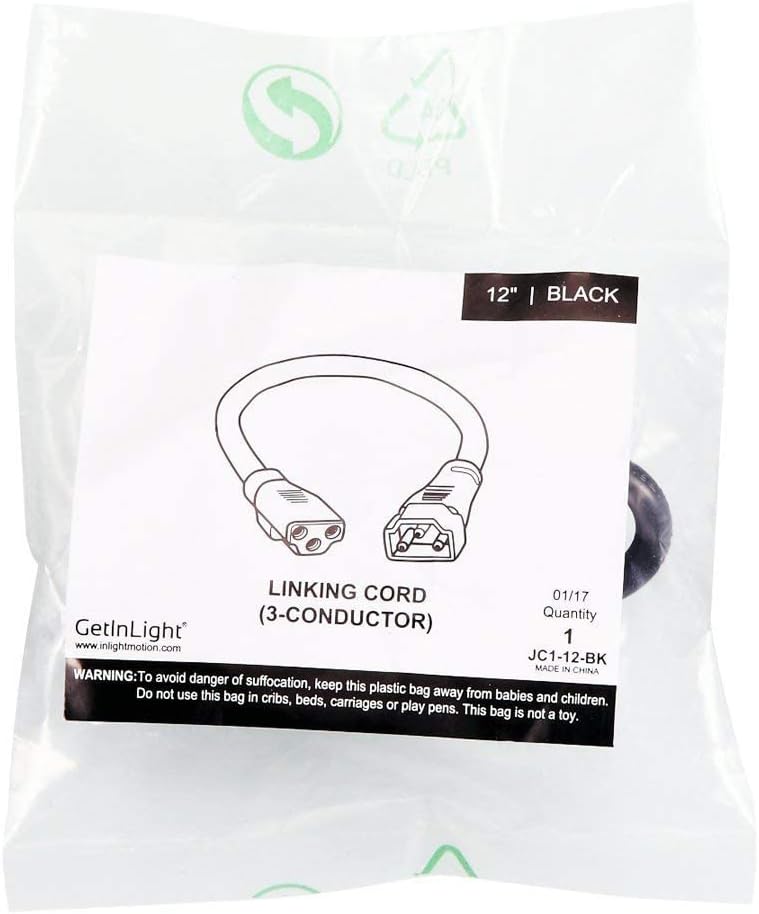
Figure 4: 12-inch Linking Cord for connecting multiple units.

Figure 5: Compatibility chart for linking various GetInLight fixtures.
Operating Instructions
Your GETINLIGHT Under Cabinet Light features a convenient slide switch for controlling brightness and color temperature.
1. Power On/Off
Locate the slide switch on the front of the light fixture. Slide the switch to the 'ON' position to turn on the light, and to the 'OFF' position to turn it off.
2. Adjusting Brightness
The slide switch also controls brightness. Move the switch to one end for the brightest setting and to the other end for a lower setting. If using a compatible wall dimmer, adjust brightness via the dimmer switch.
3. Changing Color Temperature
The light fixture allows you to select from three color temperatures: Warm White (2700K), Soft White (3000K), and Bright White (4000K). Slide the switch to cycle through these options until you find your preferred lighting ambiance.

Figure 6: Visual representation of the three selectable color temperatures.
Maintenance
To ensure the longevity and optimal performance of your GETINLIGHT Under Cabinet Light, follow these simple maintenance guidelines:
- Cleaning: Disconnect power before cleaning. Use a soft, dry cloth to wipe the fixture. For stubborn spots, a slightly damp cloth with mild soap can be used, followed by a dry cloth. Avoid abrasive cleaners or solvents.
- Bulb Replacement: The LED bulbs are integrated and not user-replaceable. If the LEDs fail, the entire fixture may need replacement.
- Inspection: Periodically check the wiring and mounting screws to ensure they are secure.
Troubleshooting
If you encounter issues with your GETINLIGHT Under Cabinet Light, refer to the following common problems and solutions:
| Problem | Possible Cause | Solution |
|---|---|---|
| Light does not turn on. | No power to the fixture. | Check if the power cord is securely plugged in. Verify the outlet has power. Check circuit breaker. |
| Light flickers or dims unexpectedly. | Incompatible dimmer or loose connection. | Ensure dimmer is compatible (refer to product features). Check all wiring connections for tightness. |
| Only some linked lights are working. | Loose linking cord connection. | Check the linking cords between the working and non-working fixtures. Ensure they are fully inserted. |
| Light color or brightness cannot be adjusted. | Slide switch malfunction or fixture issue. | Ensure the slide switch is clean and moves freely. If the issue persists, contact customer support. |
Specifications
| Attribute | Value |
|---|---|
| Brand | GETINLIGHT |
| Model Number | d7f366d8-15ec-41c8-bc4b-cc7a7639aea2 |
| Color | White with Brown finish |
| Material | Metal |
| Style | Modern |
| Light Source Type | LED |
| Voltage | 120 Volts (AC) |
| Special Feature | Dimmable |
| Installation Type | Surface Mount |
| Power Source | Corded Electric |
| Efficiency | Energy Star Certified |
Warranty & Support
GETINLIGHT products are designed for durability and performance. For warranty information or technical support, please refer to the contact details provided on the product packaging or visit the official GETINLIGHT website. Keep your purchase receipt for warranty claims.