1. Introduction
Thank you for choosing the TIC-D2500 2-Input, 2-Zone, 2X300W Bridged Power Amplifier. This professional-grade amplifier is designed for reliable performance in various audio applications, featuring 8 Ohm, 4 Ohm, and 70V output capabilities, along with Crown ultra-efficient DriveCore technology. This manual provides essential information for the safe and efficient operation of your amplifier.
2. Safety Information
WARNING: To reduce the risk of fire or electric shock, do not expose this equipment to rain or moisture. Do not open the casing. Refer all servicing to qualified service personnel.
- Read all instructions before operating the amplifier.
- Keep these instructions for future reference.
- Heed all warnings on the product and in the operating instructions.
- Follow all instructions.
- Do not use this apparatus near water.
- Clean only with a dry cloth.
- Do not block any ventilation openings. Install in accordance with the manufacturer's instructions.
- Do not install near any heat sources such as radiators, heat registers, stoves, or other apparatus (including amplifiers) that produce heat.
- Do not defeat the safety purpose of the polarized or grounding-type plug. A polarized plug has two blades with one wider than the other. A grounding-type plug has two blades and a third grounding prong. The wide blade or the third prong are provided for your safety. If the provided plug does not fit into your outlet, consult an electrician for replacement of the obsolete outlet.
- Protect the power cord from being walked on or pinched, particularly at plugs, convenience receptacles, and the point where they exit from the apparatus.
- Only use attachments/accessories specified by the manufacturer.
- Unplug this apparatus during lightning storms or when unused for long periods of time.
- Refer all servicing to qualified service personnel. Servicing is required when the apparatus has been damaged in any way, such as power-supply cord or plug is damaged, liquid has been spilled or objects have fallen into the apparatus, the apparatus has been exposed to rain or moisture, does not operate normally, or has been dropped.
3. Product Overview
3.1 Front Panel

Figure 3.1: Front Panel of the TIC-D2500 Amplifier. Shows the power switch, LCD display, control knobs for channels A and B, and navigation buttons.
- Power Switch: Turns the amplifier on or off.
- CHA / CHB Level Controls: Rotary knobs to adjust the output level for Channel A and Channel B independently.
- LCD Display: Shows volume in dB per channel, operating temperature, and other system information.
- Navigation Buttons (Home, Level, Type, Function, Mute): Used to navigate menus and adjust settings on the LCD display.
- TIC-D2500 Model Indicator: Displays the product model number.
3.2 Rear Panel

Figure 3.2: Rear Panel of the TIC-D2500 Amplifier. Displays input/output connectors, mode switches, AC inlet, and breaker.
- Breaker: Circuit breaker for protection.
- AC Inlet: Power input connector for the AC power cord.
- Speaker Outputs (CH1, CH2, BRG): Connectors for speaker cables. Supports 4Ω, 8Ω, and 70V outputs. Includes both binding posts and Speakon-style connectors.
- CH1 Input / CH2 Input (XLR): Balanced XLR input connectors for audio signals.
- CH1 Link / CH2 Link (XLR): XLR link outputs for passing the input signal to another amplifier or device.
- Mode Switches (BRG, PARALLEL, STEREO): Switches to select the amplifier's operating mode (Bridged, Parallel, or Stereo).
- HI-PASS Switches (OFF, 30Hz, 50Hz): Switches to activate high-pass filters at 30Hz or 50Hz, or disable them.
3.3 Detailed Rear Panel Connectors
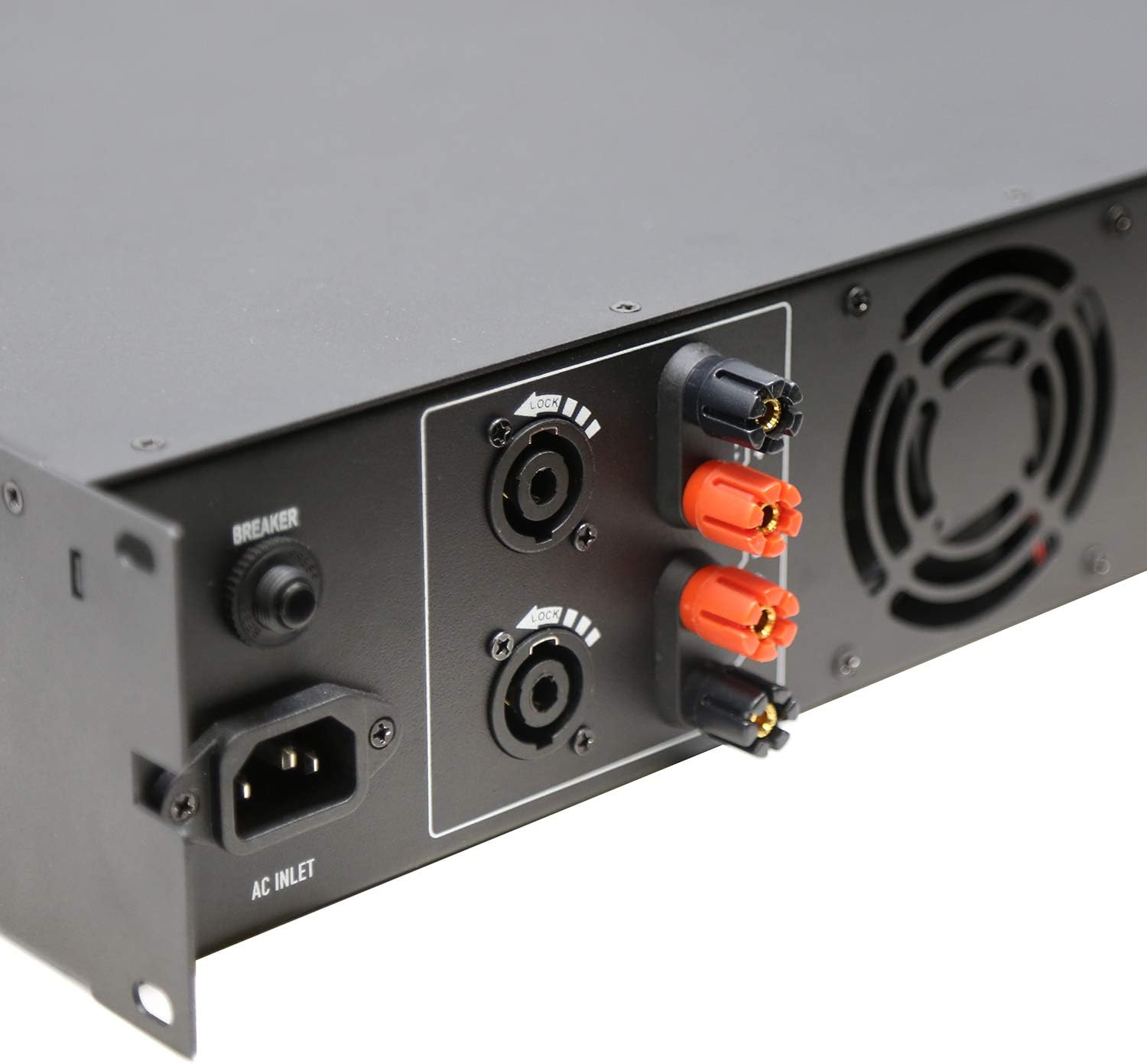
Figure 3.3: Rear Left Panel Detail. Shows the AC inlet, breaker, and speaker output terminals (binding posts and Speakon).

Figure 3.4: Rear Right Panel Detail. Shows the XLR input and link output connectors, along with the BRG/PARALLEL/STEREO and HI-PASS switches.
4. Setup
- Placement: Ensure the amplifier is placed in a well-ventilated area, preferably in a standard 2U rack space. Maintain adequate clearance around the unit for airflow.
- Power Connection:
- Ensure the amplifier's power switch is in the OFF position.
- Connect the supplied AC power cord to the AC Inlet on the rear panel and then to a suitable grounded power outlet.
- Input Connections:
- Connect your audio source (mixer, preamplifier, etc.) to the CH1 INPUT and CH2 INPUT XLR connectors on the rear panel using balanced XLR cables.
- If linking to another amplifier, use the CH1 LINK and CH2 LINK XLR outputs.
- Output Connections (Speakers):
- Connect your speakers to the appropriate speaker output terminals (binding posts or Speakon) on the rear panel. Ensure correct polarity (+ to + and - to -).
- For 70V systems, ensure your speakers are compatible with 70V constant voltage systems and connect them accordingly.
- For 4Ω or 8Ω operation, ensure your speakers' impedance matches the amplifier's output capabilities for the selected mode (Stereo or Parallel).
- For Bridged mode (BRG), connect a single speaker to the designated BRG output terminals. Refer to the rear panel markings for correct connections.
- Mode Selection:
- Set the BRG/PARALLEL/STEREO switch to your desired operating mode.
- Set the HI-PASS switches according to your system requirements. "OFF" for full range, "30Hz" or "50Hz" to filter out low frequencies.
5. Operating Instructions
- Power On:
- Before powering on, ensure all level controls (CHA, CHB) are set to their minimum position.
- Turn on your audio source equipment first.
- Flip the Power Switch on the front panel to the ON position. The LCD display will illuminate.
- Adjusting Volume:
- Slowly increase the CHA and CHB level controls to achieve the desired output volume.
- Monitor the LCD display for volume levels (in dB) and operating temperature.
- Using the LCD Display and Navigation:
- Use the "Home", "Level", "Type", "Function", and "Mute" buttons to navigate through the amplifier's settings and monitoring options displayed on the LCD.
- Consult the on-screen menus for specific adjustments related to input sensitivity, output modes, and other advanced features.
- Power Off:
- Before powering off, reduce all level controls to their minimum position.
- Turn off the amplifier using the Power Switch.
- Turn off your audio source equipment.
6. Maintenance
- Cleaning: Disconnect the amplifier from power before cleaning. Use a soft, dry cloth to wipe down the exterior. Do not use liquid cleaners or aerosols.
- Ventilation: Regularly check that ventilation openings are clear of dust and debris to ensure proper cooling.
- Cable Connections: Periodically inspect all cable connections for secure fit and signs of wear.
- Storage: If storing the amplifier for an extended period, ensure it is in a cool, dry place, protected from dust and extreme temperatures.
7. Troubleshooting
| Problem | Possible Cause | Solution |
|---|---|---|
| No power | Power cord disconnected; Power switch off; Circuit breaker tripped; Power outlet issue. | Check power cord connection; Ensure power switch is ON; Reset circuit breaker; Test power outlet with another device. |
| No sound output | Input cables disconnected; Speaker cables disconnected or incorrect polarity; Amplifier level controls at minimum; Incorrect mode selection; Audio source issue. | Check all input and output cable connections; Verify speaker polarity; Increase CHA/CHB level controls; Ensure correct BRG/PARALLEL/STEREO mode is selected; Check audio source. |
| Distorted sound | Input signal too high (clipping); Amplifier overloaded; Speaker impedance mismatch; Faulty cables. | Reduce input signal level from source; Ensure speakers match amplifier impedance; Check speaker connections and cables; Reduce amplifier output level. |
| Overheating | Blocked ventilation; Excessive load; Prolonged high-level operation. | Ensure proper ventilation around the amplifier; Reduce load or operating level; Allow amplifier to cool down. |
If the problem persists after attempting these solutions, please contact qualified service personnel or TIC Audio support.
8. Specifications
| Feature | Detail |
|---|---|
| Model | D2500 |
| Output Power (8Ω) | 300 W x 2 |
| Output Impedance | 4Ω / 8Ω / 70V Stable |
| Amplifier Type | Class D with Crown DriveCore technology |
| Frequency Response | 20Hz - 20KHz (+/-3dB) |
| Input Connectors | 2 x 3-pin XLR (balanced signal input) |
| Output Connectors | Speaker (x2) - Binding Posts & Speakon-style |
| Rack Space | 2U |
| Dimensions (W x D x H) | 483 x 257 x 88.8mm (19 x 10.1 x 3.5 inches approx.) |
| Item Weight | 17.27 pounds (7.83 kg) |
| Power Source | AC |
9. Warranty and Support
For warranty information, technical support, or service inquiries, please contact TIC Audio directly. Refer to the official TIC Audio website or your purchase documentation for the most current contact details and warranty terms.
This product may be eligible for extended protection plans. Please refer to your retailer for details on available protection plans.
Manufacturer: TIC Audio