
1. Product Overview
The IMRELAX 10x40W RGBW 4in1 Strip Wash/Beam Light Bar is a versatile stage lighting fixture designed for various applications including stage performances, dance floors, and event lighting. It features 10 high-brightness 40W RGBW (Red, Green, Blue, White) 4-in-1 LEDs, offering extensive color mixing capabilities and dynamic effects. The fixture includes a tilt function for directional control and supports DMX512 for professional integration.

Figure 1: Front view of the IMRELAX 10x40W RGBW 4in1 Strip Wash/Beam Light Bar, showcasing the 10 individual LED lenses.
2. Safety Instructions
- Ensure the power supply matches the specified voltage (AC90-240V, 50-60HZ).
- Do not operate the fixture if the power cord is damaged.
- Avoid direct eye exposure to the light source.
- Ensure proper ventilation to prevent overheating. The fixture uses a forced air cooling system.
- Installation and maintenance should be performed by qualified personnel.
- Keep the fixture away from moisture and extreme temperatures.
3. Setup
3.1 Unpacking and Inspection
Carefully remove the fixture from its packaging. Inspect for any damage during transit. Retain packaging for future transport or storage.
3.2 Mounting
The fixture can be mounted on a truss, placed on a stage floor, or other stable surfaces. Ensure all mounting hardware is securely fastened and capable of supporting the fixture's weight (13kg / 28.66lb).
3.3 Power Connection
Connect the provided power cable to the power input on the rear of the fixture and then to a suitable power outlet (AC90-240V, 50-60HZ).
3.4 DMX Connection
For DMX control, connect a 3-pin DMX cable from your DMX controller's output to the DMX input of the first fixture. Use the DMX output to link additional fixtures in a daisy chain configuration.

Figure 2: Rear panel of the light bar, illustrating the power input, DMX input, and DMX output ports for connectivity.
4. Operating Instructions
The IMRELAX light bar offers multiple control modes and effects, accessible via the integrated LCD display and control buttons on the rear panel.
4.1 Control Modes
- DMX512 Control: Allows precise control over all fixture functions using a DMX controller. Supports 21 or 65 DMX channels.
- Sound Active Mode: The fixture reacts to ambient sound, creating dynamic light shows.
- Auto Run Modes: Includes Slow Auto Run and Fast Self-Propelled modes for automated operation without external control.
- Master-Slave Mode: Link multiple fixtures together. One fixture acts as the master, controlling all linked slave units to synchronize effects.
4.2 Light Effects
The 10x40W RGBW LEDs provide a wide range of effects:
- Linear Dimming: Smooth intensity control from dark to light.
- Strobe: Adjustable strobe speed from 1 to 25 times per second, including random and lightning strobe effects.
- Color Mixing: RGBW 4-in-1 LEDs allow for a vast spectrum of colors.
- Built-in Color Effects: Pre-programmed effects such as color jump, color pulse, and color gradient.
- Dynamic Effects: Built-in dynamic patterns with adjustable speed.
- Tilt Movement: The fixture offers 270 degrees of tilt movement for precise beam positioning.

Figure 3: Demonstration of the light bar's capability to project multiple colored beams, showcasing its RGBW color mixing and wash effects.
5. Maintenance
Regular maintenance ensures optimal performance and longevity of your IMRELAX light bar.
- Cleaning: Periodically clean the lenses and exterior with a soft, lint-free cloth. Do not use abrasive cleaners.
- Cooling System: Ensure the forced air cooling system vents are clear of dust and obstructions.
- Cable Inspection: Regularly check power and DMX cables for any signs of wear or damage.
- Firmware Updates: Check the manufacturer's website for any available firmware updates.
6. Troubleshooting
This section addresses common issues you might encounter.
- No Power:
- Check if the power cable is securely connected to both the fixture and the power outlet.
- Verify the power outlet is functional.
- No Light Output:
- Ensure the fixture is receiving power and the display is active.
- If in DMX mode, check DMX signal and address settings.
- Confirm that the dimmer channel is not set to zero.
- DMX Control Issues:
- Verify DMX cable connections and ensure they are 3-pin DMX standard.
- Check the DMX address setting on the fixture matches your controller.
- Ensure the DMX controller is sending a valid signal.
- Try a different DMX cable.
- Fixture Overheating:
- Ensure the cooling vents are not blocked.
- Operate the fixture in a well-ventilated area.
7. Specifications
| Model | IM-EL1040 |
| Voltage | AC90-240V, 50-60HZ |
| Power | 600W |
| Light Source | 10 x 40W RGBW 4in1 High Brightness LEDs |
| Tilt (Y-axis) | 270 degrees |
| DMX Channels | 21CH / 65CH |
| Control Modes | DMX512, Sound Active, Slow Auto Run, Fast Self-Propelled, Master-Slave |
| Cooling System | Forced Air Cooling |
| Strobe | 1-25 times/second Electronic Strobe and Random Strobe |
| Display | LCD Display |
| Material | Metal |
| Finish Type | Painted |
| Net Weight | 13kg / 28.66lb |
| Dimensions (L x W x H) | 112cm x 12cm x 24cm (44.09" x 4.72" x 9.45") |
| UPC | 732083179747 |
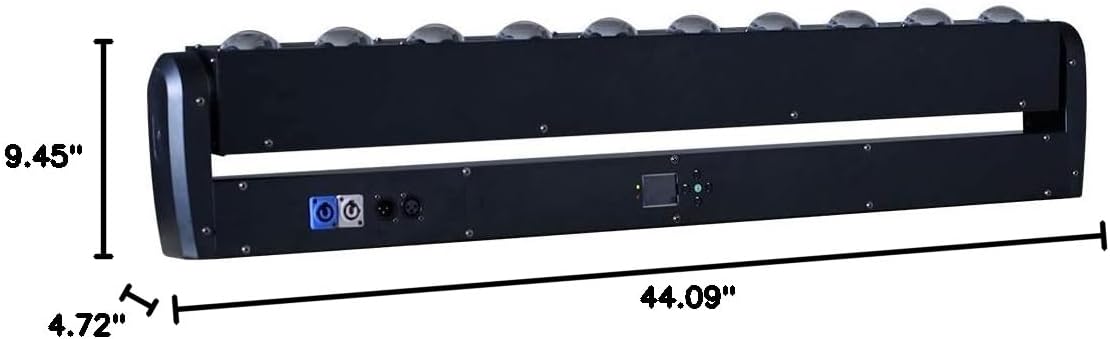
Figure 4: Dimensional drawing of the light bar, indicating its length, width, and height for installation planning.
8. Warranty and Support
8.1 Warranty Information
All products purchased from IMRELAX Stage Lighting include free parts maintenance within 2 years from the date of purchase and lifetime product service.
8.2 Customer Support
For technical assistance, warranty claims, or product inquiries, please refer to the IMRELAX brand store or contact your point of purchase.
Visit the official IMRELAX Store: IMRELAX Store on Amazon