
1. Important Safety Information
Read all instructions carefully before using the appliance. Keep this manual for future reference. Always disconnect the appliance from the power supply before cleaning or performing maintenance.
- Ensure proper grounding to avoid electric shock.
- Do not store explosive substances such as aerosol cans with a flammable propellant in this appliance.
- Keep ventilation openings clear of obstruction.
- Do not use mechanical devices or other means to accelerate the defrosting process, other than those recommended by the manufacturer.
- Do not damage the refrigerant circuit.
- Do not use electrical appliances inside the food storage compartments of the appliance, unless they are of the type recommended by the manufacturer.
2. Product Overview
The TOSHIBA GR-B31INU(UK) is a 272 L Frost-Free Double Door Refrigerator featuring Inverter technology for efficient cooling and energy saving. It includes an Ag+BIO Deodorizer for odor control and a Chiller Room for optimal food preservation.

Figure 2.1: Front view of the TOSHIBA GR-B31INU(UK) Refrigerator. This image shows the sleek black uni-glass finish and the double door design.
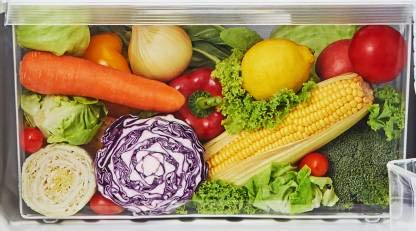
Figure 2.2: Dimensions of the TOSHIBA GR-B31INU(UK) Refrigerator. The image indicates a height of 164.0 cm, depth of 62.3 cm, and width of 54.5 cm.
3. Setup and Installation
3.1 Unpacking
Carefully remove all packaging materials. Inspect the refrigerator for any damage. Keep packaging materials away from children.
3.2 Placement
Place the refrigerator on a firm, level surface. Ensure adequate ventilation around the appliance. Avoid direct sunlight or heat sources. Maintain a minimum clearance of 10 cm from walls on the sides and back, and 30 cm from the top.
3.3 Leveling
Adjust the leveling feet at the bottom of the refrigerator to ensure it is stable and level. This helps in proper door alignment and efficient operation.
3.4 Power Connection
Connect the power cord to a dedicated, grounded electrical outlet. Do not use extension cords or adapters. Allow the refrigerator to stand for at least 2-4 hours before plugging it in to allow refrigerants to settle.
4. Operating Instructions
4.1 Temperature Control
The refrigerator features a temperature control dial located inside the fresh food compartment. Rotate the dial to adjust the cooling intensity. Higher numbers typically indicate colder settings.

Figure 4.1: Internal view of the refrigerator showing the temperature control dial. The dial allows adjustment from MIN to MAX for desired cooling levels.
4.2 Ag+BIO Deodorizer
The Ag+BIO Deodorizer system helps to filter out odor molecules and bacteria, maintaining the true flavors of food and keeping it fresh for longer. This feature operates automatically.

Figure 4.2: Diagram illustrating the function of the Ag+BIO Deodorizer. It shows how the deodorizing unit with photocatalyst filters cleans the air, removing odors and bacteria.
4.3 Chiller Room Cooling
The dedicated Chiller Room provides a lower temperature zone ideal for storing specific items that require colder conditions, such as dairy products or beverages, to maintain freshness.

Figure 4.3: Visual representation of the Chiller Room cooling. Arrows indicate air circulation within the chiller zone, ensuring consistent low temperatures for stored items.
4.4 Storage Compartments
The refrigerator is equipped with toughened glass shelves, a large vegetable box, and adjustable door pockets for flexible storage. The freezer compartment includes an ice tray and additional storage space.

Figure 4.4: Interior view of the refrigerator, showcasing the various shelves, door bins, and the large vegetable box filled with produce.
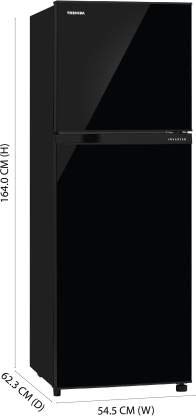
Figure 4.5: Close-up view of the large vegetable box, designed to store a significant quantity of fruits and vegetables, helping to keep them fresh.
5. Maintenance and Cleaning
5.1 Cleaning the Interior
Before cleaning, unplug the refrigerator. Use a soft cloth dampened with a mild detergent solution to clean the interior surfaces, shelves, and drawers. Rinse with clean water and dry thoroughly. Do not use abrasive cleaners or solvents.
5.2 Cleaning the Exterior
Wipe the exterior surfaces with a soft, damp cloth. For the black uni-glass finish, use a glass cleaner if necessary, applied to the cloth first, not directly to the surface. Ensure the surface is dry after cleaning.
5.3 Defrosting
This refrigerator features a frost-free system, eliminating the need for manual defrosting of the freezer compartment. However, ensure the freezer door is always properly closed to prevent excessive frost buildup.
5.4 Power Outage
In case of a power outage, keep the refrigerator doors closed to maintain the internal temperature for as long as possible. Avoid opening the doors unnecessarily.
6. Troubleshooting
| Problem | Possible Cause | Solution |
|---|---|---|
| Refrigerator not cooling | Power cord unplugged; Temperature setting too high; Door not closed properly; Insufficient ventilation. | Check power connection; Adjust temperature control; Ensure door is sealed; Provide adequate clearance around the unit. |
| Unusual noises | Refrigerator not level; Items rattling inside; Compressor noise (normal). | Adjust leveling feet; Rearrange items; Compressor noise is normal during operation. |
| Water on floor/inside | Drain tube clogged; Door left open too long. | Clear drain tube (refer to service manual if needed); Ensure door is closed properly. |
| Odor inside refrigerator | Food items causing odor; Ag+BIO Deodorizer filter needs cleaning/replacement (rare). | Remove and clean shelves/interior; Ensure food is properly sealed; The Ag+BIO Deodorizer is designed for long-term effectiveness. |
If the problem persists after attempting these solutions, please contact customer support.
7. Specifications
| Feature | Detail |
|---|---|
| Brand | TOSHIBA |
| Model | GR-B31INU(UK) |
| Capacity | 272 Litres |
| Energy Rating | 2 Star |
| Defrost System | Automatic (Frost-Free) |
| Compressor Type | Inverter Compressor |
| Colour | Black UniGlass |
| Shelf Type | Toughened Glass |
| Dimensions (LxWxH) | 54.5 x 62.3 x 164 Centimeters |
| Item Weight | 44 kg |
| Special Features | Ag+BIO Deodorizer, Big Vegetable Box, Chiller Room Cooling, Real Inverter |
8. Warranty and Support
This TOSHIBA refrigerator comes with a manufacturer's warranty. Please refer to the warranty card included with your purchase for specific terms and conditions.
- Product Warranty: 1 year on the product.
- Compressor Warranty: 10 years on the compressor (Terms & Conditions apply).
For technical support, service requests, or warranty claims, please contact TOSHIBA customer service. Contact details can typically be found on the warranty card or the official TOSHIBA website.