
1. Introduction
This manual provides comprehensive instructions for the safe and efficient operation of your new Panasonic NN-ST26JMFDG 20L Solo Microwave Oven. Please read all instructions carefully before using the appliance and retain this manual for future reference.
The Panasonic NN-ST26JMFDG is designed for reheating, defrosting, and cooking various food items using microwave energy. Its compact design makes it suitable for small kitchens and countertops.
2. Product Overview
The Panasonic NN-ST26JMFDG is a 20-liter solo microwave oven featuring 800 watts of power, a digital display, and a touch keypad for ease of use. It includes 51 auto cook menus, auto reheat, auto defrost, and a vapor clean function.
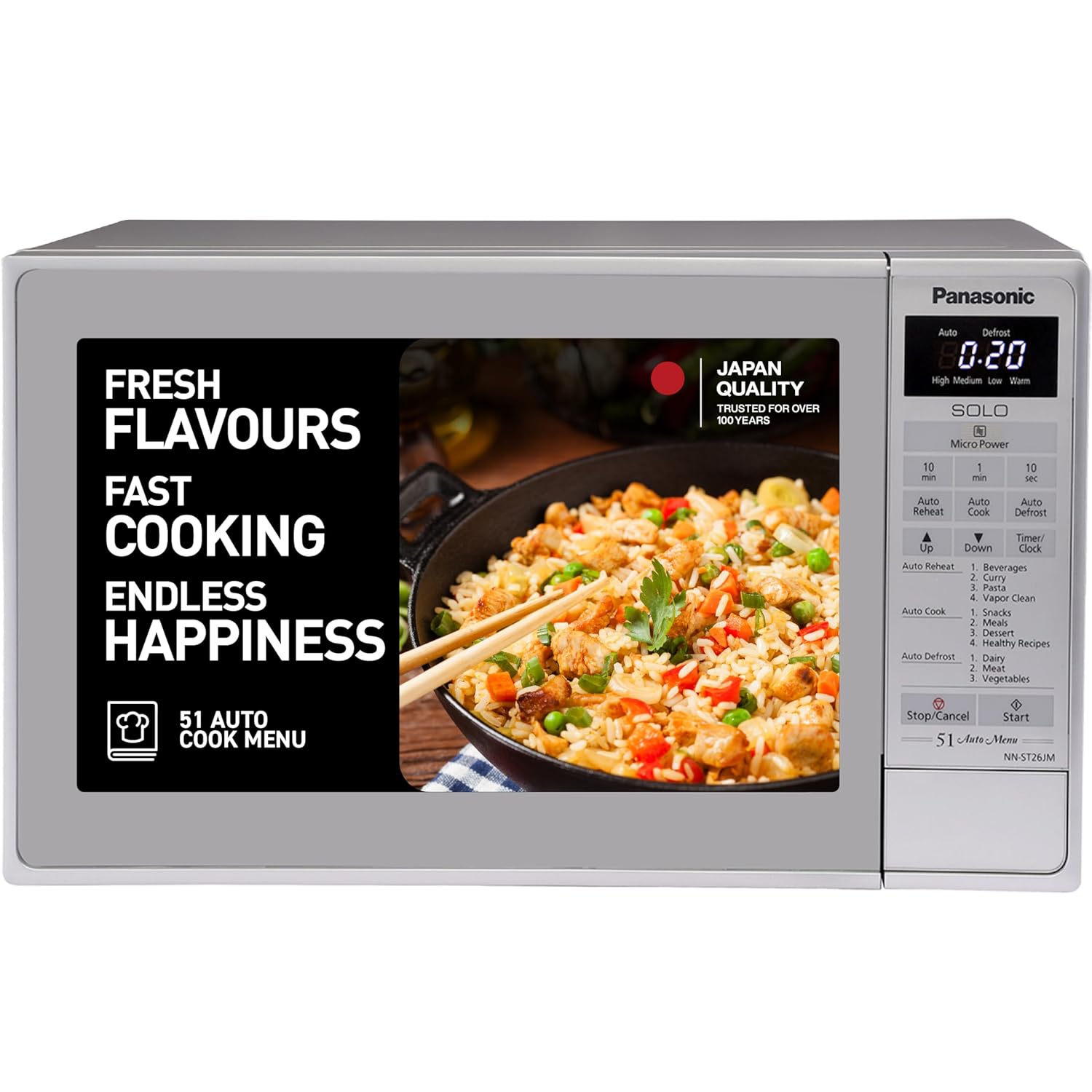
Figure 1: Panasonic NN-ST26JMFDG 20L Solo Microwave Oven

Figure 2: Key Features Overview

Figure 3: Microwave Oven Dimensions
3. Setup
3.1 Unpacking and Placement
- Carefully remove the microwave oven and all packing materials from the carton.
- Place the oven on a flat, stable surface that is strong enough to hold the oven and the food you place in it.
- Ensure adequate ventilation by leaving at least 10 cm of space at the back, 20 cm at the top, and 5 cm on each side.
- Do not block any ventilation openings.
- Keep the oven away from heat sources and strong magnetic fields.
3.2 Installing the Turntable
Your microwave oven comes with a glass turntable and a rotating ring. These components are essential for proper operation.
- Place the rotating ring securely in the center of the oven cavity.
- Carefully place the glass turntable on top of the rotating ring, ensuring it sits properly in the center support.
Note: Always ensure the turntable and rotating ring are correctly positioned before operating the oven.
3.3 Power Connection
Plug the power cord into a grounded electrical outlet. Ensure the voltage matches the specifications listed on the product label.
4. Operating Instructions
4.1 Control Panel
The microwave oven features an LED display and a touch keypad for easy control. The display shows cooking time, power level, and other relevant information.

Figure 4: Control Panel Layout
4.2 Basic Microwave Cooking
- Place food in a microwave-safe container on the glass turntable.
- Close the oven door.
- Press the 'Micro Power' button to select the desired power level (High, Medium, Low, Warm).
- Use the '10 min', '1 min', and '10 sec' buttons to set the desired cooking time.
- Press 'Start' to begin cooking.
- To stop cooking, press 'Stop/Cancel'.
4.3 Auto Reheat Function
The Auto Reheat function allows for quick and even reheating of various food items. Follow these steps:
- Place the food to be reheated in a microwave-safe dish.
- Press the 'Auto Reheat' button.
- Select the appropriate food category (e.g., Beverages, Curry, Pasta) using the 'Up' or 'Down' buttons.
- Press 'Start' to begin reheating.
4.4 Auto Defrost Function
The Auto Defrost function provides quick and even defrosting of frozen items. Follow these steps:
- Place the frozen food in a microwave-safe dish.
- Press the 'Auto Defrost' button.
- Select the appropriate food category (e.g., Dairy, Meat, Vegetables) using the 'Up' or 'Down' buttons.
- Press 'Start' to begin defrosting.
4.5 Auto Cook Menu (51 Preset Recipes)
The oven includes 51 pre-programmed recipes for various dishes, simplifying the cooking process. To use this feature:
- Place the ingredients in a microwave-safe dish.
- Press the 'Auto Cook' button.
- Use the 'Up' or 'Down' buttons to scroll through the recipe categories (Snacks, Meals, Dessert, Healthy Recipes) and select the desired recipe number.
- Press 'Start' to begin cooking.

Figure 5: 51 Auto Cook Menu Categories
5. Maintenance
5.1 Vapor Clean Function
The Vapor Clean function helps keep the oven interior odor-free and stain-free. To use:
- Place a bowl of water with a few slices of lemon or lime inside the oven.
- Press the 'Vapor Clean' button (found under Auto Reheat options).
- The oven will generate steam to loosen food particles and neutralize odors.
- After the cycle, carefully remove the bowl and wipe the interior with a soft, damp cloth.

Figure 6: Vapor Clean in Action
5.2 General Cleaning
- Always unplug the oven before cleaning.
- Clean the interior and exterior surfaces with a soft, damp cloth and mild detergent.
- The glass turntable and rotating ring can be washed with warm soapy water or in a dishwasher.
- Do not use abrasive cleaners or harsh chemicals.
6. Safety Features
Your Panasonic microwave oven is equipped with safety features to ensure secure operation:
- Child Lock: Prevents accidental operation by children. Refer to the detailed instructions in the full user manual for activation.
- Overheat Protection: Automatically shuts down the oven if it detects excessive temperatures, preventing damage and ensuring safety.
- 30 Sec Plus: Allows for quick addition of 30 seconds to the cooking time, useful for minor adjustments without stopping the cycle.

Figure 7: Safety Features
7. Troubleshooting
If you encounter any issues with your microwave oven, please refer to the following common troubleshooting tips:
- Oven not starting: Ensure the power cord is securely plugged in, the door is fully closed, and the circuit breaker has not tripped.
- Food not heating: Check that the cooking time and power level are set correctly. Ensure the door is properly latched.
- Unusual noises: Verify that the turntable and rotating ring are correctly placed and not obstructed.
- Display not working: Unplug the oven for a few minutes, then plug it back in to reset the system.
For more detailed troubleshooting or persistent issues, please contact Panasonic customer support.
8. Specifications
| Feature | Specification |
|---|---|
| Brand | Panasonic |
| Model | NN-ST26JMFDG |
| Capacity | 20 Liters |
| Oven Cooking Mode | Solo |
| Wattage | 800 Watts |
| Voltage | 230 Volts |
| Installation Type | Countertop |
| Color | Silver |
| Material | Iron |
| Item Weight | 10 kg 500 g |
| Item Dimensions (LxWxH) | 44.3 x 34 x 25.8 Centimeters |
| Special Features | Defrost, Turntable, Auto Heat, Timer, Compact, Vapor Clean, Auto Cook |
| Included Components | MWO Unit, Turntable, Rotating Ring, User Manual |
9. Warranty and Support
Your Panasonic NN-ST26JMFDG 20L Solo Microwave Oven comes with a manufacturer's warranty. Please refer to the warranty card included with your product for specific terms and conditions.
For technical assistance, service requests, or to purchase genuine spare parts, please contact Panasonic customer support through their official website or authorized service centers. Keep your purchase receipt and product model number handy when contacting support.