
Welcome
Thank you for choosing the Skull Shaver Pitbull Silver PRO electric shaver. This manual provides essential information for the safe and effective use, maintenance, and care of your device. Please read it thoroughly before first use and retain it for future reference.

Image: The Skull Shaver Pitbull Silver PRO electric shaver, showcasing its ergonomic design and rotary blades.
Safety Information
To ensure safe operation and prevent injury or damage, observe the following safety guidelines:
- Avoid direct contact with water during charging.
- Do not use the shaver while it is connected to a power source for charging.
- Always unplug the shaver from the power source before cleaning.
- Keep the device away from excessive heat sources.
- Do not use the shaver if it appears damaged in any way.
- Only use genuine Skull Shaver replacement blade heads.
- Adhere to the instructions in this user manual for proper use and maintenance.
Product Features
The Pitbull Silver PRO electric shaver incorporates several design elements for an efficient and comfortable shaving experience:
- Pivoting Blades: Features ultra-flexible pivoting blades designed for extended reach and multi-directional shaving, adapting to contours.
- Wet & Dry Shaving: Equipped with IPX5 water resistance technology, allowing for both wet and dry shaving, with or without shaving foam.
- Easy Cleaning: The PRO blades are designed for deep cleaning, separating to provide access to the internal storage chamber for trapped hairs.
- Cordless Operation: USB rechargeable with a battery life LED indicator. Can also operate in plug-and-shave mode.
- Smooth Shave: The Baron 3-head blade system aims to provide a smooth, quick shave without nicks or cuts. It uses a quick-twist locking mechanism for easy blade replacement.
- Irritation Protection: Baron PRO blades are spring-loaded to maintain optimal pressure against the skin, reducing irritation. The shaver slows down if excessive pressure is applied, providing an audible reminder.
Setup
1. Initial Charging
Before first use, fully charge your Pitbull Silver PRO shaver. Connect the USB charging cable to the shaver and a compatible USB power adapter. The LED indicator will show charging status. A full charge typically takes approximately 2.5 hours and provides up to 90 minutes of cordless use.
2. Attaching/Detaching Blade Head
The shaver comes with a detachable blade head. To attach, align the blade head with the shaver body and twist clockwise until it locks securely. To detach, twist counter-clockwise and pull gently. Ensure the shaver is turned off before attaching or detaching the blade head.

Image: A close-up view of the Pitbull Silver PRO's rotary blade head, showing the three cutting rings.
Operating Instructions
1. Powering On/Off
Press the power button located on the shaver body to turn the device on or off.
2. Wet and Dry Shaving
The Pitbull Silver PRO is designed for both wet and dry shaving. For a dry shave, ensure your skin is clean and dry. For a wet shave, you may use water, shaving cream, or gel. The IPX5 water resistance allows for use in the shower.
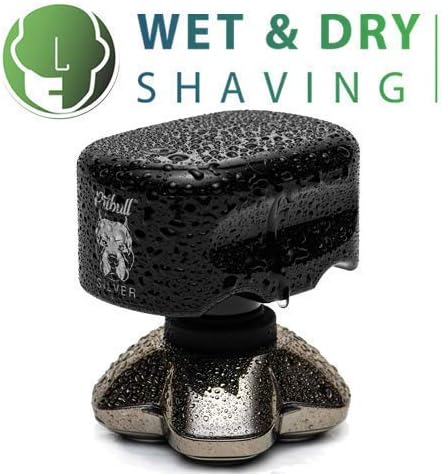
Image: The Pitbull Silver PRO shaver head covered in water droplets, illustrating its wet shaving capability.
3. Shaving Technique (Head and Face)
Hold the shaver firmly in your hand, ensuring a comfortable grip. Gently press the shaver against your skin and move it in small, circular motions. The flexible pivoting blades will adapt to the contours of your head or face. Avoid applying excessive pressure; the shaver will audibly slow down if too much pressure is applied, indicating a need to reduce force.

Image: A hand demonstrating the ergonomic grip of the Pitbull Silver PRO shaver, designed for comfortable handling.
Maintenance
1. Cleaning the Shaver
Regular cleaning is crucial for maintaining optimal performance. After each shave, turn off the shaver and detach the blade head. Rinse the blade head under running water to remove hair clippings. For a deeper clean, the blades can be separated to access the internal storage chamber. Ensure all parts are dry before reassembling or storing.

Image: The Pitbull Silver PRO blade head separated from its base, illustrating the easy cleaning feature.
2. Blade Replacement
For best shaving results, replace the blade head every 3 to 6 months, depending on usage. To replace, detach the old blade head as described in the Setup section. Align the new genuine Skull Shaver replacement blade head and twist clockwise until it clicks into place.
Troubleshooting
If you encounter issues with your Pitbull Silver PRO shaver, refer to the table below for common problems and solutions.
| Problem | Possible Cause | Solution |
|---|---|---|
| Shaver does not turn on | Low battery; Device not charged; Power button malfunction | Charge the shaver fully. Ensure the charging cable is properly connected. If problem persists, contact support. |
| Poor shaving performance | Blades are dull or clogged; Insufficient cleaning; Incorrect shaving technique | Clean the blade head thoroughly. Consider replacing the blade head. Ensure you are using gentle, circular motions. |
| Shaver stops during use | Low battery; Excessive pressure applied | Recharge the shaver. Reduce pressure during shaving. |
| Skin irritation after shaving | Excessive pressure; Dry shaving sensitive skin; Dull blades | Use less pressure. Try wet shaving with foam. Replace blade head if dull. |
Specifications
| Model Name | Pitbull Silver PRO |
| Brand Name | Skull Shaver |
| Recommended Uses | Face, Scalp |
| Power Source | Battery Powered |
| Battery Type | Rechargeable |
| Head Type | Rotary |
| Number of Blades | 3 |
| Blade Material | Stainless Steel |
| Color | Silver |
| Additional Features | Rechargeable, Waterproof (IPX5) |
Warranty and Support
For specific warranty details and customer support, please refer to the documentation included with your product or visit the official Skull Shaver website. You can also find more information and contact the seller, Skull Shaver, through their official store page.
Visit the Skull Shaver Store for additional products and support resources.
