
1. Product Overview
The Wetorcke Vinyl Record Player Style Bluetooth Speaker (Model SK-X10) combines vintage aesthetics with modern audio technology. Inspired by 1950s phonographs, this compact speaker delivers rich, loud sound with bass enhancement. It supports Bluetooth, TF Card, and AUX audio input modes, making it versatile for various uses.

Image: Front view of the Wetorcke Vinyl Record Player Style Bluetooth Speaker in green, showcasing its vintage design with a record player top and a front speaker grille.
2. Package Contents
Please ensure all items are present in the package:
- 1 x SK-X10 Bluetooth Speaker
- 1 x USB Charging Cable
- 1 x AUX Cable
- 1 x User Manual (this document)
3. Specifications
| Feature | Detail |
|---|---|
| Model | SK-X10 (also known as X10) |
| Dimensions (L*W*H) | 112.4mm x 105mm x 57mm (4.42 x 4.13 x 2.24 inches) |
| Weight | 300g (0.66 lb / 10.6 ounces) |
| Battery | 3.7V 1000mAh Li-ion |
| Charging Time | 2-3 hours |
| Speaker Output | 40mm, 4Ω, 5W |
| Charging Input | DC 5V1A (USB Type Charger Interface) |
| Bluetooth Version | 4.1+EDR |
| Bluetooth Range | Up to 10 meters (32.8 feet) |
| Material | Acrylonitrile Butadiene Styrene |
| On-mode Power Consumption | 5 watts |
4. Setup
4.1 Charging the Speaker
Before first use, fully charge the speaker. Connect the provided USB charging cable to the speaker's charging port and the other end to a compatible USB power source (e.g., computer USB port, USB wall adapter). The charging indicator light will show the charging status. A full charge takes approximately 2-3 hours.
4.2 Powering On/Off
To power on the speaker, gently move the "needle" (tonearm-like lever) from its resting position over the "record" on top of the speaker. To power off, return the "needle" to its resting position.
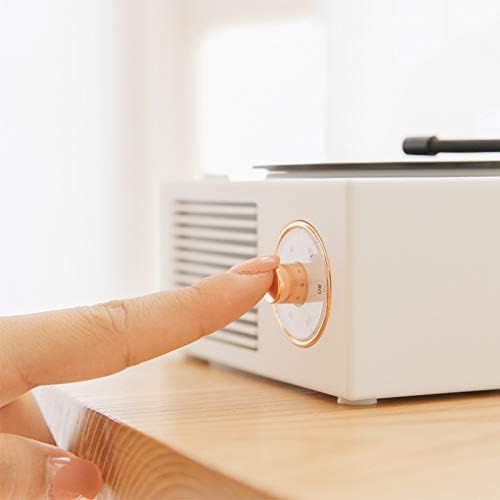
Image: A hand demonstrating the adjustment of the mechanical knob on the side of the speaker, which controls power and volume.
5. Operating Instructions
5.1 Bluetooth Mode
- Ensure the speaker is powered on. It will automatically enter Bluetooth pairing mode, indicated by a voice prompt "Bluetooth mode".
- On your mobile device (smartphone, tablet, etc.), enable Bluetooth and search for available devices.
- Select "SK-X10" from the list of devices. Once connected, you will hear a confirmation sound.
- You can now play audio from your device through the speaker.
5.2 AUX Input Mode
Use the provided AUX cable to connect the speaker to any audio device with a 3.5mm audio output jack. The speaker will automatically switch to AUX mode when the cable is inserted.
5.3 TF Card Mode
Insert a TF (MicroSD) card loaded with audio files into the designated slot on the speaker. The speaker will automatically detect the card and begin playing music from it.
5.4 Volume Control
Adjust the volume by rotating the mechanical knob on the side of the speaker. Rotate clockwise to increase volume and counter-clockwise to decrease volume.

Image: Side view of the green Wetorcke speaker, highlighting the speaker grille and the control knob.
6. Maintenance
- Keep the speaker away from water and excessive moisture.
- Avoid exposing the speaker to direct sunlight or extreme temperatures.
- Clean the speaker with a soft, dry cloth. Do not use abrasive cleaners or solvents.
- Store the speaker in a cool, dry place when not in use for extended periods.
7. Troubleshooting
| Problem | Possible Solution |
|---|---|
| Speaker does not power on. | Ensure the "needle" is moved to the ON position. Check battery level and charge the speaker if necessary. |
| Cannot connect via Bluetooth. | Ensure the speaker is in Bluetooth pairing mode. Turn off and on Bluetooth on your device. Move the speaker closer to your device. |
| No sound or low volume. | Increase the volume on both the speaker and your connected device. Check if the AUX cable is fully inserted if using AUX mode. |
| Sound distortion. | Decrease the volume. Ensure the audio source is not distorted. Move away from sources of interference. |
8. Warranty and Support
The Wetorcke Vinyl Record Player Style Bluetooth Speaker comes with a one-year warranty. If you encounter any issues during use, please feel free to contact Wetorcke customer support for assistance. We are committed to providing quality after-sales service.
For support, please refer to the contact information provided on the product packaging or the official Wetorcke website.