
Toshiba MW2-AC25TF(BK)
Toshiba MW2-AC25TF(BK) 4-in-1 Microwave Oven User Manual
Model: MW2-AC25TF(BK)
1. Introduction
Thank you for purchasing the Toshiba MW2-AC25TF(BK) 4-in-1 Microwave Oven. This versatile appliance combines microwave, hot air (convection), grill, and combination functions, offering a wide range of cooking possibilities. Please read this manual thoroughly before operating the appliance and retain it for future reference. Proper use and maintenance will ensure years of reliable service.

Figure 1: Front view of the Toshiba MW2-AC25TF(BK) 4-in-1 Microwave Oven, showcasing its sleek black design and digital display.
2. Important Safety Instructions
When using electrical appliances, basic safety precautions should be followed, including the following:
- Read all instructions before using the appliance.
- Do not attempt to operate this oven with the door open as this can result in harmful exposure to microwave energy.
- Do not place any object between the oven front face and the door or allow soil or cleaner residue to accumulate on sealing surfaces.
- Do not operate the oven if it is damaged. It is particularly important that the oven door closes properly and that there is no damage to the door (bent), hinges and latches (broken or loosened), or door seals and sealing surfaces.
- The oven should not be adjusted or repaired by anyone except properly qualified service personnel.
- Ensure the appliance is properly grounded.
- Do not use corrosive chemicals or vapors in this appliance.
- Always use oven mitts when handling hot items from the oven.
3. Product Features
The Toshiba MW2-AC25TF(BK) is designed with user convenience and cooking versatility in mind. Key features include:
- Versatile 4-in-1 Functionality: Combines microwave, hot air (convection), grill, and combination cooking modes in a single appliance.
- 10 Convenient Automatic Programs: Pre-programmed settings for popular dishes like pizza, potatoes, vegetables, and more, printed on the appliance for easy reference.
- Easy-to-Clean Ceramic Enamel Interior: Durable, scratch-resistant, and features a certified 99.9% antibacterial effect for hygienic cooking.
- Practical Equipment: Includes weight/time defrost, multi-stage cooking, child safety lock, time display, and kitchen timer.
- Powerful Performance: 900W microwave power (5 levels), 1100W grill power, and 2100W hot air power.
- Position Memory Turntable: The 315mm turntable returns to its original position after cooking, making it easier to remove dishes.
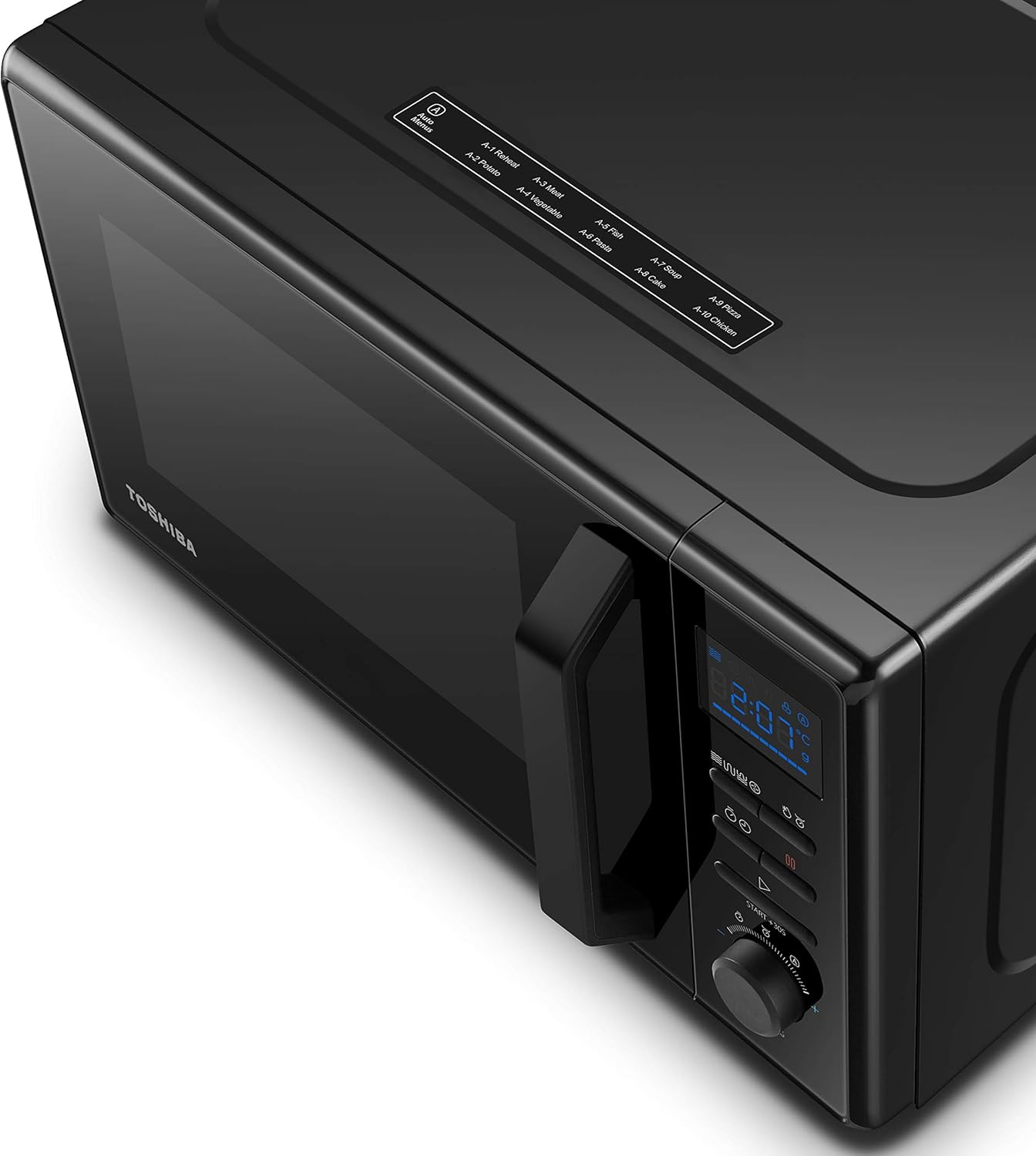
Figure 2: Top view of the microwave, highlighting the convenient labels for the 10 automatic cooking programs.
4. Setup
Follow these steps to set up your new microwave oven:
- Unpacking: Carefully remove the microwave oven and all packing materials. Check for any damage. Do not operate if damaged.
- Placement: Place the oven on a flat, stable surface strong enough to hold its weight. Ensure adequate ventilation space around the oven (at least 20cm above, 10cm at the rear, and 5cm on each side). Do not block air vents.
- Turntable Installation:
- Place the turntable ring on the oven floor.
- Place the glass turntable securely on top of the turntable ring. Ensure it is properly seated in the center hub.
- Power Connection: Plug the power cord into a grounded electrical outlet. Ensure the voltage matches the appliance's requirements (230 Volts).

Figure 3: Interior view of the microwave with the door open, illustrating the placement of the glass turntable and the ceramic enamel interior.
5. Operating Instructions
This section details how to use the various functions of your Toshiba 4-in-1 Microwave Oven.
5.1. Setting the Clock
To set the current time:
- Press the "Clock" button.
- Rotate the "Setting" dial to set the hour.
- Press the "Clock" button again.
- Rotate the "Setting" dial to set the minutes.
- Press the "Clock" button to confirm.
5.2. Microwave Cooking
For standard microwave heating:
- Place food in a microwave-safe container on the turntable.
- Press the "Microwave" button repeatedly to select desired power level (P100, P80, P50, P30, P10).
- Rotate the "Setting" dial to set the cooking time.
- Press "Start/+30s" to begin cooking.
5.3. Grill Cooking
Ideal for browning and crisping food surfaces:
- Place food on the grill rack (if provided) or a heat-resistant dish.
- Press the "Grill" button.
- Rotate the "Setting" dial to set the cooking time.
- Press "Start/+30s" to begin grilling.
5.4. Hot Air (Convection) Cooking
For baking and roasting, similar to a conventional oven:
- Press the "Hot Air" button repeatedly to select desired temperature (e.g., 110°C to 200°C).
- Rotate the "Setting" dial to set the cooking time.
- Press "Start/+30s" to begin. Preheating may occur automatically depending on the setting.
5.5. Combination Cooking
Combines microwave with grill or hot air for faster, more even cooking:
- Press the "Combi" button repeatedly to select desired combination mode (e.g., Combi 1 for Microwave + Grill, Combi 2 for Microwave + Hot Air).
- Rotate the "Setting" dial to set the cooking time.
- Press "Start/+30s" to begin.
5.6. Automatic Programs
Use the pre-set programs for common foods:
- Refer to the program list on the top of the appliance (A-1 to A-10).
- Press the "Auto Menu" button.
- Rotate the "Setting" dial to select the desired program number.
- Press "Start/+30s" to confirm and start.
5.7. Defrost Function
Defrost food by weight or time:
- Defrost by Weight: Press the "Defrost" button once. Rotate the "Setting" dial to select the food weight. Press "Start/+30s".
- Defrost by Time: Press the "Defrost" button twice. Rotate the "Setting" dial to set the defrosting time. Press "Start/+30s".
5.8. Child Safety Lock
To activate the child lock, press and hold the "Stop/Cancel" button for 3 seconds. The lock indicator will appear on the display. To deactivate, press and hold the "Stop/Cancel" button again for 3 seconds.

Figure 4: The Toshiba microwave oven positioned on a kitchen counter, demonstrating its integration into a modern kitchen setting with prepared food.
6. Maintenance and Cleaning
Regular cleaning and maintenance will prolong the life of your appliance and ensure optimal performance.
- Interior Cleaning: The ceramic enamel interior is easy to clean. Wipe the inside of the oven with a damp cloth after each use. For stubborn stains, use a mild detergent and then wipe with a clean, damp cloth. Do not use abrasive cleaners or scouring pads.
- Exterior Cleaning: Wipe the exterior surfaces with a soft, damp cloth. Avoid getting water into the ventilation openings.
- Turntable and Ring: The glass turntable and turntable ring can be removed and washed in warm soapy water or in a dishwasher. Ensure they are completely dry before placing them back in the oven.
- Oven Door: Clean the door seals and sealing surfaces regularly with a soft, damp cloth to ensure proper closure and operation.
- Odor Removal: To remove odors, combine a cup of water with the juice of one lemon in a microwave-safe bowl. Microwave on high for 5-7 minutes. Let it cool, then wipe the interior.
7. Troubleshooting
If you encounter issues with your microwave oven, refer to the following common problems and solutions:
| Problem | Possible Cause | Solution |
|---|---|---|
| Oven does not start. | Power cord not plugged in; Door not closed properly; Fuse blown or circuit breaker tripped. | Ensure power cord is securely plugged in; Close the door firmly; Check household fuse/circuit breaker. |
| Food not heating. | Door not closed properly; Incorrect power level or cooking time set. | Ensure door is fully closed; Verify power level and cooking time settings. |
| Turntable not rotating. | Turntable not properly seated; Turntable ring dirty or damaged. | Re-seat the turntable and ring; Clean the turntable ring and oven floor; Check for obstructions. |
| Unusual noise during operation. | Food container touching oven walls; Turntable not properly seated. | Ensure container is not touching walls; Re-seat turntable. |
8. Specifications
Detailed technical specifications for the Toshiba MW2-AC25TF(BK) Microwave Oven:
| Specification | Value |
|---|---|
| Model Number | MW2-AC25TF(BK) |
| Brand | Toshiba |
| Capacity | 25 Litres |
| Microwave Power | 900 Watts |
| Grill Power | 1100 Watts |
| Hot Air (Convection) Power | 2100 Watts |
| Voltage | 230 Volts |
| Installation Type | Freestanding |
| Color | Black |
| Interior Material | Ceramic Enamel |
| Product Dimensions (L x W x H) | 51.3 x 31 x 51.3 cm |
| Weight | 18.2 Kilograms |
| Energy Efficiency Class | A |
| Components Included | Microwave oven, glass turntable |
9. Warranty and Support
For warranty information and technical support, please refer to the warranty card included with your product or visit the official Toshiba website. Keep your purchase receipt as proof of purchase for any warranty claims.
For further assistance, you may contact Toshiba customer service through their official channels. Details can typically be found on the manufacturer's website or in the product packaging.