
whall 745681716412
Whall Cordless Vacuum Cleaner 11PINS Battery User Manual
Model: 745681716412
Introduction
This manual provides essential information for the safe and effective use of your Whall Cordless Vacuum Cleaner 11PINS Battery. Please read this manual thoroughly before installation and operation, and retain it for future reference.

Image: The Whall 11PINS Cordless Vacuum Cleaner Battery, shown in blue, designed as a replacement power source for compatible Whall vacuum models.
Safety Information
Always observe the following safety precautions to prevent injury or damage to the battery and vacuum cleaner:
- Do not disassemble, modify, or attempt to repair the battery.
- Keep the battery away from heat sources, direct sunlight, and flammable materials.
- Do not immerse the battery in water or other liquids.
- Use only the charger specified by Whall for this battery.
- Dispose of used batteries according to local regulations. Do not dispose of in household waste.
- Ensure the battery is compatible with your vacuum cleaner model (11-pin connector) before installation.
Setup and Installation
This battery is designed for Whall cordless vacuum cleaners that utilize an 11-pin battery connector. Verify compatibility before proceeding.
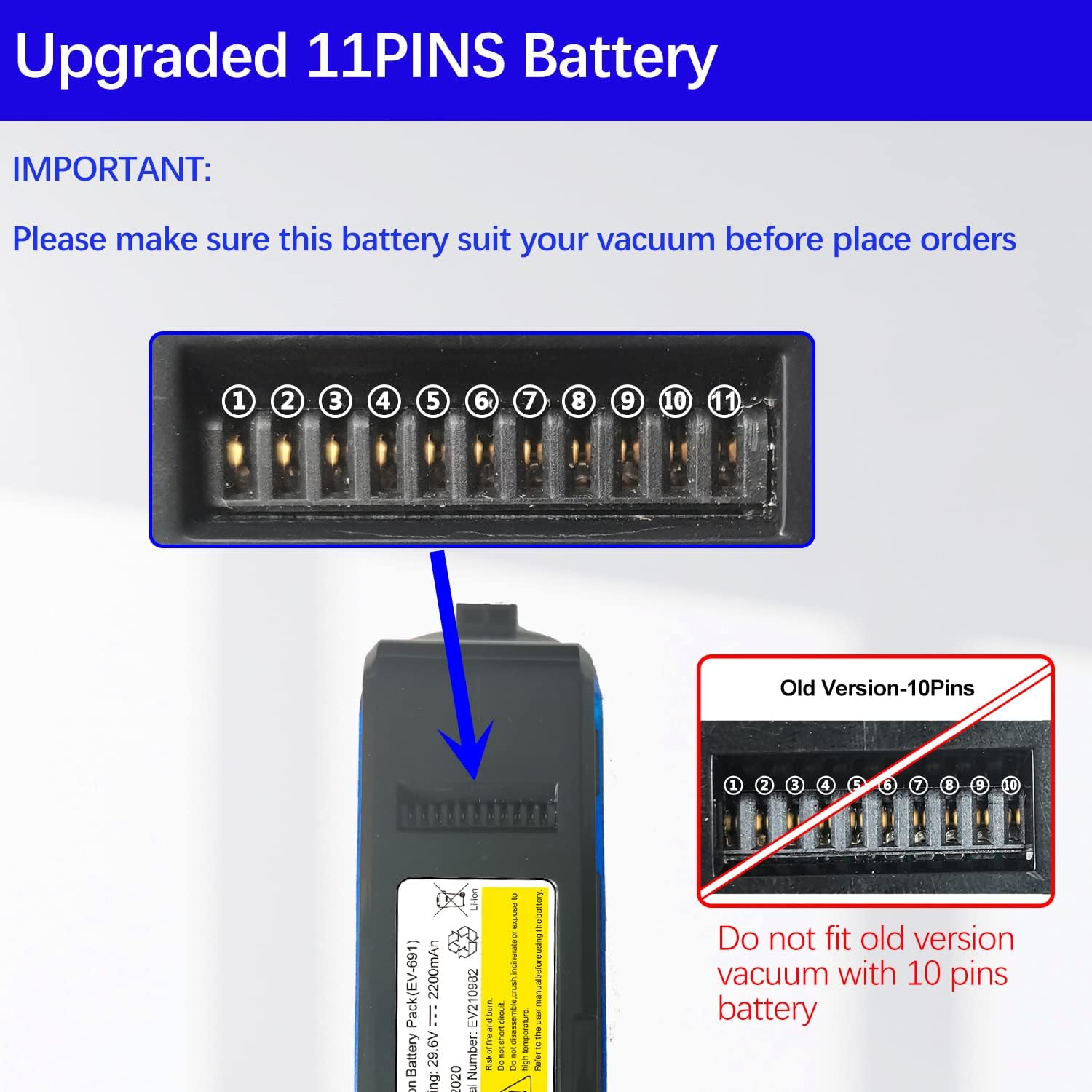
Image: A visual comparison highlighting the 11-pin connector of the new battery versus an older 10-pin version. It is crucial to ensure your vacuum cleaner requires an 11-pin battery for proper fit and function.
- Power Off: Ensure your Whall cordless vacuum cleaner is completely powered off and unplugged from any charging source.
- Locate Battery Compartment: Identify the battery compartment on your vacuum cleaner. This is typically located on the main body of the vacuum.
- Remove Old Battery (if applicable): If replacing an existing battery, press any release buttons or unlatch clips to remove the old battery.
- Insert New Battery: Align the 11-pin connector of the new Whall battery with the corresponding slot in the vacuum cleaner. Gently push the battery into place until it clicks securely. Do not force the battery.
- Initial Charge: For optimal performance, fully charge the new battery before its first use. Connect the vacuum cleaner to its charging adapter and plug it into a power outlet.
Operating Instructions
Once installed and charged, the battery powers your Whall cordless vacuum cleaner. The operation of the vacuum cleaner itself is detailed in its primary user manual.
- Powering On/Off: The battery provides power when the vacuum's power button is pressed.
- Charging: When the battery level is low, connect the vacuum to its charger. The charging indicator on the vacuum will typically show charging status.
- Battery Life: Battery life varies depending on the vacuum's power setting and usage. Higher power settings consume more battery life.
Maintenance
Proper maintenance extends the life of your battery:
- Regular Charging: Charge the battery regularly, even if the vacuum is not used frequently, to maintain battery health. Avoid letting the battery completely discharge for extended periods.
- Storage: If storing the battery for a long time, charge it to approximately 50-60% and store it in a cool, dry place away from direct sunlight. Recharge every 3-6 months.
- Cleaning: Wipe the battery's exterior with a dry, soft cloth. Do not use harsh chemicals or abrasive cleaners. Ensure the contact points are clean and free of debris.
- Temperature: Avoid exposing the battery to extreme temperatures (hot or cold), as this can degrade performance and lifespan.
Troubleshooting
| Problem | Possible Cause | Solution |
|---|---|---|
| Battery not charging. | Charger not connected properly; faulty charger; battery too hot/cold; battery defect. | Ensure charger is securely connected. Try a different outlet. Allow battery to reach room temperature. Contact customer support if issues persist. |
| Vacuum not powering on with new battery. | Battery not fully inserted; incorrect battery type (e.g., 10-pin instead of 11-pin); battery not charged. | Re-insert battery firmly. Verify your vacuum requires an 11-pin battery. Fully charge the battery before use. |
| Short battery life. | Battery not fully charged; high power mode usage; battery degradation over time. | Ensure full charge. Use lower power modes when possible. Battery lifespan naturally decreases with age and cycles. |
If you encounter problems not listed here, or if solutions do not resolve the issue, please contact Whall customer support.
Specifications
| Feature | Detail |
|---|---|
| Brand | Whall |
| Model Number | 745681716412 |
| Battery Type | Lithium-Ion |
| Included Components | Battery |
| Product Dimensions | 7.28 x 1.89 x 2.24 inches |
| Item Weight | 1.04 pounds |
| Compatibility | Whall Cordless Vacuum Cleaners with 11-pin battery connector |
Warranty and Support
For warranty information and customer support, please refer to the original purchase documentation or visit the official Whall website. Keep your proof of purchase for any warranty claims.
Whall Official Store: Visit the Whall Store on Amazon
Ask a question about this manual
Ask about setup, troubleshooting, compatibility, parts, safety, or missing instructions. Manuals+ will review the question and use this page’s manual context to help answer it.