
ANNE FJ-L-1024
ANNE Car Rear View Camera User Manual
Model: FJ-L-1024
Introduction
This manual provides detailed instructions for the installation, operation, and maintenance of your ANNE Car Rear View Camera. Please read this manual thoroughly before installation and use to ensure proper function and safety.
The ANNE Car Rear View Camera is designed to enhance vehicle safety by providing a clear, wide-angle view of the area behind your vehicle, assisting with parking and reversing maneuvers.
Product Overview
The ANNE Car Rear View Camera is a high-quality, waterproof, and shockproof camera featuring HD CCD night vision and a wide viewing angle. It is specifically designed for Mercedes Benz E Class C207 W207 models from 2009-2015, including E200, E260, E300, E350, and E63 AMG.
Package Contents:
- 1 x CCD Car Rear View Camera
- 1 x 6M RCA Video Cable
- 1 x 12V DC Power Cable
Key Features:
- High-definition and 170-degree wide viewing angles
- Good waterproof function (IP66)
- Applicable to variety of Vehicles: car, truck, RV, mini-van etc
- Supports NTSC TV system (PAL optional)
- Made of high quality and durable material
Specifications
| Parameter | Value |
|---|---|
| Video System Support | NTSC (PAL optional) |
| Effective Pixels (PAL) | 656(H)x582(V) |
| Effective Pixels (NTSC) | 656(H)x492(V) |
| Power Supply | DC 12V |
| View Angle | 170 degrees |
| Image Sensor | CCD1/3 |
| Horizontal Resolution | 520 TV lines |
| Sync. System | Internal |
| S/N Ratio | >48Db |
| Electronic Shutter | 1/60 to 1/100,000 seconds |
| Video Output | 1.0Vpp, 75Ohm |
| White Balance | Auto |
| Water-proof Rating | IP66 |
| Video Cable Length | Approx. 6m |
| Lens | 18.5mm |
Setup and Installation
Proper installation is crucial for the optimal performance of your rear view camera. It is recommended to have the installation performed by a qualified professional if you are not familiar with automotive electrical systems.
Pre-Installation Check:
- Verify the camera size matches your vehicle's license plate bulb position.
- Ensure all components listed in the package contents are present.
Installation Steps:
Identify Camera Mounting Location: The camera is designed to replace one of the license plate lights on compatible Mercedes Benz E Class models (C207 W207 2009-2015). Ensure the camera fits securely in this position.

Image: Front view of the ANNE Car Rear View Camera, showing the lens and housing.
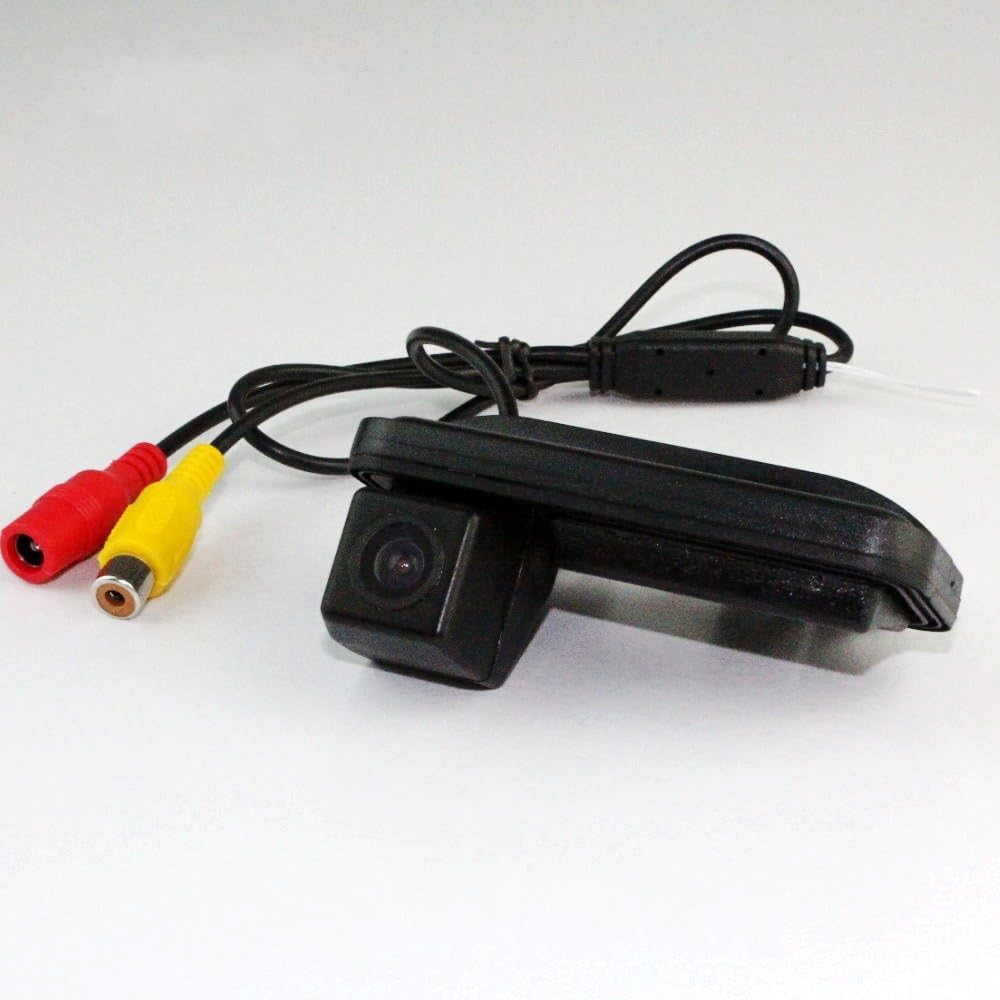
Image: The ANNE Car Rear View Camera with its attached RCA video cable (yellow) and power cable (red/black connectors).

Image: Rear view of the camera unit, highlighting the mounting tabs and cable exit point.

Image: Technical diagram illustrating the dimensions of the camera unit (89mm length, 38.40mm height) for fitment verification.
Wiring Connection (Wired Installation):
- Connect the camera's power cable (red wire) to the vehicle's reverse light positive (+) wire. This ensures the camera powers on when the vehicle is in reverse.
- Connect the camera's ground wire (black wire) to a suitable chassis ground point.
- Connect the yellow RCA video cable from the camera to the "CAM/Video IN" or "Reverse/Back" input on your car's display unit or monitor.
- Ensure all connections are secure and properly insulated to prevent short circuits.

Image: A wiring diagram illustrating the connections for the car camera. It shows the camera connecting to ACC 12V power, a reversing lamp for power, and the RCA video output connecting to the display unit's video input.

Image: A simplified wiring diagram showing both wired and optional wireless installation methods. The wired method depicts the camera connected to a 12V power source and a monitor via a 6m video cable. The wireless option shows a transmitter and receiver unit.
Route Cables: Carefully route the video and power cables from the camera to the front of the vehicle, ensuring they are tucked away safely and do not interfere with moving parts or vehicle operation. Avoid sharp edges or areas of high heat.

Image: An installation diagram showing the recommended cable routing path within a car. Points A, B, and C indicate the monitor position, camera power connection, and camera position, respectively, with a wiring diagram for the monitor and backup light power.
Test Functionality: Before reassembling all trim panels, test the camera by putting the vehicle in reverse. The image should appear on your display. Adjust the camera angle if necessary.
Operating Instructions
The ANNE Car Rear View Camera operates automatically when the vehicle is shifted into reverse gear, provided it is correctly wired to the reverse light circuit.
- Automatic Activation: When you engage reverse gear, the camera will automatically power on and transmit video to your connected display unit.
- Display View: The display will show a live, wide-angle view of the area directly behind your vehicle.
- Parking Guidelines: Some display units may overlay dynamic or static parking guidelines on the camera feed. Refer to your display unit's manual for details on these features.
- Night Vision: The camera features CCD night vision for improved visibility in low-light conditions.
Important Safety Note:
The rear view camera is an aid for safe reversing and parking. It is not a substitute for direct observation. Always check your surroundings visually and use your mirrors before and during reversing maneuvers.
Maintenance
To ensure the longevity and optimal performance of your ANNE Car Rear View Camera, follow these simple maintenance guidelines:
- Lens Cleaning: Regularly clean the camera lens with a soft, damp cloth to remove dirt, dust, or water spots that may obstruct the view. Avoid abrasive cleaners.
- Connection Check: Periodically inspect the wiring connections for any signs of wear, corrosion, or looseness. Ensure all connections remain secure and waterproof.
- Avoid High-Pressure Washing: While the camera is waterproof (IP66), avoid directing high-pressure water jets directly at the camera lens or housing during car washes, as this could potentially damage the seal.
- Temperature Extremes: The camera is designed to withstand typical automotive temperature ranges. However, prolonged exposure to extreme temperatures outside normal operating conditions may affect performance.
Troubleshooting
If you encounter issues with your ANNE Car Rear View Camera, refer to the following common problems and solutions:
| Problem | Possible Cause | Solution |
|---|---|---|
| No image on display when in reverse. |
|
|
| Image is blurry or distorted. |
|
|
| Image flickers or cuts out intermittently. |
|
|
Warranty Information
Please refer to the product packaging or the retailer's website for specific warranty terms and conditions. Typically, ANNE products come with a limited warranty covering manufacturing defects from the date of purchase.
Keep your purchase receipt as proof of purchase for any warranty claims.
Customer Support
For further assistance, technical support, or warranty inquiries, please contact ANNE customer service through the retailer where you purchased the product or visit the official ANNE website.
When contacting support, please have your product model number (FJ-L-1024) and purchase details ready.
Ask a question about this manual
Ask about setup, troubleshooting, compatibility, parts, safety, or missing instructions. Manuals+ will review the question and use this page’s manual context to help answer it.