1. Introduction
This document provides instructions for the Qiilu GY560 Handheld Frequency Counter. This device is designed for measuring frequencies of continuous wave signals from two-way radios and mobile phones. It is suitable for various applications including frequency testing of car radios, marine radios, and radio systems in hotels, communities, and properties. The device also counts digital signals generated by GSM, CDMA, and wireless remote controls.
The GY560 offers a frequency range of 50 MHz to 2.4 GHz, making it a versatile tool for radio frequency analysis.
2. Safety Information
Please read and understand all safety instructions before operating the device.
- Do not expose the device to extreme temperatures, direct sunlight, or moisture.
- Avoid dropping the device or subjecting it to strong impacts.
- Keep the device away from strong electromagnetic fields.
- Do not attempt to open or modify the device, as this will void the warranty and may cause damage.
- Dispose of batteries properly according to local regulations.
3. Package Contents
Upon unpacking, please verify that all items are present and in good condition:
- 1 x Qiilu GY560 Portable Frequency Counter
Note: Battery is not included in the package.
4. Setup
4.1 Battery Installation
The Qiilu GY560 requires one 9V 6F22 battery (not included).
- Locate the battery compartment on the back of the device.
- Carefully remove the back cover.
- Insert the 9V 6F22 battery, ensuring correct polarity (+ and - terminals match the markings inside the compartment).
- Replace the back cover securely.

Image 4.1: Front and back view of the Qiilu GY560 frequency counter. The back view shows the battery compartment cover.
5. Operating Instructions
The GY560 is designed for straightforward operation with a single control button.
5.1 Powering On/Off and Basic Measurement
- Ensure the battery is correctly installed.
- Extend the collapsible whip antenna for optimal signal reception.
- Press the single control button to power on the device. The display will illuminate.
- Position the frequency counter near the radio or signal source you wish to measure. The device will automatically detect and display the frequency.
- The device features an automatic shutdown function to conserve battery life.

Image 5.1: Front view of the Qiilu GY560 frequency counter, showing the display and the brand/model information.
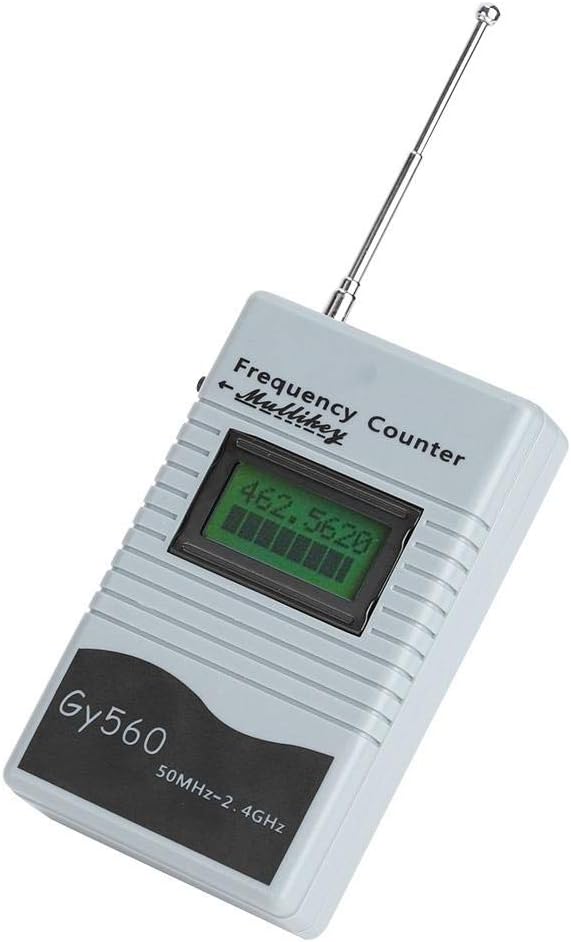
Image 5.2: Angled view of the Qiilu GY560 frequency counter with its collapsible whip antenna extended, ready for use.

Image 5.3: The Qiilu GY560 frequency counter held in a hand, illustrating its portable and compact design.

Image 5.4: A close-up view of the single control button on the GY560, alongside a comparison with a typical two-way radio, showing its application.

Image 5.5: The Qiilu GY560 frequency counter in a usage scenario, demonstrating its application for marine radio frequency testing with a ship in the background.

Image 5.6: A diagram illustrating key features of the GY560, including its collapsible whip antenna, ability to count digital signals (GSM, CDMA, wireless remote control), automatic shutdown, and single-button control.
6. Maintenance
Proper maintenance ensures the longevity and accuracy of your Qiilu GY560 Frequency Counter.
- Cleaning: Use a soft, dry cloth to clean the device. Do not use abrasive cleaners or solvents.
- Storage: When not in use for extended periods, remove the battery to prevent leakage. Store the device in a cool, dry place, away from direct sunlight.
- Antenna Care: Handle the collapsible whip antenna with care to avoid bending or breaking.
7. Troubleshooting
If you encounter issues with your GY560, refer to the following common problems and solutions:
| Problem | Possible Cause | Solution |
|---|---|---|
| Device does not power on. | Battery is dead or incorrectly installed. | Check battery polarity. Replace with a new 9V 6F22 battery. |
| Inaccurate frequency readings. | Weak signal, interference, or antenna not extended. | Ensure antenna is fully extended. Move closer to the signal source. Avoid strong interference sources. |
| Display is blank or flickering. | Low battery power. | Replace the 9V 6F22 battery. |
If the problem persists after trying these solutions, please contact customer support.
8. Specifications
| Feature | Detail |
|---|---|
| Brand | Qiilu |
| Model | GY560 (Manufacturer Reference: Qiiluou0cnxrifg) |
| Frequency Range | 50 MHz - 2.4 GHz |
| Material | ABS |
| Power Source | 9V 6F22 Battery (not included) |
| ASIN | B08CBCVWFF |
| First Available | March 8, 2021 |
9. Warranty and Support
For warranty information or technical support, please refer to the retailer or manufacturer's official website. Keep your purchase receipt as proof of purchase.
If you have questions regarding the operation or functionality of your Qiilu GY560, please consult this manual first. For further assistance, contact the seller or manufacturer directly.