
SOVARCATE HS980E
SOVARCATE HS980E Infrared Thermometer User Manual
Model: HS980E
1. Introduction
This manual provides detailed instructions for the safe and effective use of your SOVARCATE HS980E Infrared Thermometer. This device is designed for non-contact surface temperature measurement across a wide range of applications. Please read this manual thoroughly before operation and retain it for future reference.
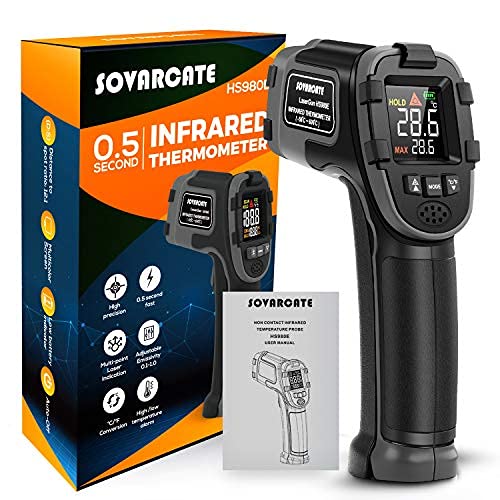
Image 1.1: The SOVARCATE HS980E Infrared Thermometer, its packaging, and included user manual.
2. Safety Information
WARNING: This infrared thermometer is an industrial-grade device and is NOT intended for measuring human or animal body temperature. Using it for medical purposes may lead to inaccurate readings and potential health risks.

Image 2.1: Important safety reminder: This device is not for human or animal temperature measurement.
- Do not point the laser directly at eyes or indirectly off reflective surfaces.
- Do not use the device in environments with explosive gas, steam, or dust.
- Avoid exposing the device to electromagnetic fields from arc welders or induction heaters.
- Do not immerse the unit in water.
- Keep the device away from children.
3. Product Components
Familiarize yourself with the different parts of your infrared thermometer:

Image 3.1: Detailed view of the thermometer's components and display elements.
- Alarm indicator
- LCD display
- Laser/numeric decrease button
- Mode button
- Backlight/numeric increase button
- Infrared sensor
- Laser indicator
- Trigger button
- Battery cover
4. Setup
4.1 Battery Installation
The SOVARCATE HS980E requires two AAA batteries for operation. Follow these steps to install or replace the batteries:
- Locate the battery cover (9) on the handle of the thermometer.
- Open the battery cover.
- Insert two AAA batteries, ensuring correct polarity (+/-).
- Close the battery cover securely.

Image 4.1: Easy battery replacement by opening the handle cover and inserting AAA batteries.
5. Operating Instructions
5.1 Basic Measurement
To take a temperature reading:
- Point the infrared sensor (6) towards the target object.
- Press and hold the trigger button (8). The laser indicator (7) will activate to help aim.
- The temperature reading will appear on the LCD display (2) within 0.5 seconds.
- Release the trigger button to hold the reading on the display. The device will automatically turn off after a period of inactivity to conserve battery.

Image 5.1: Measuring the surface temperature of an object within the specified range.
5.2 Distance-to-Spot Ratio (D:S)
The HS980E has a D:S ratio of 12:1. This means that at a distance of 12 inches, the measurement spot diameter is 1 inch. To ensure accurate readings, ensure the target object is larger than the measurement spot size at your chosen distance.
5.3 Emissivity Adjustment
Different materials emit infrared energy differently. The HS980E allows you to adjust the emissivity (E) from 0.10 to 0.95 for more accurate measurements on various surfaces. Common emissivity values:
- Most organic materials, painted surfaces, and water: 0.95
- Shiny metals: Lower values (e.g., polished aluminum 0.05, copper 0.03)
To adjust emissivity:
- Press the Mode button (4) until 'E' or 'Emissivity' is displayed.
- Use the increase (5) and decrease (3) buttons to set the desired emissivity value.
- Press the Mode button again to exit.

Image 5.2: Demonstrating adjustable emissivity for different surfaces like oil (0.95) and ice (0.89).
5.4 Alarm Function
The device features a high/low temperature alarm. When the measured temperature exceeds the set limits, the alarm indicator (1) will activate, and the backlight may flash red.
To set alarm limits:
- Press the Mode button (4) repeatedly until 'HAL' (High Alarm) or 'LAL' (Low Alarm) is displayed.
- Use the increase (5) and decrease (3) buttons to set the desired temperature limit.
- Press the Mode button again to save and exit.
5.5 Unit Conversion (Celsius/Fahrenheit)
To switch between Celsius (°C) and Fahrenheit (°F):
- While the device is on, press the Mode button (4) until the °C/°F icon flashes.
- Use the increase (5) or decrease (3) button to select the desired unit.
- Press the Mode button again to confirm.
6. Applications
The SOVARCATE HS980E Infrared Thermometer is suitable for a variety of non-contact temperature measurement tasks, including:
- Cooking: Checking oven temperatures, grill surfaces, or food surface temperatures (not internal).
- Automotive Maintenance: Diagnosing engine components, tires, or brake systems.
- HVAC: Identifying hot or cold spots in insulation, ducts, or vents.
- Electrical Engineering: Monitoring electrical panels, motors, or connections for overheating.
- Home Inspection: Detecting energy loss, moisture issues, or appliance performance.
7. Maintenance
7.1 Cleaning
- Clean the lens with a soft, damp cloth or cotton swab. Do not use abrasive cleaners.
- Clean the thermometer casing with a damp sponge or soft cloth and mild soap.
- Do not use solvents to clean the plastic lens or casing.
7.2 Storage
- Store the device in a cool, dry place when not in use.
- Remove batteries if storing for extended periods to prevent leakage.
8. Troubleshooting
- No Power: Check battery installation and ensure batteries are not depleted. Replace if necessary.
- Inaccurate Readings:
- Verify the emissivity setting matches the target material.
- Ensure the target is larger than the measurement spot size.
- Clean the infrared sensor lens if it is dirty.
- Avoid measuring through glass or other transparent surfaces, as they can affect readings.
- Laser Not Working: Check if the laser function is enabled (refer to display icons). If not, ensure batteries are sufficient.
9. Specifications
| Feature | Specification |
|---|---|
| Model Number | HS980E |
| Temperature Range | -50℃ to 600℃ (-58°F to 1112°F) |
| Accuracy | ± 2% or ± 2℃ (whichever is greater) |
| Distance-to-Spot Ratio (D:S) | 12:1 |
| Response Time | 0.5 seconds |
| Emissivity | Adjustable from 0.10 to 0.95 |
| Display Type | LED |
| Power Source | 2 x AAA Batteries |
| Special Feature | Alarm Function |
| Dimensions (L x W x H) | 16 x 9.5 x 4.5 cm |
| Weight | 230 grams |
10. Warranty and Support
Your SOVARCATE HS980E Infrared Thermometer comes with a 1-year warranty and lifetime technical support. If you encounter any issues or have questions regarding your product, please contact SOVARCATE customer service for assistance. We offer a 100% refund or replacement service for eligible concerns.

Image 10.1: The complete package includes the infrared thermometer, user manual, batteries, and exquisite packaging.
Ask a question about this manual
Ask about setup, troubleshooting, compatibility, parts, safety, or missing instructions. Manuals+ will review the question and use this page’s manual context to help answer it.