
1. Introduction
Thank you for choosing the D Debra Audio AU400 PRO UHF 4-Channel Wireless Microphone System. This system is designed to provide high-quality audio transmission with stable performance, making it suitable for various applications such as karaoke, church events, DJ performances, parties, conferences, and classrooms. This manual provides detailed instructions for setting up, operating, and maintaining your wireless microphone system.

Image 1.1: The D Debra Audio AU400 PRO UHF 4-Channel Wireless Microphone System, featuring the receiver unit and four handheld wireless microphones.
2. Package Contents
Please check the package carefully to ensure all items are present and in good condition. If any items are missing or damaged, please contact your retailer.
- 1 x AU400 PRO UHF Wireless Receiver
- 4 x Handheld Wireless Microphones
- 1 x Power Adapter
- 1 x Audio Connection Cable (6.35mm to 6.35mm)
- 1 x User Manual
- 8 x AA Batteries (for microphones)

Image 2.1: All components included in the AU400 PRO system package, including the receiver, four microphones, power adapter, audio cable, and user manual.
3. Key Features
- UHF Frequency Technology: Utilizes international standard common UHF frequencies (Frequency points: A- 501/511.5/524/538.5 MHz, B- 506/517.5/531/546.5 MHz) for stable and reliable signal transmission worldwide.
- 4-Channel System: Supports simultaneous use of four handheld wireless microphones, each with independent volume control.
- Anti-Interference Design: Engineered to minimize interference often encountered with traditional wireless microphones, especially from digital equipment.
- Advanced Squelch Circuit: Prevents sudden loud noise from the receiver when the microphone signal is weak or the microphone is turned off, by analyzing RF frequency channel intensity.
- Durable Metal Receiver: The receiver unit features a robust metal construction for enhanced durability and stable signal reception.
- Long Reception Range: Capable of remote reception up to 100 meters (under typical conditions), providing flexibility for various event sizes.
- High-Quality Dynamic Microphones: Handheld microphones feature a professional voice dynamic microphone core designed to restore the most realistic voice.
- Microphone Mute Function: Each microphone is equipped with an ON/MUTE/OFF switch for convenient control.

Image 3.1: The system offers a long reception distance of up to 100 meters, ensuring stable signal transmission over a wide area.

Image 3.2: The receiver unit features a metal panel, contributing to its stylish appearance, durability, and stable signal performance.
4. Setup Guide
Follow these steps to set up your D Debra Audio AU400 PRO wireless microphone system:
- Unpack Components: Carefully remove all components from the packaging.
- Position the Receiver: Place the AU400 PRO receiver on a stable, flat surface, away from potential sources of interference (e.g., large metal objects, Wi-Fi routers). Ensure the antennas are fully extended and positioned vertically for optimal signal reception.
- Connect Power: Connect the provided power adapter to the 'DC IN' port on the back of the receiver and plug it into a suitable power outlet.
- Connect to Audio System:
- For individual microphone outputs, connect XLR cables from the 'BALANCED A/B/C/D' outputs on the receiver to the corresponding inputs on your mixer or amplifier.
- For a mixed output of all four microphones, use the provided 6.35mm audio cable to connect the 'MIXED OUTPUT' port on the receiver to a single input on your mixer or amplifier.
- Insert Batteries into Microphones: Unscrew the bottom part of each handheld microphone. Insert two AA batteries into each microphone, ensuring correct polarity (+/-). Screw the bottom part back on securely.
- Power On: Turn on the receiver using the 'ON/OFF' switch on the front panel. The power indicator light will illuminate. Then, turn on each microphone using its ON/MUTE/OFF switch. The RF indicator lights on the receiver (RF-A, RF-B, RF-C, RF-D) will illuminate when the corresponding microphone is turned on and connected.

Image 4.1: Detailed view of the receiver's front panel showing volume knobs (A, B, C, D) and power switch, and the rear panel with mixed output, XLR independent outputs (A, B, C, D), and power input.
5. Operating Instructions
Once the system is set up, follow these steps for operation:
- Microphone Control: Each handheld microphone has a three-position switch: ON, MUTE, and OFF. Slide the switch to 'ON' to activate the microphone. Slide to 'MUTE' to temporarily silence the microphone without turning it off. Slide to 'OFF' to power down the microphone.
- Adjusting Volume: Use the individual volume knobs (VOL A, VOL B, VOL C, VOL D) on the front panel of the receiver to adjust the output level of each corresponding microphone. Start with the volume knobs at a low setting and gradually increase them to avoid sudden loud sounds.
- Monitoring Signal: The RF indicator lights (RF-A, RF-B, RF-C, RF-D) on the receiver will light up when the respective microphone is active and receiving a signal.
- Optimal Usage: For best performance, hold the microphone approximately 2-6 inches (5-15 cm) from your mouth. Avoid covering the microphone grille with your hand.

Image 5.1: The handheld microphone features a convenient slide switch for ON, MUTE, and OFF functions, allowing for easy control during use.
6. Connection Options
The AU400 PRO receiver offers flexible output options to connect to various audio systems:
- Mixed Output (6.35mm Jack): This single output combines the audio from all four microphones into one signal. Ideal for connecting to a single input on a karaoke machine, amplifier, or active speaker.
- Independent XLR Outputs (Balanced A, B, C, D): Each microphone channel has its own dedicated XLR output. This allows for individual control and mixing of each microphone's signal through a professional audio mixer.
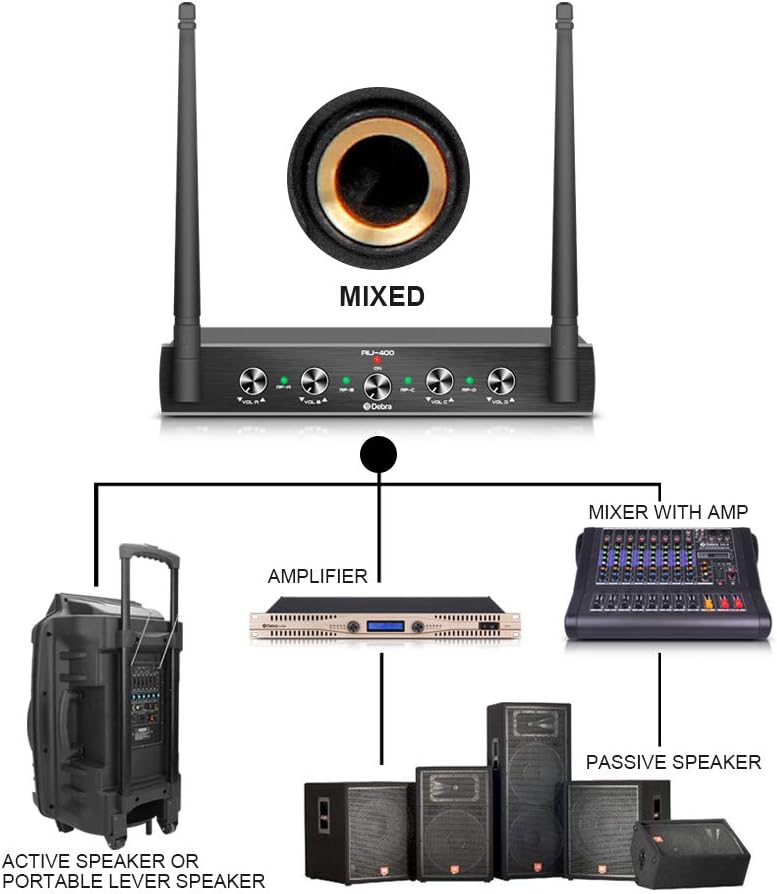
Image 6.1: Connection diagram illustrating how to connect the receiver to an amplifier, a mixer with an amplifier, passive speakers, or active/portable lever speakers using either the mixed output or individual XLR outputs.
7. Maintenance
Proper maintenance will ensure the longevity and optimal performance of your wireless microphone system:
- Cleaning: Use a soft, dry cloth to clean the receiver and microphones. Do not use abrasive cleaners, solvents, or harsh chemicals.
- Battery Replacement: Replace batteries in the microphones when the low battery indicator (if present) illuminates or when audio quality degrades. Always use fresh AA batteries and dispose of old batteries responsibly.
- Storage: When not in use for extended periods, remove batteries from the microphones to prevent leakage. Store the system in a cool, dry place, away from direct sunlight and extreme temperatures.
- Antenna Care: Handle the receiver antennas carefully. Do not bend them excessively or apply undue force, as this can damage them and affect signal reception.
8. Troubleshooting
If you encounter issues with your D Debra Audio AU400 PRO system, refer to the following common problems and solutions:
| Problem | Possible Cause | Solution |
|---|---|---|
| No sound from microphone | Microphone is off or muted; Low batteries; Receiver not powered; Incorrect audio connection; Volume too low. | Ensure microphone switch is ON; Replace batteries; Check receiver power; Verify audio cables are correctly connected; Increase receiver and amplifier/mixer volume. |
| Weak or intermittent signal | Microphone too far from receiver; Obstructions between microphone and receiver; Interference from other devices; Low microphone batteries. | Reduce distance between microphone and receiver; Ensure clear line of sight; Move away from other electronic devices; Replace microphone batteries. |
| Loud noise/static from receiver | Microphone is off or signal is very weak (Squelch circuit opening); Strong interference. | Ensure microphone is ON and within range; Check for strong interference sources and relocate if possible. |
| Microphone not pairing with receiver | Microphone and receiver not on same frequency (unlikely for fixed frequency models); Receiver or microphone faulty. | Ensure both units are powered on; If issue persists, contact customer support. |
9. Specifications
Detailed technical specifications for the D Debra Audio AU400 PRO UHF Wireless Microphone System:
| Feature | Specification |
|---|---|
| Model Number | M027 |
| Brand | D Debra |
| Number of Channels | 4 |
| Frequency Range | UHF (A- 501/511.5/524/538.5 MHz, B- 506/517.5/531/546.5 MHz) |
| Audio Sensitivity | 90 Decibels |
| Impedance | 600 ohms |
| Microphone Form Factor | Handheld |
| Power Source (Microphones) | Battery Powered (2 x AA batteries per mic) |
| Signal-to-Noise Ratio | 80 dB |
| Connectivity Technology | XLR |
| Special Features | Mute function |
| Compatible Devices | Amplifier |
| Color | Black |
| Polar Pattern | Unidirectional |
| Receiver Dimensions (approx.) | 210mm (L) x 160mm (W) x 36mm (H) |
| Microphone Dimensions (approx.) | 250mm (L) x 55mm (Head Dia.) |
| Operating Range | Up to 100m (under typical conditions) |

Image 9.1: Dimensions of the AU400 PRO receiver and handheld microphone for reference.
10. Warranty & Support
Information regarding product warranty, spare parts availability, and software updates is not explicitly provided in the available product data. For specific warranty terms, technical support, or inquiries about spare parts, please contact the manufacturer, Enping Yin Peng e-commerce Co., Ltd., or your point of purchase.
For further assistance, please refer to the contact information provided with your product packaging or visit the official D Debra Audio website.