
CAFEMASY SCR-300
CAFEMASY SCR-300 Electric Coffee Roaster User Manual
Model: SCR-300
1. Introduction
This manual provides comprehensive instructions for the safe and efficient operation of your CAFEMASY SCR-300 Electric Coffee Roaster. Please read this manual thoroughly before first use and retain it for future reference. This appliance is designed for roasting coffee beans and other grains for home use.
2. Safety Information
Always follow basic safety precautions when using electrical appliances to reduce the risk of fire, electric shock, and personal injury.
- Ensure the voltage matches your power supply (110V-120V).
- Do not immerse the appliance, cord, or plug in water or other liquids.
- Keep out of reach of children.
- Do not operate if the cord or plug is damaged.
- Always unplug the roaster when not in use and before cleaning.
- Allow the appliance to cool completely before handling or cleaning.
- Use on a stable, heat-resistant surface.
- Do not touch hot surfaces. Use handles or oven mitts.
- Ensure adequate ventilation during operation, as roasting produces smoke and chaff.
3. Product Overview and Components
Familiarize yourself with the parts of your CAFEMASY SCR-300 Electric Coffee Roaster.

Figure 3.1: Front view of the CAFEMASY SCR-300 Electric Coffee Roaster, showing the control panel and handles.

Figure 3.2: Internal view of the roaster with the lid removed, highlighting the stirring mechanism and non-stick roasting pan.
Key Features:
- Heat Resistant Plastic Body: Designed for safety and durability.
- Safe Handle Design: Ergonomic handles for secure handling.
- Transparent Glass Lid: Allows observation of the roasting process. Features 4 airholes for ventilation and temperature measurement.
- Adjustable Temperature Control: Dial for setting temperatures from 100℃ to 240℃.
- Indicator Lamp: Illuminates when the roaster is in operation.
- Upgraded Baffle Railing and Stir Bar: Ensures even stirring and heating of beans.
- Food Grade Non-Stick Roasting Pan: Honeycomb design for even heating and easy cleaning.
- Anti-slip Base: Provides stability during operation.
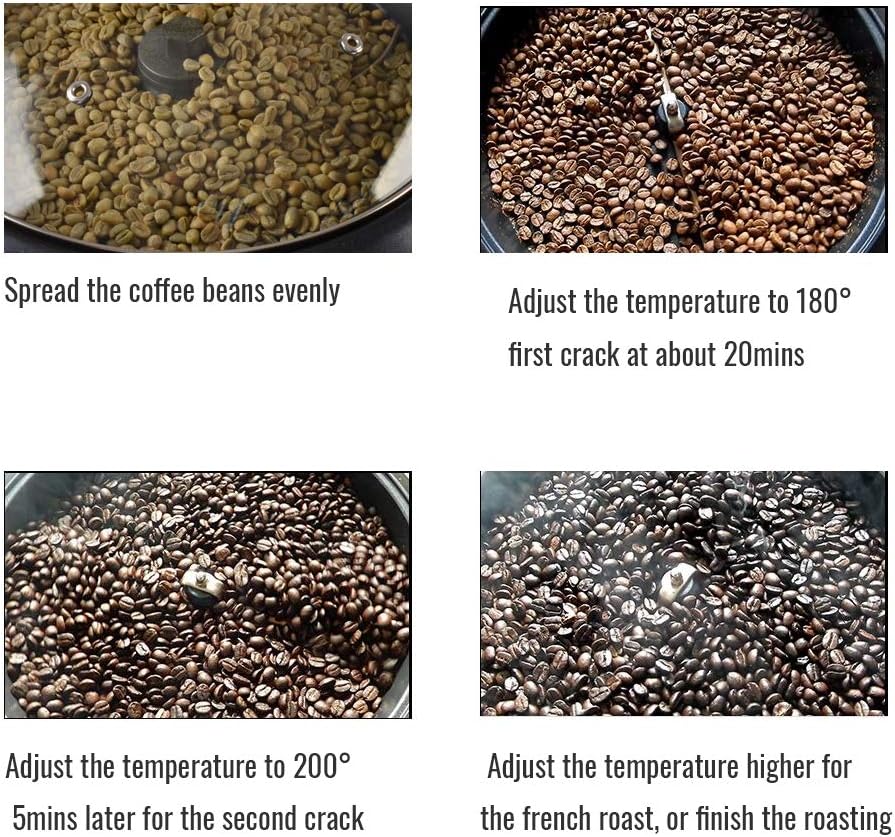
Figure 3.3: Visual breakdown of key components and features.
4. Setup
- Unpack: Carefully remove all components from the packaging.
- Inspect: Check for any damage during transit. Do not use if damaged.
- Clean: Before first use, wipe the roasting pan and lid with a damp cloth. Ensure all parts are dry before assembly.
- Placement: Place the roaster on a stable, flat, heat-resistant surface with adequate ventilation. Ensure it is away from flammable materials.
- Power Connection: Plug the power cord into a grounded 110V-120V electrical outlet.
5. Operating Instructions
5.1 Roasting Coffee Beans
The CAFEMASY SCR-300 is designed for optimal roasting of 300g (0.6lb) to 500g (1.1lb) of green coffee beans at one time.
- Prepare Beans: Ensure green coffee beans are clean and free of debris.
- Load Roaster: Place the desired amount of green coffee beans (300g-500g) into the non-stick roasting pan. Spread them evenly.
- Secure Lid: Place the transparent glass lid securely on the roaster.
- Set Temperature: Turn the temperature control dial to your desired roasting temperature. For a light roast, start around 180°C. For darker roasts, temperatures up to 240°C can be used.
- Start Roasting: Flip the ON/OFF switch to the "ON" position. The indicator lamp will light up, and the stirring mechanism will begin to rotate.
- Monitor Roasting: Observe the beans through the transparent lid. You can use an electronic thermometer through one of the lid's airholes to monitor internal temperature without opening the lid.
- First Crack: Typically occurs around 180°C-200°C, usually within 8-12 minutes, depending on bean type and quantity. You will hear distinct cracking sounds.
- Second Crack: Occurs at higher temperatures, around 220°C-230°C, usually 3-5 minutes after the first crack. This indicates a darker roast.
- Stop Roasting: Once the desired roast level is achieved, immediately turn the ON/OFF switch to "OFF" and unplug the unit.
- Cool Beans: Carefully remove the roasted beans from the hot pan and spread them on a cooling tray or surface to cool rapidly. Rapid cooling prevents over-roasting.
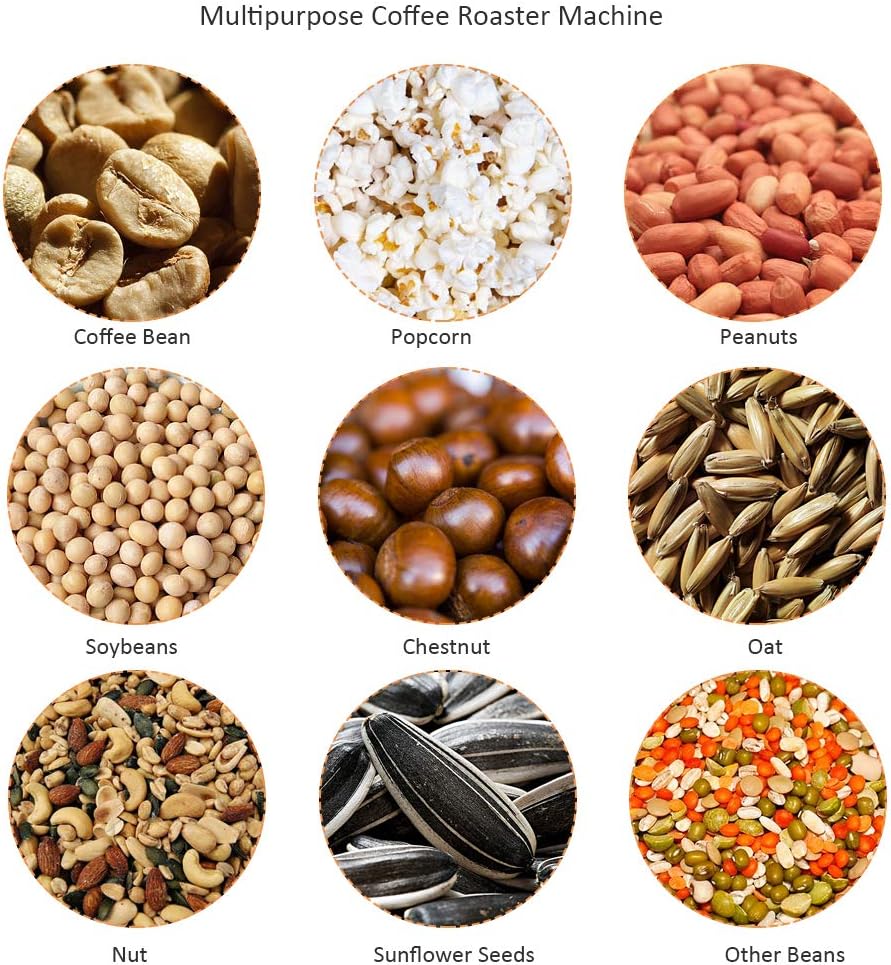
Figure 5.1: Visual guide to coffee bean roasting stages and temperature adjustments.
5.2 Multipurpose Use
Beyond coffee beans, this roaster can be used for various other grains and nuts, including:
- Peanuts
- Chestnuts
- Barley
- Dried Fruit
- Popcorn
- Pistachios
- Hazelnuts
- Rice
- Soybeans
- Oats
- Sunflower Seeds
Adjust temperature and roasting time according to the specific item being processed. Always monitor closely to prevent burning.

Figure 5.2: The roaster can also be used for making popcorn.
6. Maintenance and Cleaning
Regular cleaning ensures the longevity and optimal performance of your roaster.
- Unplug and Cool: Always unplug the appliance and allow it to cool completely before cleaning.
- Clean Roasting Pan: The food-grade non-stick coating makes cleaning easy. Wipe the interior of the pan with a soft, damp cloth. For stubborn residue, use a mild detergent and a non-abrasive sponge. Rinse thoroughly and dry completely.
- Clean Lid: Wash the glass lid with warm, soapy water and rinse well. Dry thoroughly.
- Clean Exterior: Wipe the exterior of the roaster with a damp cloth. Do not use abrasive cleaners or immerse the main unit in water.
- Storage: Store the clean and dry roaster in a cool, dry place.
7. Troubleshooting
If you encounter issues with your CAFEMASY SCR-300, refer to the following common problems and solutions.
| Problem | Possible Cause | Solution |
|---|---|---|
| Roaster does not turn on. | Not plugged in; power switch off; no power at outlet. | Ensure the power cord is securely plugged in. Check the ON/OFF switch. Verify the outlet is functional. |
| Heating element not working. | Internal component failure. | If the unit powers on but does not heat, contact customer support. Do not attempt to repair yourself. |
| Beans not roasting evenly. | Too many beans; uneven spread; stirring mechanism obstructed. | Ensure you are within the recommended capacity (300g-500g). Spread beans evenly. Check that the stir bar is rotating freely. |
| Excessive smoke during roasting. | Beans are burning; chaff accumulation; poor ventilation. | Monitor roast level closely. Ensure adequate ventilation. Clean the roaster regularly to remove chaff. |
8. Specifications
| Feature | Detail |
|---|---|
| Model Number | SCR-300 |
| Voltage | 110V-120V |
| Power | 1200W |
| Adjustable Temperature | 100℃ - 240℃ |
| Roaster Pan Diameter | 8.86 inches |
| Recommended Roasting Capacity | 300g (0.6lb) - 500g (1.1lb) |
| Maximum Capacity | 750g (1.65lb) |
| Item Weight | 6.59 pounds |
| Package Dimensions | 13.8 x 13.4 x 8 inches |
| Manufacturer | CAFEMASY |

Figure 8.1: Product dimensions for the CAFEMASY SCR-300.
9. Warranty and Support
CAFEMASY ensures that its products meet high quality standards. If you are not satisfied for any reason, or if you experience issues with your product, please contact CAFEMASY customer support.
For warranty claims or technical assistance, please refer to the contact information provided with your purchase or visit the official CAFEMASY website. Please have your model number (SCR-300) and purchase details available when contacting support.
Note: The product description mentions a "REFUND & RETURN GUARANTEE WARRANTY". Specific terms and conditions may apply and are typically detailed in separate warranty documentation provided with the product.
Ask a question about this manual
Ask about setup, troubleshooting, compatibility, parts, safety, or missing instructions. Manuals+ will review the question and use this page’s manual context to help answer it.