
1. Introduction
This manual provides detailed instructions for the assembly, operation, and maintenance of your IN WHICH BAY Adjustable Pedestal Poster Sign Stand. Please read this manual thoroughly before use to ensure proper setup and to maximize the product's lifespan.
2. Product Features
- Adjustable Height: The sign frame can be adjusted in height from approximately 31 inches (86 cm) to 48 inches (122 cm).
- 360-Degree Rotation: The display frame can be rotated horizontally or vertically and adjusted to any viewing angle.
- Quick Change Snap Frame: Features a 25mm front-opening snap frame with mitered corners for easy and rapid poster changes.
- Durable Construction: Made from an aluminum poster frame and a steel stand with a robust base.
- Protective Cover: Includes a waterproof PVC film to protect your posters from dust and moisture while maintaining clarity.
- Stable Base: The heavy-duty base can be optionally filled with water or sand for enhanced stability, suitable for both indoor and outdoor use.
3. Package Contents
Please verify that all components are present before beginning assembly:
- Adjustable Pedestal Pole
- Heavy-Duty Base
- Snap Frame (8.5 x 11 inches)
- PVC Protective Cover
- Assembly Hardware (screws, wrench if applicable)

Image 1: Overview of the IN WHICH BAY Adjustable Pedestal Poster Sign Stand.
4. Setup Instructions
- Attach the Pedestal Pole to the Base:
Align the bottom end of the adjustable pedestal pole with the opening in the heavy-duty base. Secure it using the provided screws and any necessary tools. Ensure it is tightened firmly for stability.

Image 2: Heavy-duty base with optional water/sand filling for stability.
Optional: For increased stability, especially in outdoor or high-traffic areas, the base can be filled with water or sand through the designated port.
- Attach the Snap Frame:
Connect the snap frame to the top of the adjustable pedestal pole. Ensure the connection is secure. The frame is designed for 8.5 x 11 inch posters.
- Insert Your Poster:
Gently open the front-mounted snap frame by lifting the edges. Insert your 8.5 x 11 inch poster. Place the PVC protective cover over the poster to shield it from environmental elements. Snap the frame edges back into place to secure the poster and cover.

Image 3: Detail of the front-mounted snap frame and PVC protective cover.
5. Operating Instructions
- Adjusting Height:
To adjust the height of the sign stand, locate the height adjustment mechanism on the pedestal pole. Loosen the locking mechanism, extend or retract the pole to the desired height (between 31 and 48 inches), and then firmly secure the locking mechanism.

Image 4: Adjustable height range (31" - 48").
- Adjusting Viewing Angle and Orientation:
The snap frame can be rotated 360 degrees. Loosen the knob or lever located at the connection point between the frame and the pole. Adjust the frame to your preferred horizontal or vertical orientation and viewing angle, then tighten the knob/lever to secure it.
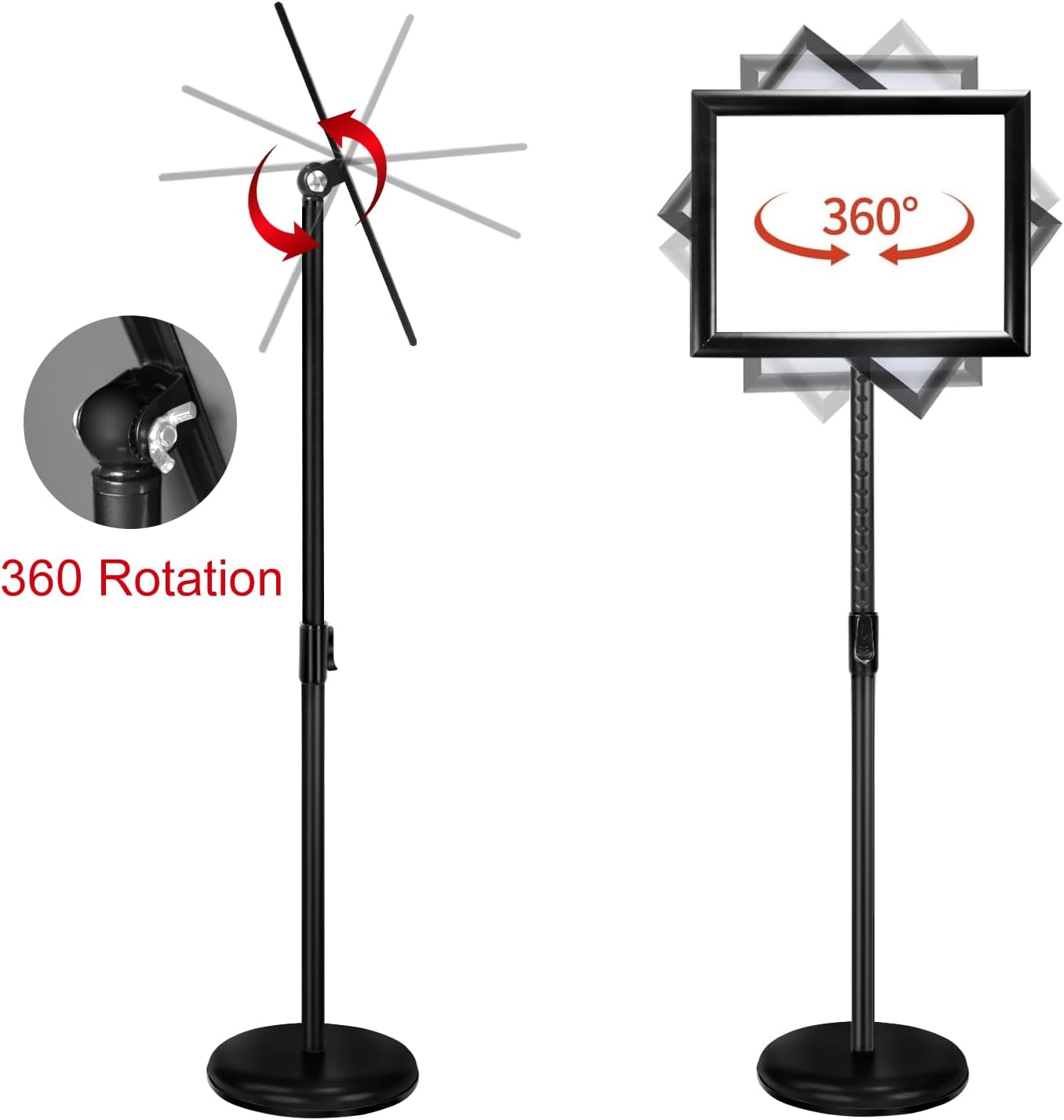
Image 5: 360-degree rotation feature.
6. Maintenance
- Cleaning: Wipe the aluminum frame and steel pole with a soft, damp cloth. Avoid abrasive cleaners that may damage the finish.
- PVC Cover: Clean the PVC protective cover with a mild glass cleaner and a soft cloth to maintain transparency.
- Stability Check: Periodically check all screws and locking mechanisms to ensure they are tight and secure. If the base is filled with water, check for leaks and refill as needed.
- Storage: When not in use, store the sign stand in a dry place to prevent rust or damage to components.
7. Troubleshooting
| Problem | Possible Cause | Solution |
|---|---|---|
| Sign stand is wobbly or unstable. | Loose connections; insufficient weight in base. | Ensure all screws are tightened. Fill the heavy-duty base with water or sand for added stability. |
| Frame does not hold poster securely. | Snap frame not fully closed; incorrect poster size. | Ensure all four sides of the snap frame are fully closed. Verify poster size is 8.5 x 11 inches. |
| Difficulty adjusting height or rotation. | Locking mechanism is too tight or stuck. | Loosen the locking knob/lever sufficiently before attempting adjustment. Do not force adjustments. |
8. Specifications
| Model Number | IWB-1 |
| Brand | IN WHICH BAY |
| Frame Size | 8.5 x 11 inches |
| Adjustable Height | 31 - 48 inches (86 - 122 cm) |
| Material | Aluminum (frame), Steel Alloy (stand/base) |
| Base Type | Pedestal (fillable for added weight) |
| Color | Black |
| Product Weight | 4.08 Kilograms (approx. 9 lbs) |
| UPC | 708200103131 |
9. Warranty and Support
For any issues encountered during the use of your IN WHICH BAY Adjustable Pedestal Poster Sign Stand, please contact our customer support. We are committed to providing after-sales service to ensure your satisfaction.
Please refer to your purchase documentation or the retailer's website for specific warranty terms and contact information.


