
eKids LOL Surprise OMG Remix Toy Microphone
Instruction Manual
Important Safety Information
Please read these instructions carefully before using the eKids LOL Surprise OMG Remix Toy Microphone. Keep this manual for future reference.
- This product is intended for children aged 36 months to 6 years.
- Do not expose the unit to extreme temperatures, direct sunlight, or moisture.
- Do not attempt to disassemble or modify the unit. This will void the warranty.
- Use only the specified battery type (2 x AAA batteries).
- Do not mix old and new batteries. Do not mix alkaline, standard (carbon-zinc), or rechargeable (nickel-cadmium) batteries.
- Remove batteries if the unit will not be used for an extended period.
- Dispose of batteries responsibly according to local regulations.
- Adult supervision is recommended during use.
Package Contents
- 1 x LOL Surprise Karaoke Microphone
Note: Batteries are not included and must be purchased separately.
Product Overview

Image: Front view of the eKids LOL Surprise OMG Remix Toy Microphone, highlighting the Microphone Button, Song Button, Speaker, and Flashing Lights area. Dimensions are also shown.
- Microphone Button: Press to amplify your voice.
- Song Button: Press to play built-in music.
- Speaker: Located at the bottom of the microphone head.
- Flashing Lights: Integrated into the microphone head, they flash to the music.
Battery Installation
The microphone requires 2 x AAA (R03) batteries (not included).
- Using a Phillips head screwdriver, locate and open the battery compartment door on the back of the microphone.
- Insert 2 x AAA (R03) batteries, ensuring the correct polarity (+/-) as indicated in the compartment.
- Replace the compartment door and tighten the screw with the Phillips screwdriver. Do not overtighten.

Image: Back of the microphone packaging showing a diagram for battery installation, indicating the battery compartment and correct battery orientation.
Operating Instructions
Once batteries are installed, the microphone is ready for use.
- To Activate Microphone: Press the Microphone Button (top blue button). Speak or sing into the microphone head to amplify your voice through the built-in speaker.
- To Play Built-in Music: Press the Song Button (bottom blue button). The microphone will play pre-recorded music.
- Flashing Lights: The lights on the microphone head will automatically flash in sync with the music or your amplified voice, enhancing the performance.
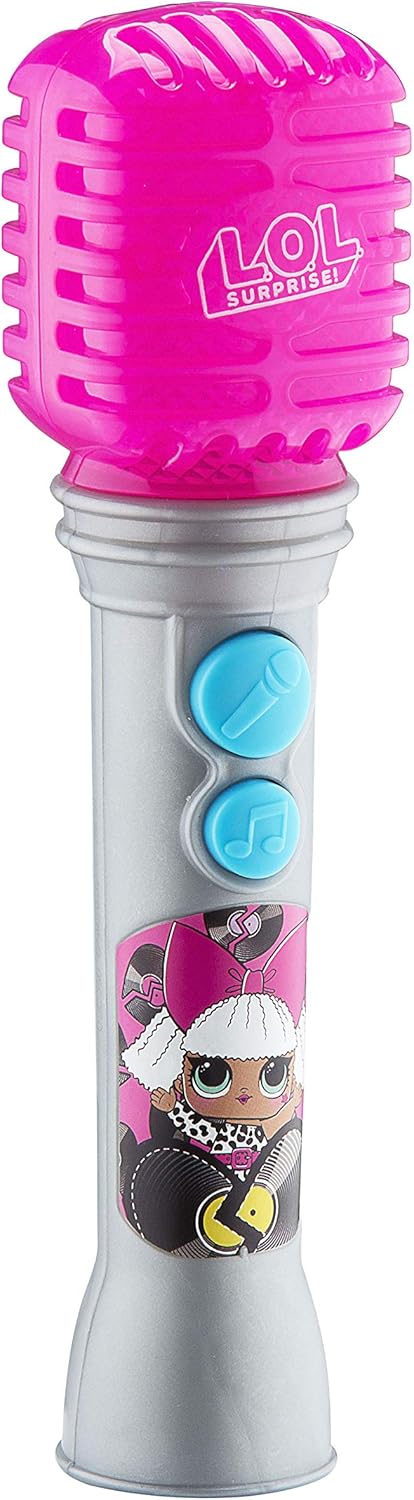
Image: A full view of the eKids LOL Surprise OMG Remix Toy Microphone, showcasing its design and buttons.
Maintenance and Care
- Wipe the microphone with a soft, dry cloth to clean. Do not use abrasive cleaners or immerse in water.
- Store the microphone in a cool, dry place away from direct sunlight when not in use.
- Remove batteries if storing for extended periods to prevent leakage.
Troubleshooting
| Problem | Possible Cause | Solution |
|---|---|---|
| No sound from microphone/speaker. | Batteries are low or incorrectly installed. | Check battery polarity. Replace with fresh AAA batteries. |
| Lights are not flashing. | Microphone is not active or music is not playing. | Ensure the Microphone Button or Song Button is pressed. Check batteries. |
| Distorted sound. | Low batteries. | Replace with fresh AAA batteries. |
Specifications
- Model Number: LL-070v0i
- Power: 2 x AAA (R03) batteries (not included)
- Recommended Age: 36 months - 6 years
- Product Dimensions: 9.7 x 7.2 x 26.7 inches (approximate packaging dimensions)
- Item Weight: 4.6 ounces
- Manufacturer: EKIDS
Warranty and Support
For warranty information or technical support, please refer to the contact details provided on the product packaging or visit the official eKids website.
eKids Website: www.ekids.com
UPC: 0092298950808
