
1. Introduction
This manual provides essential information for the assembly, operation, maintenance, and troubleshooting of your GIKPAL HW001 L-Shaped Desk. Please read these instructions carefully before assembly and use to ensure proper function and longevity of the product.

Image 1: The GIKPAL HW001 L-Shaped Desk, showcasing its design and potential setup with multiple screens and accessories.
2. Safety Information
- Ensure all components are securely fastened before use. Regularly check and tighten screws as needed.
- Do not exceed the maximum weight capacity of the desk (220 lbs for the desktop, 110.2 lbs per shelf).
- Keep small parts away from children during assembly to prevent choking hazards.
- Assemble the desk on a soft, clean surface to prevent scratches.
- Use the adjustable feet pads to ensure the desk is stable and level on uneven floors.
3. Package Contents
Verify that all parts are present before beginning assembly. The package should contain:
- 1 x Corner Desk
- 1 x Mobile Monitor Stand
- 1 x CPU Stand
- 1 x Assembly Manual (detailed instructions for step-by-step assembly)
- All necessary hardware (screws, bolts, tools)
4. Setup and Assembly
Refer to the dedicated assembly manual included in your package for detailed, step-by-step instructions. The following points highlight key features and considerations during assembly:
- Reversible Design: The L-shaped configuration can be assembled with the longer side on either the left or right, adapting to your space requirements.
- Toothed Stabilizer: The desk incorporates toothed metal clips at the joint of the upper frame. Ensure these are properly engaged during assembly to enhance stability.
- Adjustable Feet: The desk is equipped with adjustable feet pads to compensate for uneven flooring, preventing wobbling. Adjust them after the desk is fully assembled and placed in its desired location.
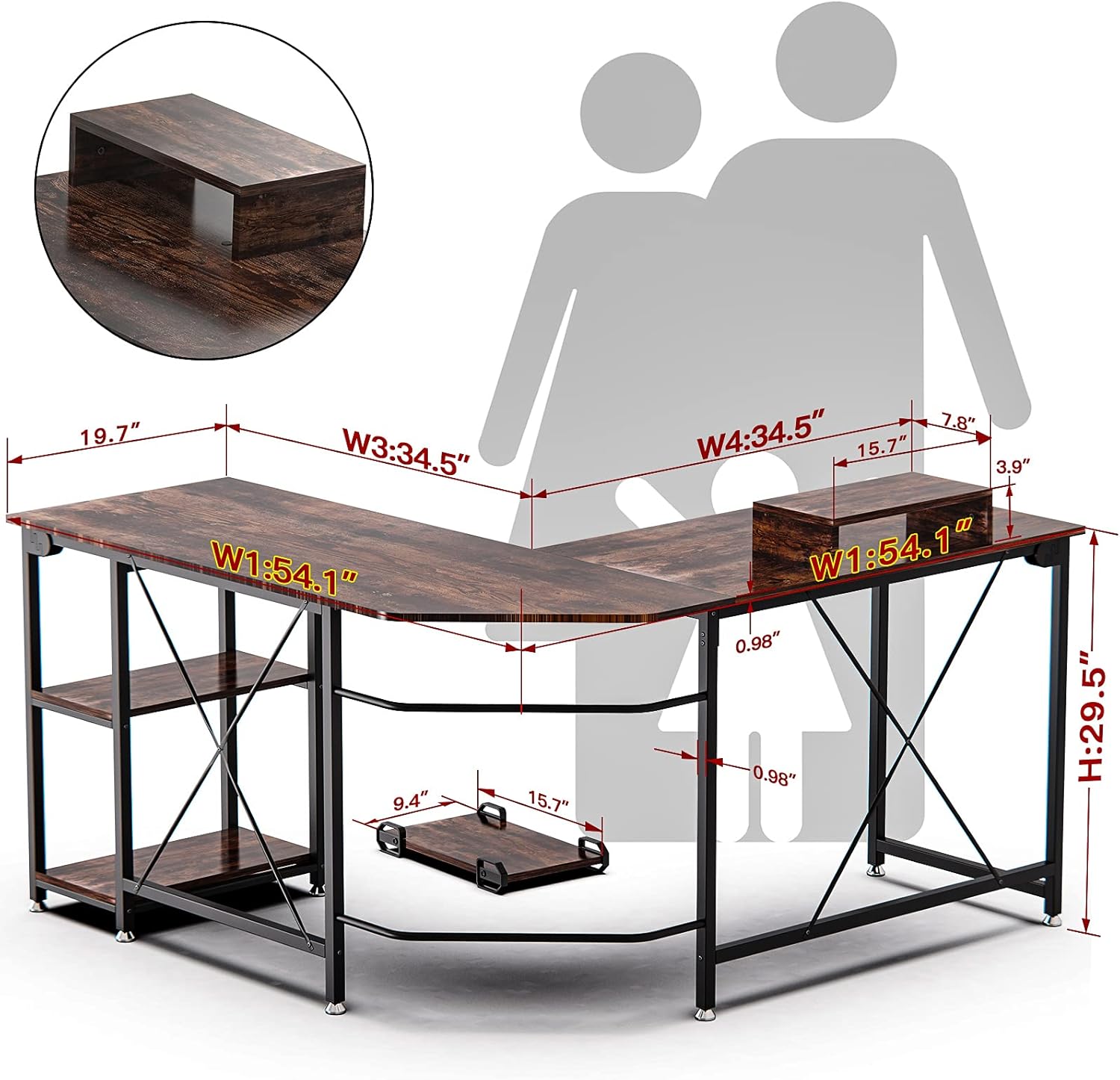
Image 2: Dimensional overview of the GIKPAL L-Shaped Desk, illustrating its overall size and the included monitor stand and CPU stand.
The assembly process involves attaching the metal frame components and then securing the desktop panels. It is recommended to have a second person assist with assembly for easier handling of larger components.
5. Operating and Usage
The GIKPAL HW001 L-Shaped Desk is designed for versatile use in home offices, gaming setups, or study areas. Its robust construction supports various equipment.
- Weight Capacity: The desktop can support up to 220 lbs (approximately 100 kg). Each storage shelf has a static load capacity of 110.2 lbs (approximately 50 kg). This allows for multiple monitors, a printer, laptop, and other office supplies.
- Monitor Raiser: Utilize the included mobile monitor stand to elevate your screen to an ergonomic height, reducing neck strain.
- CPU Stand: The mobile CPU stand keeps your computer tower off the floor, protecting it from dust and allowing for easier cleaning and mobility.
- Storage Shelves: The integrated shelves provide convenient storage for books, documents, or small electronic devices.

Image 3: The L-shaped desk configured for a home office, demonstrating its practical use and aesthetic integration.

Image 4: Illustration of the generous legroom and under-desk space, suitable for stretching legs or accommodating a file cabinet.
6. Maintenance
To ensure the longevity and appearance of your GIKPAL L-Shaped Desk, follow these maintenance guidelines:
- Cleaning: The desktop features a moisture-proof, anti-scratch P2 class particle board with a powder-coated finish. Wipe surfaces with a soft, damp cloth. Avoid abrasive cleaners or harsh chemicals that could damage the finish.
- Spills: Promptly wipe up any spills to prevent water damage, especially on the edges and seams.
- Hardware Check: Periodically check all screws and bolts to ensure they remain tight. Re-tighten as necessary to maintain desk stability.
- Protection: Use coasters for drinks and protective pads under heavy or sharp objects to prevent scratches and marks.

Image 5: Detailed views highlighting the desk's bevel edge, waterproof surface, and non-slip adjustable feet for enhanced stability and durability.
7. Troubleshooting
If you encounter issues with your GIKPAL L-Shaped Desk, consider the following common solutions:
- Desk Wobbles:
- Ensure all screws and bolts are securely tightened.
- Adjust the leveling feet at the bottom of the desk legs to stabilize it on uneven floors.
- Verify that the toothed stabilizers at the frame joints are properly engaged.
- Parts Missing or Damaged:
- Carefully check the packaging and all contents against the parts list in the assembly manual.
- Contact GIKPAL customer support for assistance with replacement parts.
- Difficulty Assembling:
- Review the assembly manual carefully, paying attention to diagrams and step order.
- Ensure you are using the correct hardware for each step.
- Do not fully tighten all screws until the entire section is assembled, allowing for minor adjustments.
8. Specifications
| Feature | Detail |
|---|---|
| Brand | GIKPAL |
| Model Number | HW001 |
| Color | Rustic Brown |
| Product Dimensions (Overall) | 50D x 140W x 74.9H Centimetres (approx. 55'' L x 18.9'' W for long side, 47.2'' L x 18.1'' W for short side) |
| Desktop Panel Thickness | 0.6 inches |
| Leg Dimensions | 1'' L x 1'' W |
| Height from floor to desktop | 29.5 inches |
| Material | Engineered Wood (P2 class particle board), Metal |
| Finish Type | Powder Coated (metal frame) |
| Special Features | Adjustable feet, Reversible L-shape, Monitor Raiser, CPU Stand, Storage Shelves |
| Item Weight | 25 kg (approx. 55 lbs) |
| Maximum Desktop Load Capacity | 220 lbs (100 kg) |
| Static Load Capacity per Shelf | 110.2 lbs (50 kg) |

Image 6: Visual representation of the desk's weight bearing capabilities, indicating maximum load for the desktop and individual shelves.
9. Warranty and Support
GIKPAL provides a 365-day warranty for this product, covering any quality issues from the date of purchase. If you encounter any problems or have questions regarding your GIKPAL HW001 L-Shaped Desk, please do not hesitate to contact our customer support team.
For support, please refer to the contact information provided in your purchase documentation or visit the official GIKPAL website.