
Energy Sistem Style 3 True Wireless
Energy Sistem Style 3 True Wireless Earphones User Manual
Model: 450749
1. Introduction
This manual provides detailed instructions for the proper use and maintenance of your Energy Sistem Style 3 True Wireless Earphones. Please read this guide thoroughly before using the product to ensure optimal performance and longevity.
2. Package Contents
Verify that all items are present in the package:
- Energy Sistem Style 3 True Wireless Earphones (Rose)
- Charging Case
- Micro USB Cable
- Quick Guide

Image: The Energy Sistem Style 3 True Wireless Earphones in rose color, shown with their matching charging case.
3. Product Overview
The Energy Sistem Style 3 True Wireless Earphones are designed for a seamless audio experience. They feature True Wireless Stereo technology, a charging case for extended battery life, and stereo call functionality.

Image: A close-up view of a single Energy Sistem Style 3 earphone, highlighting its design and ear tip.
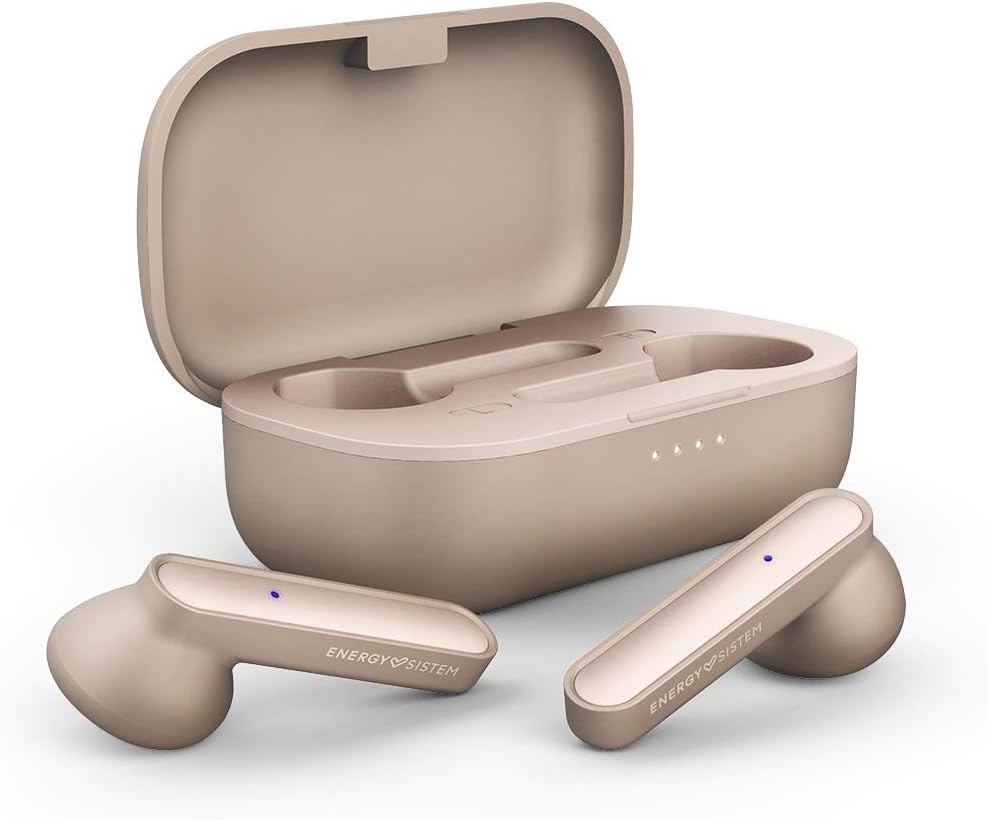
Image: The Energy Sistem Style 3 earphones placed inside their open charging case, showing the charging contacts and indicator lights.
Key Features:
- True Wireless Technology: Eliminates cables, allowing earphones to connect to each other and your smartphone simultaneously.
- Extended Battery Life: Earphones provide 4 hours of playback, with the charging case offering an additional 16 hours.
- Charging Case: Compact case for convenient transport and recharging.
- Stereo Calls: Integrated microphone and technology for stereo phone calls.
4. Setup
4.1 Initial Charging
- Before first use, fully charge the charging case and earphones.
- Connect the Micro USB cable to the charging port on the case and to a USB power source.
- The indicator lights on the case will show charging status. Once fully charged, the lights will indicate completion or turn off.
- Place the earphones into the charging case. Ensure they are correctly seated to begin charging. Red indicator lights on the earphones typically mean they are charging.

Image: The Energy Sistem Style 3 charging case, showing the Micro USB charging port at the back.
4.2 Pairing with a Device
- Ensure the earphones are charged.
- Open the charging case. The earphones will automatically enter pairing mode (or manually activate by removing them from the case).
- On your smartphone or Bluetooth-enabled device, go to the Bluetooth settings.
- Search for available devices and select "Energy Sistem Style 3" (or similar name).
- Once connected, a voice prompt or indicator light will confirm successful pairing.
- The earphones will automatically reconnect to the last paired device when removed from the case, if Bluetooth is enabled on the device.
5. Operating Instructions
5.1 Power On/Off
- Power On: Remove the earphones from the charging case. They will power on automatically.
- Power Off: Place the earphones back into the charging case. They will power off and begin charging automatically.
5.2 Music Playback
Control music playback using the touch controls on the earphones (specific gestures may vary, refer to quick guide for details):
- Play/Pause: Single tap on either earphone.
- Next Track: Double tap on the right earphone.
- Previous Track: Double tap on the left earphone.
- Volume Up/Down: Long press on the right/left earphone (specific functionality may vary by model).
5.3 Phone Calls
- Answer/End Call: Single tap on either earphone during an incoming call.
- Reject Call: Long press on either earphone during an incoming call.
- Voice Assistant: Triple tap on either earphone (activates Siri, Google Assistant, etc.).
6. Maintenance
6.1 Cleaning
- Use a soft, dry cloth to clean the earphones and charging case.
- Do not use abrasive cleaners, alcohol, or chemical solvents.
- Regularly clean the charging contacts on both the earphones and the case to ensure proper connection.
6.2 Storage
- When not in use, store the earphones in their charging case to protect them and keep them charged.
- Store in a cool, dry place, away from direct sunlight and extreme temperatures.
7. Troubleshooting
| Problem | Possible Cause | Solution |
|---|---|---|
| Earphones do not power on. | Low battery. | Charge the earphones and charging case fully. |
| Cannot pair with device. | Bluetooth is off; earphones not in pairing mode; device too far. | Ensure Bluetooth is on; remove earphones from case to enter pairing mode; keep devices within range (approx. 10 meters). |
| No sound or poor sound quality. | Volume too low; earphones not properly seated; interference. | Adjust volume on device; ensure earphones are clean and properly inserted; move away from sources of interference. |
| Only one earphone works. | Earphones not properly synced; one earphone has low battery. | Place both earphones back in the case, close it, then reopen to re-sync. Ensure both are charged. |
8. Specifications
- Model Name: Earphones Style 3 True Wireless Rose
- Model Number: 450749
- Brand: Energy Sistem
- Connectivity Technology: Wireless
- Wireless Communication Technology: Bluetooth
- Form Factor: In-Ear
- Material: Plastic
- Battery Composition: Lithium-Polymer
- Rechargeable Battery: Yes
- Water Resistance Level: Water Resistant
- Compatible Devices: Mobile Phone
- Special Features: Sports and Exercise
- Included Components: Earphones, Charging Case, Micro USB Cable, Quick Guide
9. Warranty and Support
Energy Sistem products are designed for durability and performance. This product comes with a 2-year availability of spare parts from the manufacturer.
For technical support, warranty claims, or further assistance, please refer to the official Energy Sistem website or contact their customer service directly. Keep your proof of purchase for warranty purposes.
Software updates guaranteed until: Information not available.
Ask a question about this manual
Ask about setup, troubleshooting, compatibility, parts, safety, or missing instructions. Manuals+ will review the question and use this page’s manual context to help answer it.