
Important Safety Instructions
When using electrical appliances, basic safety precautions should always be followed to reduce the risk of fire, electric shock, burns, or injury to persons.
- Read all instructions before using the appliance.
- Ensure the voltage indicated on the appliance corresponds to your local mains voltage.
- Do not operate the microwave if the door or door seals are damaged. Contact qualified service personnel.
- Do not heat liquids or other foods in sealed containers as they are liable to explode.
- Only allow children to use the oven without supervision when adequate instructions have been given so that the child is able to use the oven in a safe way and understands the hazards of improper use.
- Do not use corrosive chemicals or vapors in this appliance.
- Do not immerse the appliance, cord, or plug in water or other liquids.
- Regularly inspect the power cord for damage. If damaged, it must be replaced by the manufacturer, its service agent, or similarly qualified persons to avoid a hazard.
- This appliance is intended for household use only.
Product Overview
The ProfiCook PC-MWG 1204 is a versatile microwave with an integrated grill function, designed for efficient cooking and heating. It features a unique flatbed design, eliminating the need for a turntable and providing a 55% larger usable cooking area.
Key Features:
- Microwave Power: 800 Watts
- Grill Power: 1000 Watts
- Capacity: 23 Liters
- Flatbed Design: Glass ceramic base for 55% larger usable area, accommodating square dishes.
- Control Panel: Multifunctional digital display with clock.
- Programs: 8 automatic cooking programs, 5 microwave power levels, 3 defrost programs.
- Timers: 60-minute timer and 24-hour advance timer function.
- Safety: Child lock function.
- Construction: Mirrored glass front, stainless steel handle, stainless steel interior.

Front view of the ProfiCook PC-MWG 1204 Microwave with Grill, showcasing its sleek design and digital display.
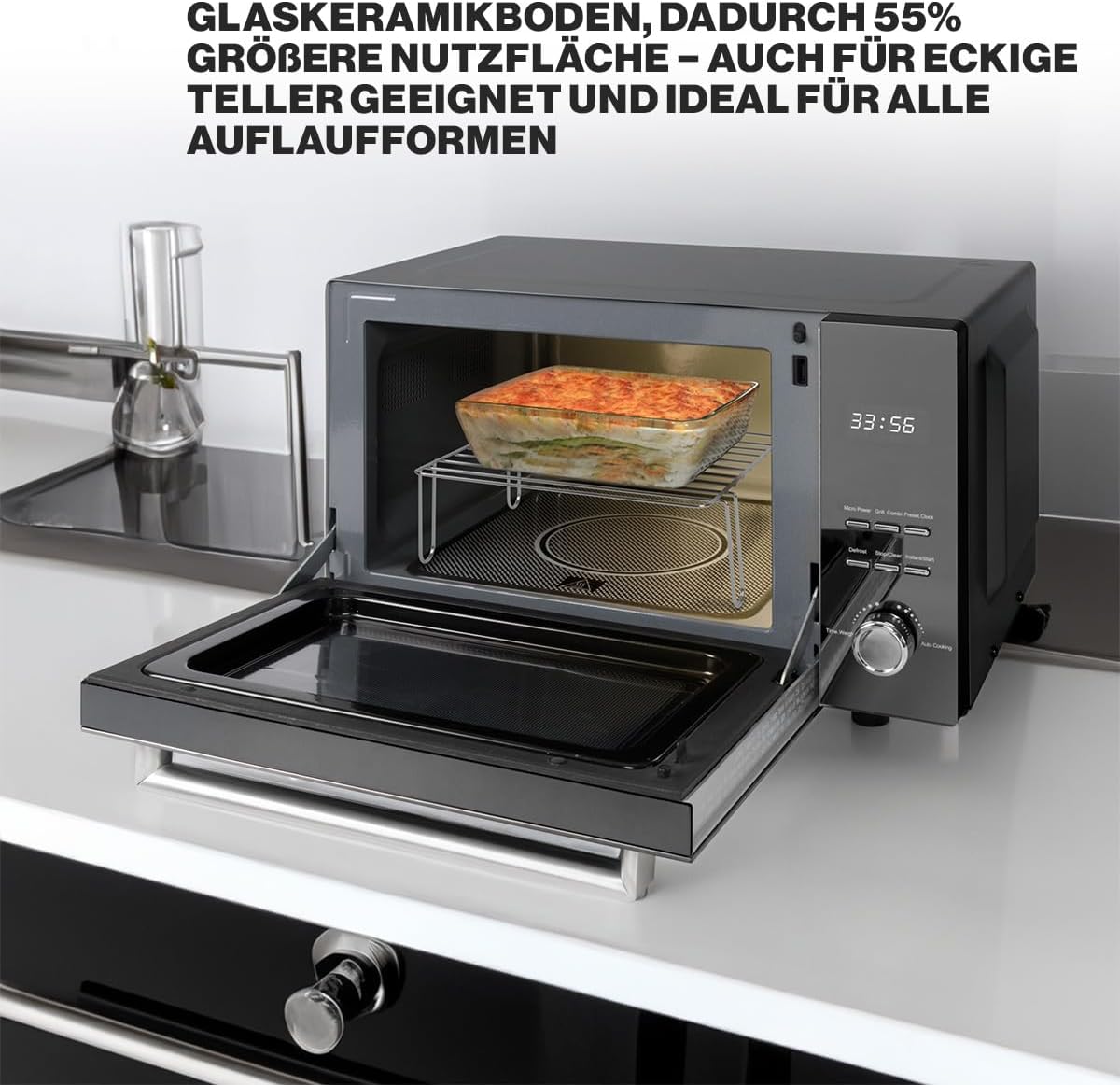
Interior view of the microwave, highlighting the flat glass ceramic base and a dish placed inside, demonstrating the increased usable space.
Setup
1. Unpacking
Carefully remove the microwave oven and all packaging materials from the carton. Check the oven for any damage, such as dents or a misaligned door. Do not operate the oven if it is damaged. Retain packaging materials for future transport or disposal.
2. Placement
- Place the oven on a flat, stable surface that can support its weight and the heaviest food item likely to be cooked in it.
- Ensure adequate ventilation. Leave a minimum of 20 cm (8 inches) of space above the oven, 10 cm (4 inches) at the rear, and 5 cm (2 inches) on both sides for proper airflow.
- Do not block air vents.
- Keep the oven away from heat sources, steam, or splashing liquids.
3. Electrical Connection
Plug the power cord into a properly installed and grounded wall outlet. Ensure the outlet is easily accessible. Do not use extension cords or adapters.
Operating Instructions
1. Control Panel Overview
The control panel features a digital display, function buttons, and a rotary knob for setting time and selecting programs.
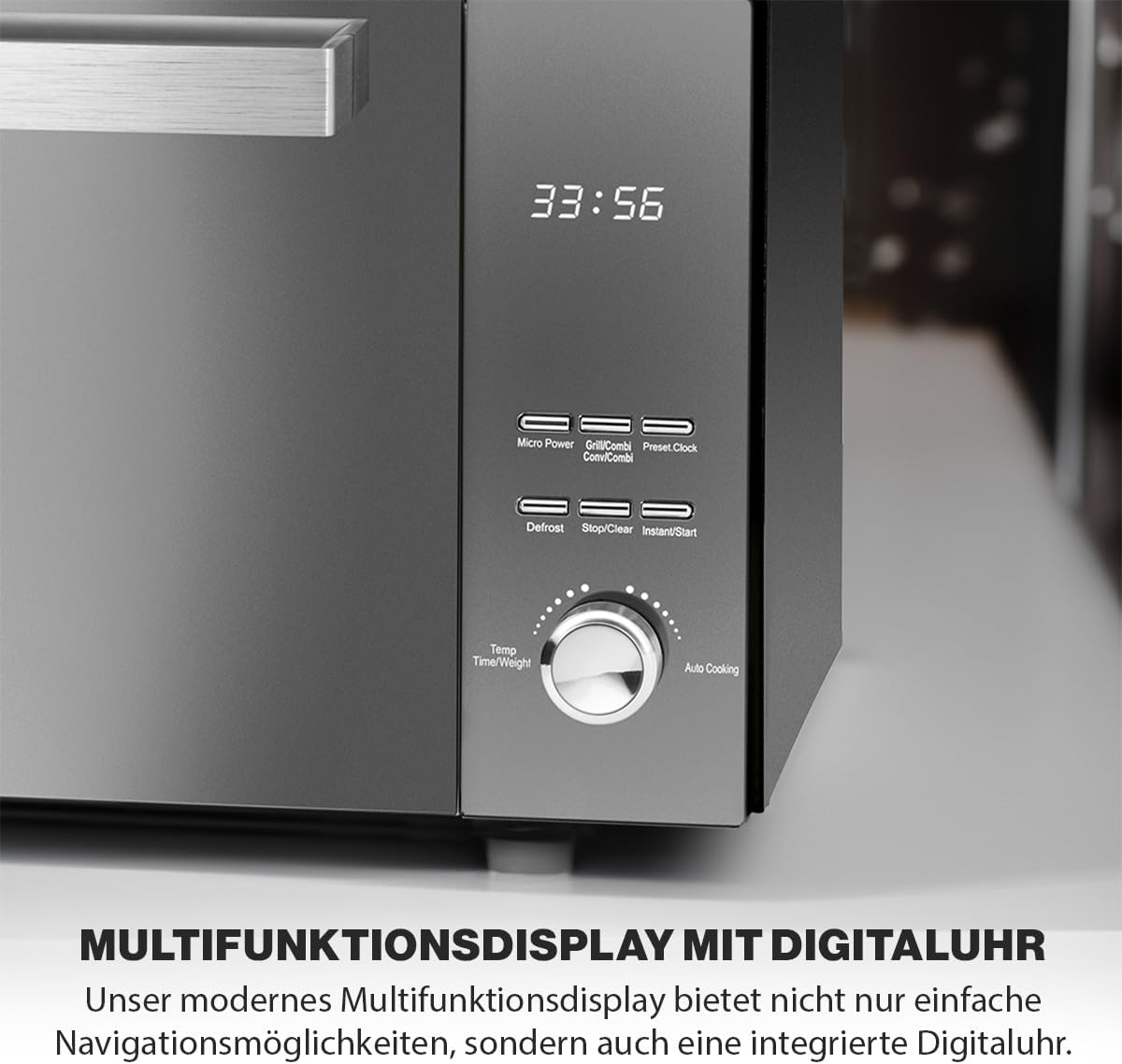
Detailed view of the microwave's control panel, showing the digital display, buttons for Micro Power, Grill/Combi, Preset/Clock, Defrost, Stop/Clear, Instant/Start, and the Temp/Time/Weight/Auto Cooking rotary knob.
- Digital Display: Shows time, cooking settings, and remaining time.
- Micro Power Button: Selects microwave power levels.
- Grill/Combi Button: Selects grill or combination cooking modes.
- Preset/Clock Button: Sets the clock or programs a delayed start.
- Defrost Button: Activates defrost programs.
- Stop/Clear Button: Stops cooking, clears settings, or cancels child lock.
- Instant/Start Button: Starts cooking or adds quick cooking time.
- Rotary Knob (Temp/Time/Weight/Auto Cooking): Adjusts time, weight, or selects automatic cooking programs.
2. Setting the Clock
- Press the Preset/Clock button once. The hour digits will flash.
- Turn the rotary knob to set the hour.
- Press the Preset/Clock button again. The minute digits will flash.
- Turn the rotary knob to set the minutes.
- Press the Preset/Clock button to confirm the time.
3. Microwave Cooking
- Place food in a microwave-safe container inside the oven.
- Press the Micro Power button repeatedly to select the desired power level (e.g., P100 for 100% power, P80 for 80%, etc. There are 5 levels).
- Turn the rotary knob to set the cooking time.
- Press the Instant/Start button to begin cooking.
4. Grill Cooking
- Place food on the grill rack (if applicable) in a heat-resistant dish.
- Press the Grill/Combi button once to select the grill function (G-1).
- Turn the rotary knob to set the cooking time.
- Press the Instant/Start button to begin grilling.
5. Combination Cooking
The appliance offers combination modes for microwave and grill cooking.
- Place food in a suitable container.
- Press the Grill/Combi button repeatedly to select a combination mode (e.g., C-1, C-2).
- Turn the rotary knob to set the cooking time.
- Press the Instant/Start button to begin.
6. Defrosting Programs
The microwave has 3 defrosting programs for different food types.
- Place the frozen food in the oven.
- Press the Defrost button repeatedly to select the desired defrost program (e.g., dEF1, dEF2, dEF3).
- Turn the rotary knob to set the weight of the food.
- Press the Instant/Start button to begin defrosting.
7. Automatic Cooking Programs
The oven includes 8 pre-set automatic cooking programs for common dishes.
- Place food in the oven.
- Turn the rotary knob to the 'Auto Cooking' section to select a program (e.g., A-1 for pizza, A-2 for potatoes).
- Press the Instant/Start button to begin.
8. Child Lock
To activate the child lock, press and hold the Stop/Clear button for 3 seconds. A lock indicator will appear on the display. To deactivate, press and hold the Stop/Clear button again for 3 seconds.
Maintenance and Cleaning
Regular cleaning helps maintain the performance and longevity of your microwave oven.
1. Exterior Cleaning
Wipe the exterior surface with a soft, damp cloth. Do not use abrasive cleaners or harsh chemicals.
2. Interior Cleaning
Clean the interior cavity, including the glass ceramic base, with a mild detergent and a soft cloth after each use. For stubborn food splatters, place a bowl of water with lemon juice inside and microwave for a few minutes to loosen residue, then wipe clean. Ensure the oven is unplugged before cleaning.
3. Grill Rack Cleaning
The included grill rack should be washed by hand with warm, soapy water and a non-abrasive sponge. Rinse thoroughly and dry completely before storing or reusing.

The included 24x24 cm grill rack, designed for use with the microwave's grill function.
Troubleshooting
If you encounter issues with your microwave oven, refer to the following common problems and solutions:
| Problem | Possible Cause | Solution |
|---|---|---|
| Oven does not start | Power cord not plugged in; Door not closed properly; Fuse blown or circuit breaker tripped. | Ensure plug is firmly in outlet; Close door securely; Check household fuse/circuit breaker. |
| Food not heating | Incorrect power level or cooking time set; Microwave-safe dish not used. | Adjust power level and time; Use appropriate cookware. |
| Sparking inside oven | Metal objects in oven; Food residue on interior walls. | Remove all metal items; Clean oven interior thoroughly. |
| Child lock activated | Child lock engaged accidentally. | Press and hold the Stop/Clear button for 3 seconds to deactivate. |
If the problem persists after attempting these solutions, please contact customer support.
Specifications
Technical Data:
| Feature | Specification |
|---|---|
| Brand Name | Profi Cook |
| Model Info | 501204 |
| Microwave Power | 800 Watts |
| Grill Power | 1000 Watts |
| Total Energy Use | 1000 Watts (as per Energy Use spec, likely max combined) |
| Capacity | 23 Liters |
| Voltage | 230 Volts |
| Installation Type | Countertop |
| Material Type | Stainless Steel (Interior and Exterior) |
| Special Features | Multi-Air Flow, Flatbed Design, Digital Clock, Child Lock |
| Oven Cooking Mode | Microwave Grill Combination |
| Color | Black |
| Item Weight | 13.4 Kilograms |
| Product Dimensions (D x W x H) | 40 x 49.5 x 29.5 cm |
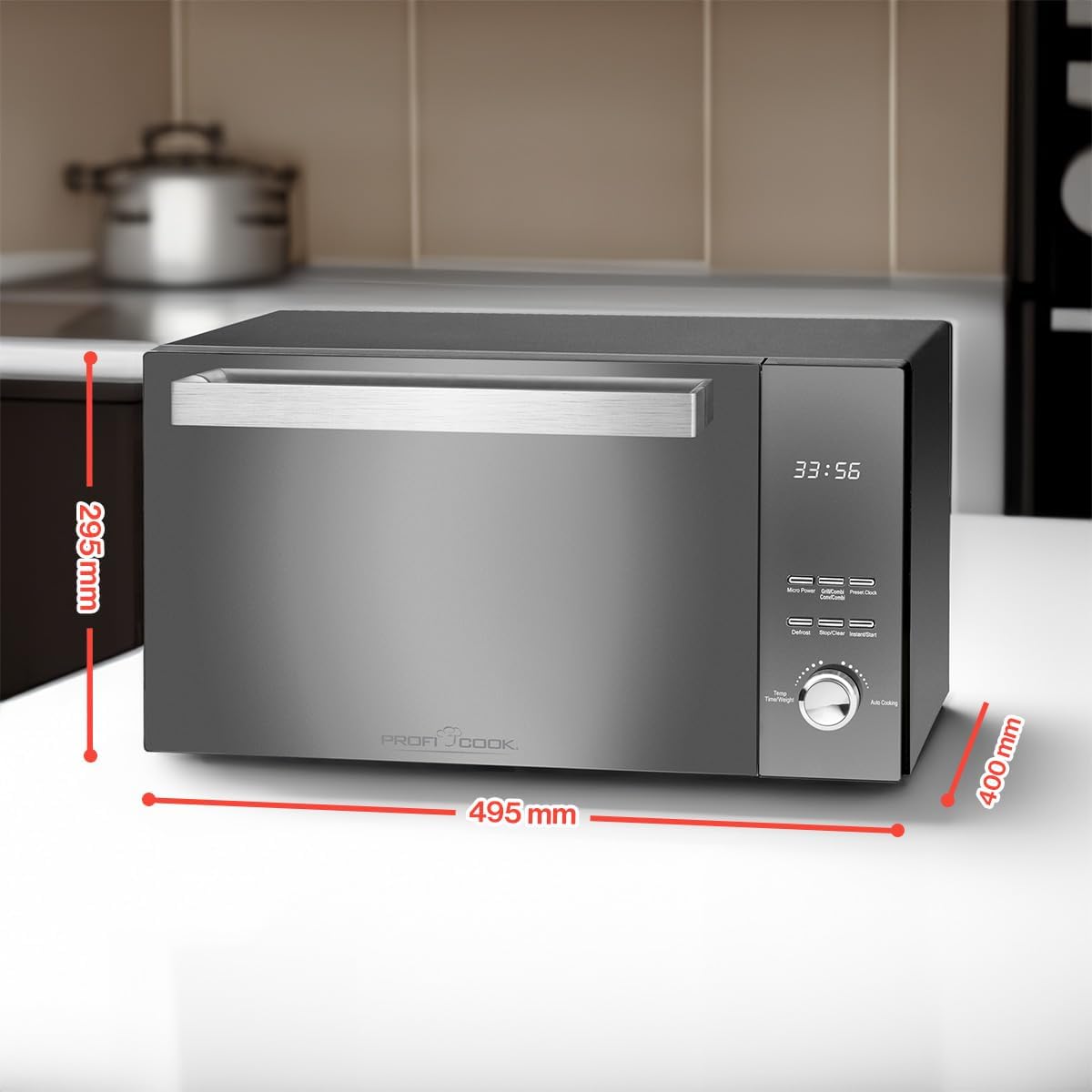
Diagram illustrating the dimensions of the ProfiCook PC-MWG 1204 microwave: 495mm width, 295mm height, and 400mm depth.
Warranty and Support
Warranty Information
This ProfiCook PC-MWG 1204 Microwave with Grill comes with a 2-year warranty on heat units and heater components from the date of purchase. Please retain your proof of purchase for warranty claims. The warranty covers manufacturing defects and material faults under normal household use.
The warranty does not cover damage resulting from improper use, accidental damage, unauthorized repairs, or normal wear and tear.
Customer Support
For technical assistance, warranty claims, or service inquiries, please refer to the contact information provided with your purchase documentation or visit the official ProfiCook website for support details in your region.


