
1. Introduction
This manual provides detailed instructions for the assembly, operation, and maintenance of your FREE SOLDIER 30070 Telescope. Designed for both beginners and enthusiasts, this portable refracting telescope offers a 70mm aperture and 300mm focal length, providing clear views of celestial objects and terrestrial landscapes. Please read this manual thoroughly before using your telescope to ensure proper setup and optimal viewing experience.
2. Package Contents
Verify that all items listed below are included in your package:
- Telescope Optical Tube (F30070M)
- Adjustable Aluminum Alloy Tripod
- Finder Scope
- Diagonal Mirror
- H20mm Eyepiece
- H6mm Eyepiece
- 3X Barlow Lens
- 1.5X Erecting Eyepiece
- Smartphone Adapter
- Wireless Remote Control
- Moon Filter
- Carry Bag
- Instruction Manual
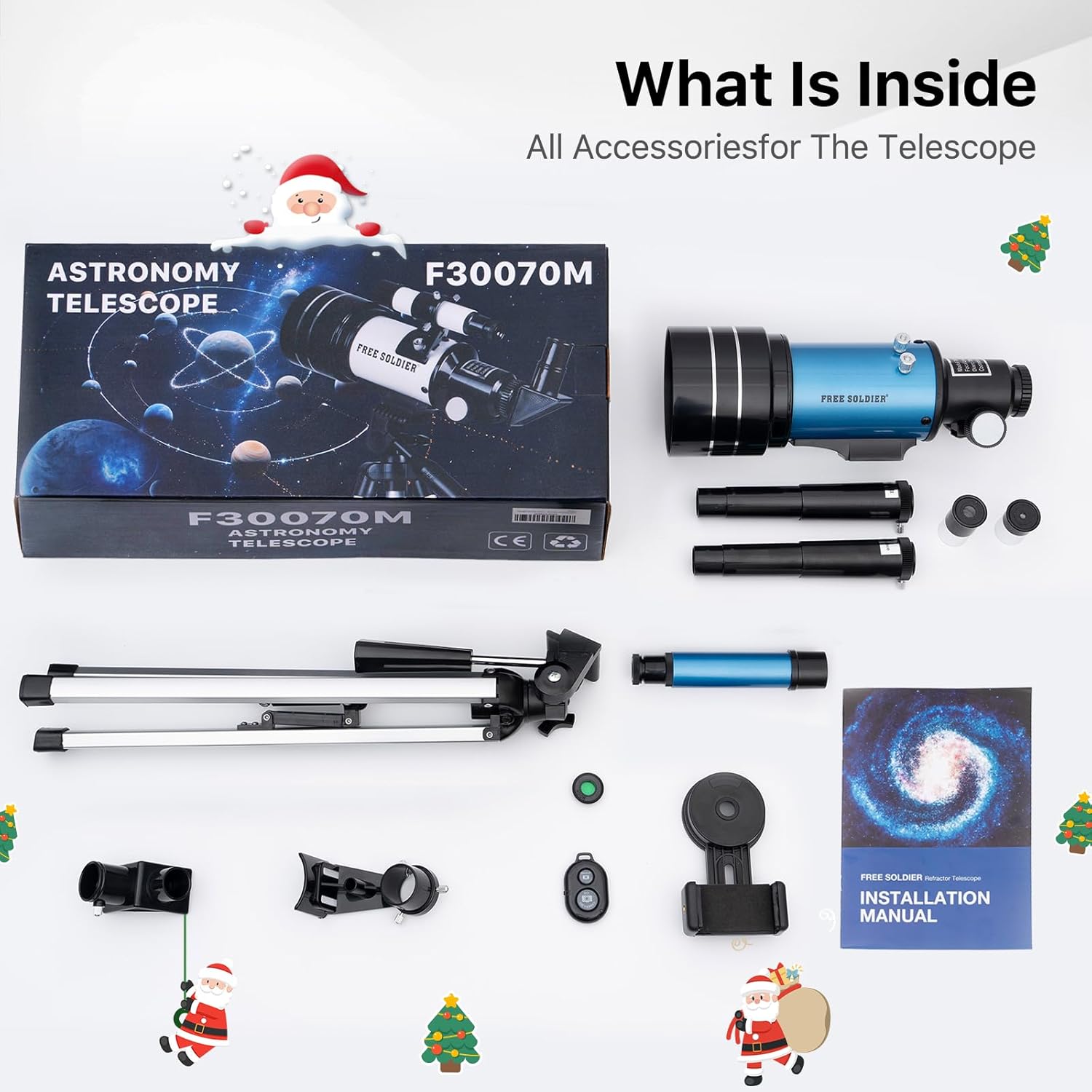
Image: All components of the FREE SOLDIER 30070 Telescope package, including the optical tube, tripod, various eyepieces, smartphone adapter, and carry bag.
3. Assembly & Setup
Follow these steps to assemble your telescope:
- Set up the Tripod: Extend the aluminum alloy tripod legs to the desired height. Secure the legs using the locking mechanisms. Ensure the accessory tray is properly attached for stability and storage of eyepieces.
- Attach the Telescope Tube: Mount the main optical tube onto the tripod's alt-azimuth mount. Secure it firmly using the mount lock knob.
- Install the Finder Scope: Slide the finder scope into its bracket on top of the main optical tube and tighten the small screws to hold it in place. The finder scope helps in locating objects before viewing them through the main eyepiece.
- Insert the Diagonal Mirror: Insert the diagonal mirror into the focuser tube. This component redirects the light at a 90-degree angle, providing a more comfortable viewing position.
- Attach an Eyepiece: Insert the desired eyepiece (e.g., H20mm for lower magnification and wider field of view) into the diagonal mirror. Secure it with the small thumbscrew. For higher magnification, you can use the H6mm eyepiece or combine an eyepiece with the 3X Barlow lens.
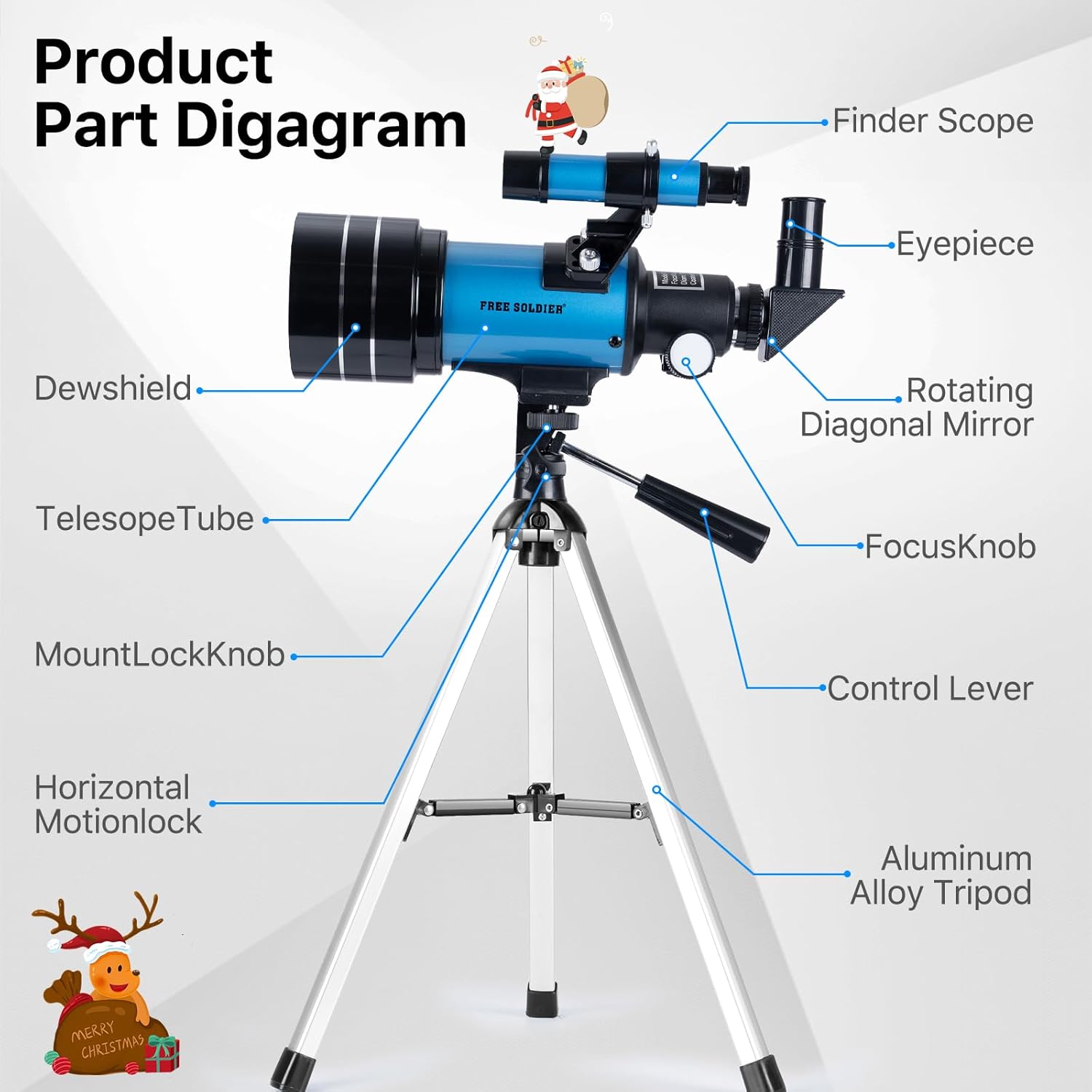
Image: Product Part Diagram illustrating the Dewshield, Telescope Tube, Mount Lock Knob, Horizontal Motion Lock, Aluminum Alloy Tripod, Finder Scope, Eyepiece, Rotating Diagonal Mirror, Focus Knob, and Control Lever.
Video: An official seller video demonstrating the assembly process of the Astronomic Telescope 30070, showing how to connect the main components and set up the tripod.
4. Operating Instructions
4.1 Using the Finder Scope
The finder scope provides a wider field of view, making it easier to locate objects in the sky. Look through the finder scope and center the desired object in its crosshairs. Once centered, the object should be visible through the main telescope eyepiece.
4.2 Adjusting Magnification
Your telescope comes with different eyepieces and a Barlow lens to vary magnification:
- H20mm Eyepiece: Provides 15X magnification. Ideal for wide-field observations and locating objects.
- H6mm Eyepiece: Provides 50X magnification. Suitable for more detailed views of the Moon and brighter planets.
- 3X Barlow Lens: Triples the magnification of any eyepiece. When used with the H20mm eyepiece, it provides 45X magnification. With the H6mm eyepiece, it provides 150X magnification.
- 1.5X Erecting Eyepiece: Used for terrestrial viewing to correct the inverted image produced by the telescope.

Image: Magnification examples showing a 20mm eyepiece (24x), 6mm eyepiece (60x), 3x Barlow lens with 20mm eyepiece (72x), and 3x Barlow lens with 6mm eyepiece (180x), illustrating views of a raccoon and the moon.
4.3 Focusing
Once an object is centered in the eyepiece, slowly turn the focus knob located on the focuser tube until the image appears sharp and clear. Fine-tune the focus for optimal clarity.
4.4 Using the Smartphone Adapter and Wireless Remote
The smartphone adapter allows you to attach your phone to the eyepiece for astrophotography or sharing your views. The wireless remote control enables you to capture photos or videos without touching the telescope, minimizing vibrations.
- Attach the smartphone adapter to the eyepiece.
- Secure your smartphone into the adapter, ensuring the camera lens is aligned with the eyepiece.
- Connect the wireless remote to your smartphone via Bluetooth.
- Use the remote to capture images or start/stop video recording.

Image: Step-by-step visual guide demonstrating the installation of the smartphone adapter onto the telescope eyepiece, showing how to secure the phone and align the camera.
Video: A user-generated video demonstrating the assembly of the phone adapter for the telescope, showing how to attach a smartphone to capture images through the eyepiece.
5. Maintenance
Proper care will extend the life and performance of your telescope:
- Cleaning Lenses: Use a soft, lint-free cloth specifically designed for optical lenses. Gently wipe the lens surface to remove dust. For stubborn smudges, use a small amount of optical cleaning fluid on the cloth, not directly on the lens.
- Storage: Store the telescope in its carry bag in a dry, dust-free environment when not in use. Keep all caps on the optical tube and eyepieces to prevent dust accumulation.
- General Care: Avoid touching optical surfaces with bare hands. Do not expose the telescope to extreme temperatures or sudden temperature changes.
6. Troubleshooting
Here are solutions to common issues:
- Image is blurry: Adjust the focus knob slowly. Ensure the correct eyepiece is securely inserted. Check for condensation on the lenses.
- Cannot find objects: Ensure the finder scope is properly aligned with the main telescope. Start with the lowest magnification eyepiece (H20mm) to get a wider field of view.
- Image is inverted/reversed: This is normal for astronomical telescopes. For terrestrial viewing, use the 1.5X Erecting Eyepiece to correct the image orientation.
- Unstable tripod: Ensure all tripod legs are fully extended and locked. Place the tripod on a flat, stable surface.
7. Specifications
| Brand | FREE SOLDIER |
| Model | 30070 |
| Objective Lens Diameter | 70 Millimeters |
| Focal Length | 300mm |
| Eyepiece Lens Description | Kellner (H20mm, H6mm) |
| Lens Coating Description | Fully Multi-Coated |
| Focus Type | Manual Focus |
| Finderscope | Reflex |
| Item Weight | 1.2 Pounds |
| Product Dimensions | 17.13 x 5.63 x 11.3 inches |

Image: Product Dimensions diagram indicating the telescope's height and width, along with illustrations of its 180-degree angle and 360-degree directional movement.
8. Safety Information
Always observe the following safety precautions:
- NEVER look directly at the sun through your telescope or its finder scope without a professionally made solar filter. Permanent and irreversible eye damage can result.
- Do not use the telescope to view objects through a window, as this can distort the image.
- Keep the telescope away from children without adult supervision.
9. Warranty & Support
For warranty information or technical support, please refer to the contact details provided with your purchase or visit the FREE SOLDIER official website. Keep your purchase receipt as proof of purchase.