
Product Overview
This manual provides instructions for the Samsung 345L Frost Free Inverter Double Door Refrigerator, Model RT37T4513S8/HL-cr. This appliance features a 3-star energy rating, convertible freezer, and Digital Inverter technology for efficient cooling.
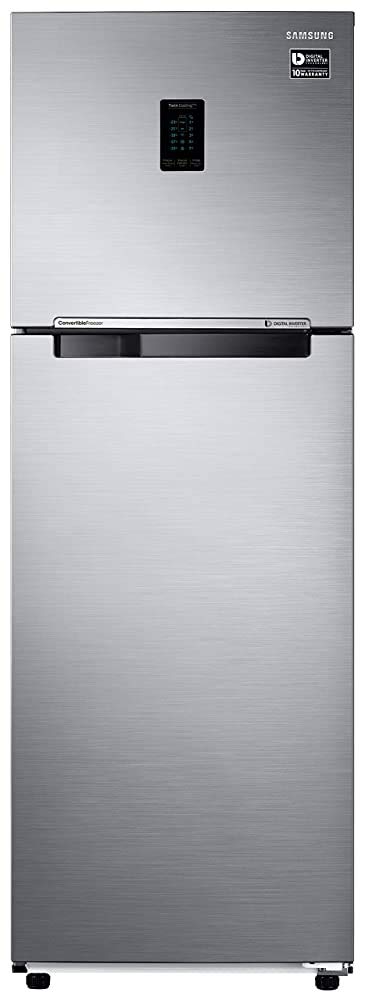
Image: Front view of the Samsung 345L Frost Free Inverter Double Door Refrigerator. The refrigerator features a sleek Elegant Inox finish with a top freezer and a digital display panel.
Setup and Installation
Unpacking
- Carefully remove all packaging materials, including tape and protective films.
- Inspect the refrigerator for any damage incurred during transit. Report any damage to your retailer immediately.
- Ensure all included components, such as the user manual and warranty card, are present.
Placement
- Place the refrigerator on a firm, level floor. Adjust the leveling feet if necessary to ensure stability.
- Allow adequate space around the refrigerator for proper ventilation (at least 5 cm on sides and back, 10 cm on top).
- Avoid direct sunlight or proximity to heat sources like stoves or heaters.
- This is a freestanding unit and should not be built into cabinetry without proper ventilation considerations.
Dimensions
The approximate dimensions of the refrigerator are:
- Width: 60 cm
- Depth: 67.2 cm
- Height: 171.5 cm

Image: A side view of the Samsung refrigerator with measurements indicating its height (171.5 cm), depth (67.2 cm), and width (60 cm).
Power Connection
- Connect the power cord to a dedicated 220 Volt AC outlet.
- Do not use extension cords or adapters.
- Allow the refrigerator to stand for at least 2-3 hours before plugging it in to allow refrigerants to settle.
Operating Instructions
Initial Operation
- After plugging in, the refrigerator will begin cooling. Allow several hours for the internal temperature to stabilize before storing food.
- The refrigerator features a frost-free system, eliminating the need for manual defrosting.
Temperature Control
The digital control panel located on the freezer door allows you to adjust temperatures for both the freezer and refrigerator compartments.

Image: A detailed view of the Twin Cooling Plus digital control panel. It displays current temperature settings for the freezer and fridge, along with options for 'Freezer Power Freeze', 'Freezer Convert', and 'Fridge Power Cool'.
- Freezer Temperature: Adjust using the 'Freezer' button. Available settings typically range from -15°C to -23°C.
- Refrigerator Temperature: Adjust using the 'Fridge' button. Available settings typically range from 1°C to 7°C.
- Power Freeze: Activates rapid freezing for new items.
- Power Cool: Activates rapid cooling for new items in the fridge.
Convertible Freezer
This model features a convertible freezer, allowing you to switch the freezer compartment to a fridge mode for additional fresh food storage when needed. Use the 'Freezer Convert' option on the control panel to activate this feature.
Internal Storage Features

Image: The interior of the Samsung refrigerator with both doors open, showing the empty freezer compartment at the top and the empty fresh food compartment below. Toughened glass shelves, door bins, and a large vegetable drawer are visible.
- Toughened Glass Shelves: Adjustable shelves for flexible storage.
- Big Box / MoistFresh Zone: A dedicated drawer designed to maintain optimal humidity levels for fruits and vegetables, keeping them fresh longer.

Image: A close-up view of the 'Big Box' or 'MoistFresh Zone' drawer in the refrigerator, filled with a variety of fresh fruits and vegetables like grapes, melons, and cauliflower.
- Movable Ice Maker: Provides convenient access to ice and can be moved or removed for additional freezer space.
- Twin Cooling Plus: Separate cooling systems for the freezer and fridge to maintain optimal humidity and prevent odor mixing.

Image: The interior of the Samsung refrigerator with both doors open, showing various food items neatly organized on shelves, in door bins, and in the vegetable drawer. The freezer compartment also contains frozen goods.
Maintenance
Cleaning
- Always unplug the refrigerator before cleaning.
- Clean the interior and exterior surfaces with a soft cloth and a mild detergent solution. Avoid abrasive cleaners or solvents.
- Wipe down door seals regularly to ensure a tight seal.
- The frost-free feature means manual defrosting is not required. The auto defrost function prevents ice build-up.
- Clean the condenser coils at the back or bottom of the refrigerator periodically (every 6-12 months) to maintain efficiency.
Power Outages
- During a power outage, keep the refrigerator doors closed to maintain internal temperatures for as long as possible.
- Avoid opening the doors unnecessarily.
Troubleshooting
Before contacting service, review the following common issues and solutions:
- Refrigerator not cooling: Check if the power cord is securely plugged in. Ensure the temperature settings are correct. Verify that the doors are fully closed.
- Unusual noises: Some operational noises (e.g., gurgling, humming) are normal. Ensure the refrigerator is level and not touching a wall or cabinet.
- Excessive frost in freezer: While frost-free, excessive door openings or a faulty door seal can lead to some frost. Check the door seal for damage or obstructions.
- Water leakage: Ensure the drain pan is correctly positioned and not overflowing. Check for blockages in the defrost drain tube.
If problems persist after attempting these solutions, please contact Samsung customer support.
Specifications

Image: The 'Power Savings Guide' energy label for the refrigerator, indicating 3 stars, 212 units per year electricity consumption, and details like appliance type, brand, model, and capacity.
| Feature | Detail |
|---|---|
| Brand | Samsung |
| Model | RT37T4513S8/HL-cr |
| Capacity | 345 litres |
| Refrigerator Fresh Food Capacity | 257 litres |
| Freezer Capacity | 88 litres |
| Energy Efficiency | 3 Star Rating |
| Annual Energy Consumption | 212 Kilowatt Hours |
| Defrost System | Frost Free |
| Installation Type | Freestanding |
| Form Factor | Double Door |
| Special Features | Convertible, Inverter |
| Colour | Elegant Inox |
| Voltage | 220 Volts |
| Shelf Type | Toughened Glass |
| Material | Steel |
| Item Weight | 59 kg |
| Item Dimensions (LxWxH) | 67.2 x 60 x 171.5 Centimeters |
Warranty Information
This product typically comes with a manufacturer's warranty. For renewed products, a 6-month warranty is often provided by the supplier. The Digital Inverter Compressor is generally covered by a 10-year warranty from Samsung.
Please refer to the warranty card included with your purchase for specific terms, conditions, and duration of coverage.
Customer Support
For further assistance, technical support, or to schedule service, please contact Samsung customer service. You can find contact details on the official Samsung website or in the documentation provided with your refrigerator.
When contacting support, please have your model number (RT37T4513S8/HL-cr) and serial number ready.


