
Introduction
Thank you for choosing the Lui Adjustable Aluminum Laptop Stand. This manual provides detailed instructions for setting up, operating, and maintaining your new stand. Designed for optimal ergonomics and portability, this stand helps improve your posture and enhance your computing experience by providing adjustable height and angle settings, along with efficient heat dissipation for your device.
Product Overview
The Lui Adjustable Aluminum Laptop Stand is a versatile accessory designed to elevate your laptop, tablet, or even smartphone to an ergonomic viewing height. Its foldable design and lightweight aluminum construction make it highly portable, while its open structure promotes natural airflow to prevent overheating.

Figure 1: The Lui Adjustable Aluminum Laptop Stand, shown with a laptop in use and its compact folded form with the included carrying bag.
Setup and Assembly
The laptop stand comes pre-assembled and requires minimal setup. Follow these steps to prepare your stand for use:
1. Unfolding the Stand
Gently unfold the stand from its compact, folded position. The two main support arms will pivot outwards, and the base will extend. Ensure all joints click securely into place for stability.

Figure 2: Visual guide demonstrating the simple steps to unfold the laptop stand from its compact form to its ready-to-use state.
2. Adjusting Height and Angle
The stand features 7 adjustable height and angle settings. To adjust, gently lift the support arms and position them into the desired notches on the base. Experiment with different angles to find the most comfortable viewing and typing position for your needs.
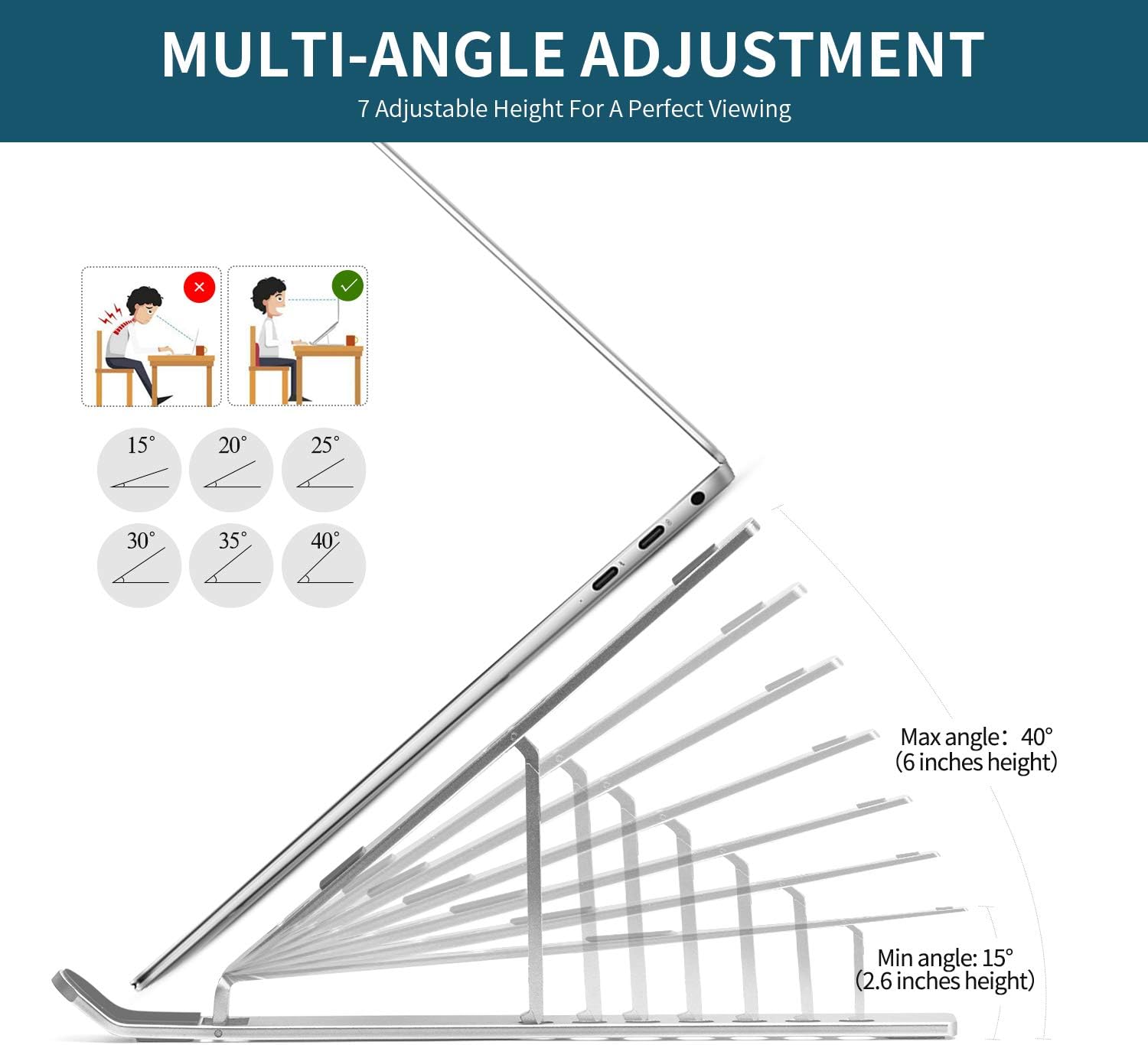
Figure 3: Illustration of the stand's multi-angle adjustment capabilities, ranging from 15° (2.6 inches height) to 40° (6 inches height), allowing for personalized ergonomic setup.
Operating Instructions
Once set up, the Lui laptop stand is ready to enhance your workspace.
Using with Laptops
Place your laptop securely on the stand's top surface. The anti-slip silicone pads on the arms and base will prevent your device from sliding. Ensure your laptop is centered for optimal balance.

Figure 4: A laptop positioned on the stand, highlighting the anti-slip silicone protective pads and the durable aluminum alloy material.
Using with Tablets and Phones
The stand's versatile design also allows it to be used as a holder for tablets and smartphones, providing a comfortable viewing angle for media consumption or video calls.
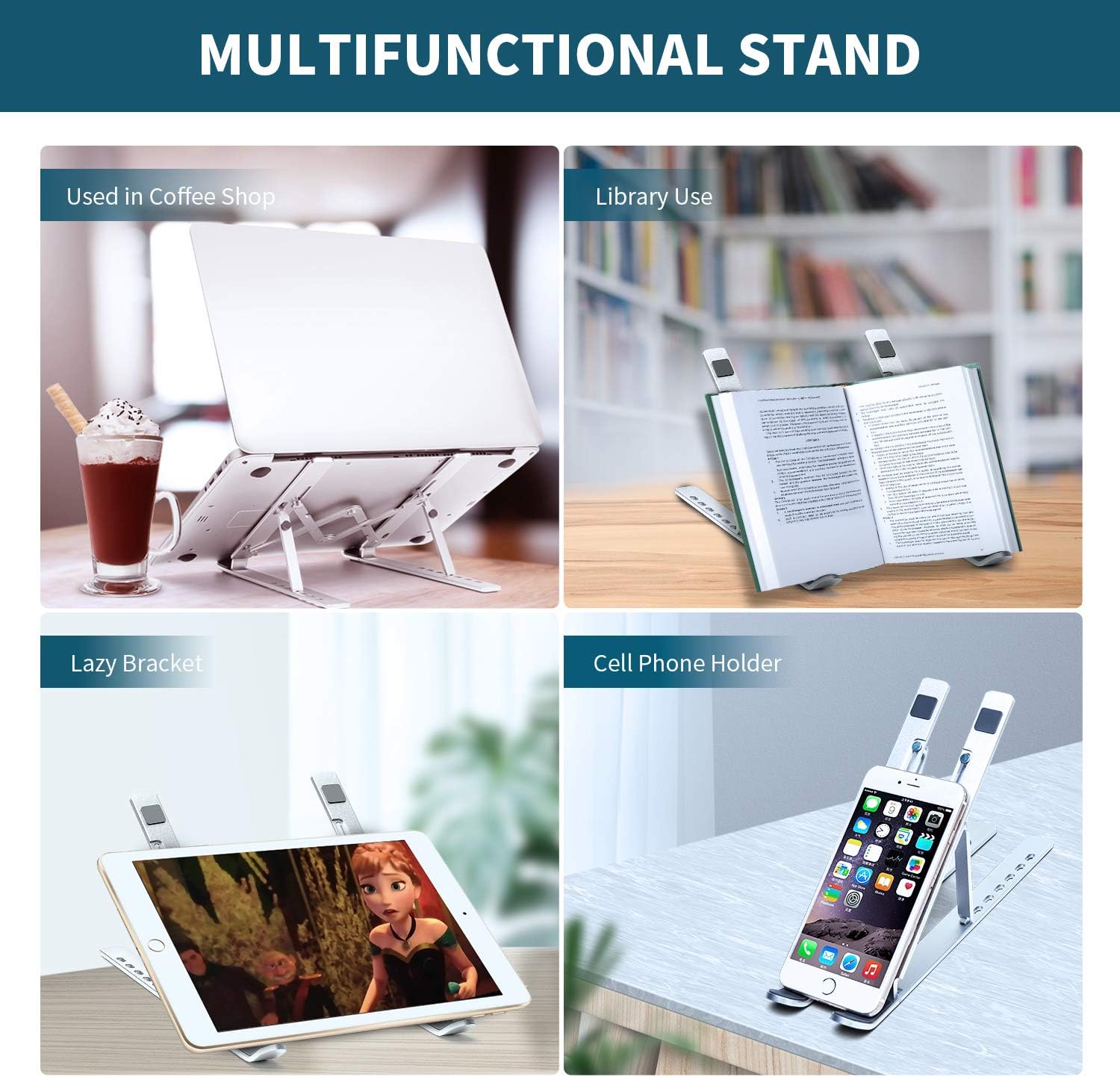
Figure 5: The stand's versatility demonstrated by its use as a holder for both a tablet and a smartphone, suitable for various applications.
Ergonomic Benefits
Adjusting your screen to eye level helps correct posture, reducing strain on your neck, back, and eyes. This stand is designed to promote a healthier and more comfortable working environment, whether at home, in the office, or outdoors.
Figure 6: Illustration showing the improvement in user posture when using the adjustable laptop stand compared to a flat surface, reducing neck and back strain.
Heat Dissipation
The hollow design of the Lui laptop stand significantly improves heat dissipation. By elevating your laptop, it allows for natural airflow underneath, preventing your device from overheating during prolonged use and extending its lifespan.

Figure 7: The hollow design of the stand facilitates excellent heat dissipation, allowing air to circulate freely and cool your laptop effectively.
Portability
Weighing only 0.6 pounds and folding down to a compact size of 10 x 1.77 x 0.71 inches, this stand is incredibly portable. It comes with a durable sleeve bag, making it easy to carry in your backpack or laptop bag, ideal for frequent travelers or those who work on the go.
Figure 8: The compact, folded laptop stand alongside its protective sleeve bag, emphasizing its portability and ease of transport, with dimensions shown.
Maintenance and Care
- Cleaning: Wipe the stand with a soft, damp cloth. Avoid abrasive cleaners or solvents that could damage the aluminum finish or silicone pads.
- Storage: When not in use, fold the stand and store it in its provided sleeve bag to protect it from dust and scratches.
- Handling: Avoid dropping the stand or applying excessive force to its joints, as this may cause damage.
Troubleshooting
| Problem | Possible Cause / Solution |
|---|---|
| Stand feels unstable. | Ensure all joints are fully extended and locked into their respective notches. Check that the stand is placed on a flat, stable surface. |
| Laptop slides on the stand. | Verify that the silicone anti-slip pads are clean and intact. Ensure your laptop is placed correctly on the pads. Avoid placing the stand on slippery surfaces. |
| Difficulty adjusting height/angle. | Apply gentle, even pressure when adjusting. The joints are designed to be firm for stability. Do not force the mechanism. |
Specifications
| Attribute | Value |
|---|---|
| Brand | Lui |
| Model Number | HSJ001 |
| Color | Silver |
| Product Dimensions (Folded) | 10 x 1.77 x 0.71 inches (25.4 x 4.5 x 1.8 cm) |
| Material | Aluminum Alloy, Silicone |
| Item Weight | 0.6 pounds (150 grams) |
| Adjustable Heights | 7 levels (from 2.6 inches to 6 inches) |
| Recommended Use | Office, Home, Travel |
Compatibility
The Lui Adjustable Aluminum Laptop Stand is designed for wide compatibility with various devices.

Figure 9: The stand is compatible with a wide range of laptops and devices, including those from HP, Samsung, Kindle, Acer, Toshiba, Chrome, Sony, Lenovo, and Dell.
It is compatible with all laptop sizes from 10 to 15.6 inches, including but not limited to:
- MacBook Air / Pro
- Google Pixelbook
- Lenovo ThinkPad
- Dell XPS
- Acer
- Chromebook
- HP
- Asus
- Microsoft Surface
- iPad (as a tablet stand)
- Other similar devices within the specified size range.
Warranty and Support
For any questions, concerns, or support needs regarding your Lui Adjustable Aluminum Laptop Stand, please refer to the retailer's return policy or contact the manufacturer directly through their official website or customer service channels. Please retain your proof of purchase for warranty claims, if applicable.