
1. Important Safety Information
Read all instructions before using this appliance to reduce the risk of fire, electric shock, or injury to persons. Keep this manual for future reference.
- Ensure the refrigerator is properly grounded.
- Do not use extension cords.
- Unplug the appliance before cleaning or performing any maintenance.
- Keep ventilation openings clear of obstruction.
- Do not store explosive substances such as aerosol cans with a flammable propellant in this appliance.
2. Setup and Installation
2.1 Unpacking
Carefully remove all packaging materials, including foam and adhesive tape. Dispose of packaging responsibly. Ensure all components are present and undamaged.
2.2 Placement
Place the refrigerator on a flat, stable surface strong enough to support the unit when fully loaded. Allow at least 4 inches (10 cm) of space between the back and sides of the refrigerator and any adjacent walls or cabinets for proper air circulation. Avoid direct sunlight or heat sources.

Image: Front view of the Frigidaire FRPE3134AM compact refrigerator. This image shows the overall design and color of the unit.

Image: Dimensions diagram for the Frigidaire FRPE3134AM compact refrigerator, indicating a height of 33.1 inches, width of 20.5 inches, and depth of 18.9 inches.
2.3 Electrical Requirements
Connect the refrigerator to a dedicated 115 Volt, 60 Hz, 15 Amp AC outlet. Do not use an adapter or extension cord. Ensure the electrical circuit is protected with a fuse or circuit breaker.
2.4 Door Reversal
The door swing can be reversed to open from either the left or right side, depending on your installation needs. Refer to the detailed instructions in the full product manual for the specific steps required to reverse the door hinges.

Image: Diagram showing how the refrigerator door can be configured to open from either the left or right side, offering flexibility for placement.
2.5 Initial Cleaning
Before first use, clean the interior and exterior of the refrigerator with a mild detergent and warm water. Rinse thoroughly and dry with a soft cloth.
2.6 Initial Power-On
After placement and cleaning, plug in the refrigerator. Allow it to operate for at least 2-3 hours before placing food inside to ensure it reaches the desired temperature.
3. Operating Instructions
3.1 Temperature Control
The refrigerator features an adjustable thermostat to control the internal temperature. Locate the thermostat dial inside the fresh food compartment and turn it to the desired setting. A mid-range setting is typically recommended for optimal performance.
3.2 Interior Features
The Frigidaire FRPE3134AM is designed with several features to optimize storage and accessibility:
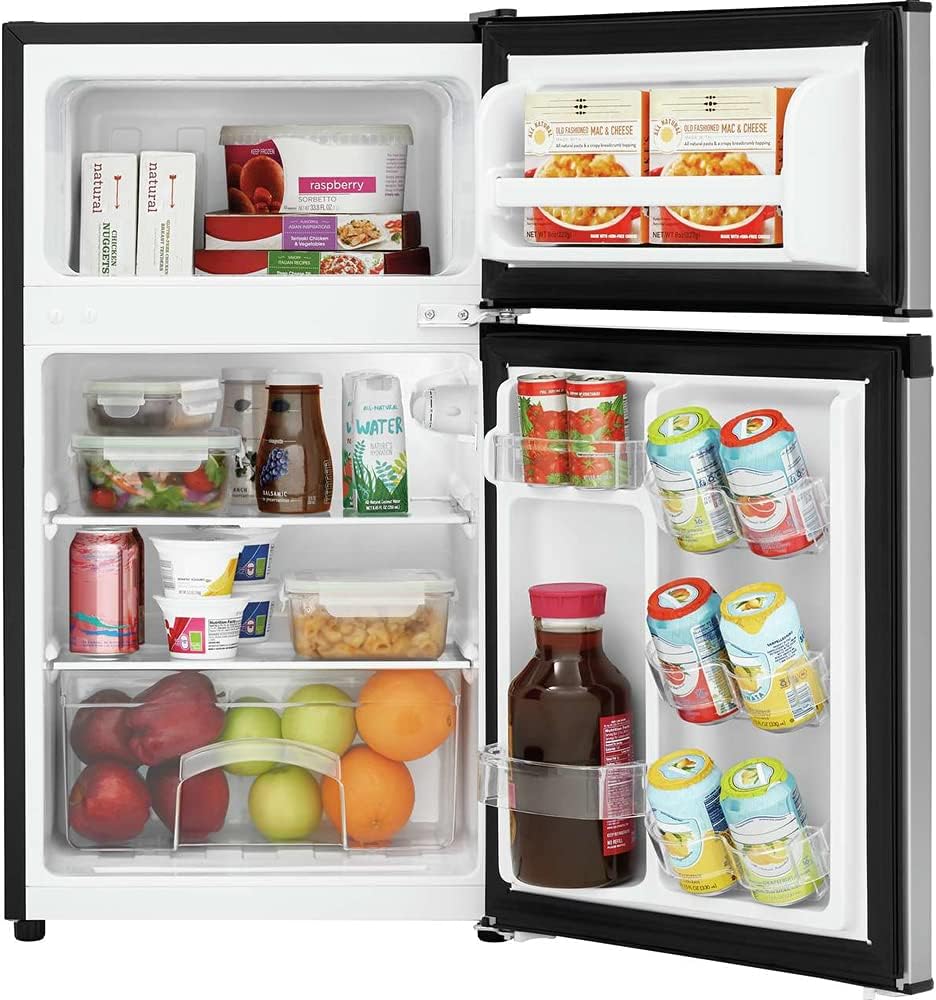
Image: Interior view of the refrigerator, showcasing its capacity and organization with food and beverages stored in the fresh food and freezer compartments.
- Easy Access Can Holders: Located on the door, these holders provide convenient storage and quick access to canned beverages.

Image: Detail of the refrigerator door showing the easy access can holders, designed for efficient storage of multiple beverage cans.
- Full-Width Freezer: The top compartment functions as a true full-width freezer, capable of cooling to -8°F, and includes a door rack for additional storage.

Image: The full-width freezer compartment, showing space for frozen items and a door rack for organization.
- Interior Light: A bright interior light illuminates the fresh food compartment, making it easier to locate items.

Image: The interior of the refrigerator with its bright lighting activated, enhancing visibility of stored contents.
- Clear Crisper Drawer: A dedicated drawer helps maintain the freshness of fruits and vegetables.

Image: A clear crisper drawer, designed to keep fruits and vegetables fresh, shown with produce inside.
- Tall Bottle Storage: The door organization system includes space specifically designed for taller items, such as 2-liter bottles.

Image: The refrigerator door interior, highlighting the tall bottle storage area suitable for larger beverage containers.
4. Maintenance
4.1 Cleaning
Regular cleaning helps maintain the efficiency and appearance of your refrigerator.
- Interior: Unplug the unit. Wash interior surfaces with a solution of two tablespoons of baking soda to one quart of warm water. Rinse and dry thoroughly.
- Exterior: Clean the exterior with a mild detergent and warm water. Wipe dry with a soft cloth. Avoid abrasive cleaners or harsh chemicals.
- Door Gaskets: Clean door gaskets regularly to ensure a proper seal.
4.2 Defrosting
This refrigerator features a manual defrost system for the freezer compartment. When frost accumulates to about 1/4 inch (6 mm) thickness, defrost the unit:
- Unplug the refrigerator.
- Remove all food items from the freezer and fresh food compartments.
- Leave the freezer door open to allow frost to melt naturally. Place towels on the floor to catch water.
- Once defrosted, clean the interior and dry thoroughly before plugging the unit back in and returning food.
4.3 Power Outage
In case of a power outage, keep the refrigerator door closed to maintain internal temperature for as long as possible. Avoid opening the door unnecessarily.
5. Troubleshooting
Before contacting customer service, review these common issues and solutions:
| Problem | Possible Cause | Solution |
|---|---|---|
| Refrigerator does not operate. | Not plugged in; circuit breaker tripped; power outage. | Ensure plug is secure; reset circuit breaker; check household power. |
| Temperature is too warm. | Thermostat set too high; door opened too frequently; excessive food load; poor ventilation. | Adjust thermostat to a lower setting; minimize door openings; allow space for air circulation; ensure proper clearance around unit. |
| Excessive noise. | Refrigerator not level; items vibrating inside; normal operating sounds. | Adjust leveling feet; rearrange items; some sounds (e.g., refrigerant flow) are normal. |
| Light not working. | Bulb loose or burned out; no power to unit. | Ensure power is supplied; consult full manual for bulb replacement instructions. |
| Frost buildup in freezer. | Door not sealed properly; frequent door openings; high humidity. | Check door gasket for proper seal; reduce door openings; perform manual defrost as needed. |
6. Specifications
| Feature | Specification |
|---|---|
| Brand | Frigidaire |
| Model Number | FRPE3134AM |
| Capacity (Total) | 3.1 Cubic Feet |
| Fresh Food Capacity | 2.2 Cubic Feet |
| Freezer Capacity | 0.9 Cubic Feet |
| Product Dimensions (D x W x H) | 18.9" x 20.5" x 33.1" |
| Item Weight | 55 Pounds |
| Voltage | 115 Volts |
| Annual Energy Consumption | 320 Kilowatt Hours Per Year |
| Defrost System | Manual |
| Door Hinges | Reversible |
| Shelf Type | Glass |
| Number of Shelves | 2 |
| Crispers/Drawers | 1 |
| Certification | CSA, Energy Star |
| Color | Silver Mist |
7. Warranty and Customer Support
This Frigidaire appliance comes with a limited warranty. For specific warranty details, including coverage period and terms, please refer to the warranty card included with your purchase or visit the official Frigidaire website.
For technical assistance, troubleshooting beyond this manual, or to schedule service, please contact Frigidaire Customer Support:
- Website: www.frigidaire.com
- Phone: Refer to the Frigidaire website for regional contact numbers.
When contacting support, please have your model number (FRPE3134AM) and serial number ready.