
1. Introduction
This manual provides detailed instructions for the safe and effective operation of your Pyle PPHP834B Portable Bluetooth PA Speaker System. Please read this manual thoroughly before using the device and retain it for future reference.

Image 1.1: The Pyle PPHP834B Portable Bluetooth PA Speaker System, including the remote control and power adapter.
2. Safety Information
To reduce the risk of electric shock, do not remove the cover. Refer servicing to qualified personnel only. Do not expose this appliance to rain or moisture. Do not block any ventilation openings. Ensure proper ventilation during use. Avoid placing the unit near heat sources. Use only attachments/accessories specified by the manufacturer. Unplug the unit during lightning storms or when unused for long periods.
3. Package Contents
- PA Speaker System (PPHP834B)
- Remote Control
- Power Adapter
4. Product Features
- Portable PA Loudspeaker System
- Bluetooth Wireless Music Streaming
- Multi-Color Flashing LED Party Lights
- Built-in Rechargeable Battery
- FM Radio with Digital LED Display
- USB Flash Memory Reader
- Aux (3.5mm) Input Connector Jack
- 6.5mm Microphone Input
- Extendable Carry Handle for portability

Image 4.1: Internal components illustrating the 8-inch subwoofer and 1-inch tweeter, contributing to the 300 Watt peak power output.

Image 4.2: The speaker supports multiple audio input methods including Bluetooth, microphone, USB, AUX, and FM radio.
5. Controls and Connections
The top panel of the speaker features various controls and input ports for managing audio playback and device functions.
- MIC IN: 6.5mm input for connecting a microphone.
- USB: Port for USB flash drive playback.
- AUX IN: 3.5mm input for connecting external audio devices.
- DC IN: Power input for charging the speaker.
- POWER ON/OFF: Main power switch.
- VOLUME: Rotary knob to adjust the master volume.
- MODE: Button to switch between Bluetooth, USB, AUX, and FM radio modes.
- PLAY/PAUSE: Button to play or pause audio playback.
- PREV/NEXT: Buttons to skip to the previous or next track/station.
- LED ON/OFF: Button to control the party lights.
- Digital Display: Shows current mode, track number, or FM frequency.
6. Setup
- Initial Charge: Before first use, fully charge the speaker for approximately 4 hours using the provided power adapter.
- Power On: Flip the POWER ON/OFF switch to the 'ON' position. The digital display will illuminate.
7. Operating Instructions
7.1 Bluetooth Pairing
- Turn on the speaker. The unit will automatically enter Bluetooth mode, indicated by 'BLUE' on the display and a blinking Bluetooth indicator.
- Enable Bluetooth on your mobile device (smartphone, tablet, etc.).
- Search for the Bluetooth network name 'PYLEUSA' and select it to connect.
- Once connected, the Bluetooth indicator will stop blinking, and you can stream music wirelessly.

Image 7.1: Wireless control of the speaker via a Bluetooth-enabled smartphone.
7.2 USB Playback
- Insert a USB flash drive (up to 32GB, MP3 audio files) into the USB port.
- The speaker will automatically switch to USB mode and begin playing audio files. If not, press the MODE button to select USB.
- Use the PLAY/PAUSE, PREV, and NEXT buttons to control playback.
7.3 AUX Input
- Connect an external audio device (e.g., MP3 player, laptop) to the AUX IN port using a 3.5mm audio cable.
- Press the MODE button to select AUX mode.
- Control playback from your connected device.
7.4 FM Radio
- Press the MODE button to select FM radio mode. The display will show the FM frequency.
- Press and hold the PLAY/PAUSE button to automatically scan and save available FM stations.
- Use the PREV and NEXT buttons to navigate between saved stations.
7.5 Microphone Input
- Connect a microphone to the MIC IN port.
- Adjust the master VOLUME knob to control the microphone's output level.
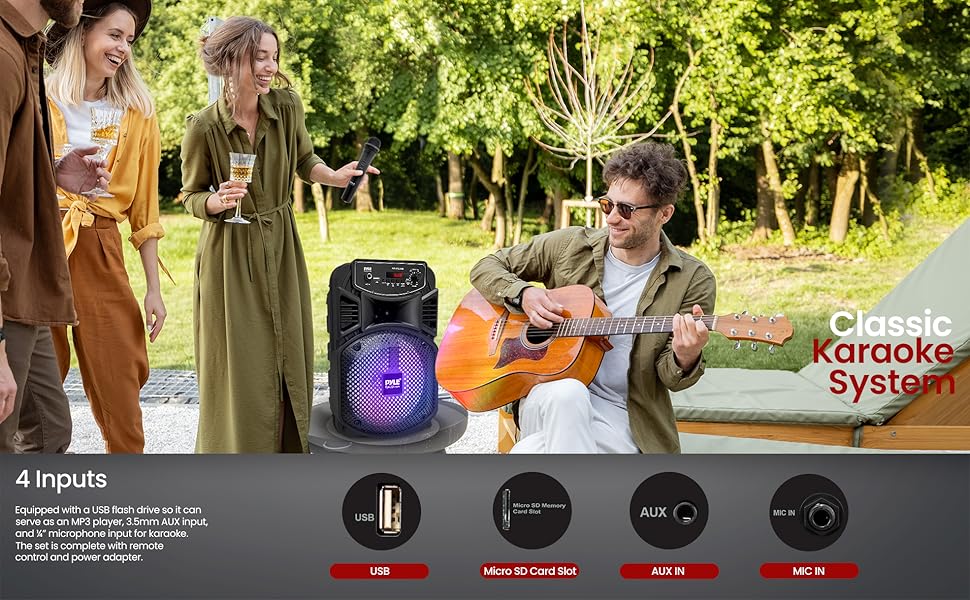
Image 7.2: The speaker can be used for karaoke with microphone and instrument inputs.
7.6 Party Lights
Press the LED ON/OFF button to activate or deactivate the multi-color flashing LED party lights on the speaker's grille.

Image 7.3: The speaker features multi-color LED lights to enhance the atmosphere.
8. Charging the Device
The speaker is equipped with a built-in rechargeable battery. When the battery level is low, connect the provided power adapter to the DC IN port on the speaker and plug it into a power outlet. The battery level LED indicators will show the charging status. A full charge takes approximately 4 hours and provides up to 2 hours of playback time.

Image 8.1: Connecting the power adapter to charge the speaker.

Image 8.2: Information on the speaker's built-in rechargeable battery, playing time, and capacity.
9. Maintenance
- Clean the speaker with a soft, dry cloth. Do not use abrasive cleaners or solvents.
- Avoid exposing the unit to extreme temperatures, direct sunlight, or high humidity.
- Store the speaker in a cool, dry place when not in use.
- Turn off the power with the ON/OFF switch when not in use to prevent battery damage from standby mode.
10. Troubleshooting
| Problem | Possible Cause | Solution |
|---|---|---|
| No power | Battery is depleted. Power switch is off. | Charge the speaker. Ensure the power switch is in the 'ON' position. |
| No sound | Volume is too low. Incorrect input mode selected. Device not connected properly. | Increase volume. Press MODE to select the correct input. Reconnect audio source. |
| Bluetooth not connecting | Speaker not in pairing mode. Device Bluetooth is off. Too far from speaker. | Ensure speaker is in Bluetooth mode ('BLUE' blinking). Enable Bluetooth on your device. Move device closer to speaker (within 32 ft). |
| USB playback not working | USB drive not formatted correctly. Unsupported file type. USB drive capacity too large. | Ensure USB is FAT32 format. Only MP3 files are supported. Max USB capacity is 32GB. |
11. Specifications
| Feature | Specification |
|---|---|
| Max Power Output | 300 Watt Max |
| Sound System | 8-inch Subwoofer + 1-inch Tweeter |
| Impedance | 2.6 Ohm |
| Bluetooth Version | 4.1 |
| Wireless Range | Up to 32 ft. |
| USB Interface Type | 2.0 |
| Digital Audio File Support | MP3 |
| Maximum USB Flash Support | 32GB |
| Battery Life | Up to 2 Hours (Charge Time: Approx. 4 Hours) |
| Rechargeable Battery | 3.7V, 1800mAh – 6.66 Wh |
| Power Supply | 120/240V, Switchable (5V/2A Power Adapter) |
| Dimensions (L x W x H) | 8.7'' x 7.9'' x 13.8'' inches |
| Item Weight | 4.75 pounds |
12. Warranty and Support
For warranty information or technical support, please refer to the official Pyle website or contact their customer service. A detailed PDF user manual is also available for download:
- Official Pyle Store: PyleUSA Store
- PDF User Manual: Download PDF


