
Introduction
This manual provides comprehensive instructions for the setup, operation, maintenance, and troubleshooting of your MAITE MTDVD-10PRO DVD Player. Please read this manual thoroughly before using the device to ensure proper functionality and longevity.
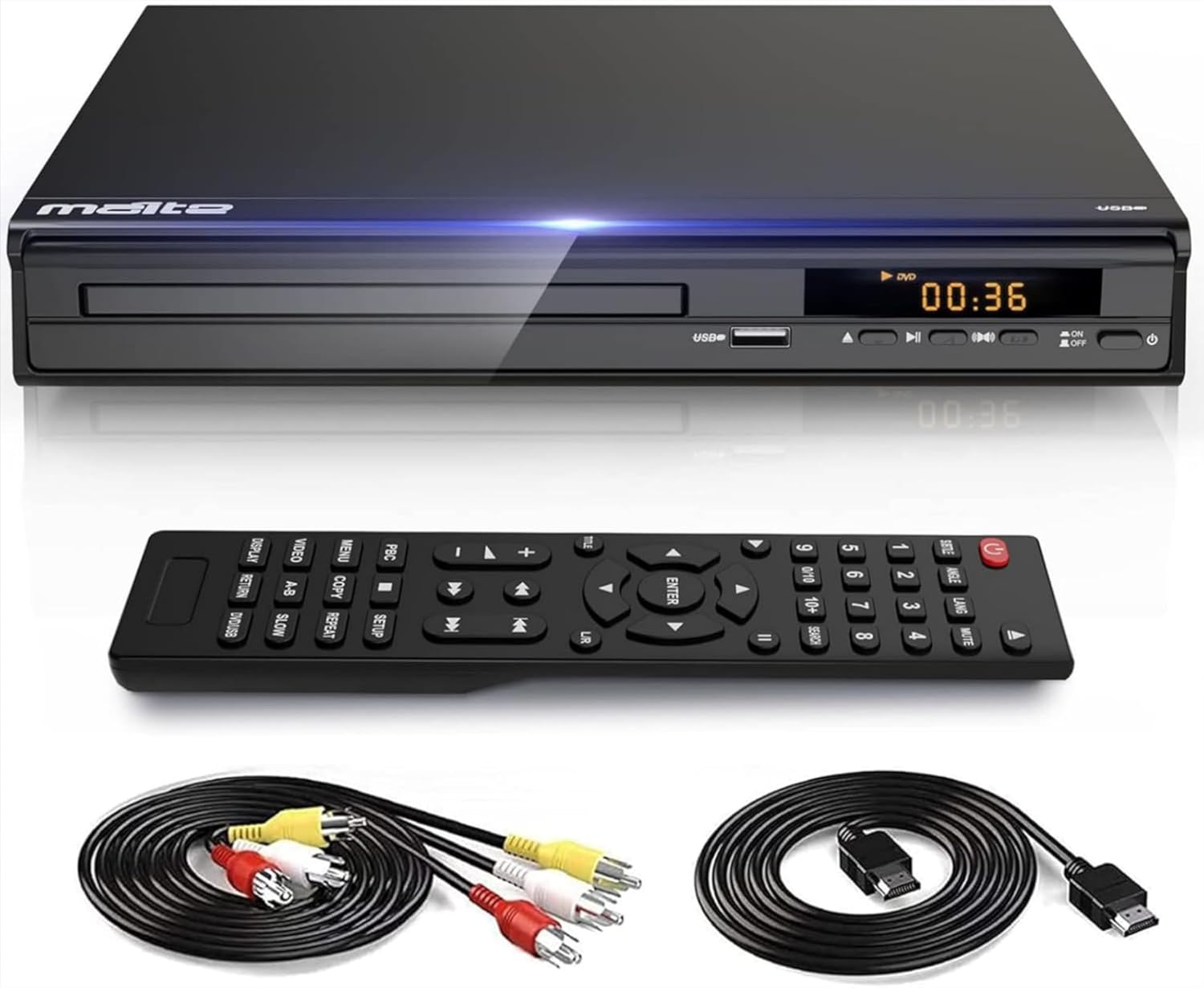
Figure 1: MAITE MTDVD-10PRO DVD Player, including the main unit, remote control, HDMI cable, and RCA cable. These components are essential for connecting and operating the device.
Setup Guide
1. Unpacking and Inspection
- Carefully remove all components from the packaging.
- Verify that all items listed in the "Package Includes" section are present: DVD Player, HDMI Cable (4 Feet), AV output cable (3.3 Feet), Remote Control (batteries not included), and User Manual.
- Inspect the DVD player and accessories for any signs of damage. If any damage is found, do not use the device and contact customer support.
2. Connecting to Your TV or Display
The MAITE MTDVD-10PRO offers multiple connection options for various display devices.

Figure 2: Connection options for the MAITE DVD Player. The player supports HDMI for modern displays like TVs, PC monitors, and projectors, and RCA for audio output to speakers. A microphone jack is also available.
HDMI Connection (Recommended for HD Quality)
- Locate the HDMI OUT port on the back of the DVD player.
- Connect one end of the provided HDMI cable to the HDMI OUT port on the DVD player.
- Connect the other end of the HDMI cable to an available HDMI IN port on your TV, monitor, or projector. Note the HDMI input number (e.g., HDMI 1, HDMI 2) on your display device.
AV (RCA) Connection
- Locate the AV OUT ports (Yellow for Video, White for Left Audio, Red for Right Audio) on the back of the DVD player.
- Connect the corresponding colored plugs of the provided AV cable to the AV OUT ports on the DVD player.
- Connect the other end of the AV cable to the matching colored AV IN ports on your TV or display device.
3. Power Connection
- Ensure all video and audio cables are securely connected.
- Plug the power cord of the DVD player into a standard electrical outlet.
- The player is designed for ultra-low power consumption and operates at 50/60Hz.
4. Remote Control Setup
- The remote control requires batteries (not included). Insert two AAA batteries, observing the correct polarity (+/-).
- The remote control allows for convenient operation of all player functions.
Operating Instructions
1. Basic Playback
- Turn on your TV and select the correct input source (e.g., HDMI 1, AV) that corresponds to your DVD player connection.
- Press the POWER button on the DVD player or remote control to turn on the device.
- Press the OPEN/CLOSE button to open the disc tray.
- Place a compatible disc (CD, VCD, SVCD, CD-R, CD-RW, EVD, DVD, DVD-9, DVD-R, DVD-RW) onto the disc tray with the label side facing up. Note: Blu-ray discs are not supported.
- Press the OPEN/CLOSE button again to close the disc tray. The player will automatically begin reading the disc.
- Use the PLAY/PAUSE, STOP, FAST FORWARD, REWIND, and SKIP buttons on the remote control to manage playback.

Figure 3: The MAITE DVD Player supports a wide range of disc formats including CD, DVD, DVD-R/+RW, CD-R/-RW, VCD, SVCD, and USB file formats such as MP3, JPG, AVI, DIVX, MPG, MPEG, VOB, FLV, and JPEG.
2. USB Playback
The DVD player supports USB input for playing media files directly from a USB flash drive.
- Insert your USB flash drive into the USB port on the front of the DVD player.
- The player will automatically detect the USB device and display a menu for file selection.
- Navigate through your files using the arrow keys on the remote control and press ENTER to select and play.
- Supported USB file formats include: AVI (Xvid, MP4V, MPEG-1), D2VX, MPG, MPEG, MP3, MOV, ASF. USB files are read up to 720p resolution.
3. Karaoke Feature (Microphone Input)
The MAITE DVD player includes a built-in microphone input, compatible with major microphones for karaoke functions.
- Locate the Mic input jack on the front of the DVD player.
- Plug your microphone (not included) into the Mic input jack.
- Adjust the microphone volume using the remote control or player controls if available.
- Ensure your audio output is connected to speakers for sound.

Figure 4: The MAITE DVD Player features a microphone input, enabling karaoke functionality. Users can connect a standard microphone (6.3mm jack) to enjoy singing along with their favorite media.
4. Region-Free Playback
This DVD player is designed to be region-free, allowing playback of DVDs from all regions, including Region 2. This provides flexibility for enjoying content from various geographical sources.

Figure 5: The MAITE DVD Player offers region-free playback, allowing users to enjoy DVDs from any region worldwide. This broad compatibility enhances the viewing experience by removing regional restrictions.
Maintenance and Care
- Cleaning the Player: Use a soft, dry cloth to wipe the exterior of the DVD player. Do not use liquid cleaners or abrasive materials, as they may damage the finish.
- Disc Care: Handle discs by their edges to avoid fingerprints and scratches. Clean discs with a soft, lint-free cloth, wiping from the center outwards. Do not use harsh solvents.
- Ventilation: Ensure the DVD player has adequate ventilation. Do not block the ventilation openings. Avoid placing the player in enclosed spaces or on soft surfaces that may obstruct airflow.
- Storage: When not in use for extended periods, disconnect the power cord and store the player in a cool, dry place away from direct sunlight and extreme temperatures.
Troubleshooting Guide
Before contacting customer support, please refer to the following common issues and their solutions.
| Problem | Possible Cause | Solution |
|---|---|---|
| No power | Power cord not connected; Power outlet not active. | Ensure the power cord is securely plugged into both the player and a working electrical outlet. Test the outlet with another device. |
| No picture or sound | Incorrect input selected on TV; Loose video/audio cables. | Select the correct HDMI or AV input on your TV. Check that all cables (HDMI or RCA) are firmly connected to both the player and the TV. |
| Disc not playing or "NO DISC" message | Disc inserted incorrectly; Disc is dirty or scratched; Incompatible disc format. | Ensure the disc is inserted label-side up. Clean the disc with a soft cloth. Verify the disc format is supported (Blu-ray is not supported). |
| Blurry picture | Disc quality; Player settings. | The DVD player features auto-correction for blurry images from discs. Ensure the disc is clean and free from damage. Check your TV's picture settings. |
| Remote control not working | Batteries are dead or inserted incorrectly; Obstruction between remote and player. | Replace batteries with new AAA batteries, ensuring correct polarity. Remove any objects blocking the line of sight between the remote and the player's sensor. |
Product Specifications
Below are the technical specifications for the MAITE MTDVD-10PRO DVD Player.
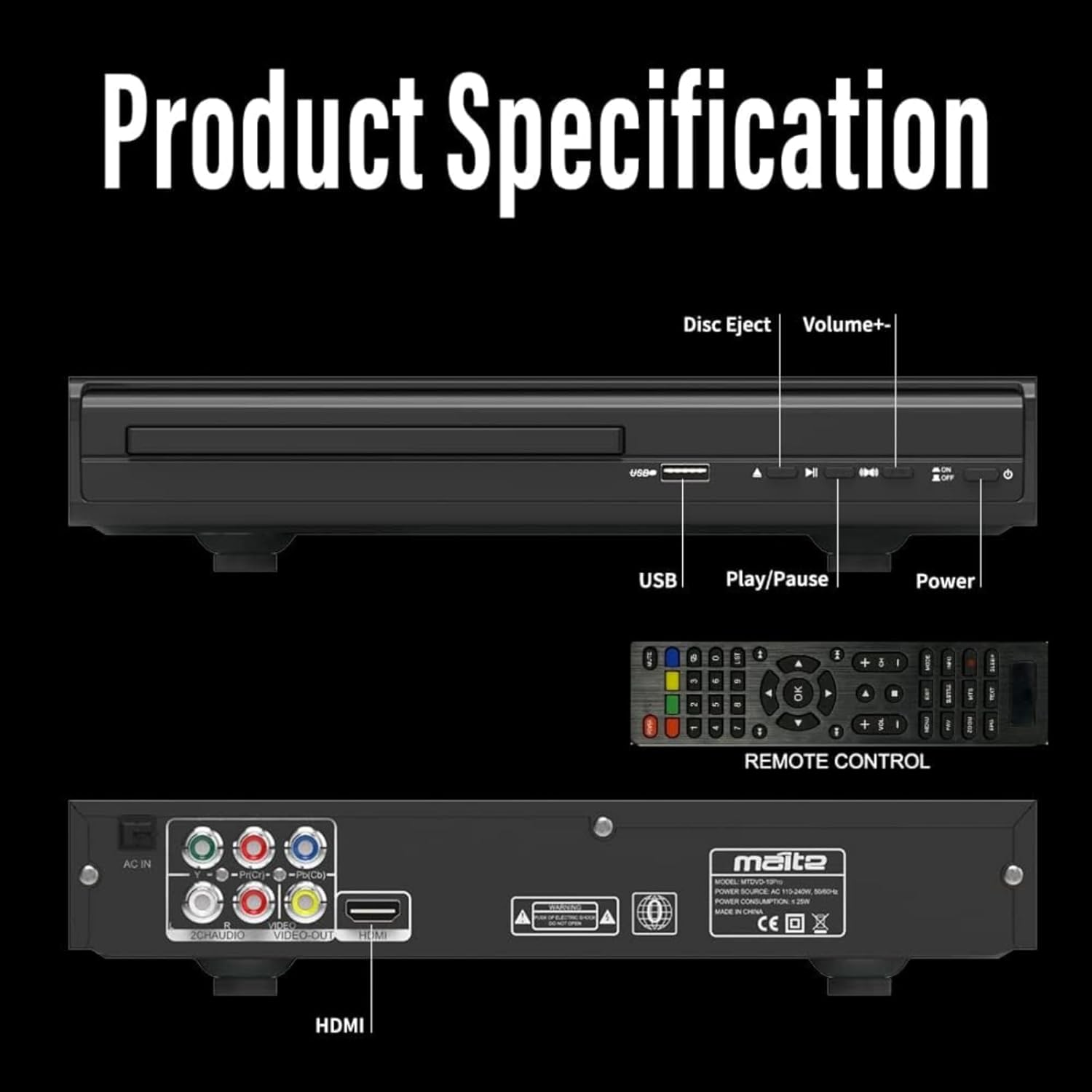
Figure 6: Detailed view of the MAITE DVD Player's front and rear panels, indicating the location of controls and connection ports such as USB, power buttons, HDMI, and RCA outputs.
| Feature | Detail |
|---|---|
| Brand | MAITE |
| Model Name | MTDVD-10PRO |
| Item Weight | 2.95 pounds (approx. 1.34 kg) |
| Product Dimensions | 10.23 x 8.11 x 1.57 inches (approx. 26 x 20.6 x 4 cm) |
| Color | Black |
| Special Features | Mic Jack, USB Input |
| Media Type Supported | CD, VCD, SVCD, CD-R, CD-RW, EVD, DVD, DVD-9, DVD-R, DVD-RW (Blu-ray excluded) |
| USB File Formats | AVI (Xvid, MP4V, MPEG-1), D2VX, MPG, MPEG, MP3, MOV, ASF (up to 720p) |
| Resolution | 1920x1080 (Output) |
| Connector Type | HDMI, RCA |
| Connectivity Technology | HDMI |
| Controller Type | Remote Control |
| Power Consumption | Ultra-low, 50/60Hz operation |
| Processor | Built-in HD588A driver with 8th gen SunPlus processors |
Warranty and Support
Your MAITE MTDVD-10PRO DVD Player comes with a 60-day warranty. Additionally, a 30-day return for refund policy is available from the date of purchase.
For technical assistance, troubleshooting beyond this manual, or warranty claims, please contact MAITE customer support through the retailer where you purchased the product or visit the official MAITE store on Amazon:
Please retain your proof of purchase for warranty purposes.