
Introduction
Thank you for purchasing the Geepas Professional Portable Rechargeable Speaker System GMS8574. This speaker system is designed for exceptional audio performance and portability, featuring Bluetooth connectivity, karaoke compatibility, disco lights, and multiple media playback options. Please read this manual carefully before using the product to ensure proper operation and to maximize its lifespan.
Safety Information
- Do not expose the unit to rain or moisture to prevent fire or electric shock.
- Do not open the casing. There are no user-serviceable parts inside. Refer all servicing to qualified personnel.
- Keep the unit away from direct sunlight, heat sources, and excessive dust.
- Ensure proper ventilation around the unit. Do not block any ventilation openings.
- Use only the power adapter supplied with the unit.
- Avoid placing heavy objects on the speaker.
- When moving the speaker, ensure the handle is fully extended and locked, and use caution on uneven surfaces.
Package Contents
Please check the box for the following items:
- Geepas Professional Portable Rechargeable Speaker System GMS8574
- Wireless Microphone
- Remote Control
- Power Adapter/Charging Cable
- User Manual
- Warranty Card
Product Overview
The Geepas GMS8574 is a versatile portable speaker system designed for various audio needs. It features a robust design with a retractable handle and wheels for easy transport.
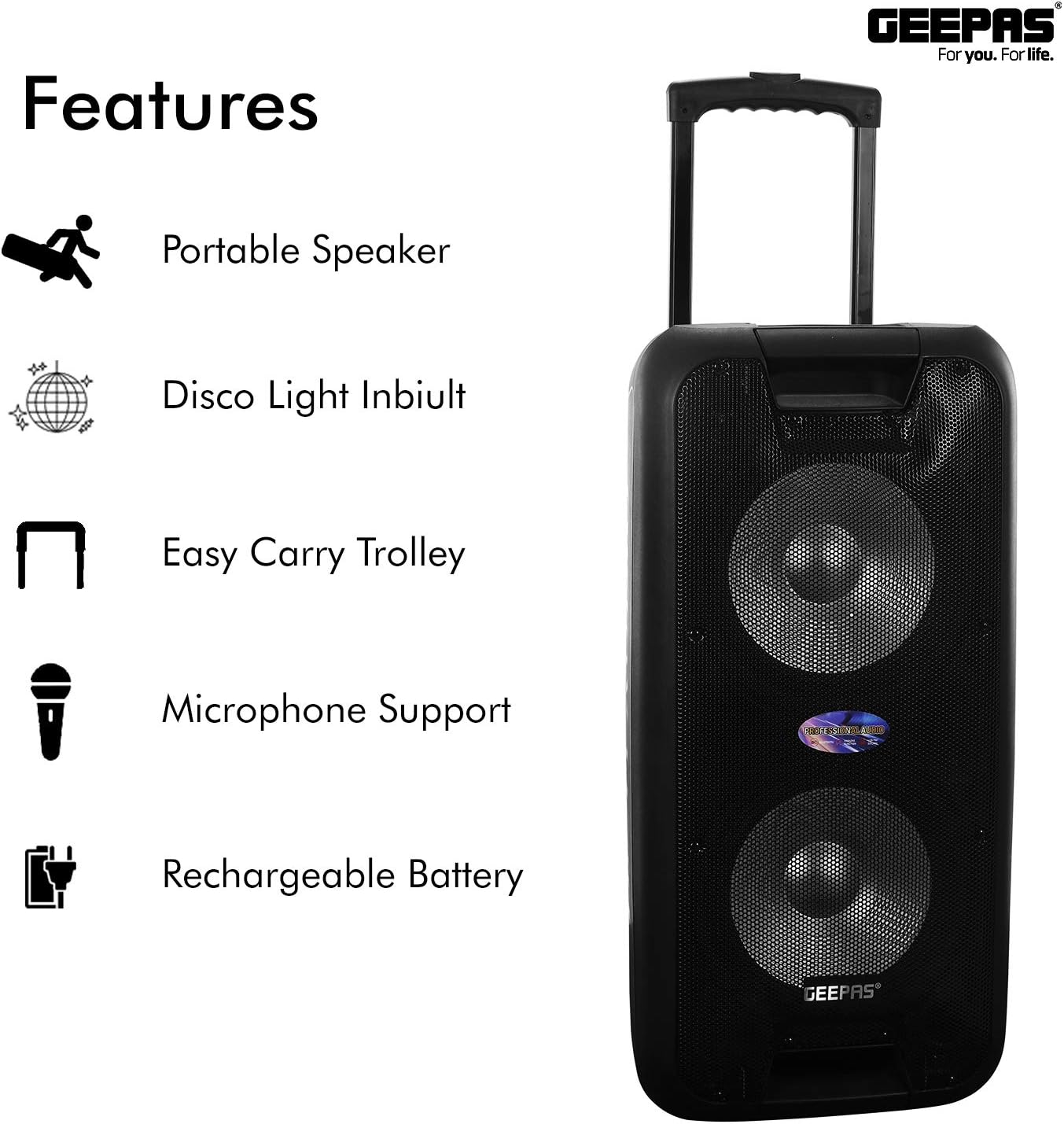
Figure 1: Key Features of the Geepas GMS8574 Speaker System.
Main Features:
- Portable Trolley Design: Lightweight with easy-swivel wheels and a foldable handle for convenient mobility.
- Rechargeable Battery: Built-in 12V/7A lead-acid battery for extended use.
- Wireless Microphone: Included for karaoke and public address functions, with volume and echo control.
- Bluetooth Connectivity: Seamless wireless audio streaming from compatible devices.
- Disco Lights: Integrated LED lights to enhance the party atmosphere.
- Multiple Media Inputs: Supports USB, TF/SD card, FM radio, and AUX input.
- Control Panel: Intuitive controls for bass, treble, echo, microphone volume, and master volume.
- LED Display: Provides information on current mode and track.
- Remote Control: For convenient operation from a distance.
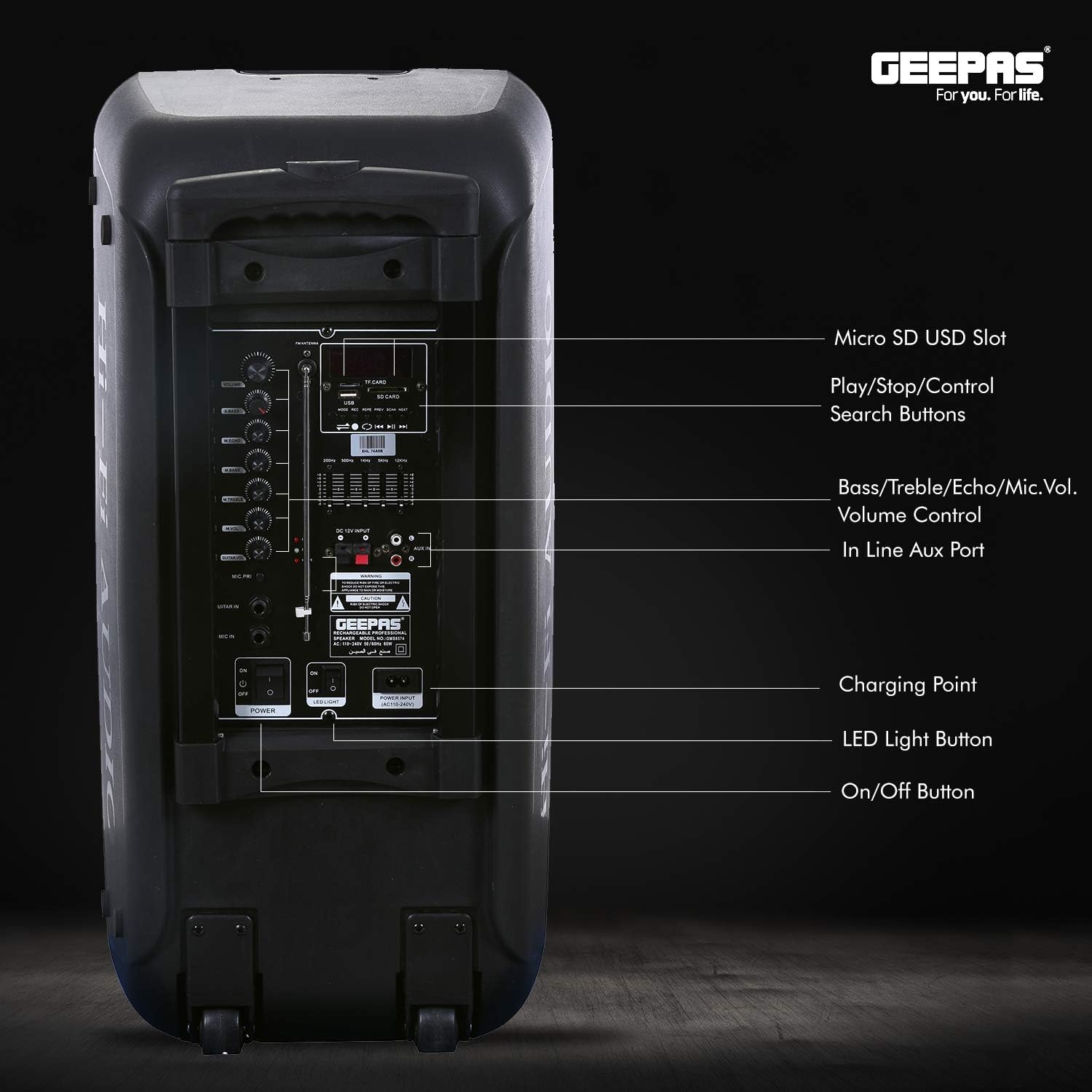
Figure 2: Rear Control Panel and Ports.
The rear panel (Figure 2) provides access to all input ports and control knobs for audio adjustments and mode selection.
Setup
- Unpacking: Carefully remove the speaker system and all accessories from the packaging.
- Initial Charging: Before first use, fully charge the speaker for approximately 6-8 hours. Connect the power adapter to the charging port on the rear panel and plug it into a power outlet. The charging indicator will illuminate.
- Positioning: Place the speaker on a stable, flat surface. Ensure there is adequate space around the unit for ventilation.
- Power On: Locate the On/Off switch on the rear panel and switch it to the 'ON' position. The LED display will light up.
Operating Instructions
Charging the Speaker
The speaker is equipped with a built-in rechargeable battery. When the battery level is low, connect the provided power adapter to the charging port and a wall outlet. The charging indicator will show the charging status. Disconnect the charger once fully charged to preserve battery life.
Power On/Off
To turn the speaker ON or OFF, use the dedicated power switch located on the rear control panel.
Bluetooth Pairing

Figure 3: Speaker ready for streaming with microphone and remote.
- Turn on the speaker. The LED display will show 'BLUE' or a similar indicator, signifying Bluetooth mode. If not, press the 'MODE' button on the speaker or remote control until Bluetooth mode is selected.
- Enable Bluetooth on your smartphone, tablet, or other Bluetooth-enabled device.
- Search for available devices and select "GMS8574" from the list.
- Once paired, the speaker will emit a confirmation sound, and you can begin streaming audio.
Media Playback (USB/TF/SD/FM/AUX)
- USB/TF/SD Card: Insert a USB flash drive or TF/SD card (with MP3 audio files) into the respective slot on the rear panel. The speaker will automatically switch to USB/Card mode and begin playback. Use the Play/Pause, Next, and Previous buttons to control playback.
- FM Radio: Press the 'MODE' button to select FM radio mode. Press and hold the Play/Pause button to auto-scan and save available radio stations. Use the Next/Previous buttons to navigate between saved stations.
- AUX Input: Connect an external audio device (e.g., CD player, laptop) to the 'AUX IN' port on the rear panel using a 3.5mm audio cable (not included). Press the 'MODE' button to select AUX mode.
Microphone Usage (Karaoke Compatible)

Figure 4: Speaker used in a karaoke setting.
The speaker comes with a wireless microphone for karaoke and public speaking. Insert batteries into the wireless microphone. Turn on the microphone. Adjust the 'MIC VOL' and 'ECHO' knobs on the rear panel to achieve the desired sound effect. There is also a dedicated wired microphone input and a guitar input for additional instruments.
Disco Lights
The speaker features built-in disco lights. To turn the lights ON or OFF, press the 'LED Light Button' on the rear control panel.

Figure 5: Remote control and disco lights in action.
Maintenance
- Cleaning: Use a soft, dry cloth to clean the exterior of the speaker. Do not use abrasive cleaners or solvents.
- Storage: When not in use for extended periods, store the speaker in a cool, dry place. Ensure the battery is partially charged (around 50%) before storage and recharge it every 3-6 months to prevent deep discharge.
- Battery Care: Avoid completely draining the battery frequently. Recharge promptly when the low battery indicator appears.
Troubleshooting
| Problem | Possible Cause | Solution |
|---|---|---|
| No power | Battery drained; Power switch off; Power adapter not connected. | Charge the speaker; Turn on the power switch; Ensure power adapter is securely connected. |
| No sound | Volume too low; Incorrect input mode; Device not paired (Bluetooth). | Increase master volume; Select correct input mode (Bluetooth, USB, AUX, FM); Re-pair Bluetooth device. |
| Microphone not working | Microphone off; Batteries low/dead; MIC VOL knob too low. | Turn on microphone; Replace batteries; Increase MIC VOL. |
| Bluetooth connection unstable | Device too far; Obstructions; Interference. | Move device closer to speaker; Remove obstructions; Avoid other wireless devices. |
| USB/SD card not playing | Incorrect file format; Card/drive corrupted; Incorrect mode. | Ensure files are MP3; Try another USB/SD card; Select USB/Card mode. |
Specifications
| Feature | Detail |
|---|---|
| Brand | Geepas |
| Model Number | GMS8574 |
| Product Type | Professional Portable Rechargeable Speaker System |
| Item Dimensions (L x W x H) | 40 x 36 x 75 cm |
| Item Weight | 16.78 Kilograms |
| Connectivity Technology | Bluetooth, USB, TF/SD Card, AUX |
| Power Source | Battery Powered (12V/7A Lead-Acid Battery) |
| Output Power | 38850 Watts (PMPO 50000) |
| Number of Channels | 2 |
| Audio Input | Wireless Microphone, Wired Microphone, Guitar Input, AUX |
| Compatible Devices | Smartphones, Tablets, Music Players, Laptops |
| Mounting Type | Floor Standing |
| Color | Black |
Warranty and Support
This Geepas GMS8574 speaker system comes with a manufacturer's warranty. Please refer to the included Warranty Card for detailed terms and conditions, including the warranty period and coverage. For technical support, troubleshooting assistance, or service inquiries, please contact Geepas customer service through the contact information provided on your warranty card or the official Geepas website.